Amazon Relay
- 5.48K
- 4.6
- Installs
- 1.00M
- Price
- Free

Screenshots

Analysis by Reviewed
I’d start with one practical question before adding another work app to a driver’s phone: does your day involve Amazon freight? That is the decision point that shapes how useful Amazon Relay can be. I see it as a focused business tool for drivers and carriers connected to that work, rather than a universal trucking app meant to replace every route planner, dispatcher, or load source.
Check the fit before the features
For me, a good fit depends on the job the app is meant to support. If you are already handling Amazon-related work, having a dedicated place to manage parts of that process can make sense. If you are looking for a way to find freight across unrelated networks, or simply need directions for a trip, the specialized focus may not help much. A tool can be well regarded and still be the wrong tool for a particular operation.
Amazon Mobile LLC publishes this free business app, which is rated for Everyone. It has a 4.6 average from around 40,000 ratings, and more than a million installs. Those figures suggest that many people have tried it and that feedback is generally positive, but they cannot tell me whether its workflow matches your routes, business arrangements, or equipment. I would use them as context, not as a substitute for checking the fit.
How I’d judge the day-to-day value
The main appeal is the link to Amazon freight work. In practical terms, a driver may use it to look at available work, keep up with a load-related process, and plan around the next leg rather than juggling every detail from memory. That focus is more relevant to an Amazon carrier than a general-purpose navigation app, but it does not automatically make Relay a complete fleet-management system. I would decide which tasks it actually handles for me before changing an established routine.
A realistic use case is a driver finishing a run and considering what to do next. Before committing to another job, I’d compare its destination and timing with the current schedule, likely breaks, and any handoff obligations. A load that looks convenient on its own can become a poor choice if the timing leaves no buffer for a delay. The useful habit is to treat the app as one input to a decision, not as a reason to accept work before considering the whole trip.
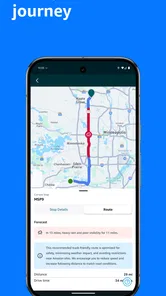
That same approach helps with route planning. I’d review the proposed route before setting off, while there is still time to question a turn or check the approach to a facility. A routing tool can make a trip easier to plan, but I would still follow road signs and posted restrictions and use my judgment. For a truck driver, a route suggestion is support—not permission to ignore the conditions on the road.
Getting Started with Amazon Relay
First things first, downloading and setting up Amazon Relay is a breeze. You can snag it from the Google Play Store or Apple App Store, and it's compatible with most devices. Once installed, the registration process is straightforward. You’ll need to provide some business details, but nothing too intense. It’s like filling out a form at a new job, only this time, it’s way more exciting because it’s your own gig.
More From Our News Desk

Weather by Xiaomi Review: Clear at a Glance, Less Clear Up Close

X Under Pressure: Can It Recover When Posting Goes Wrong?

Clash of Clans Is Won Between the Battles

Android Auto Makes the Case for Quieter Car Software

MobiOffice: Transforming Mobile Productivity with Seamless Integration

EA SPORTS FC™ Mobile Soccer: Redefining Mobile Sports Gaming
The Features that Stand Out
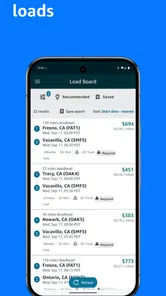
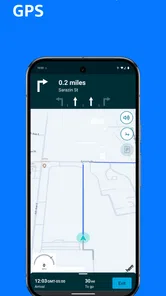
Now, let’s talk features. The app is packed with tools that make life on the road smoother. One of my favorites is the load board. It’s updated in real-time, meaning you can snag loads that fit your schedule with just a few taps. Seriously, it’s like having a personal dispatcher in your pocket. Plus, the navigation feature is top-notch, helping you avoid those pesky low bridges and tight turns that can be a nightmare when you’re hauling a big rig.
Another cool feature is the ability to track your performance. You can monitor your on-time metrics and get feedback on how efficient you are. It’s a bit like having a fitness tracker but for your driving. And, let’s be honest, who doesn’t like seeing those numbers go up?
Making the workflow work for you
One practical way I’d use the app is to check available work before planning the next leg of a trip, then compare the timing and destination with the commitments already on the schedule. A load that looks attractive in isolation is not automatically a good fit if it creates a difficult handoff or leaves little room for a delay. I’d treat the load board as a planning aid, not as a reason to accept work before checking the full operating picture.
On a busy day, I’d also make a habit of reviewing the route before moving, rather than waiting until I’m close to a turn or facility entrance. That gives me a chance to notice whether the suggested path makes sense for the vehicle and the trip. Navigation can reduce uncertainty, but I still rely on road signs, posted restrictions, and my own judgment. For a driver, that is an important trade-off: a dedicated route tool is valuable, but it should support safe decisions rather than replace them.
Why It’s a Game Changer
What really sets Amazon Relay apart from the rest is its seamless integration with Amazon’s freight network. This means more consistent loads and less downtime. For any trucker, keeping those wheels turning is key, and this app helps make that happen. It’s like having a little piece of the Amazon empire on your side!
And let's not forget the support. The app offers 24/7 assistance, which is a lifesaver when you’re out on the road and hit a snag. Whether it’s a question about a load or an issue with the app, help is just a tap away. It’s like having a pit crew ready to jump into action whenever you need them.
Where other options make more sense
The best alternative depends on what you need to solve. A general navigation app may be enough if your main concern is everyday directions and you do not need a freight-specific workflow. A broad load marketplace may suit a carrier looking across multiple sources of work, while dispatch or fleet-management software may be more useful when coordinating several drivers and business processes is the priority. Those tools serve different purposes; I would not expect them to replace Relay’s connection to Amazon freight.
Likewise, a driver who does not work with Amazon loads may find little reason to make this their main business app. The key question is not whether Relay has useful tools, but whether those tools line up with the work available to that driver or fleet. The app has more than a million installs and is free, but neither fact changes that basic fit test.
Everyday trade-offs and setup choices
For a small carrier, the most useful habit may be keeping business information accurate and checking the app before relying on it for a planned job. I’d also review performance feedback periodically instead of reacting to one result in isolation. A metric is more helpful when it points to a repeatable pattern—such as a timing issue worth investigating—than when it becomes a score to chase without considering traffic, facility conditions, or other parts of the run.
There is also a practical switching cost. If you already use a preferred navigation app, dispatcher, or load source, Relay may add another step rather than remove one unless you decide clearly which tasks belong in which tool. I would test it alongside the existing routine first, then simplify only after I understand where it saves time. It runs on Android 8.0 or later, and its current version is 2.28.77, so checking device compatibility before making it part of a workday is sensible.
Questions I’d settle during a trial
Before relying on Relay for a full shift, I’d make sure the account and business details are ready and that the driver knows which parts of the work should be handled in the app. A quick practice run through the ordinary workflow can reveal small friction points—such as when to check for an update or where the app fits alongside dispatch instructions—before they matter during a tight schedule. I would not wait until a time-sensitive job to learn the basics.
Drivers may also wonder whether it replaces their usual navigation or whether it can serve as the only tool for a carrier. I would not assume either. Its freight connection is the distinctive reason to use it, while general directions, multi-network load searching, and broader fleet coordination may still belong in other tools. The sensible setup is often a combination, with each app assigned a clear role so drivers do not have to reconcile duplicate or conflicting instructions on the move.
For a fleet owner, I’d consider how many people need access to the workflow and how consistently the business can keep its operating details current. For an independent driver, the question is simpler: does the Amazon-related work available to you justify making this a regular part of your phone setup? The answer can change with your work mix, so I’d judge the app by whether it removes a real step or improves a real decision—not by how many features appear on screen.
The Final Mile
So, is Amazon Relay worth the download? Absolutely. Whether you’re a seasoned truck driver or just starting out, this app can enhance your efficiency and boost your bottom line. It’s user-friendly, packed with features, and backed by Amazon’s reliable network. If you’re looking to streamline your operations and keep those profits rolling in, give Amazon Relay a try. You might just find it’s the partner you’ve been searching for on the open road.
My recommendation is strongest for drivers and carriers whose work genuinely connects with Amazon freight and who want their load-related tasks in one focused place. I’d be more cautious if you need a neutral tool for comparing many freight networks, or if you mainly want route guidance without the business side. Amazon Relay was released on October 25, 2017, and its established presence is reassuring, but the right choice still comes down to how well it fits your routes, equipment, and day-to-day process.
Until next time, keep on truckin’!
Amazon Relay Frequently Asked Questions
What should I check before downloading Amazon Relay?
Amazon Relay is a business app for truck drivers and carriers involved in Amazon transportation operations, so it is worth checking that the app fits your work before installing it. Make sure your device meets the operating-system requirement and that you have the account access needed for your role. The app is free to download, and its content rating is Everyone.
Can I use Amazon Relay on an older Android phone or tablet?
Amazon Relay requires Android 8.0 or later, so check your device’s operating-system version before downloading. The app is intended for work use by truck drivers and carriers, and access to its functions depends on having the appropriate account. If your Android device meets the minimum requirement, you can install the app and see whether it suits your transportation workflow.
Is Amazon Relay available for iPhone and iPad?
Amazon Relay is an app for truck drivers and carriers, and it is available for iOS as well as Android. Before installing it on an Apple device, check that the device meets the app’s operating-system requirement. You will also need appropriate account access to use its work features. The app is designed for Amazon transportation operations rather than general personal trip planning.
What is the current version of Amazon Relay, and who makes it?
Amazon Relay is developed by Amazon Mobile LLC. Its current version is 2.28.77, and the app has been available since October 25, 2017. Those details can help you identify the app when checking for an update or confirming that you have the intended download. It is a business app built around truck-driver and carrier workflows at Amazon facilities.
Who is Amazon Relay intended for, and can an individual driver use it?
Amazon Relay is a business app for truck drivers and carriers working with Amazon transportation operations. Its tools are designed around carrier load management and delivery workflows, rather than general trip planning for personal vehicles. Drivers who are interested in using it should check that they are connected with a registered carrier company and have the appropriate account access before relying on the app for work.
Pros
- User-friendly interface for easy navigation
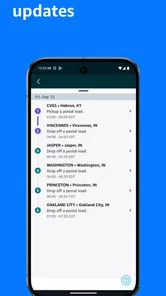
- Real-time updates and notifications
- Wide range of loads available
- Efficient load booking process
- High earnings potential
Cons
- Limited to Amazon loads only
- Occasional app glitches
- Requires constant internet connection
- High competition for loads
- Limited customer support













