AlphaClean: Junk Cleaner
- 22.00
- 4.2
- Installs
- 1.00M
- Price
- Free

Screenshots

Analysis by Reviewed
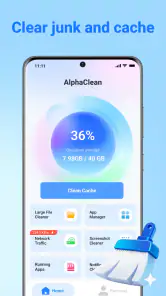
When my phone starts warning me about low storage, I usually do not want a complicated maintenance suite. I want to see what is taking up space, remove obvious clutter, and avoid deleting something important by mistake. That is the role AlphaClean: Junk Cleaner tries to fill. Developed by Ovifocus Limited, this free tools app focuses on clearing unwanted files, recovering storage, and making a crowded app list easier to manage.
I approached it less like a magic speed booster and more like a practical housekeeping tool. That distinction matters. A cleaner cannot create storage out of nowhere, and it cannot replace sensible file management. What it can do is bring scattered cleanup tasks into one place. In my experience, that is where AlphaClean is most useful: reducing the effort needed to decide what deserves to stay on a phone.
The app is available for Everyone, runs on Android 7.0 or later, and its current release is V1.1.0. It is free to use, and its public reception is a 4.2 average from around 1.2K ratings, with over 1M installs. Those figures suggest that it has reached a broad audience, but I still think the right question is not popularity. The better question is whether its approach suits the way you read, tap, review, and organize information on your own device.
How clearly the cleanup experience communicates what is happening
The first thing I look for in a storage utility is not visual polish. It is clarity. Cleanup tools deal with files that may look disposable but can still matter, so labels and screen structure need to support careful decisions. AlphaClean works best when I treat each suggested item as something to inspect rather than an automatic instruction.
Its purpose is easy to understand from the start: find unnecessary material, show where storage is being used, and help me organize installed apps. That straightforward focus is valuable for people who do not want to learn a technical vocabulary before reclaiming space. Someone helping a family member with an older phone can explain the app in one sentence: open it, review the categories, and remove only what you recognize.
Readability is especially important during scanning. A useful cleaner should make a distinction between a broad result and the individual files inside it. When I am reviewing clutter, I prefer a workflow that lets me pause, look at names or locations, and make a deliberate choice. That is safer than pressing a prominent clean control simply because the number on screen looks impressive.
I also find that concise screens are easier to use when attention is limited. If I am standing in a station, dealing with a nearly full phone, or helping someone over a video call, I do not want several unrelated maintenance tools competing for attention. AlphaClean’s narrow purpose gives it an advantage over all-in-one utilities that mix storage cleanup with many other controls.
There is a trade-off, though. A focused interface can feel less reassuring to users who expect detailed explanations for every recommendation. If you want a file-by-file account of why an item is considered unnecessary, you should slow down and inspect the available details rather than assuming every result has the same risk. The app can assist with discovery, but the final judgment still belongs to the person using it.
Making scanning easier for different reading needs
For users who find dense screens tiring, a sensible method is to work in short sessions. Scan one category, review a small group of results, and stop before moving to another task. This is not merely a comfort tip. It reduces the chance of confusing temporary clutter with personal files when the screen contains many similar names.
I would also recommend increasing the phone’s system text size before starting if small labels are difficult to read. That adjustment belongs to Android rather than the cleaner itself, but it can make a major difference when reviewing storage. Larger text may mean more scrolling, yet extra scrolling is a better trade-off than removing something without understanding it.
People who rely on screen readers should test the main navigation and result descriptions before beginning a large cleanup. The important question is whether controls, headings, and selectable items are announced in a meaningful order. I would not assume that a visually simple layout automatically gives the same experience through spoken feedback. For a cautious first session, reviewing a small amount of low-risk clutter is the most sensible way to learn how the app behaves with your preferred Android accessibility settings.
Why organization can matter more than the final cleanup button
One less obvious benefit of a storage tool is that it can expose habits rather than merely remove files. If the same kind of temporary material keeps returning, the problem may be a messaging app, a camera workflow, or repeated downloads. I use the scan as a prompt to ask where the clutter comes from. That makes the app more useful than a one-time purge.
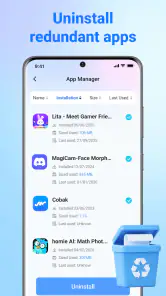
Organizing apps deserves similar attention. A crowded home screen is not the same problem as low storage, but finding rarely used apps can help me decide which ones still belong on the phone. I prefer doing that review separately from file deletion, because uninstalling an app changes access to its local content and may affect someone who depends on it. Keeping those decisions mentally separate is a small but important safety habit.
Motor, visual, hearing, and sensory considerations in daily use
Cleanup involves repeated taps, scrolling, selecting, and confirming. That makes motor comfort relevant even though AlphaClean is not a specialized accessibility product. For someone with limited dexterity, tremor, or fatigue, the best approach is to avoid rushing through long result lists. Short sessions with deliberate pauses are easier than trying to complete every recommendation at once.
Accidental deletion is the main motor-related concern I would keep in mind. A large action button may be convenient for fast maintenance, but convenience can work against precision when a finger lands slightly off target. I recommend reviewing the screen before each confirmation and using the phone’s touch-and-hold or magnification tools when they make small controls easier to distinguish.
Users with low vision may benefit from system magnification, increased contrast, or a larger display setting. Those tools can help separate headings from file entries and make confirmation screens less stressful. The compromise is that more content may move below the visible area, so scrolling becomes part of the task. I would rather accept that extra movement than rely on a quick glance at a cramped list.
Color should not be the only clue for a destructive action. If a result is presented with a warning color, I still look for its wording and position. People with color-vision differences, older users, or anyone viewing the screen in bright sunlight should be able to understand the decision from text and layout. In practical use, that means reading the control label instead of treating color as proof that an item is safe to remove.
For users who are sensitive to animation, visual motion, or busy interfaces, a storage session can be made calmer by enabling the phone’s reduced-motion preferences where available and avoiding unnecessary multitasking. I also find it easier to work with notifications temporarily minimized. That is a situational strategy rather than a special AlphaClean setting, but it keeps the cleanup decision in focus.
Hearing access is less central here because the task is primarily visual and touch-based. That does not mean every user has the same experience. If the phone communicates confirmations or status changes through sounds or spoken feedback, captions and visual confirmation are preferable to relying on audio alone. I would never consider a cleanup complete until the screen itself makes the result clear.
A realistic low-storage situation
Imagine taking photos at a family event when the phone suddenly reports that storage is nearly full. You may be tired, outside, and trying to preserve new pictures rather than study a technical dashboard. AlphaClean can be useful in that moment as a quick way to identify removable clutter, but I would not run a broad cleanup while distracted. I would first save or share the important photos, then scan one category at a time.
If a family member has difficulty reading small text or controlling precise taps, I would sit beside them and let them make the final choices. I could help interpret a category, but I would not treat assistance as permission to approve everything. The person using the phone should remain in control of personal files, app choices, and any confirmation that changes their device.
When access depends on the setting, not just the app
AlphaClean is more comfortable to use at a desk or in a quiet room than while walking, commuting, or handling another task. Storage review requires attention. Bright sunlight can reduce screen legibility, gloves can make touch input unreliable, and one-handed use can increase the chance of tapping the wrong item. In those situations, postponing cleanup is a genuine usability improvement.
It can also help people who share responsibility for a device. A caregiver, parent, or technically confident friend may use the app during a scheduled maintenance session, while the phone’s owner explains which apps and files are important. That workflow is safer than an automatic routine because personal context matters more than a generic definition of junk.
For older or budget phones, the minimum operating system of Android 7.0 or later is a practical point to check before planning a cleanup. Compatibility with the operating system does not guarantee identical performance on every device, so I would keep expectations realistic on hardware with limited memory or an already crowded system. A scan that takes patience is still preferable to repeatedly forcing a phone through rushed maintenance.
Where AlphaClean fits beside the usual alternatives
The first alternative is Android’s own storage settings and file manager. Those built-in tools are often the better choice for people who want maximum control, familiar system screens, and a clear connection to the operating system. They may require more navigation, but that extra effort can be worthwhile when I need to understand exactly where a file lives.
A dedicated file manager is also stronger when the main job is moving, renaming, backing up, or sorting personal documents. AlphaClean is more appealing when I want a guided cleanup starting point rather than a full manual filing system. It reduces the number of places I need to check, but it should not be mistaken for a replacement for careful document management.
Some phone manufacturers include their own maintenance dashboards. Those may be more deeply integrated with the device, while AlphaClean offers a separate, focused option for someone who prefers one recognizable tool. The better choice depends on whether convenience or system-level familiarity matters more to you. I would not install a second cleaner merely because it promises a larger cleanup number.
There is also the option of doing nothing beyond deleting obvious downloads and uninstalling unused apps manually. That approach is slower but can be the safest for people who are nervous about automated recommendations. AlphaClean earns its place when the time saved during discovery outweighs the time needed to review results carefully.
Remaining barriers and the limits of a cleaner
The biggest barrier is not a missing button. It is the risk of treating “junk” as a universal category. A file can be disposable to one person and essential to another. Offline maps, downloaded reading material, old voice recordings, and application data may all look like storage candidates while still serving a real purpose.
That is why I would skip aggressive cleanup if I cannot read the results comfortably, if I am unsure what a category means, or if another person’s files are involved. The free price makes experimentation easy, but it does not remove the need for judgment. Free tools still deserve the same care as paid ones when they can affect personal data.
I would also skip it if my real problem is not clutter. If the phone is slow because of a failing battery, an outdated operating system, a badly behaved app, or insufficient hardware, removing files may not solve the underlying issue. In that case, built-in diagnostics, app-specific troubleshooting, or professional support may be a better next step.
Another limitation is that accessibility needs vary widely. System settings such as magnification, larger text, switch access, voice control, and screen-reader support can improve the experience, but I would test the actual workflow rather than assume compatibility from the app’s category. A person who needs very large targets, highly detailed spoken labels, or a fully hands-free process may find manual file review demanding.
Privacy and trust also affect the decision, even when the task seems simple. Before cleaning, I would read each screen carefully, avoid granting attention to promotional prompts, and keep a backup of irreplaceable material. I would not use any cleaner as a substitute for backups. Storage recovery and data protection are related tasks, but they are not the same task.
My inclusive verdict after using it as a practical maintenance tool
I see AlphaClean as a useful middle ground for people who find manual storage management tedious but still want to review what is being removed. Its strongest quality is focus: it brings junk-file cleanup, storage recovery, and app organization into a single tools experience without asking the user to become a file-system expert first.
It is a good fit for someone who regularly runs out of space, prefers guided screens, and can comfortably inspect results before confirming them. It may also help a family member or caregiver structure a cleanup session, provided the phone’s owner remains involved in decisions about personal content.
I would recommend a more manual alternative for users who need complete file-by-file control, extensive document organization, or a fully hands-free workflow. I would also avoid relying on it during stressful moments when a quick tap could remove something important. The app is most inclusive when used slowly, with Android’s own display and input settings adjusted to the user’s needs.
My final view is positive but deliberately cautious. AlphaClean is not a cure for every performance problem, and no cleaner can know the personal value of every file. Used as a review assistant rather than an automatic delete button, it can make phone housekeeping less intimidating. The most accessible workflow is the one that keeps the user informed, gives them time to decide, and treats recovered storage as less important than preserving the right data.
Pros
- Quickly identifies cache
- residual files
- and unused data.
- Simple interface makes routine cleaning easy for beginners.
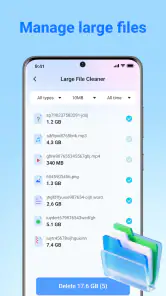
- Large-file scanning helps recover meaningful storage space.
- Duplicate-file detection can reduce unnecessary photo and video copies.
- Provides useful storage insights before deleting selected items.
Cons
- Some scans may require broad storage permissions.
- Cleaning results can vary depending on the device and Android version.
- Aggressive cleanup may remove files you intended to keep.
- Ads or premium prompts may interrupt the cleaning process.
- Battery and storage usage can increase during deep scans.

- Category
- Tools
- Version
- V1.1.0











