AdTranquility VPN Spam Blocker
- 7.94K
- 4.6
- Installs
- 1.00M
- Price
- Free

Screenshots


Analysis by Reviewed
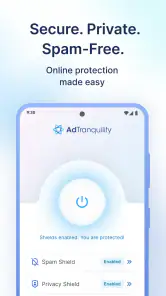
I judge tools like AdTranquility VPN Spam Blocker by a simple question: does it make everyday phone use calmer without creating a new set of problems? In my experience, this app is aimed at people who want two related things in one place: a VPN-style privacy layer and less disruptive notification clutter. It is a free Android tools app from Leverage Technologies Social Media LLC, and its focus is much narrower than a full security suite or a highly configurable network utility.
That narrow focus is part of its appeal. I can see the value for someone who regularly uses public Wi-Fi, dislikes notification pop-ups, and does not want to assemble several separate utilities. At the same time, I would not treat the app as an automatic answer for every privacy concern. A VPN can change how network traffic is routed, while notification control addresses what appears on the phone; those are useful but different jobs. The right choice depends on which problem is actually bothering you.
How I would decide whether it belongs on your phone
Start with the problem, not the feature list
If your main annoyance is a busy notification shade, AdTranquility has a clear reason to be considered. If your priority is safer browsing on shared networks, its VPN and proxy positioning may also be relevant. But if you need advanced network controls, detailed server selection, or a complete mobile security package, I would compare it with more specialized categories before installing anything.
I also think about how much setup I am willing to tolerate. A tool that combines several conveniences can be easier to start using than separate apps, but combined tools may offer fewer controls in each area. For a casual user, that trade-off can be sensible. For someone who wants to inspect every connection setting, it may feel restrictive.
The app is rated for Everyone, which makes its intended audience broad. It runs on Android from version 8.1 onward, so compatibility is reasonably accessible for people using older supported phones. Its current version is 2.1.5, and the app has been available since October 16, 2019. Those details matter less than the practical question: will its bundled approach match your habits?
What I would check before relying on a VPN
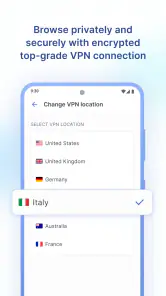
I would not install any VPN and immediately assume that every online activity is private. A VPN changes the route between the device and the internet, but it does not make a person anonymous in every situation, remove tracking from every app, or replace careful account security. I would still use strong passwords, keep Android updated, and avoid treating the connection as permission to open suspicious links.
For everyday use, I would pay attention to whether the connection remains comfortable while switching between Wi-Fi and mobile data. I would also notice whether banking, streaming, work tools, or location-sensitive services behave normally. VPN connections can occasionally create friction with services that care about location or unusual traffic patterns. That is not a reason to reject this app automatically; it is a reason to test it during normal routines before making it part of every activity.
The notification question is more personal than it sounds
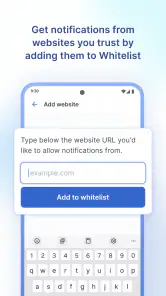
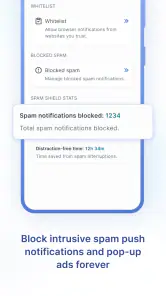
Blocking notification pop-ups can be genuinely helpful, but I would configure that goal carefully. Some alerts are merely promotional, while others remind me about appointments, messages, deliveries, or account activity. A calmer screen is not useful if important information disappears into the background.
My practical approach would be to start with the noisiest source rather than trying to silence everything at once. I would keep essential communication visible and use the app’s notification-blocking purpose for interruptions I already know I do not need immediately. This is one of the less obvious trade-offs: reducing visual noise may improve concentration, but aggressive blocking can also hide a useful prompt.
What the audience figures suggest, and what they do not
The app has a 4.6 average from around forty-eight thousand ratings, with more than seven thousand written reviews and over one million installs. I read that as a sign that the basic idea has found a substantial audience, not as proof that it will suit every phone or network. VPN behavior can vary with device settings, connection quality, and the services a person uses, so my own testing priorities would still come first.
The app is free to install, although optional in-app purchases range from $2.99 to $125.95 per item. That wide range is a good reason to inspect the purchase screen and understand which functions are available without payment before building a routine around the app. I would not assume that “free” means every useful capability is included indefinitely.
Where AdTranquility is most convincing
It brings two everyday annoyances into one decision
The strongest idea here is convenience. Instead of looking for one application to manage network privacy and another to reduce pop-up interruptions, I can begin with a single tool. That matters on phones where storage, attention, and patience are limited. Even if I eventually decide that a specialist app handles one task better, starting with a combined option can help me identify what I actually need.
I especially like the fit for a person who travels between home Wi-Fi, cafés, libraries, hotels, and mobile data. In that situation, a VPN-oriented tool is easy to understand: I want an additional layer when using networks I do not control. The notification side is useful during the same day, but for a different reason. It can make the phone less intrusive while I work, read, or travel.
A realistic day-to-day scenario
Imagine I spend the morning in a café, answer messages over public Wi-Fi, and then move to a shared workspace where several apps begin sending promotional alerts. I could use AdTranquility as a single place to address both kinds of friction: the network connection deserves more care, while the notification stream needs filtering. Later, when I return home, I would reassess whether I want the VPN active for every task or only for situations where the extra routing layer is useful.
The important point is not that the app magically solves public-network risk or notification overload. It is that the two features map to a realistic mobile routine. I would get the most value if I prefer simple, broad controls over a collection of narrowly focused utilities.
The combined approach can reduce app juggling
There is also a small but meaningful workflow advantage. When a phone becomes difficult to manage, the problem is often not a missing feature but too many separate settings screens. A combined tool can make it easier to remember where I started troubleshooting. If notifications suddenly become distracting, I know to review the same app I use for the network layer rather than searching through several unrelated tools.
That convenience has a boundary, though. If one part of the app does not suit me, I may still need another solution for that specific job. Bundling is valuable only while the included functions are good enough for my needs. I would not keep a tool solely because it combines features if its controls make an important task harder.
It is approachable for ordinary Android users
AdTranquility is categorized among tools rather than presented as an enterprise networking product. That matches my impression of its likely role: a practical phone utility for everyday users, not a laboratory for network experimentation. The Everyone age rating also supports that approachable positioning.
For a friend who asks me for a straightforward way to explore VPN use without starting with a complicated technical product, I would put this app on the shortlist. I would explain that “straightforward” should not be confused with “complete.” The simpler the interface and the broader the audience, the more important it becomes to understand which controls are available and which decisions remain mine.
Three useful habits that improve the experience
I would test notification blocking in stages, beginning with low-value promotional alerts and leaving time-sensitive communication visible until I am confident the arrangement works.
I would try the VPN during ordinary browsing and app use before relying on it during travel, work, or access to services that may react to a changed network route.
I would review the purchase options before activating a long-term routine, especially because the available purchase range is broad and a free installation does not tell me the full cost of optional extras.
These habits are more useful than simply turning on every available control. They let me see whether the app improves my actual day instead of assuming that more blocking or more privacy settings are always better.
Where the experience may become less comfortable
The first limitation is conceptual: VPN protection and notification blocking are not the same kind of protection. A user who expects one switch to stop advertisements inside every app, erase all tracking, and secure every account may be disappointed. I would describe the notification function as a way to reduce interruptions, not as a universal replacement for ad-blocking, anti-malware, or privacy management.
The second limitation is the possibility of compromise. A bundled app may be convenient, but a specialist VPN can be a better fit for someone who cares deeply about network choices, while Android’s own notification controls may be enough for someone who only wants to silence a few apps. I would not pay for additional functions simply to avoid installing a second tool if the second tool gives me the control I actually need.
How it compares with the usual alternatives
Compared with using Android’s built-in notification settings alone, AdTranquility is attractive if I also want a VPN-oriented function in the same app. The built-in route may be preferable when notification control is my only goal, because it avoids adding another service to the phone. In that case, the extra VPN focus could be unnecessary.
Compared with a dedicated VPN application, this app may be more appealing to a casual user who wants fewer separate utilities. A dedicated alternative may be better for a person whose decision depends on detailed network behavior, provider-specific controls, or a more focused privacy workflow. I would choose the specialist category when the VPN is the central requirement rather than one half of a convenience package.
Compared with a broader mobile security suite, AdTranquility appears more focused on its VPN, proxy, and notification-blocking role. A security suite may make more sense for someone seeking a wider collection of protective functions, while this app is easier to justify when I want a lighter, more specific tool. I would avoid judging it by features it was not designed to replace.
Privacy expectations deserve a deliberate check
Because a VPN handles network traffic, I would read the app’s current privacy and service explanations before using it for sensitive work. I would want to understand the developer’s stated handling of data and the practical effect of enabling the connection. That is not a criticism aimed specifically at AdTranquility; it is a sensible step for any VPN product.
I would also remember that the developer is Leverage Technologies Social Media LLC, and that the app’s store summary presents it as a fast, secure VPN and online proxy tool with notification pop-up blocking. Those claims describe the intended experience, but my decision would still depend on how the app behaves on my device, how clear its controls are, and whether its purchase choices feel reasonable.
When switching away makes sense
The cost of switching is fairly low if I am only experimenting with notification control. I can compare the app with Android’s native settings and decide whether the combined approach saves time. The decision becomes more important if I have built a habit around its VPN function, because changing network tools means learning a new interface and retesting the apps and services I use most.
I would switch to another category if I repeatedly need controls that are not easy to find, if the VPN interferes with essential services, or if the notification behavior is too broad for my communication needs. I would also reconsider the app if optional purchases do not match my budget or if I cannot clearly tell which functions I am paying to unlock. Convenience should reduce friction, not hide it.
On the other hand, I would stay with AdTranquility if it gives me a comfortable way to use a VPN when appropriate and keeps low-value pop-ups from interrupting my day without affecting important alerts. In that situation, the main benefit is not a dramatic transformation; it is having a practical routine that I can understand and adjust.
Who should try it first
I would recommend trying it to Android users who want a free starting point for combining a VPN-style connection with notification cleanup. It is especially suitable for people who move between different networks, dislike promotional interruptions, and prefer one approachable tool over several specialist apps.
I would be more cautious with it for people who need a highly technical VPN setup, depend on location-sensitive services throughout the day, or expect a complete security and advertising solution. Those users may be happier comparing dedicated VPN products, native notification controls, or broader security tools separately. The best alternative is not always the one with the most features; it is the one that matches the problem I am actually trying to solve.
My recommendation after weighing the trade-offs
My recommendation is to treat AdTranquility as a convenient trial rather than an all-purpose privacy promise. Its combination of VPN-oriented access and notification pop-up control is specific enough to be useful, particularly for everyday Android users who want less interruption and a simple way to explore safer network habits. The broad audience, substantial install base, and strong average rating make it reasonable to consider, but they do not remove the need for personal testing.
I would install it when the bundled approach genuinely fits my routine, start conservatively with notification controls, and test the VPN across the networks and apps I use most. I would keep essential alerts visible, inspect optional purchases before committing, and compare a specialist alternative if network control becomes my main priority.
My clear verdict: AdTranquility is worth trying if you want a free, approachable Android tool that combines two practical conveniences. I would recommend it to casual users and travelers who value simplicity, but I would steer technical privacy users and people seeking complete device protection toward more specialized options. Used with realistic expectations, it can make the phone feel quieter and network use more deliberate without pretending to replace every other security or notification tool.
Pros
- Blocks many spam calls
- texts
- and unwanted tracking attempts.
- VPN-style protection helps secure traffic on public Wi-Fi networks.
- Simple setup makes it accessible for users without technical knowledge.
- Can reduce interruptions from suspicious callers and promotional messages.
- Useful privacy-focused tool for everyday mobile browsing.
Cons
- VPN protection may reduce connection speed on some networks.
- Blocking accuracy can vary by country
- carrier
- and spam database.
- Some features may require a paid subscription or in-app purchase.
- Battery usage may increase while filtering traffic continuously.
- VPN-based filtering may conflict with other VPN or security apps.

- Category
- Tools
- Version
- 2.1.5











