ABP for Samsung Internet
- 1.08K
- 3.9
- Installs
- 10.00M
- Price
- Free

Screenshots

Analysis by Reviewed
I judge ABP for Samsung Internet by a simple question: does it make the browser I already use less frustrating without creating new hassles? For people who browse in Samsung Internet, it can. Its focus is narrow, and that is both its strongest point and its main limitation: it is an add-on for that browser, not a universal filter for every app on a phone.
A better fit for familiar browsing habits
I find an ad blocker most useful on pages I return to often: a recipe site open beside the kitchen counter, a long article read during a commute, or a search page where banners compete with the results. In those moments, removing some advertising can make the main text easier to follow. It can also reduce the amount of page content the browser needs to load, which may help browsing feel quicker and use less data, especially when a connection is limited. The difference depends on the site, though; ABP cannot make every page load instantly or remove every interruption.
A practical habit is to check a page after enabling the blocker rather than assuming every site will behave the same way. If a page looks incomplete or a feature stops working, the first useful test is to revisit it with ad blocking disabled for that site, if the available controls permit it. That helps distinguish a blocking issue from a problem with the page itself. I would keep this kind of troubleshooting in mind for sites that depend on advertising to support their content.
Articles Related to ABP for Samsung Internet
Clash of Clans Is Won Between the Battles
Its raids are quick; its community is a long-term project of coordination, teaching, rivalry, and shared responsibility—with all the friction that entails.
Android Auto Makes the Case for Quieter Car Software
The car interface is no longer judged by how much it can do, but by how quietly it helps. Android Auto shows what drivers now expect—and what still gets in the way.
MobiOffice: Transforming Mobile Productivity with Seamless Integration
MobiOffice: Word, Sheets, PDF is redefining mobile productivity with a surprising blend of functionality and innovation.
EA SPORTS FC™ Mobile Soccer: Redefining Mobile Sports Gaming
Dive into EA SPORTS FC™ Mobile Soccer, where immersive gameplay and strategic depth transform mobile sports gaming.
How the blocker fits Samsung Internet
ABP for Samsung Internet is an ad-blocking application specifically designed for the Samsung Internet browser. It's like having a magical shield that prevents unwanted advertisements from popping up while you're surfing the web. And the best part? It's free to install. The app is made by eyeo GmbH and sits in the communication category, though its practical role is to change how pages appear inside that particular browser. It has an average rating of 3.9 from around 23,000 ratings, and it has been installed over 10 million times. Those figures suggest broad use, but they do not guarantee that every site will look or work exactly as you expect.
Setup depends on the browser you use
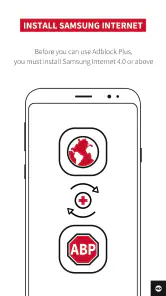
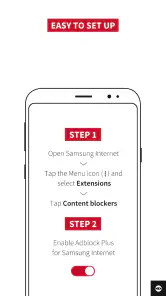
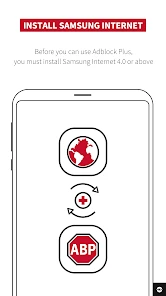
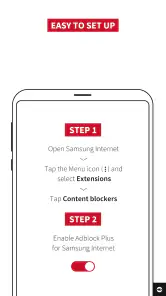
Getting started with ABP is as easy as pie. Head over to the Samsung Galaxy Store or Google Play Store, download the app, and voila! You're almost ready to enjoy an ad-free browsing experience. Once installed, simply enable the ad blocker within your Samsung Internet browser settings, and you're good to go. No complicated configurations or tech-savvy skills required! The app is free, rated for Everyone, and its current version is 2.5.7, with Android 5.0 as the minimum operating system. A useful first step is to check that Samsung Internet is the browser you actually use; installing a browser-specific blocker will not replace a system-wide ad filter for other apps.
What changes on busy pages
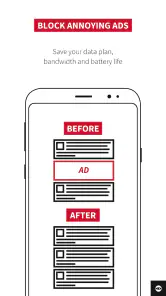
With ABP for Samsung Internet, surfing the web becomes a breeze. Gone are the days of pesky pop-ups and distracting banner ads. What's more, pages tend to load faster since your browser isn't busy loading all those extra ads. This means you can focus on what really matters - the content you want to see. The benefit is most noticeable on ad-heavy pages, rather than on every site equally. If you rely on a page’s embedded video, sign-in flow, or other interactive elements, check that these still work; blocking can sometimes change how a page behaves, and the cleanest-looking version is not always the most functional one.
Privacy benefits have a boundary
One of the standout features of ABP is its ability to enhance your online privacy. By blocking ads, it also prevents ad trackers from collecting your data. This means you can browse with peace of mind knowing that your personal information remains just that - personal. I would treat that as a useful layer against some advertising-related tracking, not as complete anonymity. An ad blocker is not a substitute for careful account settings or cautious sharing, and it does not make every kind of tracking disappear. That distinction matters if privacy is your main reason for installing it.
You May Like

How Microsoft OneDrive Became a Mobile Productivity Giant

How Google Translate Breaks Language Barriers Effortlessly

Why Google Sheets Is the Ultimate Mobile Productivity Tool

Unveiling the Dynamic World of My Talking Tom Friends

Free Fire MAX: Dominating the Battle Royale Arena

Free Fire: Winterlands – The Ultimate Winter Gaming Adventure
When customization is worth the effort
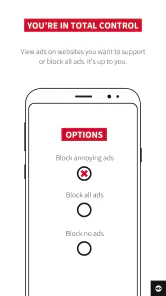
ABP for Samsung Internet isn't just a one-size-fits-all solution. You have the power to customize your ad-blocking experience. Whether you want to allow certain non-intrusive ads or block specific elements on a webpage, ABP provides you with the flexibility to tailor your browsing experience to your liking. I would use that flexibility selectively: a site that is broken or harder to navigate may work better when its advertising is allowed, while a page crowded with distractions may benefit from stricter blocking. The trade-off is that adjusting settings takes a little attention, so someone who wants a single blocker for every browser and app may prefer a broader system-level alternative.
Who benefits most, and who should look elsewhere?
This is a good fit if Samsung Internet is your regular mobile browser and your main annoyance is advertising on websites. Compared with switching to a browser that includes its own blocking tools, ABP lets you keep Samsung Internet and add a dedicated blocker to that routine. If you use several browsers, or want filtering beyond web pages, a browser with built-in controls or a system-wide option may be more convenient. I would also skip it if you rarely encounter intrusive ads; an extra app and setup step may not be worthwhile for occasional browsing.
For a realistic test, install it before a day when you expect to read several long pages, enable it in Samsung Internet, and compare the same kinds of sites you normally visit. Notice not only whether ads are reduced, but whether menus, video playback, and sign-in still work. If one site gives you trouble, adjust the blocking for that case instead of deciding the whole app has failed. This small trial gives a clearer answer than judging it from a single homepage.
Small checks that make the trial more useful
Try to compare like with like: revisit a familiar article or search page in the same browser, rather than comparing a blocked page in Samsung Internet with an entirely different site in another browser. That makes it easier to spot what changed. I would also test a page where you need to take an action, not just read: open a menu, follow a sign-in step, or use a video control. If those elements still behave normally, the cleaner page is genuinely useful; if not, you have a concrete reason to adjust the setting for that site.
There is also a practical trade-off for people who want to support sites they regularly rely on. Advertising can be part of how a publisher pays for free material, while intrusive placements can make that material unpleasant to use. I would not treat one setting as a moral rule for every page. Instead, decide which sites are readable with blocking on and which ones you are comfortable allowing, then use the available controls accordingly. That approach is more considerate and often avoids the frustration of a page that needs its ads or scripts to operate normally.
How it compares with other approaches
The main alternative is not necessarily another standalone blocker. If you are happy to change browsers, built-in blocking controls can reduce setup and keep the experience within one app. If your aim is to filter traffic beyond browser pages, a system-level option may cover more of your phone, though it is a different kind of solution and may require a different setup. ABP’s advantage is more specific: it lets a Samsung Internet user keep that browser rather than moving their bookmarks, habits, and everyday browsing elsewhere just to reduce ads.
That makes the choice fairly clear. Pick this app when you value Samsung Internet enough to keep using it and want a focused way to cut advertising there. Choose a broader alternative if you expect the same filtering in multiple browsers or other apps. Neither route is automatically better; the right one depends on whether continuity in Samsung Internet matters more to you than coverage across the device.
What to expect from a focused ad blocker
It is reasonable to ask whether installing it means every advertisement disappears. I would not set that expectation. The effect varies by page, and the app’s role is to reduce advertising rather than promise a perfectly blank web. The same goes for speed: lighter pages may feel quicker, but a slow connection, a busy site, or a page’s own scripts can still affect loading. Think of these as likely benefits on suitable pages, not guarantees for every visit.
Another useful question is whether it is the right choice if privacy is the main concern. It can help with some advertising-related tracking by blocking ads, but I would not rely on it as a complete privacy setup. Keep normal care around personal information and account settings, and consider whether your other browsing habits need attention too. If you mainly want fewer visual interruptions in Samsung Internet, the match is stronger than if you expect one app to provide comprehensive privacy protection.
Final Thoughts
In a world where digital ads are everywhere, ABP for Samsung Internet offers a refreshing escape. It's easy to install, simple to use, and can provide a smoother browsing experience when pages are crowded with ads. Whether you're tired of advertising or just want a quicker way to reach the content you came for, this app is worth considering if Samsung Internet is already part of your routine. Its limits are equally clear: it is browser-specific, it cannot guarantee that every page will work perfectly, and ad blocking is only one part of online privacy. I recommend trying it if those trade-offs suit your needs, then keeping it only if it improves the sites you actually use.
ABP for Samsung Internet Frequently Asked Questions
Will ABP for Samsung Internet work if I use a different browser?
ABP for Samsung Internet is built specifically for use with Samsung Internet on Android, rather than as a general-purpose ad blocker for every browser. If you browse with another app, this version may not provide the same integration or ad filtering. Before downloading, check which browser you use most often and whether Samsung Internet is available on your device.
Can I use ABP for Samsung Internet on an iPhone or iPad?
ABP for Samsung Internet is intended for Android devices and works with the Samsung Internet browser. It is not an iOS browser extension, so it is not the right choice for someone looking to block ads in Safari on an iPhone or iPad. If you use an Android device, also make sure Samsung Internet is the browser you want to pair it with.
What devices and browsers is ABP for Samsung Internet intended for?
ABP for Samsung Internet is an ad-blocking app made specifically to work with the Samsung Internet browser on Android. It is not a general-purpose blocker for every browser, so check that you use Samsung Internet before downloading. The app supports Android 5.0 and later, making compatibility with your device’s operating system an important first check.
What is ABP for Samsung Internet and how does it work?
ABP for Samsung Internet is an ad blocker tool designed to improve your browsing experience by removing intrusive ads. It works by filtering out unwanted content from web pages, allowing for faster loading times and a cleaner interface. Once installed and enabled, it integrates seamlessly with Samsung Internet, providing ongoing protection against irritating ads.
Is ABP for Samsung Internet free to use?
Yes, ABP for Samsung Internet is completely free to download and use. The app offers a straightforward setup process without any hidden charges or subscription fees. Users can enjoy ad-free browsing without any costs involved, making it a popular choice for those seeking a more pleasant and uninterrupted web experience.
Pros
- Blocks ads effectively on most websites.
- Reduces page load times significantly.
- Saves mobile data by blocking unnecessary ads.
- Enhances battery life with fewer ads loading.
- Easy to install and configure.
Cons
- May block non-intrusive ads too.
- Occasional website compatibility issues.
- Not all ads are blocked on every site.
- Limited customization options.
- Consumes some background resources.

- Category
- Communication
- Version
- 2.5.7













