

Word Chums
- 43.66K
- 4.6
- Installs
- 1.00M
- Price
- Free

Screenshots
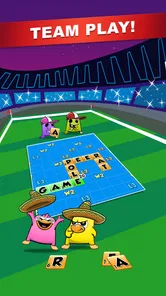


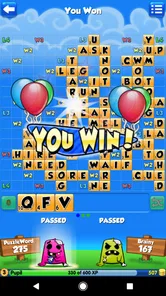
Analysis by Reviewed
I’ve found that Word Chums works best when I treat it less like a quick solo puzzle and more like a word-board match that can unfold at its own pace. That distinction matters: if you enjoy looking for a clever placement and returning to a friendly rivalry, it has a different appeal from a timed word search. If you want a brisk game with a definite finish every few minutes, the turn-based feel may be less satisfying.
Why the board-and-opponent format stands out
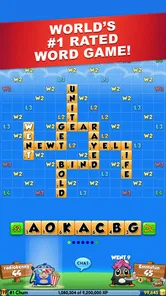
At its core, this is a word game from PeopleFun built around making words from a hand of letters on a shared board. What gives that familiar idea personality is the combination of opponents, cartoon chums, and a little room to think between turns. I like that the character presentation keeps the board from feeling stark, while the actual challenge still comes down to spotting useful words and choosing where they fit.
That makes it a good fit for people who enjoy the strategic side of classic letter-board games but would rather play through a more playful interface. It is not simply about finding the longest word in isolation: a move has to make sense on the board in front of you. I find that small difference gives each turn a satisfying decision, even when I’m only playing for a short break.
How I’d fit a match into an ordinary day
The multiplayer format is easiest to enjoy when I don’t expect every match to demand continuous attention. I can make a move, put my phone away, and come back later when there is another turn to consider. For example, it suits the gaps around a commute or a quiet coffee break better than a game that needs me to keep my eyes on the screen until a round ends. The useful habit is to look at the whole board before playing, rather than just placing the first decent word I spot.
That board check can change the quality of a move. I try to notice whether a word creates an easy opening for the other player, as well as whether it gives me a stronger scoring opportunity now. If I’m stuck, the hint option can help me get moving, but I’d use it as a nudge rather than a substitute for learning to scan the available letters. When I want to build vocabulary, checking a word’s meaning through the dictionary is more valuable than simply accepting a high-scoring play and moving on.
What the social side adds—and what it asks of you
Playing friends or other people gives the game a reason to last beyond a single puzzle. The chat can make a match feel sociable, and the competitive element is appealing if a little friendly rivalry motivates you. I would not choose it for someone who wants a completely solitary experience, though: the opponent is part of the appeal, and the pace can depend on when both players take their turns. Chat is a pleasant extra, but it is not essential to enjoying the board itself.
There is also a difference between competing with someone you know and looking at a leaderboard. A leaderboard can encourage me to improve, but it is not the same as a close match and may not be a useful goal for a casual player. I’d focus on making better decisions in the game rather than treating rank as a measure of whether I’m having fun. That keeps the competitive layer motivating instead of turning every move into pressure.
More From Our News Desk

 Gmail
GmailGmail in a Busy Inbox: Who Benefits Most?
From first account to crowded workday, Gmail earns its place through dependable search and flexible sorting—but its best fit depends on how much inbox maintenance you can tolerate.

 Prime Video
Switching to Prime Video: What Changes in Your Viewing Routine
Prime Video can make a compelling second home for streaming, but switching means learning a different catalog, rental layer, and route from browsing to playback.

 Universal TV Remote Control
Universal TV Remote Control Works Best as a Reliable Backup
A phone remote earns its place through quick setup and reliable habits. Here is how to get more from Universal TV Remote Control—and where its limits show.

 Weather - By Xiaomi
Weather by Xiaomi Review: Clear at a Glance, Less Clear Up Close
Xiaomi’s weather app makes everyday forecasts quick to scan, but its calm surface can leave useful details and recovery paths harder to find than they should be.

 X
XX Under Pressure: Can It Recover When Posting Goes Wrong?
A resilience-focused review of X, examining setup, mistaken posts, interruptions, weak connections, and the gaps that matter when recovery needs to be dependable.

 Clash of Clans
Clash of Clans Is Won Between the Battles
Its raids are quick; its community is a long-term project of coordination, teaching, rivalry, and shared responsibility—with all the friction that entails.
Latest News



Where it sits among word-game alternatives
Compared with a solo word search, this asks for more planning and gives you another person’s choices to react to. Compared with a crossword, it is less about solving a fixed set of clues and more about making the most of letters on a shared board. Those alternatives are better if you specifically want quiet solo play, clue-solving, or a quick round with no waiting. I’d pick this one when I want a familiar word-board challenge with a social thread and a lighter visual style.
The game is free to download, and its age rating is Everyone, which makes it approachable for a broad range of players. It has a 4.6 average from around 151,000 ratings and more than 1 million installs. Optional in-app purchases range from $0.99 to $49.99 per item, so I’d check the purchase prompts carefully if I’m setting up a device for a child or simply want to keep play spending-free. The presence of purchases does not change the basic reason to try it: whether the turn-by-turn word play is enjoyable to you.
A closer look at the experience
I use this section to focus on what the shared board changes from turn to turn: it makes word choice a question of placement and timing, not just vocabulary. I’ll also look at how a few deliberate habits can make a casual match feel more rewarding, especially when I’m playing in short bursts rather than sitting down for a long session.
Gameplay and Features
The game starts by inviting you to create a chum, which is your little avatar, and then you dive right into the word-building action. The interface is super user-friendly, making it easy for both newbies and seasoned word game enthusiasts to get started. You’re presented with a board and a set of letters to create words, trying to score as many points as possible.
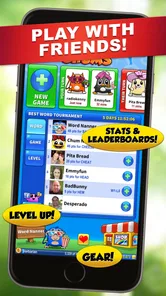
One of the standout features of Word Chums is its multiplayer mode. You can challenge your friends or other players around the world, which means there’s always a fresh opponent to test your skills against. Plus, there's an in-game chat feature, so you can engage in some friendly (or fierce) banter as you play.
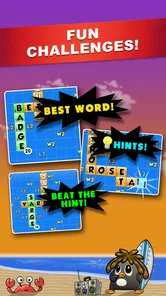
Another cool aspect is the hint option. If you’re ever stuck, the game offers little nudge options to help you out. It’s like having a helpful buddy whispering ideas in your ear, ensuring you’re never too frustrated while playing.
Graphics and Sound
Now, I’m not usually one to rave about graphics in a word game, but Word Chums absolutely nails it. The vibrant colors and lively animations make the game visually appealing. The little chums themselves can be customized, which adds a personal touch to your gaming experience. Plus, the sound effects are just the right amount of peppy without being overwhelming. It’s like having a mini-celebration every time you score big!
Learning and Engagement
If you’re looking to improve your vocabulary, this game is a fantastic tool. The built-in dictionary feature means you can check the meaning of words as you play, which is a great way to expand your word knowledge. It’s educational, but in a fun, engaging way that doesn’t feel like you’re back in school. Honestly, who knew learning new words could be this entertaining?
A practical way to get more from that feature is to pause after an unfamiliar word and look up its meaning before moving on. I find that turns a lucky play into a small learning moment. If you’re playing with a child, it can also prompt a quick conversation about how the word is used, rather than making the match feel like a lesson. It is still a game first, so I wouldn’t rely on it as a structured vocabulary course.
Community and Interaction
One of the things I love most about Word Chums is the sense of community. The game has a vibrant player base, and the leaderboards add a competitive edge that keeps you coming back for more. You can see how you stack up against other players globally, which is a great motivator to keep improving your skills.
The developers also host regular events and challenges, keeping the game fresh and exciting. It’s like being part of a club where everyone shares the same love for words and fun.
Things to weigh before you install
The charm and customization make the presentation more lively, but they may not matter much to players who prefer a plain, distraction-free board. Likewise, the hint option is helpful when a move does not come to mind, yet leaning on hints too often can blunt the satisfaction of finding a play yourself. I’d save them for moments when I’m genuinely stuck and use the dictionary when I want to understand a word, not just validate it.
The game first appeared on July 30, 2013, and the current version is 2.16.1, with Android 6.0 as the minimum OS requirement. It has been around long enough to feel like an established option in the word-game space, though I’d still make sure my device meets that requirement before downloading. Its long-running, board-based style is also exactly why it won’t suit everyone: there is no appeal in waiting on another turn if what you want is an immediate solo challenge.
Who I’d recommend it to
I’d recommend Word Chums to someone who enjoys testing vocabulary against another player, likes a bit of character and color, and is happy to revisit a match over time. It is particularly suitable for friends or family who can make a casual rivalry part of their routine. A useful approach is to agree on a relaxed pace and treat each move as a small puzzle; that avoids turning a leisure game into a demand for instant replies.
I’d steer solo players toward a crossword or word-search game if they want a self-contained activity with no opponent involved. People who dislike chat, competitive rankings, or asynchronous pacing may also get more from those alternatives. But if those elements sound like a bonus rather than a burden, the combination of board choices, hints, dictionary lookups, and a personal chum gives this game a clear identity among word games.
Choosing a comfortable way to play
For a relaxed match, I would start by choosing an opponent whose pace feels compatible with mine, especially if I’m playing with a friend. A casual game is more enjoyable when neither person expects an immediate reply every time. If I have only a few minutes, I can still inspect the board and plan a move, but I wouldn’t begin a match expecting to finish it in that same short window. The asynchronous rhythm is a strength for flexible play, not a shortcut to a completed round.
I also find it helps to separate a “good word” from a “good move.” A word may be impressive on its own yet leave a useful opening on the board. Before placing letters, I look at the spaces the play will create and consider what the next player might be able to build from them. That habit is more useful than trying to memorise obscure vocabulary, and it gives newer players a fair way to make thoughtful choices even when an opponent knows more words.
When I play to learn, I use the dictionary selectively. Looking up every unfamiliar word can interrupt the flow, while checking one or two that genuinely catch my attention gives the match a small educational payoff without turning it into homework. With younger players, I’d make the conversation about what a word means and how it might appear in everyday speech. That keeps the feature useful while respecting that the main activity is still a game between people.
What the free-to-play setup means in practice
Because the game is free to download, it is easy to try before deciding whether its pace and social format suit you. I’d approach the purchase options as optional spending rather than a reason to install: the key question is whether the board play is enjoyable without buying anything. If you share a device with a child, it is sensible to review purchase settings and prompts beforehand, since the game is rated Everyone but includes in-app purchases. That practical distinction matters more than assuming an age rating means every part of the experience is automatically right for every family.
Its 4.6 average across around 151,000 ratings suggests many players have found the format appealing, while the more than 1 million installs show that it has reached a broad audience. I wouldn’t treat popularity as proof that it will fit my habits, though. A player who likes short, self-contained rounds may still prefer another word game, even if this one is widely played. I’d use those figures as context, then judge it by whether I enjoy waiting, planning, and returning to an ongoing match.
How it feels beside other familiar choices
Many word games reward speed or ask you to solve something set in advance. This one leans toward making decisions on a shared board, so the challenge changes as the other player makes choices. That gives it more of a back-and-forth quality than a word search and less of a clue-solving focus than a crossword. It is a particularly good alternative when I want language play to feel social but don’t want a live, timed contest demanding uninterrupted attention.
On the other hand, if I’m waiting in a line and want a quick activity that begins and ends on my terms, a solo puzzle is easier to pick up. A paper crossword can also be preferable when I want to concentrate without chat, character customization, or an opponent’s turn affecting the board. The right comparison is not which format is universally better; it is whether I want to solve alone, race against a clock, or trade considered moves with someone else. The shared-board strategy is the feature that should decide it.
Final Thoughts
In conclusion, Word Chums is a delightful mix of entertainment and education wrapped in a colorful package. Whether you’re looking to kill some time, challenge your brain, or engage with a community of fellow word lovers, this game has something for you. It’s perfect for all ages and offers a charming escape into a world of words.
So, go ahead and give it a whirl! I promise you won’t be disappointed. Just be prepared to get a little addicted. Happy word-building, folks!
Word Chums Frequently Asked Questions
Does Word Chums have multiplayer, and can I play with friends?
Word Chums is a multiplayer word board game, so you can challenge other players and build words in a shared match rather than only solving puzzles alone. Its turn-based format makes it easy to return to a game as it progresses. The game also supports play with friends, giving you a familiar opponent for its vocabulary and strategy challenges.
What is the gameplay like in Word Chums?
Word Chums is a word-focused board game in which players form words and use vocabulary-based strategy to play. The character-based presentation and colorful visuals add a playful feel to the board-game format. If you enjoy thinking through possible words and making strategic choices, it offers a different pace from action games that depend on quick reflexes.
Is Word Chums suitable for casual players who only want short play sessions?
Word Chums is a word board game built around taking turns, so it can suit players who want to fit a puzzle into a spare moment rather than commit to a long session. Its multiplayer format lets you return to an ongoing game, while the word-building challenge gives each turn a clear purpose. The character-based presentation also keeps the experience playful.
What should I know about Word Chums’ age rating and device requirements?
Word Chums is rated Everyone, making it a broadly accessible word game for players of different ages. On Android, it requires version 6.0 or later. Before installing, check that your device meets this requirement and has enough available storage. The game is free to download, so you can try its word-board gameplay without paying upfront.
What is Word Chums and how does it differ from other word games?
Word Chums is a multiplayer word puzzle game that combines the challenge of traditional word games with engaging character-based gameplay. Unlike other word games, Word Chums offers customizable characters, vibrant graphics, and interactive features that make each game session more dynamic and entertaining. It also includes an extensive dictionary and hints to help players improve their vocabulary and strategic skills.
Pros
- Engaging multiplayer experience.
- Colorful and vibrant graphics.
- Wide range of vocabulary challenges.
- Easy to learn
- hard to master.
- Regular updates with new features.
Cons
- Occasional in-app purchase prompts.
- Ads can be intrusive at times.
- Limited offline play options.
- Some features require premium.
- Might drain battery quickly.













