Wordscapes Search: Word Games
- 50.36K
- 4.7
- Installs
- 10.00M
- Price
- Free

Screenshots

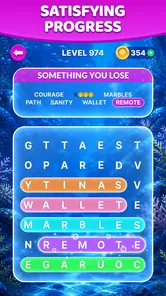
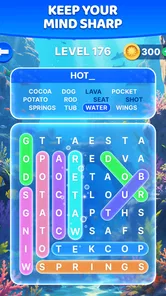
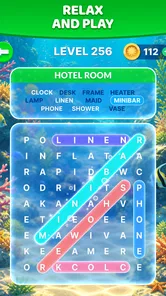
Analysis by Reviewed
I like word games best when they give me something to focus on without demanding a whole evening, and this one fits that mood. Wordscapes Search: Word Games turns a familiar letter-grid puzzle into a quiet, theme-led activity. I can start quickly, look for a few words, and stop when the moment is over. Its appeal is less about dramatic surprises than the way the scenery, sound, and steady pace make a small puzzle feel like a pleasant pause.
A small pause that suits a busy day
I’d reach for this kind of word search game when I wanted a contained puzzle rather than a long session with a story or a complex strategy system. A short break between errands is a natural fit: you can focus on spotting words, put the phone down when you need to, and return when you have another quiet moment. The theme gives each puzzle a little direction, so the task feels more purposeful than scanning a grid at random.
That same simplicity is also the main trade-off. If you enjoy building a plot, competing through deep tactical choices, or learning a large set of rules, this is not trying to replace those experiences. I’d choose a story-driven game for an evening when I want a stronger sense of progression, and a more demanding word puzzle when I want to wrestle with vocabulary rather than unwind. Here, the appeal is the easy entry point and the steady, low-pressure rhythm.
Unveiling the Charm of Wordscapes Search
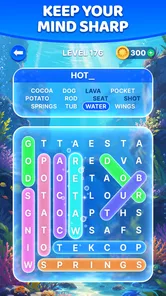
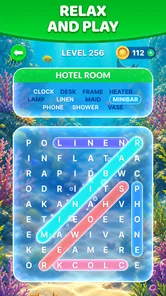
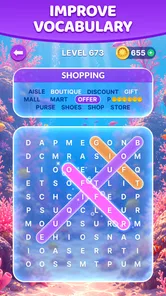
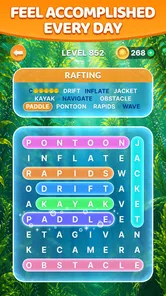
Right off the bat, Wordscapes Search captivates with its clean and visually pleasing interface. The game is a delightful twist on classic word search puzzles, challenging players to find words hidden in a grid. But it’s not just about finding words; it’s about finding the right words that fit the given theme. This thematic approach adds an extra layer of fun and challenge.
Gameplay That Keeps You Hooked
The gameplay is straightforward yet engaging. Each level presents a new theme—ranging from nature to travel—which keeps things fresh. You swipe through letters to uncover hidden words, with calming background music supporting the relaxed feel. The gradual increase in difficulty gives the puzzles room to become more involved, although the overall design remains approachable rather than punishing.
The theme is useful as a solving tool, not just decoration. When I get stuck, I try naming several things that belong to the topic before scanning again; that small change in approach helps me search with a clearer idea of what I might be overlooking. I also find it better to take a brief pause than to swipe the grid repeatedly without a plan. Returning with fresh eyes can make a letter pattern stand out, and it keeps a relaxing puzzle from turning into a frustrating one.
For a realistic routine, I’d play a level while waiting for a drink or during a quiet commute when I’m not the one navigating. The quick-to-understand format makes it easy to start without setting aside time to learn controls. I wouldn’t rely on it as a hands-free pastime, though: finding words requires looking closely at the screen, so it’s best saved for a safe, stationary moment rather than walking or driving.
More From Our News Desk

Weather by Xiaomi Review: Clear at a Glance, Less Clear Up Close

X Under Pressure: Can It Recover When Posting Goes Wrong?

Clash of Clans Is Won Between the Battles

Android Auto Makes the Case for Quieter Car Software

MobiOffice: Transforming Mobile Productivity with Seamless Integration

EA SPORTS FC™ Mobile Soccer: Redefining Mobile Sports Gaming
One of the best parts? The game doesn’t bombard you with ads. It’s refreshing to play a mobile game where you’re not constantly interrupted, allowing you to fully immerse yourself in the experience. Plus, there are daily challenges to keep you coming back for more. It’s perfect for those who love a daily dose of wordplay.
Atmosphere, value, and who it suits
The scenery and gentle presentation help the puzzle feel like a calm little destination instead of a bare grid. That visual mood works alongside the music, although I’d still treat the sound as a personal preference: if you like silence, you can enjoy the word-search task for its own sake, while players seeking a dramatic soundtrack or a story-led setting may find the atmosphere too quiet. The game’s identity is deliberately understated, and that restraint is part of its appeal.
As a free word game from PeopleFun, it is approachable to try, and its Everyone age rating makes the basic premise suitable for a broad audience. It has a 4.7 average from around 227,000 ratings and over 10 million installs, which suggests many players have found the format worth returning to. There are in-app purchases, priced from $0.99 to $99.99 per item, so I’d check the purchase prompts carefully if you share a device or want to keep spending under control. The game is on version 1.42.1 and requires Android 7.0 or later.
Compared with a conventional word search, the themed targets give me a useful hint about what belongs in the puzzle, while the relaxed presentation makes it less like a timed test. Compared with word-building games, it asks me to recognize words already concealed in the grid rather than make words from a rack of letters. That distinction matters: choose this when visual scanning and a gentle pace sound appealing; choose a word-building alternative if you want to create combinations or sharpen spelling through more active construction.
Making a little routine out of the puzzles
For me, the best way to fit this game into a day is to give it a small, predictable slot instead of opening it whenever I’m already tired of looking at a screen. A puzzle during a tea break can be a satisfying reset; several rounds in a row may feel less special because the core action stays the same. If I have only a minute, I can still make progress, but I avoid starting when I know I’ll need to pay attention to something else immediately. The visual search rewards focus, even though the mood is gentle.
One practical habit is to scan the grid in a consistent pattern rather than bouncing between promising letters. I might check the outer edges first, then move inward, keeping the theme in mind as I trace possible words. This is not a hidden mode or a shortcut; it is simply a way to make the search less haphazard. When a word does not appear, I stop forcing it and look for a different starting point. That approach helps preserve the relaxed character instead of making every unsolved target feel like a test.
The game is also an easy shared activity for a quiet moment with a child or another family member: one person can suggest words connected to the theme while the other scans. The Everyone age rating fits that broad, accessible premise, but I’d still treat the screen as something to use together rather than assume every player will find the same puzzle equally easy. Younger players may enjoy spotting familiar words; adults who want a tougher vocabulary challenge may find the gradual rise in difficulty too gentle.
Where it sits among word games
Word games often ask me to do one of three things: locate a word, build one from available letters, or answer a clue. This title is firmly about locating words, so its best moments come from visual recognition and pattern spotting. If I enjoy the tactile feeling of tracing a sequence through a grid, it offers a more soothing alternative to an anagram game that keeps asking me to rearrange letters. If I want a crossword-like test of definitions and general knowledge, I’d pick a clue-based game instead.
That narrower focus is a strength when I want a low-pressure activity, but it also limits how much the experience can change from one session to another. Themes provide variety in what I’m searching for, yet they do not turn the game into a different kind of puzzle. Players who need each session to introduce a new mechanic may prefer a collection of varied brain teasers. I’d choose this for consistency and atmosphere, not for a broad catalogue of puzzle formats.
There is a useful distinction between “relaxing” and “effortless.” I still need to pay attention to letters and trace a route carefully, so the game is not ideal when I’m distracted or trying to multitask. Its calmness comes from the lack of a heavy narrative or complicated system, not from being something I can play without looking. That makes it a better fit for a short, settled break than for filling time while walking around or listening for important announcements.
A Community of Word Enthusiasts
Another aspect I love about Wordscapes Search is its community. You can connect with other players, compare scores, and even engage in friendly competitions. This sense of community adds to the game’s appeal, making it more than just a solitary experience. It’s like having a group of friends who are always down for a word puzzle challenge.
That social side can be a nice extra if you enjoy sharing a small challenge with someone, but I wouldn’t choose the game mainly for competition. Its strongest quality is still the calm puzzle loop, and the group element will matter less to players who prefer to solve privately. I’d recommend it most to casual word fans, people who like themed visual puzzles, and anyone after a gentle screen break. If you need substantial strategy, a demanding vocabulary workout, or a narrative to pull you through a long session, another genre will probably suit you better.
Small points to consider before settling in
The game is free to start, which makes trying its basic puzzle style an easy decision, but the presence of in-app purchases changes the calculation for anyone who wants a strictly no-spend experience. I’d keep purchase approval under control on a shared device and avoid tapping through prompts without checking what they mean. The listed per-item range extends from $0.99 to $99.99, so optional spending can vary considerably; that is a reason to set expectations before handing the phone to a child, not a reason to assume a purchase is necessary to enjoy the word search.
People wondering whether it suits a quick daily habit can reasonably try one short session and judge how the grid feels on their own screen. The controls are simple to understand, but comfort still depends on being able to see and trace the letters clearly. I would not recommend it as a substitute for a paper puzzle if you specifically want to avoid screens, nor as a language-learning course: recognizing themed words can be enjoyable, but the central task is solving the grid, not following a structured lesson.
For Android users, the current version is 1.42.1 and the minimum operating system is Android 7.0. The game is free, rated Everyone, and has attracted over 10 million installs; its average rating is 4.7 across around 227,000 ratings, with about 49,000 reviews. Those figures offer a broad sense of its reach, but they do not change the more personal question: do you enjoy scanning a grid at an unhurried pace? I’d make that the deciding factor.
Final Thoughts
In a world overflowing with mobile games, finding one that’s both enjoyable and enriching can be a tough task. But Wordscapes Search: Word Games hits the mark perfectly. It’s a game you can pick up at any time—whether you’re on a coffee break or unwinding at the end of the day. The combination of beautiful graphics, engaging gameplay, and a welcoming community makes it a must-have for any word game enthusiast. So, if you’re on the hunt for a game that’ll tickle your brain and soothe your senses, look no further. Happy word hunting!
My final advice is to try it in short sessions first and see whether the theme-led search feels satisfying to you. The free entry makes that an easy decision, while the optional purchases are worth keeping in mind if you prefer a strictly no-spend experience. I’d keep it for calm pockets of the day, rather than expect it to become a deep puzzle challenge: in that role, its art, sound, and simple rhythm come together nicely.
Wordscapes Search: Word Games Frequently Asked Questions
Can I play Wordscapes Search in short sessions?
Yes. Wordscapes Search is built around word-search puzzles, so you can focus on finding words whenever you have a little time. Its straightforward format makes it easy to pick up for a brief break, while the continuing puzzle experience gives word-game fans a reason to return. The store summary also emphasizes beautiful scenery, adding a calm backdrop to the letter-finding activity.
Does Wordscapes Search include visual scenery as well as puzzles?
Yes. Wordscapes Search combines word-search puzzles with scenic visuals, giving the game a more relaxed feel than a plain grid of letters. That presentation may appeal to players who like having a pleasant setting alongside their word challenges. The main activity remains finding words, so the scenery complements the puzzle experience rather than changing it into a different kind of game.
Who developed Wordscapes Search, and what kind of game is it?
Wordscapes Search: Word Games is a word puzzle game developed by PeopleFun. Its central activity is searching for words among letters, offering a straightforward format for players who enjoy language-based challenges. It is free to download, with optional in-app purchases available. The game has an Everyone content rating and is available for Android devices running version 7.0 or later.
What is Wordscapes Search: Word Games?
Wordscapes Search: Word Games is a popular word puzzle game available on both Android and iOS platforms. Players are tasked with finding hidden words in a grid of letters, enhancing their vocabulary and cognitive skills. The game offers a relaxing yet challenging experience, making it suitable for all age groups. Its store summary highlights beautiful scenery alongside an ongoing supply of word-search puzzles, giving the letter-finding gameplay a calm, visually appealing setting.
Is Wordscapes Search: Word Games free to play?
Yes, Wordscapes Search: Word Games is free to download and play. However, it offers in-app purchases, with listed prices ranging from $0.99 to $99.99 per item. While optional purchases may appeal to players who want additional conveniences, they are not necessary to enjoy the core word-search gameplay. Consider your spending preferences before making purchases, particularly if children will be playing on your device.
Pros
- Engaging word puzzles
- Variety of challenging levels
- Visually appealing design
- Improves vocabulary skills
- Offline play available
Cons
- Contains ads
- In-app purchases can be pricey
- Repetitive gameplay over time
- Limited hint system
- Requires frequent updates













