Rotate Rings
- 915.00
- 4.7
- Installs
- 1.00M
- Price
- Free

Screenshots

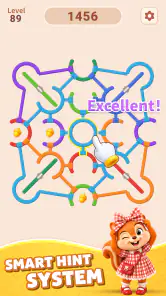

Analysis by Reviewed
I like puzzle games that let me settle into a problem without turning every mistake into a punishment. Rotate Rings is built around a simple idea: arrange a set of rings by rotating them until the pieces line up. That makes it easy to understand at a glance, but the simplicity also puts the quality of the experience in the details—how clearly I can read the puzzle, how comfortable the controls feel, and whether I can enjoy a quick session without distractions.
This is a free puzzle game from Nebula Studio, currently at version 1.0.8, with an Everyone age rating. Its 4.7 average across around 94,000 ratings suggests it has found a broad audience, and it has passed one million installs. I would describe it as a focused, low-pressure option for people who enjoy visual logic more than story, competition, or elaborate progression. The key question is not whether the basic idea is complicated; it is whether rotating rings stays satisfying once the novelty wears off.
Seeing the puzzle and finding your way around
I look first at whether the rings are easy to distinguish and whether the screen’s layout lets me focus on the puzzle without hunting for what to do next. In this section, I’ll consider how that visual setup shapes the experience, then turn to the separate question of how touch and sensory comfort affect play.
A clear idea, with visual attention at its core
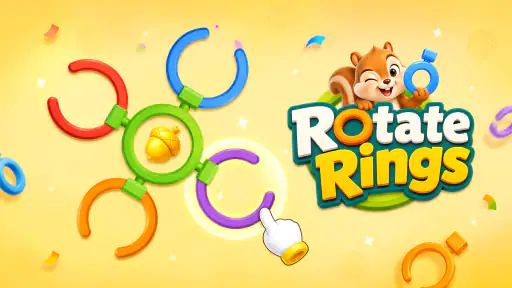
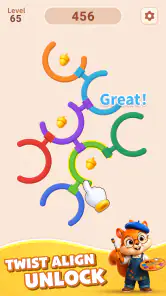
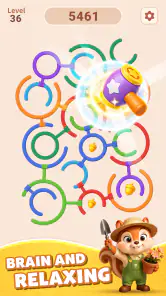
The central task is immediately legible: look at the ring arrangement, work out how its parts relate, then rotate rings to bring the pattern into order. I appreciate that kind of directness. There is no long explanation to remember before I can start thinking, and the puzzle itself remains the focus rather than a separate layer of menus or narrative.
That clarity is useful, but it should not be confused with effortless readability for everyone. A ring puzzle asks me to distinguish shapes and positions, track how one rotation affects the larger arrangement, and keep the intended pattern in mind. Someone with low vision, difficulty separating similar colors, or trouble seeing small details may find that visual workload more demanding than the calm premise suggests. If you are considering it for someone else, the best first check is practical: open a puzzle together and see whether its rings and pieces are comfortably distinguishable on that person’s screen.
I also find it helpful to approach each puzzle as a sequence of observations rather than a test of speed. Before rotating anything, I look for a distinctive piece or boundary and use it as a reference point. Then I make one move and check what changed. This habit reduces the chance of losing track of the pattern, especially when several rings appear to interact visually. It is a small workflow, but it makes the game feel more like deliberate reasoning and less like random tapping.
The interface is most comfortable when I can give the puzzle my full attention. If I’m glancing at the screen in bright light, holding the device at an awkward angle, or trying to interpret the rings while multitasking, the visual relationships are easier to miss. I would choose a stable position and a screen brightness that makes the pieces easy to separate before starting a longer session. That is not a special setting or hidden mode; it is simply the kind of setup that suits a game whose challenge is carried by what I see.
More From Our News Desk

Weather by Xiaomi Review: Clear at a Glance, Less Clear Up Close

X Under Pressure: Can It Recover When Posting Goes Wrong?

Clash of Clans Is Won Between the Battles

Android Auto Makes the Case for Quieter Car Software

MobiOffice: Transforming Mobile Productivity with Seamless Integration

EA SPORTS FC™ Mobile Soccer: Redefining Mobile Sports Gaming
Touch, pace, and sensory comfort
Rotating rings makes touch interaction central, so hand comfort matters. I would expect the most reliable play to come from deliberate taps or gestures rather than fast repeated movements. If a move does not produce the result I intended, pausing to reorient is more useful than immediately making several corrective moves. That approach can help players who have limited dexterity or find precise, repeated input tiring, though it does not remove the need to interact with the screen.
The game’s relaxed puzzle premise suits people who prefer thinking at their own pace, but “relaxing” does not automatically mean sensory-neutral. The important sensory question is whether the visual presentation and any interaction feedback feel comfortable to you. I would test a short session first, particularly if motion, bright effects, or repeated visual changes tend to cause discomfort. I would not assume that every screen will feel equally comfortable simply because the underlying puzzle is calm.
One useful way to keep the mental load manageable is to treat a difficult arrangement as a few smaller relationships. I look at one ring, note which pieces seem fixed relative to it, and then consider the next ring rather than trying to solve the whole picture at once. This is especially helpful when concentration is limited or I’m playing in a noisy room. If I lose my place, I stop and re-establish the reference pattern instead of treating the interruption as a reason to rush.
There is a trade-off here: the same visual simplicity that makes the concept approachable can leave less room for players who need richer cues or a different input style. If a person relies on spoken instructions, high-contrast presentation, or non-touch controls, they should not assume those needs are covered. I would make the decision based on an actual hands-on check, not on the game’s gentle tone or age rating.
Where a ring puzzle fits into the day
This is the sort of game I would open during a quiet break: a few minutes between errands, a pause while waiting for an appointment, or a wind-down moment when I want a small logic task instead of an endless feed. The ring format gives me something concrete to inspect, and the offline brain-training focus makes it suitable for moments when a connection is not available. For travel, I would still prepare by opening it before I’m relying on it, then check that the puzzle is accessible in the situation where I plan to play.
Short sessions are also a sensible choice if screen use causes eye strain or if maintaining attention for long stretches is difficult. I can stop after a puzzle rather than treating the game as an obligation to keep progressing. On the other hand, if you want a rich social experience, a story to follow, or a competitive challenge to share with friends, this is not the strongest fit. Its appeal is the small, self-contained act of working out a visual arrangement.
Compared with familiar alternatives such as jigsaw puzzles, sliding-tile games, or number grids, Rotate Rings puts more emphasis on circular relationships and the consequences of rotation. A jigsaw tends to reward matching visible edges and images; a number grid leans on symbols and rules; here, I need to reason about how parts sit around a center and how a turn changes their alignment. That makes it a good change of pace for someone who already enjoys logic puzzles but wants a different spatial problem. If you prefer words, arithmetic, or a tactile physical puzzle, those alternatives may feel more natural.
What to expect—and what may get in the way
The main limitation is also the game’s defining choice: it asks me to enjoy repeating a compact visual action. Players who want varied mechanics, a plot, character development, or a broad set of puzzle types may find the experience narrow. I would not choose it as my only game if variety is the priority. Nor would I recommend it as a substitute for a structured learning tool; “brain training” here is best understood as a reason to engage with a logic puzzle, not as a promise of a measurable benefit.
Another practical friction is that ring-based puzzles can become hard to follow after an interruption. A notification, conversation, or moment away from the screen can break my mental map. My solution is to pause before putting the device down and remember a simple reference point, such as which distinctive piece I was tracking. If I return unsure, I inspect the arrangement again instead of trying to continue from memory. That makes the game more forgiving in everyday use, even when the puzzle itself remains the same.
The current release is 1.0.8, which gives readers a version to recognize when checking the app on their device. I would keep the expectations modest: version information alone does not tell me how the experience will change over time, so my recommendation rests on the core ring-rotation concept. The game is free to get, which makes it easy to try, but the more important question is whether the visual and touch demands suit the player. An Everyone rating is reassuring as an age classification, not a guarantee that every person will find the controls or presentation comfortable.
With 915 written reviews alongside its large rating pool, there is clearly substantial interest in the game, but I would still judge it against your own needs rather than treating popularity as proof of fit. If you are choosing it for a child, an older relative, or someone with a visual or motor disability, spend a moment watching them interact with the rings. Can they tell the pieces apart? Can they make a rotation without strain? Do they enjoy figuring out the arrangement? Those are more useful questions than whether the game sounds relaxing in a short description.
A measured recommendation for different players
I recommend Rotate Rings to people who want a quiet, visual logic game and are comfortable using touch to manipulate circular layouts. It is particularly appealing if you like solving one compact problem at a time, want something that can fit into a short break, or are looking for an offline-friendly puzzle rather than a game built around social competition. Its 4.7 average and more than a million installs indicate that many players have taken to the idea, while the game’s straightforward premise makes it easy to understand what you are choosing.
I would steer away from it if you need strong spoken guidance, cannot comfortably distinguish the puzzle’s visual elements, or find repeated screen interaction tiring. I would also pick a different puzzle if you are after frequent changes of format, a narrative campaign, or a challenge based on words and numbers rather than spatial rotation. Those are not defects in a ring puzzle; they are clear boundaries around who is likely to enjoy this particular one.
For me, the most inclusive way to approach the game is to let the player set the pace and test the actual experience instead of assuming a calm concept works for every ability. Use a comfortable viewing position, take pauses when the pattern gets hard to track, and begin with a short session. Rotate Rings works best as an unhurried visual puzzle, not a test of speed or endurance. If that matches what you want—and the rings are easy for you to see and manipulate—it is a worthwhile free option to try. If those practical conditions are not met, a puzzle with larger, clearer symbols or a different control method will be a better choice.
Rotate Rings Frequently Asked Questions
What is Rotate Rings, and how do you play it?
Rotate Rings is a casual puzzle game built around turning circular rings to line up their openings or match the pieces shown on screen. The basic controls are easy to understand: tap, swipe, or otherwise rotate the rings, depending on the version, and work out the sequence that completes each puzzle. Later levels may require more careful planning, so it can suit both quick play sessions and players who enjoy spatial challenges.
Is Rotate Rings free to download and play?
Rotate Rings may be available as a free download, but the exact pricing and purchase options can vary by platform, region, and version. Some editions of casual puzzle games include advertising, optional in-app purchases, or paid options to remove ads or unlock extras. Check the app’s current store listing before downloading, and review the purchase settings on your device if you want to avoid accidental spending.
Does Rotate Rings work offline?
Simple ring-rotation puzzles can often be played without a continuous internet connection, but offline access depends on the particular Rotate Rings release. An internet connection may still be needed for the initial download, advertisements, cloud saves, leaderboards, or other online features. If you expect to play while travelling, install the game and test it offline beforehand rather than assuming every mode will be available without a connection.
Is Rotate Rings suitable for children?
Rotate Rings’ puzzle-focused gameplay may be approachable for children because it generally emphasizes observation, logic, and hand-eye coordination rather than complex controls. However, suitability also depends on the specific version’s advertisements, privacy practices, and any links to purchases or external content. Parents should check the age rating and permissions on the app store, then consider supervising younger players and using device-level purchase controls.
What should I check before downloading Rotate Rings?
Before downloading, confirm that the store listing is for the Rotate Rings game you want, since similarly named apps can differ in developer, gameplay, and features. Check device compatibility, the latest update date, user reviews, required permissions, and whether the listing mentions ads or in-app purchases. Download through the official Apple App Store or Google Play Store, and make sure your device has enough free storage for installation and updates.
Pros
- Simple controls make it easy to start playing right away.
- Short levels suit quick play sessions.
- Ring rotation adds a satisfying spatial puzzle element.
- The core gameplay is easy to understand without a long tutorial.
- A good fit for players who enjoy casual logic challenges.
Cons
- Some puzzles may feel repetitive after extended play.
- Later levels can require trial and error to solve.
- The game may offer limited variety beyond rotating rings.
- Ads or in-app purchases may interrupt the experience.
- Players seeking a story or deep progression may find it sparse.
- Category
- Puzzle
- Version
- 1.0.8