WePlay - Game & Party
- 3.24K
- 4.5
- Installs
- 10.00M
- Price
- Free

Screenshots





Analysis by Reviewed
I’d set aside the big promises of a perfect party and treat WePlay - Game & Party as a shared activity to try with friends. It is an entertainment app from WEJOY Pte. Ltd., built around playing and socializing rather than a single standalone game. That distinction matters: the experience is most appealing when other people are ready to join, and less useful if you mainly want a solo game to open for a few minutes.
What to expect before you begin
With a 4.5 average from around 203,000 ratings and over 10 million installs, WePlay has clearly found an audience for social play. It is free to download, with optional in-app purchases ranging from a few cents to just under $90 per item. I’d start without spending anything and first see whether the games and social setup suit your group. The Teen content rating is also worth keeping in mind if younger family members might be playing.
The app is currently at version 5.5.5 and supports Android 7.0 and newer. It was released on August 19, 2021, so it is not a brand-new experiment, but the details that matter most in practice are whether your friends are willing to join and whether you enjoy playing while chatting. For a first-time user, that is a better test than browsing a long list of games alone.
Make the first session easy
I’d install it before the moment you want to use it, rather than asking a whole group to wait while one person gets ready. Open the app when you have a little time to look around, then decide who you want to invite and whether you’re meeting in person or connecting remotely. A small group that already knows one another is a forgiving place to learn: nobody needs to feel responsible for entertaining a room full of strangers.
For a first try, agree on a simple goal: play one round together, then decide whether to continue. That keeps the session low-pressure and makes it easier to tell if the group likes the pace. If people are in the same room, put one phone in view and let everyone understand the basic flow before starting; if you’re apart, settle who is joining before choosing an activity. Those little decisions help avoid the familiar “what are we doing now?” pause.
The Ultimate Social Gaming Experience
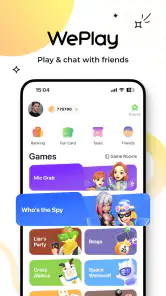
Alright, so picture this: you’re hosting a party, and everyone’s bored of the usual chit-chat and music. Enter WePlay - Game & Party, your ultimate savior! This app is designed to elevate your social gatherings by offering a plethora of games that are not just entertaining but also incredibly engaging. From classic trivia to interactive mini-games, this app has got it all. It’s like having a portable game console right on your smartphone!
Features That Stand Out
One of the coolest things about WePlay is its ability to bring people together. Whether you're in the same room or connecting virtually, the app ensures everyone is part of the fun. The user interface is super intuitive, making it easy for anyone to jump in and start playing. No tech-savvy skills are required here, folks!
More From Our News Desk

Weather by Xiaomi Review: Clear at a Glance, Less Clear Up Close

X Under Pressure: Can It Recover When Posting Goes Wrong?

Clash of Clans Is Won Between the Battles

Android Auto Makes the Case for Quieter Car Software

MobiOffice: Transforming Mobile Productivity with Seamless Integration

EA SPORTS FC™ Mobile Soccer: Redefining Mobile Sports Gaming
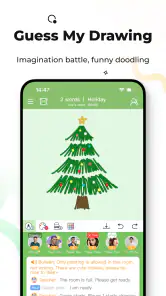
The game variety is another highlight. You’ve got everything from fast-paced action games to thought-provoking puzzles. What’s more, new games are added regularly, so there’s always something fresh to try. The app also supports voice and video chats, so you can trash-talk your opponents in real-time or simply catch up with friends while playing.
Why It’s a Must-Have
So, why should WePlay - Game & Party be on your download list? Well, for starters, it’s a fantastic icebreaker. If you’re hosting a party where not everyone knows each other, these games can help break the ice and get people talking and laughing in no time. Plus, the convenience of having multiple games in one app means you don’t have to clutter your phone with numerous downloads.
Another reason to love this app is its accessibility. It’s available on both Android and iOS, so no one is left out of the fun. Plus, the app’s lightweight nature ensures it won’t hog your phone’s resources, leaving you with plenty of space for those party selfies!
Try it with a real group, not just a quick browse
A practical first success is a short catch-up with one or two friends: choose an activity everyone can understand, start together, and use voice chat if conversation is part of the fun. Don’t make the first session a test of how many games you can explore. One shared round gives you a clearer answer about whether the social format works for your group than scrolling through options does.
There is a useful trade-off here. Having games and communication in one place can spare your group the back-and-forth of picking a separate game and then switching to a call. At the same time, people who prefer focused gameplay may find the social layer distracting. If your friends are not available, or you want a deep single-player campaign, a dedicated game is likely a better fit.
Where the format can be awkward
Social play depends on the people, not just the app. If a friend has not installed it or is unsure about joining, the fun can stall while you coordinate. I’d send a simple invitation ahead of time and explain that the plan is only to try one round; that is less intimidating than announcing a full party session. For a gathering where everyone wants to chat freely, music and conversation may still work better than asking the group to focus on a phone.
Voice and video chat can make a remote session feel more connected, but they also make the experience less suited to noisy rooms or people who would rather not be on camera. You can keep the first attempt casual and let each person choose how much to participate. The app’s Teen rating is a reminder to consider the age and comfort of everyone in a mixed-age group, rather than assuming every activity will suit every guest.
Make the group fit the activity
One small choice can make a first session feel much smoother: invite people who are comfortable trying something without needing to master it. A friend who enjoys quick, playful challenges is a more natural first partner than someone who expects a carefully balanced competitive match. I’d also avoid making the person who suggested the app explain every detail while everyone waits. Let the group learn the rhythm together, and keep the first round short enough that switching plans feels easy.
For a casual evening, this can work as a bridge between catching up and doing something more active. Imagine two friends finishing dinner at home, with one person heading back later and the other wanting to keep talking. They can arrange a short remote session, play while chatting, and stop when the conversation naturally winds down. That is a more realistic use than expecting the app to rescue a large gathering where nobody has agreed on what to do.
What to check before you spend
Because optional purchases span from a few cents to just under $90 per item, I would treat the free start as a chance to learn what the app actually adds for your group. Don’t buy anything simply because a screen presents it during your first visit. First see whether your friends return for another session and whether any paid option would change something you genuinely care about. If the fun comes from the shared activity itself, spending may not improve it.
It is also sensible to decide how you will handle purchases before handing a device to a younger player. The Teen rating and the availability of paid items make a quick conversation with family members worthwhile. I’d keep the first outing focused on understanding how to join and play, then look at spending choices later, when nobody is under pressure to keep a group waiting.
Who will enjoy it most
I’d recommend giving it a try if you already have a couple of friends who like casual games and are happy to talk while playing. It can be especially handy for remote catch-ups that otherwise become a long video call with no shared activity. People who enjoy sampling different light games may also appreciate having several options in one place, rather than deciding in advance which single title everyone should install.
I’d skip it if your main goal is a polished solo experience, serious competition, or a game you can enjoy without coordinating with anyone. It is also not the best answer when a group wants conversation without screens, or when some guests would feel put on the spot by voice or video. In those cases, a regular call, a board game, or a dedicated single-player title better matches the mood.
Choose the right alternative for your group
Compared with downloading several separate casual games, WePlay’s appeal is having social play and different activities gathered in one app. That is convenient for a friend group that wants variety without coordinating a new download each time. A dedicated party game may be a better choice when you want one specific game with a familiar set of rules; a conventional messaging or video-call app is better when conversation matters more than playing.
On a quiet weeknight, for example, I’d invite a friend who is already free, agree to try one quick activity, and keep the call going only if we are both enjoying it. If nobody is available, I would not open the app expecting it to provide the same value alone. That simple distinction helps set expectations: it is a tool for shared downtime, not a replacement for every kind of mobile entertainment.
Final Thoughts
In conclusion, WePlay - Game & Party is not just an app; it’s a ticket to endless fun and social interaction. Whether you’re planning a quiet night in with family or a wild party with friends, this app has something for everyone. Its seamless integration of games and social features makes it a standout in the crowded app market.
So, what are you waiting for? Give WePlay a try and transform your next gathering into a memorable event. Happy gaming!
WePlay - Game & Party Frequently Asked Questions
How much space should I have available before installing WePlay - Game & Party?
It is sensible to leave enough free storage for the installation and for your device to run comfortably. The amount you need can vary with your phone or tablet and its existing apps, so check your available space before downloading. WePlay - Game & Party is an entertainment app, and keeping some storage free can also help avoid installation or performance interruptions.
Does WePlay - Game & Party need an internet connection?
WePlay - Game & Party is built around social entertainment, including multiplayer games and party experiences with other people. A reliable internet connection is therefore important for connecting and playing with friends or meeting other users. If you are planning to use it while away from home, consider whether you will have access to a suitable connection, as online interactions are central to the app’s appeal.
What devices and operating systems can run WePlay - Game & Party?
WePlay - Game & Party is an entertainment app for mobile devices, with support for Android 7.0 and later. Before downloading, check that your phone or tablet meets that minimum requirement and has enough available storage for installation. Keeping your operating system up to date can also help you get the best experience from the app.
What is WePlay - Game & Party all about?
WePlay - Game & Party is a dynamic social entertainment platform designed to bring people together through a vast array of engaging games and interactive party experiences. The app offers a variety of casual games that cater to different interests and skill levels, making it perfect for friends looking to connect and have fun, no matter where they are.
Is WePlay - Game & Party free to use?
WePlay - Game & Party is free to download and offers a range of games and features at no cost. However, the app may include in-app purchases for additional content, items, or premium features that enhance the gaming and social experience. Users can choose to engage with these optional purchases based on their preferences. Purchases range from $0.29 to $89.99 per item, so review any purchase prompt carefully before confirming.
Pros
- User-friendly interface for seamless navigation.
- Wide variety of games to choose from.
- Real-time multiplayer gaming experience.
- Customizable avatars and profiles.
- Built-in chat feature for easy communication.
Cons
- Requires stable internet for optimal performance.
- In-app purchases can be costly.
- Some games have long loading times.
- Limited offline mode capabilities.
- Occasional bugs and app crashes.
- Category
- Entertainment
- Version
- 5.5.5











