

Weather watch face W6.5
- 19.00
- 4.3
- Installs
- 10.00K
- Price
- $2.99
Screenshots
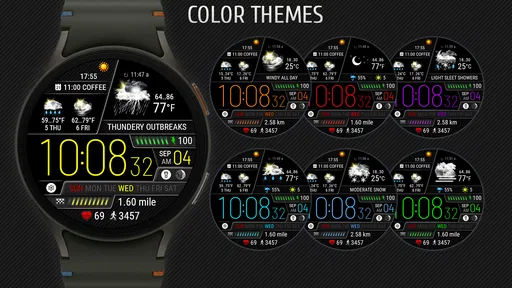
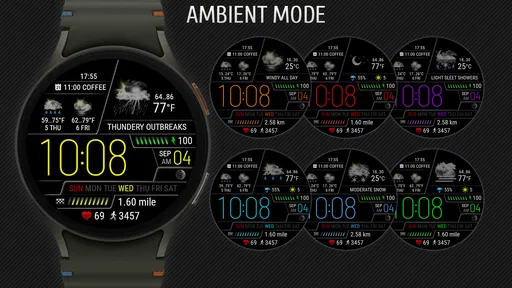
Analysis by Reviewed
I tend to check the weather at the least convenient moment: while I’m already dressed to leave, or after I’ve stepped outside and realized the sky looks different from the forecast. A weather display on a watch can make that quick decision easier, provided it gives useful information without turning a glance into a phone session. Weather Watch Face W6.5 is made for Wear OS 5 and later, and its appeal is straightforward: keep weather close at hand as part of the watch face rather than opening a separate forecast app.
Weather at the point of decision
The key question is not whether weather belongs on a watch; it is whether a quick glance changes what I do next. If I’m deciding between a light jacket and a warmer layer, or wondering whether to bring an umbrella for a short walk, the watch can shorten that small decision. It is less suited to questions that need context, such as how conditions may change over several hours or whether a particular route will be affected.
That focus also sets expectations. This is a paid weather watch face from Futorum, priced at $2.99, rather than a broad weather service I’d choose for deep forecast research. It has an Everyone content rating. The current version is 1.0.0, and it was released on September 4, 2024. Those details matter most if you’re deciding whether a dedicated watch display fits your routine: the value comes from convenient access, not from replacing every weather tool on your phone.
From a quick glance to a day’s plan
When I first installed Weather Watch Face W6.5 on my smartwatch, I was immediately impressed by its sleek and modern design. The app integrates effortlessly with my device, and the setup was a breeze. You know how some apps make you jump through hoops just to get started? Not this one! It was as easy as pie, and within minutes, I had a full suite of weather data displayed right on my watch face.
Features That Stand Out
One of the standout features of this app is its real-time weather updates. I love that I can glance at my wrist and get up-to-the-minute information about the temperature, humidity, and even wind speed. It's like having a little meteorologist hanging out on your wrist! Another cool feature is the customizable watch face. You can tweak the design to match your style, which is perfect if you're picky about aesthetics like I am.
That glance-first approach works best when I decide in advance what I need to see most. If I’m walking the dog, wind and temperature are more useful than a detailed forecast discussion; if I’m choosing clothes before leaving, the current conditions are a fast starting point. I’d treat the watch face as a prompt to check the weather, not as a reason to stop paying attention to changing conditions. A quick look can help with a small decision, but it doesn’t remove the need to use a fuller forecast when timing or local detail matters.
What really sets this app apart, though, is the live radar feature. I found it incredibly useful for planning my day, especially when there’s unpredictable weather on the horizon. It’s like having a mini weather station with you all the time. Plus, the app's interface is super intuitive. Even if you’re not tech-savvy, you’ll find navigating through its features a walk in the park.
More From Our News Desk

 Gmail
GmailGmail in a Busy Inbox: Who Benefits Most?
From first account to crowded workday, Gmail earns its place through dependable search and flexible sorting—but its best fit depends on how much inbox maintenance you can tolerate.

 Prime Video
Switching to Prime Video: What Changes in Your Viewing Routine
Prime Video can make a compelling second home for streaming, but switching means learning a different catalog, rental layer, and route from browsing to playback.

 Universal TV Remote Control
Universal TV Remote Control Works Best as a Reliable Backup
A phone remote earns its place through quick setup and reliable habits. Here is how to get more from Universal TV Remote Control—and where its limits show.

 Weather - By Xiaomi
Weather by Xiaomi Review: Clear at a Glance, Less Clear Up Close
Xiaomi’s weather app makes everyday forecasts quick to scan, but its calm surface can leave useful details and recovery paths harder to find than they should be.

 X
XX Under Pressure: Can It Recover When Posting Goes Wrong?
A resilience-focused review of X, examining setup, mistaken posts, interruptions, weak connections, and the gaps that matter when recovery needs to be dependable.

 Clash of Clans
Clash of Clans Is Won Between the Battles
Its raids are quick; its community is a long-term project of coordination, teaching, rivalry, and shared responsibility—with all the friction that entails.
Latest News



A practical morning-to-outing workflow
In a realistic morning routine, I’d check the face while making coffee, notice that conditions look unsettled, and use the radar to decide whether to take a rain layer before heading out. The useful handoff is from glance to action: the watch helps me spot a reason to think twice, while the phone remains the better place to inspect a broader forecast or plan around a longer trip. That division keeps the watch from trying to do too much. It’s especially handy when my phone is tucked away, though the radar’s usefulness naturally depends on having a moment to look at it rather than simply reading a number at a glance.
For a commute, I’d use the face as a checkpoint rather than a complete itinerary tool. I can check conditions before leaving, then decide whether a quick phone check is worthwhile. If I’m already outside, the watch may help me reconsider whether to walk or wait, but I would not rely on a glance to judge a complicated change in the forecast. The advantage is fewer unnecessary phone checks; the sensible limit is recognizing when a quick indicator has raised a question that deserves a fuller answer.
A small workflow tip is to connect the information to a specific decision. Before a walk, I might look at wind and temperature; before cycling, I’d be more cautious and check a broader forecast as well. That keeps the watch face from becoming a stream of details I glance at without acting on. It also helps me decide whether the face is genuinely useful to me: if the displayed conditions regularly change what I bring or when I leave, the format is earning its place.
Performance and Usability
The app runs smoothly without any hiccups. I’ve been using it for a couple of weeks now, and I haven’t experienced any crashes or lag. The developers clearly put a lot of thought into optimizing it for performance. Battery usage is minimal, which is a big plus for me because I hate having to charge my devices constantly. It’s refreshing to have an app that doesn’t drain your battery life while keeping you informed.
Because a watch face is something I see repeatedly, I’d spend a little time settling on a layout that stays readable during ordinary movement, rather than choosing purely for looks. Customization is most useful when it reduces the effort of finding the detail I care about; adding visual clutter would defeat the point of putting weather on the wrist. This is a small but important trade-off with any information-rich face: the more I want to see at once, the more carefully I need to balance style and quick legibility.
That also shapes how I’d use customization over time. I’d start with a layout that makes the most relevant weather detail easy to spot, then change it only if I repeatedly find myself searching for something else. A watch face is not a dashboard I want to study; its job is to make the glance feel effortless. If I’m squinting or pausing to decode the screen, I’d simplify the presentation rather than trying to squeeze in more information.
Where a watch face hands off to the phone
Weather Watch Face W6.5 is aimed at Wear OS 5+ users, so it isn’t the right pick for someone with a different smartwatch platform or an older Wear OS setup. I’d also skip it if I rarely check conditions from my wrist, or if I want a full-screen map and detailed forecast as my main weather experience. A conventional phone weather app is better for comparing several days, reading longer explanations, or planning a trip. The watch face makes more sense for someone who already wears a compatible watch and values an immediate glance over opening an app.
There’s also a practical distinction between seeing current conditions and deciding what the day will bring. Temperature, humidity, wind and radar can help me make a near-term choice, but I wouldn’t assume a glance alone answers every question about later hours or changing weather. For an outdoor plan that depends on a narrow window, I’d check the phone before committing. For a short walk or a commute, the watch can be the faster first check and save me from pulling out my phone unnecessarily.
Compared with the usual phone-first weather alternatives, this face trades screen space and depth for speed. A phone app is easier for inspecting a map, considering multiple forecast periods, or researching a destination; this watch face is more convenient when the question is immediate and modest. I would not treat those options as rivals. They work better as a handoff: the watch flags a condition, and the phone supplies more context when the decision is important enough to warrant it.
The app has an average rating of 4.4 from around 216 ratings, with 14 written reviews and over 5,000 installs. I see that as a useful sign that other people are trying it, but not a substitute for asking whether its specific format suits me. Paying $2.99 is easiest to justify if I’ll actually use the watch face regularly; if I only want occasional forecasts, the weather app already on my phone may be enough. The price buys the convenience of a dedicated watch display, so the more often I make quick decisions from my wrist, the more that convenience matters.
Another worthwhile habit is to check the watch before leaving home and then use the phone only when the glance raises a question. That keeps the face in its strongest role: a fast checkpoint between getting ready and stepping outside. It also gives me a sensible way to judge whether the purchase fits my routine. If I find myself checking the watch naturally, the dedicated face is doing its job; if I keep reaching for the phone anyway, a standard watch face and phone forecast may be a better match.
Accuracy, trust, and sensible limits
Another thing I appreciate about the Weather Watch Face W6.5 is its accuracy. The weather predictions have been spot-on so far, which is crucial when you’re relying on this information for your daily plans. Whether I’m heading out for a run or planning a picnic, I trust the data this app provides.
Even when conditions appear straightforward, I’d separate trust in a useful quick reading from confidence about every later change. For a run close to home, a glance can help me decide whether to head out now; for a long outdoor event, I’d use the phone to review the wider forecast before making plans. That isn’t a flaw unique to this face. It is the practical boundary between a convenient wrist display and a full weather service, and knowing where that boundary lies makes the information more useful.
Who will get the most from it
I’d recommend this to someone who wears a compatible Wear OS watch every day and wants weather to be part of the glance they already make to check the time. It’s a particularly natural fit for short, flexible outings where a quick look at conditions can change what I bring along. People who want extensive forecast detail, a large radar map, or support beyond Wear OS 5+ should stick with a phone-based weather option instead. For me, the deciding question is simple: do I want weather on my wrist often enough to make a dedicated face worthwhile?
It is also a better fit for someone who likes to make small decisions without taking out a phone: whether to bring an extra layer, pause before leaving, or check the sky more carefully. Someone who rarely wears their smartwatch, prefers a very minimal face, or expects a wrist display to replace detailed forecast planning may not get enough from it. The $2.99 price makes most sense when the weather glance becomes part of an existing habit, rather than a feature I have to remind myself to use.
If you are wondering whether the face can replace your usual weather app, my answer is no—and that is not the role I would ask it to fill. I would keep the phone option for longer-range planning and use the watch for quick checks during the day. If you are wondering whether it suits a non-Wear OS watch, it does not: its intended platform is Wear OS 5 and later. Those two points make the choice fairly clear before paying for it.
Final Thoughts
Overall, Weather Watch Face W6.5 has exceeded my expectations. It’s a fantastic tool for anyone who needs quick access to reliable weather information. The combination of its user-friendly interface, robust features, and stylish design makes it a must-have app for smartwatch users. If you haven’t tried it yet, I highly recommend giving it a whirl. You won’t be disappointed!
My recommendation comes with one qualification: it is worthwhile when wrist access solves a real, repeated inconvenience. I’d choose it for a compatible watch I wear daily and a routine shaped by short trips, walks, or quick decisions about what to carry. I’d choose a phone-first weather option instead if my priority were detailed maps, extended planning, or support for another platform. Used as a fast first look with the phone available for deeper checks, this watch face has a clear and practical place in the day.
Weather watch face W6.5 Frequently Asked Questions
What does Weather Watch Face W6.5 do, and who is it for?
Weather Watch Face W6.5 is a weather app for Wear OS that puts weather information on your watch face. It is aimed at people who want to check conditions from their wrist rather than open a separate app. It is designed for Wear OS 5 and later, so check that your watch runs a compatible version before downloading.
How much does Weather Watch Face W6.5 cost, and what is its age rating?
Weather Watch Face W6.5 costs $2.99 and has an Everyone content rating. That makes it a straightforward paid download for users looking for a weather-focused watch face. Consider whether its weather display and personalization options suit your needs before purchasing, and make sure your smartwatch meets the Wear OS 5+ requirement.
What features does the Weather Watch Face W6.5 offer?
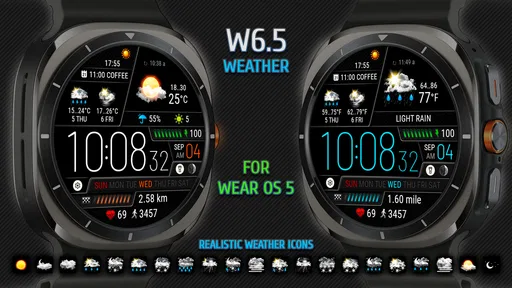
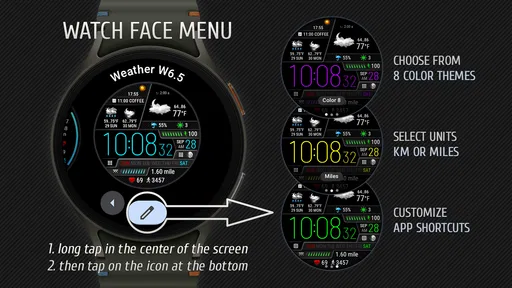
The Weather Watch Face W6.5 provides real-time weather updates directly on your smartwatch. It includes temperature, wind speed, humidity, and weather conditions. The app is designed to be customizable, allowing users to choose the displayed information and personalize the watch face's appearance to suit their preferences.
Is Weather Watch Face W6.5 compatible with all smartwatches?
Weather Watch Face W6.5 is designed for Wear OS 5 and later, rather than every smartwatch platform. Check that your device runs a compatible version of Wear OS before downloading, since watches on other operating systems may not support it. This compatibility check is especially important if you are choosing the app for a particular watch.
Does Weather Watch Face W6.5 require an internet connection to function?
Yes, Weather Watch Face W6.5 requires an internet connection to fetch and update the latest weather data. Without an active connection, the app may not display current weather information, limiting its usefulness until a connection is re-established.
Pros
- Customizable interface options.
- Accurate weather updates.
- Battery-efficient design.
- Supports multiple locations.
- User-friendly interface.
Cons
- Limited free features.
- Ads in the free version.
- Requires constant internet.
- Occasional slow loading.
- Limited watch compatibility.












