Weather watch face W5.5
- 25.00
- 4.1
- Installs
- 5.00K
- Price
- $2.99
Screenshots
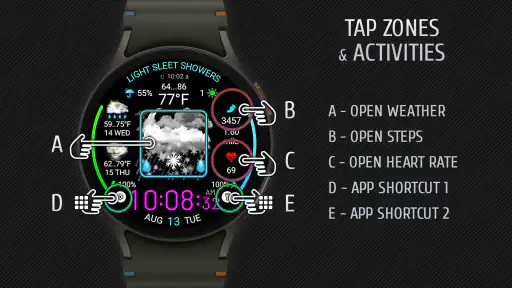
Analysis by Reviewed
I tend to judge a watch face by what I can understand before the next crossing light changes, not by how many details it can squeeze onto a tiny screen. Weather watch face W5.5 is aimed at Wear OS 5 or later, so it makes most sense for someone who already wears a compatible watch and wants weather information in the place they naturally check the time. It is a paid app at $2.99, which makes the practical question simple: will a glance at your wrist be more useful than opening a weather app on your phone?
Readable at a glance, with a setup trade-off
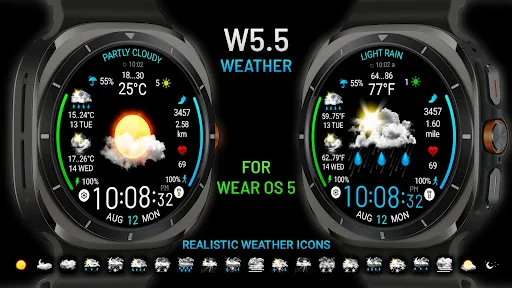
The face puts weather details on a watch display rather than asking me to open a separate forecast screen each time. That can help when I am deciding whether to take a light layer or change plans before leaving. The developer is Futorum, and the app’s 1.0.1 version is listed as a weather watch face rather than a full phone-based forecasting service. I would treat it as a convenient glance point, not a replacement for checking a detailed forecast when timing or changing conditions matter.
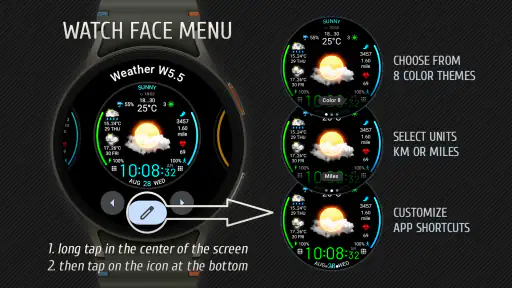
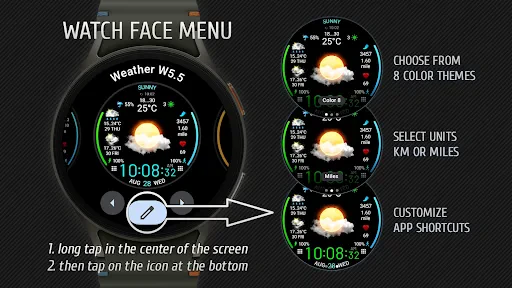
Its custom choices are useful if a default arrangement does not suit your eyes or habits. I would start by showing only the information I actually use, then check whether the resulting layout stays easy to read on my particular watch. There is a real trade-off here: more visible details may reduce the need to tap around, but a crowded face can be harder to scan quickly. A simpler layout is likely the better choice for anyone who finds small text tiring.
That choice also changes how I would use the face across a day. If I mostly need a quick temperature check before stepping outside, I would make that the easiest detail to find instead of trying to turn my wrist into a miniature dashboard. If I am planning a longer outing, I would use the watch for a quick reminder, then open a fuller forecast on my phone before committing to a route or schedule. Keeping those jobs separate makes the watch face more useful without expecting it to do more than its format allows.
A Seamless Weather Experience
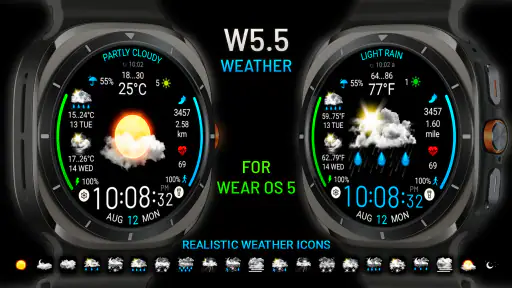
Let’s talk about how Weather watch face W5.5 integrates into your daily routine. The moment I installed this app, I was struck by its intuitive design. It’s like having a personal weather station attached to your wrist! The app provides real-time weather updates that are surprisingly accurate. Just a quick glance, and you know whether to grab an umbrella or slap on some sunscreen.
Sleek Design and User-Friendly Interface
The first thing you’ll notice is the sleek design. It’s minimalist, yet it packs a punch with all the essential information displayed right where you need it. No fluff, just pure functionality. The user interface is super friendly, even for those who aren’t the most tech-savvy. You can easily swipe through various features without any hassle. The developers really nailed it with this one!
For people with limited dexterity, reducing repeated taps can be a meaningful advantage, but setup still matters: changing options may require more precise interaction than simply glancing at the finished face. I would configure it while seated and unhurried, rather than trying to adjust anything while walking. If touch gestures are uncomfortable or difficult, a watch face that needs frequent interaction is unlikely to be a good fit; the appeal here is strongest when the information you want is already visible.
More From Our News Desk

Clash of Clans Is Won Between the Battles

Android Auto Makes the Case for Quieter Car Software

MobiOffice: Transforming Mobile Productivity with Seamless Integration

EA SPORTS FC™ Mobile Soccer: Redefining Mobile Sports Gaming

How Microsoft OneDrive Became a Mobile Productivity Giant

How Google Translate Breaks Language Barriers Effortlessly
One small but useful habit is to settle on a layout during a calm moment and leave it alone for a few days. That gives me time to notice whether I can find the important detail naturally, without repeated adjustments becoming another task. If I keep needing to change the arrangement, that may be a sign that a phone forecast or a simpler face suits me better. A watch face earns its space when the glance becomes automatic, not when I have to keep managing it.
Customization at Your Fingertips
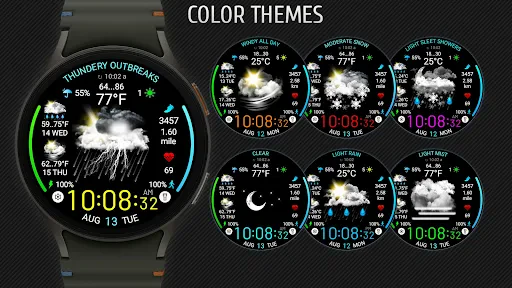
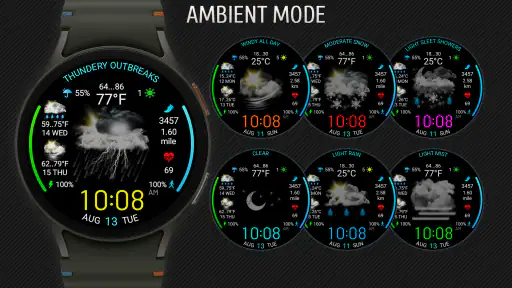
Customization is a big deal for many of us, and Weather watch face W5.5 doesn’t disappoint. Whether you’re into vibrant colors or prefer a more subdued palette, you can tweak the display to match your style. And let’s not forget the nifty option to choose what weather data you want to see upfront – temperature, wind speed, humidity, you name it.
A useful way to approach those choices is to match the display to a recurring decision, not to show everything just because it is available. For a commute, temperature and rain-related context may matter more than a long collection of measurements; for a run, wind could be more relevant. I would also check the face outdoors and indoors, since glare and a dim room can change what feels readable. Personalization helps, but it cannot make a small watch screen equally comfortable for every set of eyes.
For someone who takes public transport, a quick check while waiting can be more convenient than pulling out a phone with bags in hand. But the same setting may be less helpful on a sunny platform, where glare makes the screen harder to inspect. I would test the layout in the places I actually use it, not only at home. If a particular color or arrangement disappears in bright light, the practical answer is to simplify or switch to a clearer option rather than rely on memory to interpret it.
Battery-Friendly
One of my initial concerns was how much battery this app would consume. I mean, who wants an app that drains their watch’s battery in a heartbeat? But guess what? It’s surprisingly efficient! Even with constant updates, the app manages to use minimal battery power, which is a major win in my books.
In ordinary use, the strongest case for a weather face is the small decision it can simplify. Imagine getting ready for work, checking your wrist as you put on your shoes, and spotting a temperature that makes you reconsider a thin jacket. That is a more realistic benefit than expecting a watch face to explain a whole day’s forecast. If rain is approaching later or the weather is changing quickly, I would still check a fuller forecast before setting off.
A second everyday example is a walk planned between errands. I can glance at the watch before leaving one shop and decide whether to keep the walk short or bring an extra layer, then use my phone if the choice depends on the next several hours. That division is especially useful when I do not want to stop and navigate a small screen in the street. It also keeps the face from becoming a substitute for the context a longer forecast provides.
How it fits beside other weather options
Compared with opening a standard weather app on a phone, this face favors speed over depth: it can make a quick check feel effortless, while a dedicated forecast app is usually the better place to explore upcoming conditions in detail. Compared with a non-weather watch face, it gives weather a permanent place in the glance you already make to see the time. That is worthwhile for people who check conditions several times during a normal day; it is less compelling if they only look up weather occasionally.
The app is for Wear OS 5 or later, so compatibility is the first thing I would check before paying. It has an Everyone content rating, a 4.1 average from around 260 ratings, and over 5,000 installs. Those figures suggest some adoption, but I would still decide based on the watch-face format and my own reading needs rather than popularity alone. It was released on August 13, 2024, and has 25 written reviews.
The choice is not simply between this face and a phone app. If I want the time and a quick weather cue together, a weather-focused watch face is convenient; if I want maps, extended outlooks, or room to compare changing conditions, a phone screen is a more natural tool. A plain watch face may be preferable when weather is not part of my routine, since it avoids dedicating limited display space to information I rarely check. The best option depends on whether weather is a frequent glance or an occasional research task.
Before purchasing, I would make two checks: confirm that my watch runs Wear OS 5 or later, and think about whether a visual wrist display is comfortable for me to read. The $2.99 cost is easiest to justify when I expect to use that glance often. If I usually check weather only once in the morning, the phone app I already have may be enough; if I check repeatedly while moving through the day, keeping the information close to the time has a clearer everyday benefit.
Who will benefit, and where the limits show
I can see this working well for someone who already wears a compatible watch, prefers quick information over opening a phone, and is willing to tune the display to suit their routine. It is a weaker choice for someone who needs a detailed forecast, has difficulty reading compact screens, or does not want to pay for a watch face when a phone app already meets their needs. Weather awareness can support planning, but I would not rely on a brief glance for safety-critical decisions or fast-changing conditions.
There is also a practical distinction between visual access and full hands-free access: a glanceable face can reduce navigation, but it still depends on being able to see the watch and interpret its display. If vision, contrast sensitivity, or wrist movement makes that difficult, another way to check weather may be more comfortable. I would test the selected layout in the lighting and posture where I expect to use it most, rather than assuming a color choice alone solves readability.
It is also worth asking whether the watch is actually available at the moments when weather decisions happen. Someone who removes a watch for much of the day, cannot comfortably raise their wrist, or prefers not to wear one may get little value from a face that depends on those habits. In those cases, a phone forecast or another way of receiving weather information is a better match, even if it takes an extra step.
For sensory comfort, I would avoid treating a dense display as automatically more helpful. Extra details can create more visual competition, while a pared-back arrangement may make the one useful signal easier to pick out. The right balance will depend on the wearer and the watch screen, so I would judge it by how quickly I can identify the information I need—not by how much content I can fit.
In conclusion, if you’re looking for an app that blends style with functionality, Weather watch face W5.5 is definitely worth checking out. It’s user-friendly, customizable, and doesn’t take a toll on your watch’s battery life. Plus, it’s like having a weather guru on your wrist, ensuring you’re always prepared for whatever Mother Nature throws your way. So, go ahead, give it a whirl, and never be caught off guard by the weather again!
My inclusive verdict
I would recommend it to a friend who values a quick weather glance and can comfortably use a Wear OS watch face. The strongest inclusive point is the chance to choose which information deserves space; the main limitation is that a compact visual display cannot suit every vision, motor, or sensory need. If you need richer context or a different way to access forecasts, a dedicated phone app or another accessible weather option is the better choice. For the right wearer, this is a practical everyday shortcut—not a substitute for every kind of forecast or access need.
Weather watch face W5.5 Frequently Asked Questions
Does Weather Watch Face W5.5 work with Wear OS 5 or later?
Weather Watch Face W5.5 is a weather watch face for Wear OS 5 and later, so checking your smartwatch’s operating system is an important step before downloading. It is designed for Wear OS rather than Apple Watch, and a compatible watch is needed to use it as a watch face. The app is developed by Futorum.
What is Weather Watch Face W5.5, and how much does it cost?
Weather Watch Face W5.5 is an app in the Weather category, designed to put weather information on a Wear OS watch face. It costs $2.99, so it is a paid download rather than a free watch face. Its content rating is Everyone. Consider whether you want weather details displayed on your watch before deciding if the purchase suits your needs.
What features does the Weather Watch Face W5.5 offer?
The Weather Watch Face W5.5 displays real-time weather updates directly on your smartwatch. It provides detailed information such as temperature, humidity, wind speed, and weather conditions. The app also offers customizable themes, allowing users to personalize their watch face according to their preferences. It supports multiple weather data providers for accurate information.
Is the Weather Watch Face W5.5 compatible with all smartwatches?
Weather Watch Face W5.5 is primarily designed for Android smartwatches that run on the Wear OS platform. It may not be compatible with other operating systems like Apple's watchOS. Users should ensure their smartwatch supports Wear OS to fully utilize the features of this app. Compatibility details can usually be found in the app description on Google Play.
How often does the Weather Watch Face W5.5 update the weather information?
The Weather Watch Face W5.5 updates weather information at regular intervals, typically every hour. However, users can customize the update frequency based on their preferences and connection availability. For real-time updates, a stable internet connection is required, as the app fetches data from online weather services.
Pros
- Customizable interface elements
- Accurate real-time weather data
- Supports multiple weather providers
- Battery-efficient performance
- Easy integration with smartwatch OS
Cons
- Limited free features
- Occasional syncing delays
- Requires stable internet connection
- Less compatibility with older devices
- Subscription model for premium features
- Category
- Weather
- Version
- 1.0.1