

Weather Live
- 21.00
- 4.7
- Installs
- 1.00K
- Price
- $4.99
Screenshots
Analysis by Reviewed
I find weather apps most useful when they help me make a small, immediate decision: whether to leave now, pack a light layer, or change an outdoor plan. Weather Live is a paid weather app from Nuts Mobile Inc., currently listed at $4.99. That price is the clearest part of the buying decision: I would treat it as a purchase, not assume there is a free tier or trial. Its Everyone age rating makes it suitable for a broad audience, though the value still depends on whether its weather information fits your routine.
What the price needs to earn
At $4.99, I would want to use the app regularly rather than install it for a single trip and forget it. Its appeal is the combination of forecast details and radar-style map viewing: the forecast helps with planning, while a map can make approaching conditions easier to interpret than a row of numbers. The app has a 4.7 average from over 200 ratings, but ratings alone cannot tell me whether it will suit my location or habits. I would judge the purchase by whether I actually check it before leaving home.
Value in ordinary decisions
The useful test is not whether an app displays a long list of weather details, but whether those details change what I do. For a commute, I might check rain probability before choosing a jacket; before a walk, I might compare the current conditions with the broader forecast. Sunrise and sunset times can help me plan a late outing, while the UV index is relevant when I expect to spend time outside. These details have practical value when they answer a question I already have, rather than becoming numbers I check out of habit.
Weather Live is on version 1.4.0 and has over 1,000 installs, so it has a smaller visible audience than many familiar weather services. That is not proof of poor quality, but it does make me cautious about treating popularity as a reason to buy. I would compare its forecast and map presentation with the weather app I already use, especially for the places I visit most. If the existing app already gives me clear local forecasts and useful alerts, paying for another option may not add enough to my day.
Where the trade-offs show
Radar and detailed readings can be helpful, but they are not guarantees that a shower will miss your street or that conditions will stay unchanged. I use a map as context, not as a promise, and check again before a plan that would be costly or uncomfortable to disrupt. Notifications also need restraint: alerts that match decisions I care about can help, while too many prompts become noise. I would start with only the notices I expect to act on, then adjust after seeing how they fit my routine.
Ever find yourself staring out the window, trying to figure out if you should grab an umbrella or sunglasses before heading out? Well, let me introduce you to Weather Live, your new best friend when it comes to planning your day around Mother Nature's whims. It's like having a personal meteorologist in your pocket!
Real-Time Weather Updates
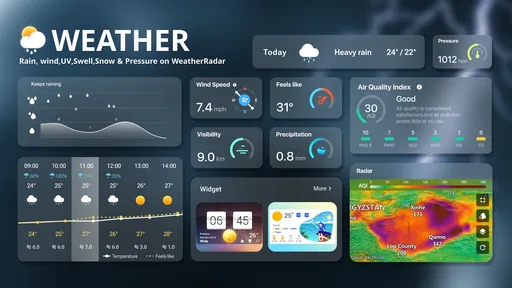
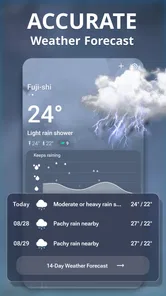
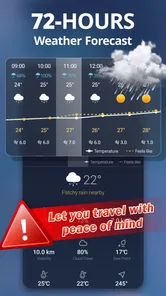
One of the standout features of Weather Live is its ability to provide real-time weather updates. Whether you’re planning a weekend getaway or simply stepping out for a quick run, this app ensures you're never caught off guard. You can see the current temperature, wind speed, and even the probability of rain at a glance. It's pretty cool to have this level of detail right at your fingertips.
More From Our News Desk

 Gmail
GmailGmail in a Busy Inbox: Who Benefits Most?
From first account to crowded workday, Gmail earns its place through dependable search and flexible sorting—but its best fit depends on how much inbox maintenance you can tolerate.

 Prime Video
Switching to Prime Video: What Changes in Your Viewing Routine
Prime Video can make a compelling second home for streaming, but switching means learning a different catalog, rental layer, and route from browsing to playback.

 Universal TV Remote Control
Universal TV Remote Control Works Best as a Reliable Backup
A phone remote earns its place through quick setup and reliable habits. Here is how to get more from Universal TV Remote Control—and where its limits show.

 Weather - By Xiaomi
Weather by Xiaomi Review: Clear at a Glance, Less Clear Up Close
Xiaomi’s weather app makes everyday forecasts quick to scan, but its calm surface can leave useful details and recovery paths harder to find than they should be.

 X
XX Under Pressure: Can It Recover When Posting Goes Wrong?
A resilience-focused review of X, examining setup, mistaken posts, interruptions, weak connections, and the gaps that matter when recovery needs to be dependable.

 Clash of Clans
Clash of Clans Is Won Between the Battles
Its raids are quick; its community is a long-term project of coordination, teaching, rivalry, and shared responsibility—with all the friction that entails.
Latest News



Interactive Weather Maps
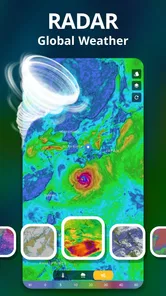
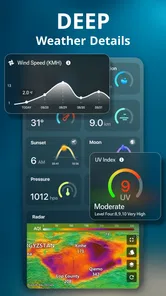
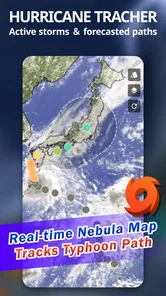
Now, let's talk maps. Weather Live offers an interactive weather map feature that allows users to visualize weather conditions in different locations. It's like having a bird's eye view of the world's weather patterns. You can zoom in and out, swipe across regions, and watch weather fronts move in real-time. It's both educational and practical, especially if you're a weather enthusiast like I am!
Customizable Notifications
Another feature worth mentioning is the customizable notifications. You can tailor these alerts to your preferences, ensuring you receive only the information you deem necessary. Whether it's a sudden drop in temperature or an unexpected rain shower, Weather Live keeps you informed, so you can adjust your plans accordingly. This level of customization is a game-changer for those of us who like to stay one step ahead of the weather.
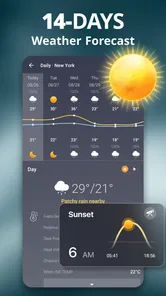
Weather Live doesn't just stop at providing the basics. It goes a step further by offering additional features such as sunrise and sunset times, UV index levels, and even moon phases. It’s perfect for anyone who likes to have all the details when planning outdoor activities. Trust me, once you start using these features, you'll wonder how you ever got by without them!
Who will get the most from it?
I can see this being a good fit for someone who makes frequent outdoor plans and likes to check more than a single temperature. Think of a weekend when I have a walk planned, errands across town, and an evening event: I can use the forecast for the broad plan, then look at the map before committing to a route or timing. For a photographer or gardener, sunrise and sunset information can be more actionable than a general daily summary, while UV readings can prompt a more sensible choice about time outside.
A small but useful habit is to check the map and the forecast separately instead of assuming one replaces the other. The forecast gives a compact answer; the map helps me understand how conditions may be arranged around nearby areas. I would also avoid turning on every alert on day one. Choose the weather changes that would genuinely alter your plans, then see whether those notifications arrive at useful moments rather than interrupting you for details you would have checked anyway.
When another weather app is better
If you only need a quick temperature glance, the weather service already built into a phone may be enough, and paying for a separate app would be hard to justify. People who depend on highly specialized local forecasts should compare the results for their own area before relying on this one. The same goes for travel: check each destination directly, since a map that feels informative at home may not be the deciding tool for a place you do not know. Weather Live makes more sense when its mix of map, alerts, and extra outdoor details is something you will actually use.
For a practical comparison, I would put it beside two familiar choices: the built-in phone weather panel and a dedicated local forecast service. The first usually wins when I want a quick glance without opening another app; a specialist service may be a better fit when a particular location or activity calls for more focused local information. This app’s case is strongest when I want the forecast and a visual map in one place, then use sunrise, UV, or moon information to shape an outdoor plan. That combination is useful, but it does not automatically make it the best source for every question.
Make the map work for a decision
One way I would get more from the map is to look at it before choosing a time, not just after rain appears outside. If a walk is flexible, I can compare the visual picture with the forecast and decide whether to leave earlier, take a shorter route, or wait. For a fixed appointment, the same check helps me plan clothing and transport without pretending I can control the weather. The useful distinction is between a map that informs a choice and one that is treated as a precise guarantee.
I would also use different details for different kinds of plans rather than trying to monitor everything. Wind matters more to me for an exposed walk or an outdoor event than it does for a quick trip between buildings; UV is more relevant when I expect to stay outside for a while. Sunrise and sunset times can help me decide whether a route fits the available daylight. These are small planning cues, not substitutes for judgment, but they can make the app feel more purposeful than checking a temperature out of habit.
A routine that avoids overchecking
Weather information can become distracting when I keep refreshing it without changing my plan. I would settle on a simple routine: check the forecast when I first organize the day, use the map if rain or shifting conditions could affect the timing, and check once more before a longer outing. Notifications should fill a gap between those checks, not turn every minor change into a reason to pick up the phone. That approach gives alerts a job and makes it easier to tell whether they are genuinely useful.
A realistic example is a morning when I have a commute, groceries to pick up, and a walk planned later. I would check rain probability before leaving, then use the map if the forecast suggests unsettled weather around the time of the walk. If the outing is flexible, I can shift it or choose a shorter route; if it is fixed, I can prepare for the conditions rather than expecting the app to eliminate uncertainty. The value is in making that decision sooner and with more context.
Questions worth settling before buying
Is it useful if I already have a weather app? It can be, but only if the map, alert controls, or outdoor details make a difference to your routine. I would compare the same familiar locations in both apps for several ordinary days before deciding whether the separate purchase adds anything. If the built-in service already answers your questions clearly, there is little reason to pay just to see another version of the same basic forecast.
Should I rely on its radar for a time-sensitive plan? I would use it as one input, then keep a backup source in mind when being wrong would cause a real problem. Weather can shift locally, and a visual map does not turn a forecast into certainty. Similarly, a notification is most useful when it prompts an action you can take; if an alert arrives too often or at an unhelpful moment, I would narrow the settings rather than leave every notice enabled.
Does it suit someone who rarely checks the weather? Probably not at this price. A paid app earns its place when I return to it often enough for its extra presentation and planning details to matter. A casual user who only wants to know whether it is hot or raining may be better served by the phone’s existing weather option. A frequent walker, gardener, or outdoor planner has more opportunities to put its information to work, though the forecast should still be checked against personal needs and local conditions.
Who should pass
I would skip it if cost is the deciding factor and a basic forecast already meets your needs, or if you need a specialist source for a demanding local activity. It is also not the right purchase for someone who expects a map or alert to promise exactly what will happen at a particular address. Weather tools are most helpful when they support a flexible plan; for safety-critical decisions, I would consult an appropriate authoritative source rather than rely on one consumer app alone.
For someone who travels between places, I would test the locations that matter before making the app part of a routine. A map can be pleasant to explore, but the practical question is whether its presentation helps you understand the conditions at the destination, not merely whether it looks informative. I would also avoid buying it solely because it has a strong average rating: other users’ opinions can be reassuring, but your own local results and habits are better evidence of fit.
Final Thoughts
In a world where weather can be unpredictable, having Weather Live as a companion is invaluable. It's more than just an app; it's a tool that helps you navigate through your day with confidence and ease. Whether you're a casual user or a weather geek, this app has something for everyone. So why not give it a try? After all, being prepared never goes out of style.
My buy-or-skip verdict
For me, the decision comes down to whether the map, configurable alerts, and outdoor details earn a place in my daily routine. The app was released on June 16, 2023, and it requires Android 6.0 or later; those are practical compatibility details to check before buying. I would consider it if I often plan around weather and want these tools together. I would skip it if a built-in forecast already answers my everyday questions, or if I need specialized local guidance. At $4.99, it is a modest purchase, but its value is personal: pay only if the extra detail will change a real decision for you.
Weather Live Frequently Asked Questions
Who develops Weather Live, and what kind of app is it?
Weather Live is a weather app from Nuts Mobile Inc., intended to help users check forecasts and weather radar. Its store summary describes it as a choice for knowing weather forecasts and radar, making it relevant for everyday planning as well as keeping an eye on changing conditions. The app is rated for Everyone, so its content rating is suitable for a general audience.
What features does Weather Live offer to users?
Weather Live provides a comprehensive range of features to help users stay informed about the weather. These include real-time weather updates, detailed forecasts, weather maps, and severe weather alerts. Users can also customize the app to receive notifications tailored to their specific needs, making it a versatile tool for planning daily activities or trips.
Is Weather Live available for both Android and iOS devices?
Yes, Weather Live is available for both Android and iOS platforms. Users can easily download the app from Google Play Store for Android devices or the Apple App Store for iOS devices. This accessibility ensures that a wide range of users can benefit from its features regardless of their preferred mobile operating system. Before downloading, check that your device meets the minimum operating-system requirement of version 6.0.
Does Weather Live require an internet connection to function?
Weather Live primarily relies on an internet connection to provide real-time weather updates and forecasts. However, certain features, such as basic weather information and previously downloaded data, may be available offline. For the best experience, it's recommended to use the app with a stable internet connection to access all its features and receive up-to-date information.
Can users customize notifications in Weather Live?
Yes, Weather Live allows users to customize notifications according to their preferences. Users can set alerts for specific weather conditions, such as rain or snow, and receive notifications at chosen times. This feature ensures that users are always aware of important weather changes, helping them plan their day more effectively and avoid any unpleasant weather surprises.
Pros
- Highly accurate weather forecasts.
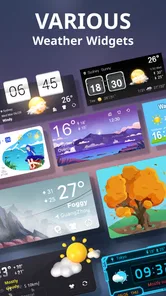
- Customizable weather widgets.
- Detailed weather maps available.
- Real-time severe weather alerts.
- User-friendly interface.
Cons
- Contains ads in free version.
- Requires internet for updates.
- Some features need premium.
- Battery usage can be high.
- Limited offline functionality.












