

DJ Mixer - DJ Music Remix
- 77.00
- 4.2
- Installs
- 5.00M
- Price
- Free
Screenshots
Analysis by Reviewed
I like DJ Mixer - DJ Music Remix best as a low-pressure way to try mixing on a phone: it gives curious listeners a practical space to experiment, without asking them to buy decks or learn a complicated production setup first. That convenience has limits, though. A touchscreen can help you explore the basics, but it won’t replace the feel or precision of dedicated DJ equipment when a set needs careful, repeatable control.
My overall take is that this is an approachable way to experiment with mixing on a phone, especially if you want to try transitions and effects without committing to dedicated DJ equipment. It is a free music and audio app from Nuts Mobile Inc., and its broad appeal is reflected in an average rating of 4.2 from around 6,500 ratings, with more than 5 million installs. Those figures suggest plenty of people have tried it, but the practical question is whether its hands-on approach suits the way you want to make music.
Mixing Made Easy
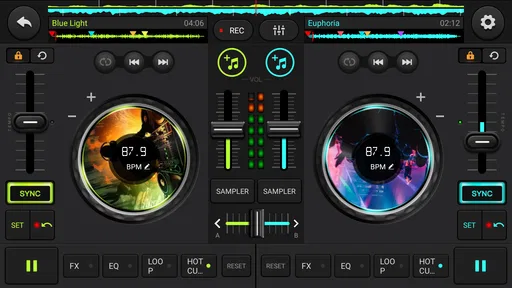
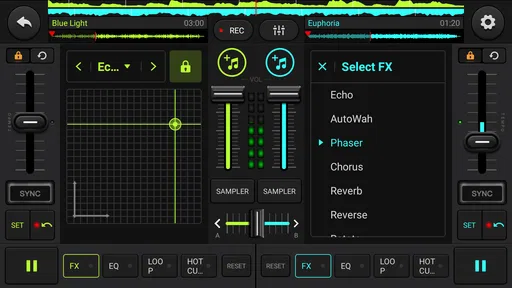
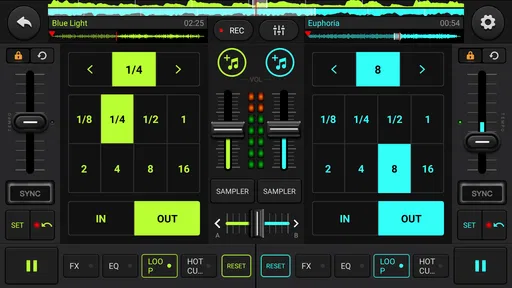
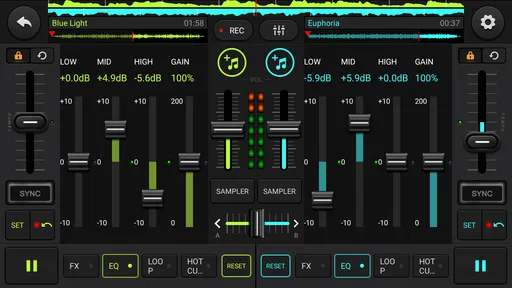
First things first, the user interface of DJ Mixer - DJ Music Remix is incredibly intuitive. I was able to navigate through the app with ease, even as a newbie. The layout is designed to mimic a real DJ setup, which is super helpful. You’ve got your dual turntables, mixer, and a playlist section all in one screen. It’s like carrying a mini DJ booth in your pocket!
That layout makes the most sense when you treat the app as a practice space rather than a shortcut to a polished live set. I’d start by choosing two tracks you already know well, then listen for a natural point to bring the second one in. Familiar songs make it easier to judge whether a transition feels smooth, and the two-deck arrangement gives you a clear place to focus your attention instead of hunting through separate screens.
A helpful first exercise is to use a pair of tracks with clearly different openings, then decide which one should lead and where the handoff ought to happen. Listen to the outgoing track for a moment that feels complete, rather than cutting over as soon as the next song is ready. This simple constraint teaches you to pay attention to phrasing and mood, even before you worry about making a technically elaborate blend.
I’d also keep early practice sessions short. Trying to mix a long sequence before you know how the controls feel can turn a fun experiment into a string of small frustrations. A couple of transitions are enough to reveal whether you enjoy making choices in real time or would rather leave playback to a regular music player. That distinction matters: the app is most rewarding when you actually want to shape the listening experience, not merely press play.
Features That Shine
One of the standout features of this app is the auto-mix function. I found this particularly useful when I just wanted to enjoy the music without worrying about transitions. But, if you’re up for a challenge, the app offers a plethora of effects like echo, flanger, and reverb to spice up your mixes.
More From Our News Desk

 Gmail
GmailGmail in a Busy Inbox: Who Benefits Most?
From first account to crowded workday, Gmail earns its place through dependable search and flexible sorting—but its best fit depends on how much inbox maintenance you can tolerate.

 Prime Video
Switching to Prime Video: What Changes in Your Viewing Routine
Prime Video can make a compelling second home for streaming, but switching means learning a different catalog, rental layer, and route from browsing to playback.

 Universal TV Remote Control
Universal TV Remote Control Works Best as a Reliable Backup
A phone remote earns its place through quick setup and reliable habits. Here is how to get more from Universal TV Remote Control—and where its limits show.

 Weather - By Xiaomi
Weather by Xiaomi Review: Clear at a Glance, Less Clear Up Close
Xiaomi’s weather app makes everyday forecasts quick to scan, but its calm surface can leave useful details and recovery paths harder to find than they should be.

 X
XX Under Pressure: Can It Recover When Posting Goes Wrong?
A resilience-focused review of X, examining setup, mistaken posts, interruptions, weak connections, and the gaps that matter when recovery needs to be dependable.

 Clash of Clans
Clash of Clans Is Won Between the Battles
Its raids are quick; its community is a long-term project of coordination, teaching, rivalry, and shared responsibility—with all the friction that entails.
Latest News



The app also supports various audio formats, so you’re not restricted to MP3s. I was able to import WAV and AAC files without a hitch. Plus, the beat sync feature ensures that your tracks are always on point, keeping the music flowing smoothly.
Auto-mix and manual control serve different moods. For background music while cooking or getting ready, I’d let auto-mix handle the flow; when I want to learn, I’d switch to hands-on transitions and add effects sparingly. Echo or reverb can make a changeover feel more deliberate, but piling effects onto every transition can muddy the result. A useful habit is to listen back to a recording and note one moment to improve, rather than trying to fix the whole mix at once.
Effects are easiest to judge when I treat them as accents, not decoration. I might try a brief echo at a transition, then leave the next changeover clean so I can hear what the effect actually contributed. If every section is heavily altered, it becomes harder to tell whether the underlying track choice and timing work. This is a small but useful practice rule for anyone learning by ear: change one thing at a time, then listen back before adding another layer.
Beat sync is helpful for keeping a transition from feeling immediately lopsided, but I would not treat it as a substitute for listening. Two tracks can line up rhythmically and still clash in energy or feel awkward when one vocal or prominent phrase overlaps another. I’d preview the point where the songs meet and use my ears to decide whether the combination makes sense. Sync can support the mechanics; the musical choice is still yours.
Compared with a conventional music player, this app is more about shaping how tracks meet than simply choosing what plays next. Compared with a full desktop DJ setup, it is easier to pick up casually, but a phone screen is a tighter workspace for detailed control. I’d choose dedicated hardware or desktop software for a planned performance that demands precise, repeatable control; this app is better suited to experimenting, informal listening, and getting comfortable with the idea of mixing.
There is also a middle ground between those alternatives. If you mainly want a hands-off queue, a standard music player is simpler and asks less attention from you. If your aim is to learn the physical habits of DJing, a controller paired with suitable software gives you tactile controls that a glass screen cannot imitate. I see this app as a useful first step or casual companion, not a replacement for either option when those are the real need.
Performance and Usability
I put the app through its paces during a small house party, and it did not disappoint. The sound quality is top-notch, and I didn’t experience any lag, which is crucial when you’re in the groove. The app is responsive and runs seamlessly, even on older devices. It’s also worth mentioning that the app doesn’t chew through your battery life, so you can keep the tunes going all night long.
For a realistic everyday use, I’d make a short mix before friends arrive, then play it while everyone settles in. Recording is useful here because it gives you a chance to check the transitions privately before sharing anything. I would still test the intended tracks and volume ahead of time rather than discovering an awkward changeover in the middle of a gathering. A phone-based mixer is convenient, but it is not a substitute for a backup playlist if the music needs to keep going without interruption.
For that kind of get-together, I’d prepare the music in the same order I expect to use it and give the recording a quick listen before guests arrive. A transition that seems fine while I’m concentrating on the screen can feel distracting when heard as part of a longer sequence. I’d also keep a separate, ready-to-play queue nearby. That is not a criticism unique to this app; it is sensible planning whenever one phone is doing both the mixing and the playing.
Another worthwhile use is a private practice session during a commute break or a quiet moment at home. I can experiment without an audience, try a different handoff, and decide whether an effect helps or simply gets in the way. The value here is not that every recording will sound finished; it is that replay makes small timing choices easier to notice. If I were preparing music for a formal event, I would still rehearse on the exact setup I planned to use.
DJ Mixer - DJ Music Remix also includes a recording feature, which I found to be a fantastic addition. You can easily record your sessions and play them back or share them with friends. It’s a great way to track your progress and see how much you’ve improved over time.
Recording also answers a common practical question: you can capture a session for later listening, which makes the app useful even when no one else is around. I’d use that playback to compare the opening, middle, and ending of a mix, rather than judging it only while performing. Keep in mind that recording a practice session and preparing a finished track for a specific release are different goals; anyone who needs detailed production tools should look for a dedicated audio workstation instead.
When I review a recording, I’d listen once for the overall flow and a second time for a single detail, such as whether the new track arrives too early. That makes feedback manageable and stops practice from becoming a vague judgment of “good” or “bad.” Sharing a mix can be a fun way to show a friend what you are trying, but anyone expecting studio-style editing should keep their expectations grounded: a recorded DJ session and a carefully produced song are different kinds of audio work.
Who It Suits, and Where It Falls Short
This is most appealing if you are curious about DJing, want a compact way to try basic mixing ideas, or simply like adding a little control to casual music listening. The Everyone age rating makes it broadly accessible, and the app is free to install. It runs on Android 6.0 and later; the current version is 1.2.6. Some optional purchases are available, ranging from $0.99 to $12.99 per item, so I’d begin with the free experience and decide whether you need anything beyond it before spending.
For a first-time user, I’d explore the free experience before considering an optional purchase. Start with the parts you know you will use—choosing tracks, trying a transition, and recording a short practice run—then judge whether the app fits your routine. That is a more reliable way to decide than buying something simply because it appears alongside the mixer. The free starting point makes casual testing easier, while the in-app purchases mean it is still sensible to check the cost of any extra before confirming it.
The app is a better fit for someone who enjoys active listening than for someone who wants a completely invisible tool. Even when auto-mix takes care of transitions, the appeal is that you can step in, experiment, and make choices about how songs connect. If what you need is a dependable background queue with no attention required, I would use a familiar player instead. If the fun is in trying a transition and hearing the result, the mixer has a clearer purpose.
There are trade-offs. The phone-sized interface is handy, but it cannot offer the physical spacing and tactile feedback of DJ decks, which matters when you want to make quick adjustments without looking down. Auto-mix is convenient, yet it does not replace learning why one transition works better than another. And although the app can be fun for a small gathering, anyone planning a demanding event or aiming for a carefully produced set may be happier with dedicated gear and software. The app has 77 written reviews alongside its larger pool of ratings, so I would treat popularity as a reason to explore it, not proof that it fits every workflow.
There is a practical comfort trade-off, too: a touchscreen can make it easy to get started, but it asks you to watch where you tap. That can pull attention away from the music, especially when you are still learning what each control does. I would practice the basic motions when the stakes are low, rather than trying to make a complicated change in front of a crowd. If hands-on confidence and quick physical adjustments are central to your goal, a controller is the more natural choice.
I would also skip this as a primary tool if the job is to produce a polished original track or run a high-pressure event with no room for mistakes. The app’s appeal is quick, accessible experimentation, and that is different from a production workspace or a performance rig built around dependable, precise control. For a curious beginner, that narrower role is a strength; for someone who already knows exactly what a professional setup must do, it may feel limiting.
Final Thoughts
So, is this app worth downloading? Absolutely! Whether you’re a beginner looking to dip your toes into the world of DJing or a seasoned pro wanting a portable solution, this app has something for everyone. It’s packed with features, easy to use, and delivers excellent performance. Plus, it’s just plain fun to use.
In the end, DJ Mixer - DJ Music Remix allows you to unleash your creativity and bring your musical ideas to life. So go ahead, give it a spin, and let the music take control!
My recommendation is clearest for beginners and casual listeners who want to learn by trying, not by reading a manual or investing in a full setup first. Use auto-mix when you want the music to keep moving, switch to manual practice when you want to understand transitions, and record a short session when you want an honest way to review your choices. Those simple habits make the app more useful than treating it as just another play button.
If you already mix regularly, think of it as a portable place to sketch an idea rather than a substitute for the controls you know. If you are simply looking for music playback, a conventional player is likely less distracting. For everyone in between—especially someone curious about what makes a transition feel satisfying—this is an easy, approachable way to find out whether mixing is something you want to pursue further.
DJ Mixer - DJ Music Remix Frequently Asked Questions
What should I know about DJ Mixer - DJ Music Remix before downloading it?
DJ Mixer - DJ Music Remix is a music and audio app for creating remixes, making music, and recording mixes on the go. It is free to download, and its age rating is Everyone. The app is developed by Nuts Mobile Inc. and has over five million installs, making it a popular option for people interested in experimenting with DJ-style mixing on a mobile device.
Does DJ Mixer - DJ Music Remix require a recent Android device?
The app supports Android 6.0 and later, so it can work on a range of Android devices, including some that are not running the newest operating system. Before downloading, check that your device meets this minimum requirement and has enough available space for the app and any content you choose to use. Compatibility can still vary between individual devices.
What features does DJ Mixer - DJ Music Remix offer to enhance my DJing experience?
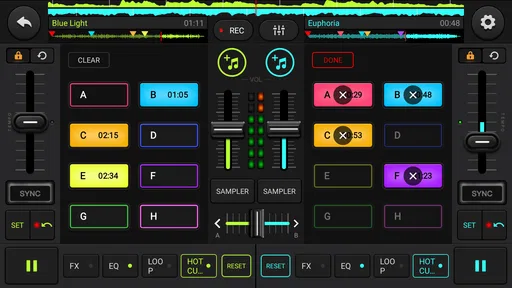
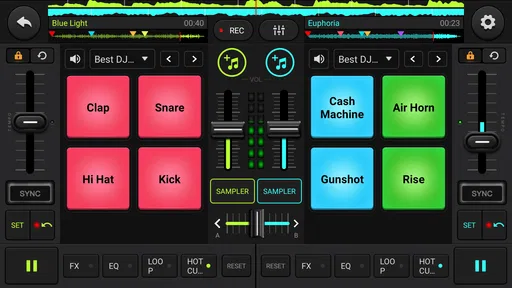
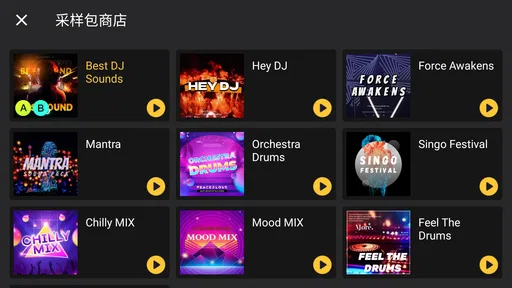
DJ Mixer - DJ Music Remix provides a wide array of features designed to enhance your DJing experience. This includes an intuitive interface with multi-touch controls, crossfading, pitch control, and looping capabilities. The app also offers a vast library of sound effects and samples to let you creatively mix and remix tracks. Additionally, it supports multiple audio formats and has seamless integration with popular music streaming services, making it easy to access and mix your favorite tunes.
Is DJ Mixer - DJ Music Remix suitable for beginners as well as professional DJs?
Yes, DJ Mixer - DJ Music Remix is designed to cater to both beginners and professional DJs. For beginners, the app offers a user-friendly interface with tutorials and easy-to-use features that help new users learn the ropes of DJing. For professionals, the app provides advanced tools and customizable options to fine-tune mixes and deliver high-quality performances. Regardless of your skill level, the app is equipped to meet your DJing needs.
Can I use DJ Mixer - DJ Music Remix offline, or do I need an internet connection?
DJ Mixer - DJ Music Remix can be used both online and offline. While an internet connection is required to access music streaming services and download additional content, the app allows you to work offline with tracks and samples stored locally on your device. This flexibility makes it convenient for DJs who perform in environments without reliable internet access.
Pros
- Intuitive interface for beginners
- Wide range of sound effects
- Supports multiple audio formats
- Real-time remixing capabilities
- Customizable DJ decks
Cons
- Limited tutorial resources
- Occasional app crashes
- Ads can be intrusive
- Limited free version features
- Requires high-performance device












