

WCYB StormTrack 5
- 2.01K
- 4.8
- Installs
- 500.00K
- Price
- Free

Screenshots
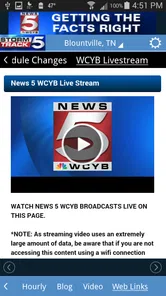
Analysis by Reviewed
I tend to judge a weather app less by how many screens it offers than by how quickly I can answer a practical question: should I leave now, bring a coat, or change plans? WCYB StormTrack 5 is built around that everyday decision-making, with radar, forecasts, and alerts gathered in one place. It is a weather app from Sinclair Broadcast Group Inc, and its local StormTrack identity makes it especially appealing to people who want a quick view of conditions around their area.
Quick checks and speed expectations
For a fast check before heading out, the useful question is whether the app gets me to the information I need without a lot of tapping. The layout feels approachable, and the mix of hourly and daily forecasts gives me a practical way to check both the next few hours and the broader shape of the day. Radar is more useful when I have a specific concern than when I just want the temperature: I can look for approaching rain and decide whether a walk or errand can wait.
I would not treat any weather app’s radar or forecast as a guarantee. Conditions can change, and a map is a planning aid rather than a promise about exactly what will happen at my street. For a quick routine check, though, having forecasts and radar together is more convenient than switching between a general forecast app and a separate map.
First Impressions and User Interface
Upon launching the WCYB StormTrack 5 app, the first thing that caught my eye was its clean and user-friendly interface. Seriously, navigating through the app is as smooth as butter. It’s got this intuitive design that even my tech-challenged grandma could get the hang of. Everything is neatly organized, making it super easy to find the information you need without any fuss.
Features That Stand Out
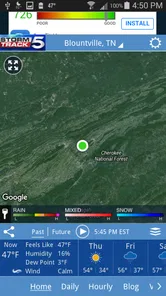
Now, let’s dig into the meat and potatoes of this app—its features. The radar feature is a personal favorite. It’s incredibly detailed, allowing you to see live weather updates as they happen. Whether it's a drizzle or a full-blown storm, you’ll be in the know. Plus, the future radar option lets you peek into the future (well, the weather future), so you can plan ahead.
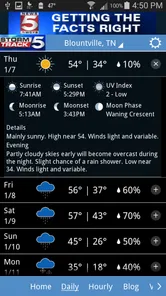
Another cool feature is the customizable alerts. You can set it up to notify you about severe weather conditions specific to your location. This is a game-changer for planning your day around unexpected weather shifts. And for those of us who love a good forecast, the app provides detailed daily and hourly forecasts that are surprisingly accurate.
Making it useful through a busy day
The most helpful way I use location-based alerts is as a backup, not as a substitute for checking the forecast. If I know I will be away from my phone or focused on work, an alert can bring a severe-weather change to my attention. I still check the radar before a time-sensitive trip, because an alert is most useful when it prompts a decision: leave earlier, postpone, or choose a safer indoor plan.
More From Our News Desk

 Gmail
GmailGmail in a Busy Inbox: Who Benefits Most?
From first account to crowded workday, Gmail earns its place through dependable search and flexible sorting—but its best fit depends on how much inbox maintenance you can tolerate.

 Prime Video
Switching to Prime Video: What Changes in Your Viewing Routine
Prime Video can make a compelling second home for streaming, but switching means learning a different catalog, rental layer, and route from browsing to playback.

 Universal TV Remote Control
Universal TV Remote Control Works Best as a Reliable Backup
A phone remote earns its place through quick setup and reliable habits. Here is how to get more from Universal TV Remote Control—and where its limits show.

 Weather - By Xiaomi
Weather by Xiaomi Review: Clear at a Glance, Less Clear Up Close
Xiaomi’s weather app makes everyday forecasts quick to scan, but its calm surface can leave useful details and recovery paths harder to find than they should be.

 X
XX Under Pressure: Can It Recover When Posting Goes Wrong?
A resilience-focused review of X, examining setup, mistaken posts, interruptions, weak connections, and the gaps that matter when recovery needs to be dependable.

 Clash of Clans
Clash of Clans Is Won Between the Battles
Its raids are quick; its community is a long-term project of coordination, teaching, rivalry, and shared responsibility—with all the friction that entails.
Latest News



For example, imagine a day that starts dry but has rain in the forecast later. I would check the hourly view before leaving, then use radar again when deciding whether to walk home or arrange a ride. That small workflow is more useful than repeatedly refreshing the same screen, and it takes advantage of the app’s different forecast tools without assuming any one view can predict every local change.
Planning around uncertainty, not just rain
A useful habit is to check the forecast at the point when it can still change your plan. Before a commute, I would compare the hourly outlook with the radar rather than treating a morning glance as a promise for the whole day. If the map suggests weather is moving toward my area, I can decide whether to carry an umbrella or shift an outdoor errand. If nothing on the radar affects my route or timing, there is little value in watching it continuously.
This distinction matters because radar is a visual tool, not a simple yes-or-no answer. A patch of rain on a map does not automatically tell me whether it will reach my street at the time I need to be outside. I use the forecast for the broad plan and the radar for a closer look when timing matters. That two-step check is more sensible than making a firm decision from a single image.
Performance and Reliability
In terms of performance, this app runs like a dream. I’ve experienced zero lag, and the updates are frequent enough to keep the data fresh without being overwhelming. It’s like having a personal meteorologist in your pocket, minus the small talk.
I also appreciate that the app doesn’t bombard you with ads, which is a rare find in free apps these days. It keeps the experience seamless and enjoyable from start to finish.
Reliability in everyday use
For me, reliability is not only about whether a screen opens quickly. It is also about using the right information for the decision at hand and having a backup plan when weather is important. A forecast can help me prepare, while an alert can catch my attention when I am not actively checking. Neither should be treated as a substitute for judgement, especially when a trip or outdoor activity depends on exact timing.
If I were preparing for a long drive, I would use this app to check local conditions and radar near the area I am leaving, then reassess as the trip gets closer. For a route through several regions, a national service or another broad-coverage forecast may be a better companion. That is not a weakness unique to this app; it is a practical limit of choosing a locally focused tool for a journey that spans a wider area.
How it compares, and where it may not fit
Compared with a phone’s built-in weather view, this app puts more emphasis on radar and severe-weather alerts, which can be valuable when changing conditions matter more than a simple temperature check. A broad national weather service may suit someone who regularly tracks several regions or wants one consistent view while travelling. I see WCYB StormTrack 5 as a more focused choice for people who mainly want to follow weather near their usual location and make everyday plans around it.
There is a trade-off to that focus: anyone who wants a single app primarily for international travel or detailed comparisons across many distant places may prefer a more general-purpose alternative. And while alerts can be useful, I would keep notification settings deliberate; too many prompts can become background noise. Pick the severe-weather notices that would genuinely change what you do, rather than expecting every alert to replace your own check of current conditions.
Getting more value from alerts and radar
To make alerts useful rather than distracting, I would start by asking which notification would actually change my next step. A severe-weather warning matters if I might be outdoors, driving, or responsible for someone else’s plans. If I am unlikely to act on a particular prompt, it may not deserve space in my notification stream. The ability to customize alerts makes that choice worth taking seriously instead of accepting every option by default.
I would also avoid using radar as a reason to keep checking the phone every few minutes. A better routine is to check once while planning, then return when the weather could affect a specific decision. This is especially helpful on a busy day: the hourly forecast can set expectations, and a later radar look can tell me whether it is time to adapt. The app’s tools work best as a small planning routine, not as a constant live feed.
Device fit and practical expectations
The app is free and rated for Everyone, so it is easy to consider for a household device as well as a personal phone. Its current version is 5.17.706, and it supports Android from version 9. I would check that requirement before installing it on an older device. As with any radar-focused weather app, a clear display is more comfortable for examining map details than a cramped screen, while a quick forecast check remains straightforward on a phone.
For performance, I would distinguish between the interface feeling responsive and weather information being current: those are related but not identical. A map may take more attention and data to interpret than a simple forecast card, so I use it when it answers a real question rather than leaving it open unnecessarily. If the app ever feels slow on a particular device, restarting it and reopening the forecast is a sensible first step; I would not assume that a delayed map means the forecast itself is wrong.
Who will appreciate the local focus
This is a natural fit for someone who checks local weather several times a week, wants radar within reach, and would value severe-weather notifications. It can also make sense for a household where one person keeps an eye on conditions before school, work, or outdoor plans. Because forecasts and radar sit together, there is less need to jump between a basic forecast screen and a separate map just to make a routine decision.
I would be less enthusiastic about recommending it to someone who rarely looks beyond the day’s temperature, or who needs one tool for frequent international travel and many saved destinations. A built-in weather app may be simpler for occasional checks, while a broader service may be more convenient for tracking multiple places. The better choice depends on how often radar and local alerts affect what you do, not simply on how many features an app offers.
Final Thoughts
So, what’s the verdict on the WCYB StormTrack 5 app? Honestly, it’s a solid choice for anyone who wants reliable weather information at their fingertips. It’s user-friendly, packed with useful features, and performs consistently well. Whether you're planning a weekend getaway or just trying to decide if you need a raincoat before heading out, this app has got you covered.
In conclusion, if you’re on the hunt for a trusty weather app that won’t let you down, give WCYB StormTrack 5 a whirl. It’s free to download, so you’ve got nothing to lose—except maybe the element of surprise when it comes to the weather!
Who I would recommend it to
The app has an average rating of 4.8 from around seven thousand ratings, with roughly two thousand written reviews and over five hundred thousand installs. Those figures suggest that many people have tried it, but I would still choose based on fit: it makes the most sense for someone who checks local conditions often, values a radar view, and wants severe-weather alerts available alongside everyday forecasts. If you only need a glance at the day’s high and low, the built-in weather app may be enough.
Its release goes back to October 3, 2013, so this is an established app rather than a new experiment. That history may reassure someone looking for a familiar local-weather tool, but it is not a reason to expect every screen to suit every device or preference. I would install it when radar and alerts are part of my routine, then keep another source handy for decisions where broader coverage or a second forecast perspective matters.
A sensible performance verdict
My overall performance judgement is that the app is most convincing when used for brief, purposeful checks: open the forecast, compare the hours, and consult radar when a route or outdoor plan is at stake. The original experience feels responsive to me, but I would not turn that personal impression into a promise that every phone or connection will behave identically. Weather maps and changing conditions are naturally more demanding to interpret than a single temperature reading.
On a device that meets the Android requirement, I would give it a try if local radar and alerts solve a real problem in your routine. Keep the notifications selective, use the forecast and map for different jobs, and have a wider-coverage source available for trips far beyond your usual area. With those expectations, WCYB StormTrack 5 is a practical weather companion rather than an all-purpose answer to every forecast question.
WCYB StormTrack 5 Frequently Asked Questions
Who develops WCYB StormTrack 5, and what type of app is it?
WCYB StormTrack 5 is a weather app developed by Sinclair Broadcast Group Inc. It is designed for people who want weather information in an app connected to the WCYB StormTrack 5 name. Its focus is weather rather than general news or entertainment, making it a practical option to consider if you are looking for a dedicated weather app.
What is WCYB StormTrack 5 and what are its main features?
WCYB StormTrack 5 is a comprehensive weather app designed to provide real-time weather updates and forecasts. Its main features include interactive radar maps, severe weather alerts, and detailed daily and hourly forecasts. Users can customize notifications to stay informed about weather changes, ensuring they are always prepared for any weather conditions.
Is WCYB StormTrack 5 available for both Android and iOS devices?
Yes, WCYB StormTrack 5 is available for download on both Android and iOS platforms. Users can find it on the Google Play Store for Android devices and the Apple App Store for iOS devices. This ensures a wide range of users can access its features regardless of their device preference.
Does WCYB StormTrack 5 offer real-time weather alerts?
Absolutely, WCYB StormTrack 5 provides real-time weather alerts to keep users informed about severe weather conditions. These alerts are customizable, allowing users to set notifications for specific weather events such as thunderstorms, tornadoes, or heavy rainfall. This feature ensures users receive timely updates to make informed decisions.
Can I customize the weather notifications in WCYB StormTrack 5?
Yes, WCYB StormTrack 5 offers customization options for weather notifications. Users can tailor alerts to their specific needs, choosing which types of weather events they want to be notified about. This level of customization ensures that users receive relevant information without being overwhelmed by unnecessary alerts.
Pros
- Accurate weather forecasts.
- User-friendly interface.
- Real-time storm alerts.
- Detailed radar maps.
- Customizable notifications.
Cons
- Ads can be intrusive.
- Limited free features.
- App can be slow at times.
- Occasional crashes reported.
- Requires constant internet.












