

News 4 Reno
- 50.00
- 4.0
- Installs
- 10.00K
- Price
- Free

Screenshots
Analysis by Reviewed
When I want a quick sense of what is happening around Reno, I do not always need a broad national news service. Sometimes I need a local update, a weather check, or a sports headline before leaving home. That is the situation where News 4 Reno makes the most sense. It is a free news and magazines app built around the News 4 Reno identity, with local information gathered in one place instead of making me jump between unrelated sources.
I reviewed it as an everyday mobile tool rather than as a complete replacement for every news app. Its focus is narrow, and that is its main appeal. The app is from Sinclair Broadcast Group Inc and carries an Everyone age rating, so it is aimed at a general audience. The current version is 10.32.2, and it supports devices running Android 7.0 or newer. Those details matter if you are using an older phone, although most recent Android users should find the compatibility requirement fairly ordinary.
The store gives it a 4.0 average from around 163 ratings, with over 10K installs. That suggests a modest but established local audience rather than the scale of a national news platform. I would choose it for convenience and regional relevance, not because it tries to compete with every newspaper, broadcaster, weather service, and sports app at once.
From a local question to a useful answer
I find the value of a local news app easiest to judge by the question it helps me answer, not by how long it keeps me reading. This section considers how News 4 Reno can turn a quick check into a practical next step, while keeping its regional focus in view. It also sets up the important question of how that focused approach holds up when I use it during a busier day.
Starting with a specific Reno need
My most useful way to approach News 4 Reno is to begin with a clear question. Is there important local news this morning? What is the weather likely to do before I drive across town? Did a local sports result change the conversation today? The app is strongest when the answer needs to be local and immediate, rather than deeply researched or international.
That distinction prevents disappointment. If I open it expecting a huge archive of national reporting, financial coverage, opinion columns, and specialist sections, I am asking it to do a job outside its natural purpose. If I open it because I want a practical Reno update in a few minutes, the focused approach feels much more sensible.
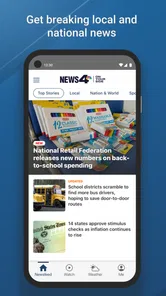
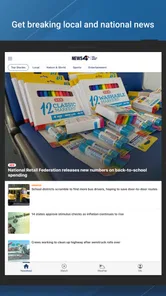
The first useful habit is to treat the home screen as a starting point, not the entire experience. I scan the lead items, then move toward the part that matches my reason for opening the app. This avoids a common problem with news apps: reading whatever happens to be placed first and forgetting the original question. With a local app, the value comes from turning a broad feed into a quick decision.
More From Our News Desk

 Gmail
GmailGmail in a Busy Inbox: Who Benefits Most?
From first account to crowded workday, Gmail earns its place through dependable search and flexible sorting—but its best fit depends on how much inbox maintenance you can tolerate.

 Prime Video
Switching to Prime Video: What Changes in Your Viewing Routine
Prime Video can make a compelling second home for streaming, but switching means learning a different catalog, rental layer, and route from browsing to playback.

 Universal TV Remote Control
Universal TV Remote Control Works Best as a Reliable Backup
A phone remote earns its place through quick setup and reliable habits. Here is how to get more from Universal TV Remote Control—and where its limits show.

 Weather - By Xiaomi
Weather by Xiaomi Review: Clear at a Glance, Less Clear Up Close
Xiaomi’s weather app makes everyday forecasts quick to scan, but its calm surface can leave useful details and recovery paths harder to find than they should be.

 X
XX Under Pressure: Can It Recover When Posting Goes Wrong?
A resilience-focused review of X, examining setup, mistaken posts, interruptions, weak connections, and the gaps that matter when recovery needs to be dependable.

 Clash of Clans
Clash of Clans Is Won Between the Battles
Its raids are quick; its community is a long-term project of coordination, teaching, rivalry, and shared responsibility—with all the friction that entails.
Latest News



For example, before heading out for work, I might check the latest local headlines and then look at weather information. The outcome I want is not a long reading session. I want to know whether my route, clothing, timing, or plans need adjusting. That makes the app useful even when I spend only a short time inside it.
The step-by-step flow I found most practical
I would use the app in four passes. First, I open it and scan the main news presentation for anything that could affect my day. I look for stories tied to the Reno area rather than automatically opening the most dramatic headline. Local news can be useful precisely because it changes ordinary decisions: travel, errands, school routines, weekend plans, or whether I should follow a developing situation more closely.
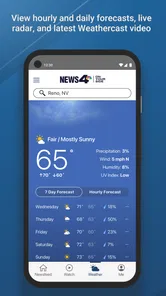
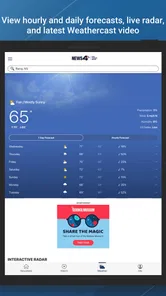
Second, I move to weather when conditions are part of the decision. The weather component is more useful alongside the news feed than in isolation. A forecast by itself tells me what may happen, while a local news update can add context about conditions affecting the area. I still would not use a news app as my only tool for safety-critical weather decisions, but it is convenient for an everyday check.
Third, I look at sports when I want a local angle rather than a general scoreboard. This is a small but important difference. A large sports app is better for following many leagues, teams, standings, and live events. News 4 Reno is more appropriate when I want the local sports conversation included with the rest of the region’s news.
Finally, I decide whether an item deserves a deeper read or whether the headline has answered my immediate question. This workflow keeps the app from becoming a distraction. I am not opening it to scroll endlessly; I am using it to move from a local information need to an action or a decision.
The best practical tip is to open News 4 Reno with a purpose and leave once that purpose is satisfied. That sounds simple, but it changes how useful a compact local app feels. It also makes the experience easier to compare with a general news reader, where the volume of unrelated stories can bury the information I actually wanted.
How the handoffs work in real life
A local news app rarely completes the entire journey by itself. The handoff usually goes from a headline to a more detailed story, then from that story to something I do outside the app. I may read a report, check the weather, and then use a separate navigation or communication tool to change my route or tell someone I will be late. News 4 Reno fits naturally into that chain as the information-gathering step.
That is also where I see its limits. The app can help me notice what deserves attention, but it is not the final authority for every decision. For urgent weather concerns, official emergency information should take priority. For detailed sports tracking, a dedicated sports service will usually offer more depth. For a broad national briefing, a major general-news app will probably be more efficient.
The handoff is still valuable because local relevance is often the hardest part to get from a general service. A national app may tell me that a major event is happening somewhere, while this app is more likely to put Reno-area information in front of me without requiring a very specific search. That saves time at the beginning of the workflow.
I also find the local focus useful when sharing information with family or coworkers. A regional headline has an obvious context: people nearby may care about it for the same practical reason. I can use the app to understand the basic situation before deciding whether a longer conversation or another source is necessary.
What the result looks like after a short session
The result is a compact local briefing covering the three areas promised by its identity: news, weather, and sports. I would describe it as a convenient front door to Reno-oriented information. It is not trying to be my entire media diet, and I do not think it should be judged by the same standard as a large national publication.
For a morning routine, that can be enough. I can check local headlines, see whether the weather changes my plans, and catch sports information without opening three separate services. The benefit is not necessarily more detail; it is reduced friction between opening the phone and finding something relevant.
Another useful outcome is better local awareness without committing to a long reading session. Someone who does not regularly follow regional coverage may find the focused format easier to maintain than a broad news subscription or a crowded feed. I would especially recommend trying it if your news habit begins with “what is happening near me?” rather than “what happened everywhere overnight?”
The app is free, which removes the most obvious barrier to testing it. I can install it, see whether its local coverage fits my routine, and decide from actual use instead of committing money first. That matters for a regional app because usefulness depends heavily on where I live, work, study, or travel.
Its Everyone rating also makes it a straightforward option for a household that wants a general local news source. I would still use personal judgment with any news content, especially when sharing stories with younger readers, but the app is positioned for broad everyday use rather than a narrowly adult audience.
Where the flow breaks down
The first weak point is depth. A quick local feed is convenient, but a headline-first experience may not satisfy me when I need extensive background, multiple viewpoints, searchable archives, or specialist reporting. In those situations, I would move to a newspaper, official agency source, or a dedicated publication rather than expecting this app to carry the whole investigation.
The second weak point is breadth outside Reno-focused interests. If my main routine involves international news, business markets, technology, entertainment, or a wide range of national stories, this app will feel incomplete. Its regional focus is a strength only when regional information is what I need. A general news reader is the better choice for someone who wants one app to cover many subjects and locations.
The third issue is that the three-part promise can create different expectations. News, weather, and sports are related in a local briefing, but they are not equally deep as specialized services. I would use the weather information for planning an ordinary day, while relying on official alerts for serious conditions. I would read the sports section for local awareness, while using a specialist app for detailed schedules, statistics, or broad league coverage.
There is also a practical risk in relying on a single local source. Even when an app is convenient, important stories deserve verification through official statements or another reputable outlet. That is not a criticism unique to News 4 Reno; it is simply good news-reading practice. The app works best as the first step in a local information workflow, not as permission to stop checking when the stakes are high.
Who should use it, and who should skip it
I think News 4 Reno is a good fit for Reno residents, people working in the area, and visitors who want a local briefing during their stay. It is also useful for anyone whose news routine begins with practical questions: what changed locally, how might the weather affect the day, and what sports information is worth knowing nearby?
I would be more cautious recommending it to readers who want long-form journalism, a large national news mix, or a single universal dashboard. Those users may be happier with a broad news aggregator or a publication with stronger depth in their preferred subject. The same applies to someone who mainly wants severe-weather monitoring or comprehensive sports data; dedicated tools are more suitable for those jobs.
The app is also less compelling if I already have a reliable local-news routine that gives me the same information with less effort. Installing another app only helps when it improves the path from question to answer. Its free price makes experimentation easy, but free does not automatically mean necessary.
Compatibility and everyday setup considerations
Because the app requires Android 7.0 or newer, I would check the operating system before planning around it on an older device. On a compatible phone, the more important setup question is behavioral: will I use it as a brief local check or allow it to compete with every other notification and feed on the device?
My advice is to begin with a small routine. Open it once in the morning for local headlines and weather, then return only when there is a specific reason. This gives me a clearer sense of its value than leaving it open and judging it by how much content appears. It also keeps the app connected to an outcome, such as changing a commute plan or following a local story.
I would avoid treating the install count or rating as a substitute for personal fit. Around 10K installs and a 4.0 average show that it has found an audience, but local news usefulness is naturally personal. A Reno-area reader may find it immediately relevant, while someone far away may have little reason to keep it.
My final assessment after following the full workflow
News 4 Reno succeeds when I start with a local information need and want a fast path to news, weather, and sports in one place. The strongest part is the handoff from a regional headline to a real-world decision: leave now, adjust plans, keep watching a story, or decide that nothing requires action. That is a modest role, but it is a useful one.
I would recommend it to a friend who wants a free Reno-centered briefing and understands that local convenience is more important than comprehensive coverage. I would not recommend relying on it alone for emergency decisions, detailed sports following, or a complete national news habit. In those cases, another service should take over the parts this app does not specialize in.
My honest conclusion is that it works best as a focused local companion. News 4 Reno does not need to replace every app on my phone to be worthwhile; it only needs to make the first few minutes of staying informed more relevant. If that is the gap in your current routine, this is a sensible app to try.
News 4 Reno Frequently Asked Questions
Who publishes News 4 Reno, and is it a local news app?
News 4 Reno is published by Sinclair Broadcast Group Inc and is a local news app focused on the Reno, Sparks, and Northern Nevada area. It gives users access to current headlines, breaking news updates, weather information, traffic reports, sports coverage, and other regional stories. The app is designed for readers who want a convenient way to follow important developments without relying only on a traditional web browser or television broadcast.
What is News 4 Reno?
News 4 Reno is a local news app focused on the Reno, Sparks, and Northern Nevada area. It gives users access to current headlines, breaking news updates, weather information, traffic reports, sports coverage, and other regional stories. The app is designed for readers who want a convenient way to follow important developments without relying only on a traditional web browser or television broadcast.
What type of news and information can I find in the app?
The app typically covers a broad selection of local and regional topics, including breaking news, crime and public safety, weather alerts, road and traffic conditions, politics, community events, health, business, sports, and human-interest stories. Available sections and content may change throughout the day as new reports are published, so users should check the app regularly for updates and developing stories.
Does News 4 Reno provide breaking news notifications?
Yes, News 4 Reno may send push notifications for breaking stories, severe weather, traffic problems, and other important local updates. Notifications can be useful when you need information quickly, particularly during emergencies or rapidly changing situations. However, the number and type of alerts depend on your device settings and the app’s notification controls, which can usually be adjusted if you prefer fewer interruptions.
Is News 4 Reno free to download and use?
News 4 Reno is free to download, allowing users to browse news stories, videos, weather information, and other selected features without an initial purchase. Some content, services, advertising, or optional features may vary depending on the platform and publisher policies. Before downloading, review the current store listing for any subscriptions, in-app purchases, or access limitations.
Pros
- Covers local Reno and Northern Nevada stories in one place.
- Push alerts help users stay updated on breaking news.
- Includes weather updates useful for daily planning.
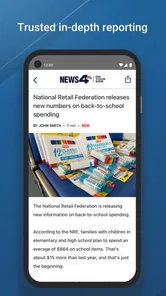
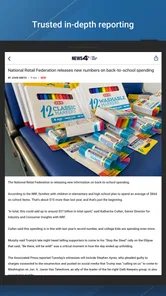
- Simple layout makes articles easy to browse and read.
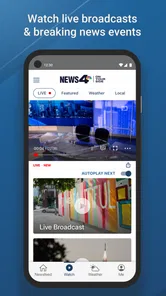
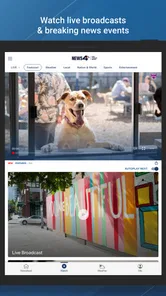
- Video content adds context beyond written reports.
Cons
- Some stories may be limited to the Reno area.
- Breaking-news alerts can feel frequent for some users.
- Content availability may vary outside broadcast hours.
- The app may require a stable connection for video playback.
- Advertising can interrupt browsing and article reading.












