Walkie Talkie - All Talk
- 977.00
- 3.7
- Installs
- 10.00M
- Price
- Free

Screenshots




Analysis by Reviewed
I like the basic idea behind Walkie Talkie - All Talk: instead of composing a message or starting a conventional call, you can speak to friends in a walkie-talkie style. That can make quick coordination feel more immediate, especially when everyone in a group is already using the same app. It is a social app from Picslo Corp., and its appeal is practical more than flashy: get a voice message across without turning every exchange into a full phone conversation.
A quick way to coordinate in the moment
The format is easiest to appreciate when your hands or attention are already occupied. Picture friends trying to meet at a crowded outdoor event: one person is approaching an entrance while another has found a place to wait. A brief spoken update can be more convenient than stopping to type, and it avoids the formality of starting a call for a sentence or two. The benefit is less about replacing every conversation and more about making small, time-sensitive exchanges feel lightweight.
I would agree on a few simple habits with a group before using it regularly. Keep updates short, say who you are speaking to, and pause to let others respond. In a shared voice space, long monologues can make it harder for everyone to follow the useful details. If a plan includes an address, a time, or another detail people may need to check later, send that in text as well rather than expecting everyone to remember a spoken message.
That combination can be especially useful for a family managing errands or friends splitting up during a day out. One person can give a quick status update while the rest continue what they are doing, then the group can use ordinary messages for information that needs to remain visible. It is a small workflow change, but it helps avoid asking a voice tool to do the job of a written record.
What the free access means
The app is free to download, so trying its core walkie-talkie approach does not require an upfront purchase. It also offers in-app purchases, with items listed from $0.99 to $79.99 each. Those are the confirmed cost details I would use when deciding whether to install it; the range alone does not tell me which purchase suits a particular person, so I would check the in-app options before spending.
That distinction matters if you are comparing it with ordinary calls or messaging. The free entry point makes experimenting easy, while the purchase range means I would not assume every option is necessary—or that paying automatically improves the experience I need. I would start with the free use and only consider a purchase if I understood what it adds and expected to use it regularly.
For a fair value check, I would first ask whether the people I want to reach will actually use the same app. A free download has little practical value if the group defaults to another service, while a paid option is hard to justify before I know it solves a real problem for us. I would try a low-stakes routine first—such as coordinating a weekend meetup—and judge the experience by whether it saves effort compared with the group’s normal messages and calls.
You May Like

Clash of Clans Is Won Between the Battles

Android Auto Makes the Case for Quieter Car Software

MobiOffice: Transforming Mobile Productivity with Seamless Integration

EA SPORTS FC™ Mobile Soccer: Redefining Mobile Sports Gaming

How Microsoft OneDrive Became a Mobile Productivity Giant

How Google Translate Breaks Language Barriers Effortlessly
Where push-to-talk can be useful
In everyday use, the format makes most sense when a short spoken update is more convenient than typing. Imagine friends arriving at different entrances to a busy outdoor gathering: a quick voice exchange can help them coordinate without repeatedly calling one another. It also suits a household or hobby group that wants casual, shared communication, provided everyone is comfortable joining the same space and keeping the app handy.
For a group, I would agree on a simple habit before relying on voice chat: keep messages brief, say who you are addressing, and avoid speaking over someone else. That is not a special setting; it is a practical way to make live group audio easier to follow. If people cannot listen at the same time or need a searchable written record, text messages may be the better tool.
When a voice burst beats a call—and when it does not
A normal phone call is better for a private, sustained conversation, and text is easier when a reply can wait or needs to be reread. Push-to-talk sits between those habits: it favors quick spoken bursts and can feel more natural when several friends are coordinating. That convenience depends on the group adopting it, though. If the people you need to reach are not on the app, your usual messaging service remains the more useful choice.
There is also a practical difference between spoken coordination and a conversation that needs everyone’s full attention. A call gives two people a clearer back-and-forth, while a group voice exchange is useful when updates are brief and participants can listen as they go. For sensitive topics, complicated decisions, or anything that could be misunderstood without context, I would choose a direct call or a carefully written message instead.
I would also avoid treating any voice-chat app as a guaranteed emergency channel. Its usefulness depends on having a working connection and on the intended listeners being available; for urgent or sensitive matters, a direct call or another dependable contact method is a safer choice. That is a sensible limitation of relying on app-based communication, not a reason to dismiss it for casual coordination.
Who is likely to get the most from it
Walkie-talkie voice chat is most appealing to friends, families, or small teams who already share a reason to talk in short bursts. The app is rated Teen, so I would keep that age guidance in mind when deciding whether it is suitable for a younger user. It has an average rating of 3.7 from around 56,000 ratings, with about 977 written reviews, and more than 10 million installs. Those figures suggest a sizeable audience, but they do not tell me whether a particular group will find it convenient.
The strongest fit is a group with a recurring reason to coordinate, not someone who mostly wants one-to-one chat. For instance, a hobby group meeting at a large venue might benefit from quick location updates, while a person who mainly shares links, photos, or long explanations will probably be better served by a conventional messaging app. I would also skip it if the group is unwilling to keep another communication app in its routine; adoption is the difference between a useful shared tool and an unused download.
For anyone checking compatibility, the current version is 4.9.1 and the stated minimum Android requirement is 7.0. The app was released on October 15, 2019. I would still check the relevant app store on my device before installing, since compatibility is only one part of whether it will fit a group’s routine.
Setting up a group routine that stays clear
Before using voice chat for a busy day, I would decide which group is for which purpose and keep the conversation focused. If everyone is trying to use the same channel for unrelated plans, useful updates can get buried in the flow of speech. A simple convention—one space for a particular outing, for example—makes it easier for people to know where to listen and reduces the chance of interrupting a conversation they do not need.
It is also worth agreeing on what should not be sent by voice. A changing location or a quick “we are here” update suits spoken coordination; a confirmation number, exact address, or list of items is easier to verify in writing. That is not a limitation unique to this app, but it is a useful way to get the best of both formats without relying on memory.
One question people often have is whether this can replace their usual messaging app. I would not treat it as a full replacement. Its appeal is the immediacy of short voice exchanges, whereas text remains more practical for asynchronous replies, searchable details, and people who cannot listen at that moment. I would keep the familiar option available and use this when voice is genuinely faster.
Getting Started with Walkie Talkie - All Talk
First things first, downloading and setting up Walkie Talkie - All Talk is a breeze. Available on both Android and iOS, you can find it in your respective app store. Once downloaded, the installation process is straightforward, and you'll be up and running in no time without any hiccups.
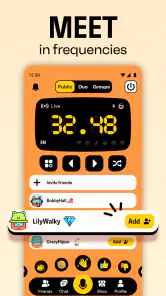
The interface is clean and intuitive. You won't be bombarded with unnecessary features or complex settings, which is a breath of fresh air. As soon as you launch the app, you're greeted with a simple push-to-talk button, reminiscent of the good old days of walkie-talkies.
Features that Stand Out
One of the most impressive features of the app is its range. You can communicate over long distances, which is fantastic for outdoor activities or when you're in different parts of a large building. The app uses Wi-Fi or mobile data to connect, ensuring you have a reliable connection as long as you're within network coverage.
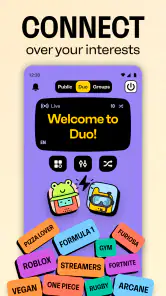
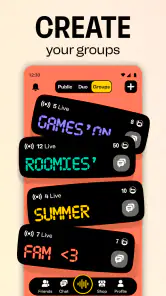
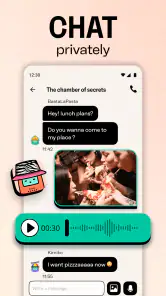
Another cool feature is the ability to create group channels. Whether you're planning a hiking trip or need to coordinate with a team, you can easily set up a group channel for seamless communication. Plus, the app supports voice messages, so if someone misses the live talk, they can catch up later.
Those options suit different rhythms of use: a live exchange is handy when several people are actively coordinating, while a recorded voice message can help when one person is busy and will listen later. I would not assume that every member of a group prefers audio, though. If someone is in a quiet place, cannot play sound, or simply wants to scan information quickly, a text alternative remains important.
Performance and Usability
In terms of performance, the app is incredibly responsive. The audio quality is clear, and there's minimal lag, which is crucial for real-time communication. I've had no issues with connectivity, and the app hasn't crashed or frozen during my use. It's clear that the developers have focused on delivering a smooth and reliable user experience.
What I love most is how user-friendly it is. You don't need to be tech-savvy to navigate the app, which makes it accessible to a wide range of users. Whether you're a kid looking to have fun or an adult needing a practical communication tool, this app has got you covered.
Even with a straightforward interface, I would test the basic routine with the group before relying on it for a day when timing matters. Have everyone join, exchange a short message, and confirm that the people who need to hear it are able to do so. This avoids the common group-tool problem of assuming that an installed app automatically means everyone is connected and paying attention.
Choosing it over familiar alternatives
Compared with standard messaging, the clearest advantage is that speaking can be quicker than typing when a person is moving or coordinating several people at once. Compared with a regular call, it can feel less demanding for brief updates because there is no need to turn each small exchange into a sustained conversation. But messaging apps already combine text and calls for many groups, so adding a separate tool only makes sense when the push-to-talk habit is genuinely more convenient.
That is why I would judge it by the group’s behavior rather than by the novelty of the walkie-talkie idea. If everyone remembers to listen and uses concise updates, it can reduce friction during a shared activity. If people miss audio, prefer typing, or rarely need immediate coordination, the familiar group chat is likely to be simpler and easier to maintain.
Final Thoughts
Overall, Walkie Talkie - All Talk is a fantastic app for anyone looking to turn their smartphone into a walkie-talkie. It's simple, efficient, and packed with features that make communication easy and fun. Whether you're using it for leisure or work, it's a reliable tool that won't disappoint. So go ahead, give it a try, and enjoy the nostalgia of walkie-talkie communication right from your phone!
My recommendation is more specific than that closing enthusiasm suggests: I would try it if my friends or family already had a recurring use for short, shared voice updates, and I would stick with the free access until I knew what, if anything, a purchase would add. I would skip it as a replacement for private calls, written planning, or a group that does not want another app. Its value comes from a clear routine and willing listeners; without those, ordinary messaging is the better fit.
Walkie Talkie - All Talk Frequently Asked Questions
How much space and connectivity should I allow for Walkie Talkie - All Talk?
Walkie Talkie - All Talk is an online social communication app, so a working internet connection is needed when you want to use its voice chat, groups, or messaging. If you plan to talk while away from Wi-Fi, mobile data may be used. Make sure you have enough available space for an app installation and consider your data connection when using voice features.
Can I communicate with friends who use a different phone platform?
The app is available on Android and iOS, which makes it possible for friends on different mobile platforms to consider using it together. Its focus is push-to-talk voice chat with friends, alongside groups and messaging. Each person should install the app on a compatible device and have an internet connection before trying to communicate.
What devices and operating systems can run Walkie Talkie - All Talk?
Walkie Talkie - All Talk is available for Android and iOS, so friends using different mobile platforms may be able to use the app together. On Android, it requires version 7.0 or later. Before downloading, check that your device meets the relevant operating-system requirements and has a working internet connection for online communication.
Is Walkie Talkie - All Talk suitable for teenagers?
The app has a Teen content rating, which can help families decide whether it is appropriate for younger users. Since it is a social communication app with voice chat, groups, and messaging, parents may want to discuss safe online behavior and who their teenager communicates with. Encourage them to avoid sharing personal details with people they do not know.
What is Walkie Talkie - All Talk?
Walkie Talkie - All Talk is a mobile application designed to provide users with an easy and efficient way to communicate instantly with friends and family. It mimics the traditional walkie-talkie experience, allowing users to send voice messages in real-time over Wi-Fi or cellular data. The app is available on both Android and iOS platforms, making it accessible to a wide audience.
Pros
- Easy to use interface.
- Real-time communication.
- No account needed to start.
- Supports global connections.
- Low battery consumption.
Cons
- Limited to voice messages.
- Requires internet connection.
- Ads can be intrusive.
- No video call option.
- Privacy concerns due to data sharing.

- Category
- Social
- Version
- 4.9.1