Video to MP3 - Video to Audio
- 9.12K
- 4.8
- Installs
- 50.00M
- Price
- Free

Screenshots
Analysis by Reviewed
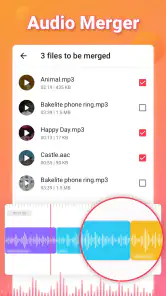
I find Video to MP3 - Video to Audio most useful when a clip is easier to keep as sound than as a video. In a shared household, that might mean turning a locally saved talk into something one person can listen to while another uses the screen, or keeping audio from a family recording handy without repeatedly opening the full clip. The app is focused on that one job: it is a free audio and video editor from InShot Inc., and its appeal is the direct route from a video file to an audio file.
A practical fit for shared devices
For an everyday example, imagine someone has recorded a spoken reminder or a short presentation and wants to listen while cooking, commuting, or tidying up. Extracting the sound can be more convenient than replaying the video, and it avoids tying up the phone display. I would use this for content I already have on the device and have a legitimate reason to convert, rather than expecting it to retrieve audio from streaming services or replace a music library.
That distinction matters in a household: a converted file is a separate item that may be easier to find and play later, but it can also be easy to confuse with someone else’s audio. I’d give exported files clear names and agree on a shared folder or location before several people start saving their own conversions. That small bit of coordination prevents a useful tool from turning into a pile of mystery tracks.
When a shared device changes the workflow
On a family tablet or a phone passed between people, I would treat conversion as a small handoff rather than a fully shared process. The person who knows the source clip should identify it, choose what needs extracting, and tell the next listener where the resulting audio was saved. That avoids a common little mix-up: someone opens a converted file expecting a song, when it is actually a school explanation, voice note, or recording meant for another member of the household.
A useful habit is to include the subject and speaker in the filename instead of relying on a generic label such as “audio” or “new file.” If the recording is temporary, I’d also decide whether the audio copy should stay after it has served its purpose. Keeping both versions can be sensible when the video contains visual context, but deleting neither by default can leave a shared device cluttered with duplicate material.
Keep expectations and boundaries clear
There is no need to treat the app as a family organizer. I would check which video is being converted, choose a sensible output name, and make sure the resulting audio is saved somewhere the intended listener can access. On a device used by several people, that simple handoff is more dependable than assuming one person’s files and preferences will suit everyone.
The app is free to install, with optional in-app purchases listed from $3.99 to $19.99 per item. Its 4.8 average across around 684,000 ratings and more than 50 million installs suggest broad use, though popularity alone does not tell me whether every workflow will suit you. The age rating is Everyone, but I’d still make the usual household choice about which media children can access and convert; an age label is not a substitute for adult guidance around the source material.
More From Our News Desk

Weather by Xiaomi Review: Clear at a Glance, Less Clear Up Close

X Under Pressure: Can It Recover When Posting Goes Wrong?

Clash of Clans Is Won Between the Battles

Android Auto Makes the Case for Quieter Car Software

MobiOffice: Transforming Mobile Productivity with Seamless Integration

EA SPORTS FC™ Mobile Soccer: Redefining Mobile Sports Gaming
Who should handle the conversion?
For a shared device, I would let the person who understands the source file make the conversion, especially if the clip is personal or contains a conversation. The app’s simple purpose does not remove the need to consider whether everyone in the recording is comfortable with an audio copy being made or shared. A converted track can be easier to replay and pass around than the original video, so I’d be thoughtful about where it goes and who can reach it.
That also helps with practical troubleshooting. If the exported file sounds wrong, the person who selected the original can check whether the intended clip was used, rather than asking another household member to guess what happened. For children, I’d keep the choice of source material and any sharing decisions with an adult; the Everyone rating describes the app’s age context, not every video someone might choose to process.
The Magic of Conversion
Alright, so let’s dive into what makes Video to MP3 - Video to Audio so special. The app is designed to convert video files into audio formats, primarily MP3. It’s super simple to use – even if you're not the most tech-savvy person around, you’ll feel right at home navigating through its user-friendly interface.
Features That Stand Out
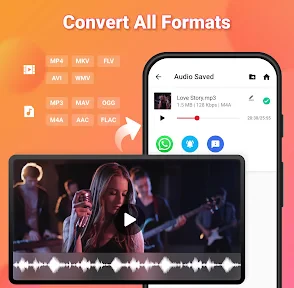
One of the things I love about this app is its wide range of supported video formats. Whether your video is in MP4, AVI, or any other popular format, this app has got you covered. It seamlessly extracts audio without any noticeable loss in quality, which is a big win in my book.
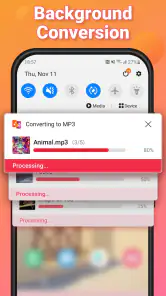
Another highlight is the batch conversion feature. I often find myself converting multiple videos at once, and having the ability to queue them up and let the app do its thing is incredibly convenient. Plus, it’s pretty fast, so you’re not sitting there twiddling your thumbs while it works its magic.
Choosing the right tool for the job
My advice is to test one short, ordinary clip before committing to a large batch. Listen to the result with headphones and on the speaker you normally use: the audio can only be as good as the source, so a quiet or muffled recording will remain quiet or muffled after conversion. For a personal archive, I’d keep the original video until I’ve checked the exported file, then decide whether the smaller audio copy is enough for my needs.
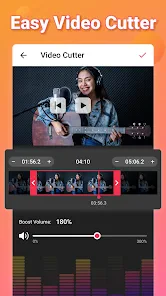
This is a focused alternative to a full video editor, which usually offers trimming, titles, and visual adjustments that are unnecessary when all you need is sound. A general file converter may handle more kinds of media, but can involve extra choices and steps. If your main goal is extracting audio from videos already on your phone, a dedicated converter is the simpler starting point; if you need careful editing, noise cleanup, or detailed control over a finished track, I’d use an audio editor instead.
A sensible way to check results
When a clip has a quiet introduction, a long pause, or a short section worth keeping, I would listen through the converted file before sharing it. Conversion gives you the sound track, but it does not make a recording more intelligible or remove distractions. If the important words are near the beginning or end, checking those moments first is a quick way to catch a cut-off or an unexpected source issue before relying on the audio elsewhere.
For a batch, I’d use a simple order: start with a representative short clip, confirm that the output plays as expected, then queue similar files. I would not assume every video in a folder behaves the same just because one worked. This is especially useful for household recordings collected from different phones or sources, where file types and recording conditions may vary. It keeps the convenience of processing several clips without turning the whole task into a blind wait.
Intuitive and User-Friendly
The app’s interface is clean and straightforward. You won’t find yourself lost in a sea of buttons and options. Instead, everything is laid out logically, making the process from opening the app to converting your first video a breeze. It’s refreshing to use an app that doesn’t overcomplicate things.
Not to mention, the app doesn’t bombard you with ads, which is a rare find these days. This makes the experience smooth and uninterrupted, allowing you to focus on what you’re there to do – convert those videos!
Useful, with a few sensible limits
Before converting a long recording, I’d check that there is enough free storage for both the source and the new audio, at least until I have verified the result. For several clips, a queue can save repeated effort, but batching is not automatically the best choice: if one source has important speech, handling it separately makes it easier to check that the right section and sound came through. A quick test also helps avoid discovering after the fact that a particular file is not a good fit.
I would skip this app if my real need were to download music from online platforms, mix several tracks, remove background noise, or produce a polished podcast. Those are different jobs, and a specialist editor or an authorized download option is a better match. For simple extraction from videos I can already access, however, the narrow focus is an advantage rather than a weakness.
What it can and cannot solve
A frequent question is whether converting a clip will make it easier to listen to. It can remove the need to keep video playing, but it does not repair weak audio, separate voices, or remove room noise. If the source was recorded from across a busy room, the extracted track will still reflect that. I would use this app to change the format and listening routine, not as a substitute for recording well or editing sound.
Another practical question is whether I should keep the original after conversion. My answer depends on the purpose: for a spoken reminder that has been checked and is no longer needed as video, an audio copy may be sufficient. For a lesson, demonstration, or family recording where gestures and surroundings matter, I would keep the video too. The smaller, sound-only version is convenient, but it cannot preserve information that was visible on screen.
Why You Need It
So, why should you consider downloading this app? If you’re like me and enjoy listening to talks, music, or any audio content on the go, then this app is a must-have. It saves space on your device by allowing you to keep just the audio files, and it’s perfect for creating playlists of your favorite soundtracks from videos.
Overall, Video to MP3 - Video to Audio app is a gem. It’s efficient, easy to use, and does exactly what it promises. Whether you’re looking to extract audio for personal enjoyment or for professional use, this app won’t disappoint. Give it a try, and you’ll see why it’s become a staple in my app collection.
Where it fits among alternatives
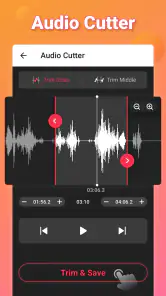
Compared with using a full video editor, this app is appealing when the picture is irrelevant and I want to get to an audio copy without learning a timeline or handling visual effects. A general-purpose converter can be more flexible if I regularly switch between many file types, but that flexibility may mean more choices than I need for a one-off extraction. A dedicated audio editor is the better option once I want to cut, clean, balance, or assemble sound rather than simply take it from a video.
That makes the best choice depend on the next step, not just the source file. If I want to listen to a recording while doing chores, a straightforward conversion is enough. If I need a polished presentation or a podcast episode, extracting the track is only the beginning, and I would move to a tool built for editing. For music from a service, I would use that service’s legitimate offline option rather than treating a converter as a way around access rules.
My household verdict
I’d recommend it to someone who wants a straightforward way to make audio copies of suitable video files, especially when people share a device and need to listen without occupying its screen. I would not choose it as a replacement for a full editor or a managed family media library. The sensible routine is simple: convert a clip you have the right to use, check the result, label it clearly, and keep the original when its visuals or quality still matter.
For a household, the strongest case is a small, repeatable task: make a listening copy of a recording that is already available, confirm it plays correctly, and leave it somewhere the intended person can find. It is less suited to people who expect automatic organization, advanced sound repair, or a way to manage access among several users. I would also be selective about purchases: the app is free to install, while optional items are available, so I’d first see whether the basic conversion workflow meets my needs before paying for extras.
In short, I see it as a handy utility rather than a complete media workspace. It earns a place when the goal is specific and modest—turning an accessible video into audio for easier listening—and becomes the wrong tool when the job shifts to editing, privacy management, or organizing a household’s whole collection. If that narrow purpose matches what you need, the direct approach is its real strength.
Video to MP3 - Video to Audio Frequently Asked Questions
Can Video to MP3 - Video to Audio convert a long video or just a short clip?
The app is intended to extract audio from video files, so it may be useful for both quick clips and longer recordings when you want an audio version. Choose the video you want to convert and follow the available conversion steps. Before starting, consider how much storage space the video and resulting audio may require on your device.
Do I need an internet connection to convert a video?
Video to MP3 - Video to Audio focuses on converting a selected video into audio, which makes it a practical tool to keep handy when you want to work with media on your phone. Whether you are preparing a file at home or while travelling, make sure the video is accessible from your device and that you have enough free storage for the converted audio.
Can I use the converted audio for personal projects or share it with others?
You can use the app to create an audio file from a video, which may be convenient for personal listening or projects. Keep in mind that the right to reuse or share the resulting audio depends on the content’s copyright and any permissions attached to it. The app’s conversion function does not itself grant permission to distribute someone else’s music or recordings.
Is Video to MP3 - Video to Audio suitable for beginners?
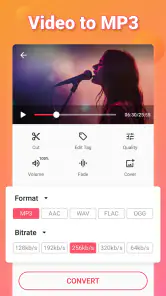
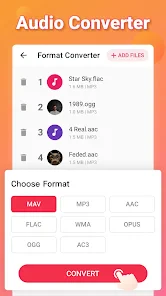
Yes. Video to MP3 - Video to Audio is designed to make extracting audio from a video straightforward: choose a video, select an audio format, and start the conversion. Its focused purpose makes it approachable even if you have not used a conversion app before. It is a video editing app from InShot Inc., and its Everyone age rating makes it suitable for a broad audience.
What is Video to MP3 - Video to Audio and how does it work?
Video to MP3 - Video to Audio is a powerful application designed to convert video files into audio formats. The app supports various video formats and allows users to extract audio tracks or soundtracks from videos effortlessly. Simply select the video file you wish to convert, choose the desired audio format, and let the app do the rest. It’s a user-friendly tool perfect for those who need audio files on the go.
Pros
- Supports various video formats.
- Fast conversion speed.
- High-quality audio output.
- User-friendly interface.
- Batch conversion available.
Cons
- Limited editing features.
- Ads in free version.
- Requires internet for some features.
- No cloud save option.
- Limited audio format output.
- Category
- Video Players & Editors
- Version
- Varies with device













