Video Downloader HD - Vidow
- 521.00
- 4.0
- Installs
- 50.00M
- Price
- Free

Screenshots

Analysis by Reviewed
In the first few days, a video downloader can feel like an easy fix for small annoyances: a clip takes too long to load, a connection is unreliable, or you want something ready before leaving home. Video Downloader HD - Vidow is built around that simple appeal. I can see why someone would try it quickly, especially if saving videos is already part of their routine rather than a one-off experiment.
Why the first week feels useful
The first-week test is straightforward: find a video you are allowed to save, try the app’s download flow, and check whether the result is convenient to watch later. That is a more useful trial than collecting a large batch immediately. A successful download is only valuable if you can find it again, if the quality suits your screen, and if saving it does not take more effort than streaming it would have.
For a practical first use, I would start with one short clip on Wi-Fi, then look for the saved file in the app or on the device. That gives you a chance to understand where downloads go and whether the process feels clear before you rely on it for a commute or a trip. I would also check that the source permits saving; convenience does not override a creator’s rights or a platform’s rules.
Who benefits from keeping it around
This is most appealing to people who repeatedly need offline access to permitted videos: perhaps a traveler preparing a small set of clips, a student keeping an authorized tutorial handy, or someone with patchy reception who prefers to download before heading out. It can also help when you want to avoid repeatedly streaming the same material on a limited connection. The value comes from a repeatable habit, not from having a downloader installed for a single interesting clip.
It is less suited to someone who mainly watches videos inside social or streaming services and already has a dependable offline option there. Those built-in tools can be a better fit when they are available because they keep viewing within the service and its own rules. Likewise, if your goal is to archive a creator’s work without permission, this is not the right tool or a responsible use.
A realistic routine might be to save a permitted cooking demonstration at home, then follow it in the kitchen where the network is weak. Another person might prepare a few allowed clips before a long journey and remove them afterward to reclaim space. In both cases, the useful step is planning: save only what you expect to watch, check the result before leaving, and avoid treating a growing downloads folder as an automatic library.
What is Video Downloader HD - Vidow All About?
Firstly, let me give you the lowdown on what Video Downloader HD - Vidow is all about. This app is designed to help you download videos from various platforms directly to your device. No more worries about buffering or going over your data limit while streaming. It's like having your personal video library in your pocket!
You May Like

Clash of Clans Is Won Between the Battles

Android Auto Makes the Case for Quieter Car Software

MobiOffice: Transforming Mobile Productivity with Seamless Integration

EA SPORTS FC™ Mobile Soccer: Redefining Mobile Sports Gaming

How Microsoft OneDrive Became a Mobile Productivity Giant

How Google Translate Breaks Language Barriers Effortlessly
Vidow is a social app from Vidow™ with a focus on saving video, rather than a general-purpose video player or a full media collection service. Its store summary also points to video-making alongside downloading, so it is positioned as more than a bare save button. The key distinction I would keep in mind is that a downloader can make an allowed file available offline, but it does not replace a platform’s own library, subscriptions, or creator controls.
The app is free to install and is rated for Everyone. It has a 4.0 average from around 320,000 ratings, and it has passed 50 million installs. Those figures suggest that it has found a broad audience, but they do not guarantee that every source or every device will behave the same way. Vidow is currently at version 2.3.38, and the listed Android requirement starts at 5.0. There are in-app purchases, with items priced at $14.99 each, so I would check the purchase screen carefully before choosing anything paid. The basic appeal is easy to understand, but the lasting value depends on whether the free experience fits your actual routine.
Easy Peasy Lemon Squeezy
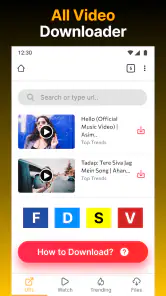
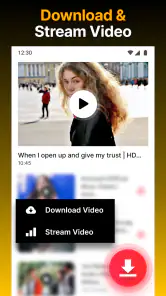
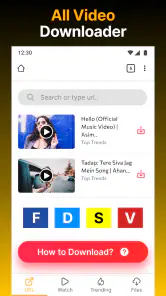
One of the first things I noticed about the app is how user-friendly it is. The interface is super intuitive, making it a breeze even for those who aren’t tech-savvy. You just open the app, paste the video URL, and hit download. It’s as simple as that! Plus, the app supports multiple formats, so you can choose the one that works best for you. How cool is that?
That simple URL workflow is most useful when you already have a link and know that saving the video is permitted. I would treat the paste-and-download sequence as a starting point, not assume that every link will work identically. Platforms can handle media differently, and access rules can change. If a link fails, repeatedly trying variations may waste time; checking whether the source offers an official offline option is often the cleaner alternative.
There is also a small but important organization trade-off with direct downloads. Saving a clip is only half the job; later, you need to recognize it among other files. I recommend giving yourself a simple routine: download only the specific items you need, open one after saving to confirm it plays, and remove it when its purpose is over. That keeps offline viewing useful without turning the phone’s storage into an uncurated pile.
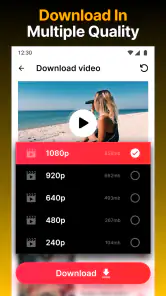
The name and store summary suggest HD video saving, but I would choose quality with the intended screen and connection in mind rather than assuming the highest option is always best. A short reference clip viewed on a phone may not need the same file size as a video you plan to watch on a larger display. When storage or mobile data matters, a smaller suitable copy can be the more sensible choice, if the available source and app options allow it.
Speedy Gonzales of Downloading
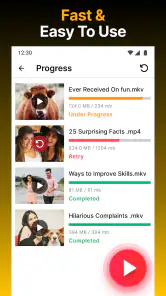
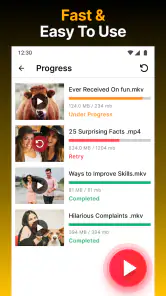
Let’s talk about download speeds. Nobody likes waiting forever for a video to download, especially when you’re excited to watch it. Luckily, Vidow doesn’t disappoint in this department. The download speeds are impressive, and you can even queue multiple videos to download simultaneously. This feature is a lifesaver when you’re trying to batch download content for a long flight or a road trip.
For a trip, I would still avoid leaving a batch until the last minute. A queue can make preparation feel easier, but the time required depends on the connection, the size of the files, and whether the source is available. Start while you have reliable Wi-Fi, then check that the clips actually open before you leave. This is a practical safeguard: a finished-looking download is not much help if the saved item is incomplete or unavailable when you need it.
Batching also has a downside. Multiple files can use storage quickly, and a long queue may include videos you later decide you do not need. I find it more sensible to make a short, deliberate list than to save everything that looks interesting. For people who only download occasionally, one-at-a-time use may be easier to manage and less likely to create cleanup work.
Quality Matters
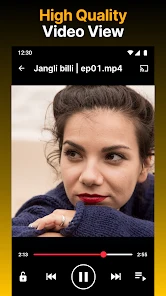
We all know that video quality can make or break your viewing experience. Vidow allows you to download videos in HD quality, ensuring that you don’t miss out on any details. Whether it's the vibrant colors of a travel vlog or the crispness of an animated short, the app maintains the quality you crave.
Quality is not only about sharpness; it is also about the balance between a clear picture and a file that is practical to keep. Before saving a collection, I would test one representative video and view it on the device where I expect to watch it. That small check helps answer a real question: does the saved version look good enough for this use, or is the file larger than the benefit justifies?
There is another reason to test a file promptly: offline access can expose problems that are easy to miss while browsing online. Confirm that both picture and sound work, and make sure the clip is the one you intended to keep. If the video is for a lesson or a recipe, checking it before the moment you need it is especially worthwhile. The app’s promise is convenience, but a quick verification is what makes that convenience dependable.
Things to Keep in Mind
While Vidow is a fantastic tool, it’s important to mention that it’s crucial to use it responsibly. Always respect copyright laws and the terms of service of the platforms you’re downloading from. This ensures that you’re not only enjoying your videos but also supporting creators the right way.
That responsibility is also a practical limit on where a downloader fits. Some services provide their own offline viewing, while others restrict copying or saving. I would use Vidow only for content I have permission to download, and I would not assume that a link being visible means it is free to keep. If the official service offers a download feature, that is usually the better option for its content because it follows the service’s intended access model.
Compared with a browser’s built-in saving tools, Vidow is aimed more directly at video downloads and can feel convenient when a link-based workflow is supported. Compared with a platform’s official offline feature, though, it may require more judgment from the user about permissions, file handling, and where a video came from. Those differences matter more over time than the novelty of pressing download: the best choice is the one that makes legal, repeat viewing simple without adding avoidable work.
For maintenance, I would review saved videos every so often rather than waiting until storage is tight. Keep useful items, delete temporary ones, and avoid saving duplicate copies if the same clip is already available through another app. That habit is particularly helpful for people who download travel or study material in bursts. If you rarely revisit offline files, the app may not earn a permanent place on your home screen; if you regularly prepare permitted videos in advance, a small, tidy collection can justify keeping it installed.
Users should also be comfortable making a few choices themselves: which sources are appropriate, which files are worth keeping, and when an official alternative is preferable. The app’s social category and video-making angle may appeal to people who move between finding and preparing clips, but someone who wants only a polished streaming catalog may find a subscription service easier. Vidow is more compelling when the task is specific and recurring, not when the expectation is that every video on the internet can be saved with no conditions.
So, there you have it! My take on the Video Downloader HD - Vidow. If you’re looking for a reliable and easy-to-use video downloader, give it a shot. It might just become your new favorite app for offline entertainment. Happy downloading!
Does it deserve a place after the novelty fades?
My long-term verdict is that Vidow makes sense for a particular kind of habit: you regularly prepare videos you are allowed to save, and you genuinely watch them offline later. In that case, the straightforward workflow and HD focus can turn a brief download into useful preparation. If you install it out of curiosity but rarely need offline clips, the initial appeal may fade quickly, while file cleanup and checking sources remain small chores.
I would give it a fair trial with one or two legitimate videos tied to a real need, such as a weak-signal journey or a tutorial you will use away from Wi-Fi. If that test saves time more than once, keep the app and build a modest routine around it. If you find yourself returning to official offline viewing or streaming instead, that is a clear sign that another option better matches your habits. For me, Vidow is worth considering as a focused utility, not as a replacement for every way of watching video.
Video Downloader HD - Vidow Frequently Asked Questions
Who is Video Downloader HD - Vidow intended for?
Video Downloader HD - Vidow is a social-category app for people who want to save online videos for later viewing. Its focus is video downloading, and its store summary also describes it as a movie downloader and video maker. The app is rated Everyone, so its stated age classification is suitable for a broad audience.
Does Video Downloader HD - Vidow work on my device?
The app requires Android 5.0 or later, so check your device’s Android version before downloading. It is listed as an Android app, and the current version is 2.3.38. If your phone or tablet meets the minimum operating-system requirement, you can install it from a reputable app store and then see how it performs on your device.
What is Video Downloader HD - Vidow and how does it work?
Video Downloader HD - Vidow is an application designed to help users download high-definition videos from various online platforms directly to their devices. The app supports multiple formats and allows users to choose the quality of the video to download. With a user-friendly interface, it simplifies the process of saving online content for offline viewing, making it accessible for users of all tech skill levels.
Is Video Downloader HD - Vidow free to use?
Yes, Video Downloader HD - Vidow is free to download and use, with in-app purchases offered at $14.99 per item. The free option makes it possible to try the app before deciding whether a purchase suits your needs. Check the purchase details shown in the app before buying, and review the available terms so you understand what an item includes.
What video platforms are supported by Video Downloader HD - Vidow?
Video Downloader HD - Vidow supports a wide range of popular video platforms, including social media sites and video sharing websites. This means users can download content from places like YouTube, Facebook, Instagram, and more. However, the availability of certain platforms may vary based on regional restrictions or platform-specific updates, so users should verify compatibility with their desired sources.
Pros
- Supports multiple video formats
- Fast download speeds
- User-friendly interface
- Free with optional in-app purchases
- Allows background downloads
Cons
- Contains ads
- Limited editing features
- Requires internet connection
- May not support all sites
- Occasional bugs reported

- Category
- Social
- Version
- 2.3.38











