US Breaking News: Local & News
- 8.05K
- 4.5
- Installs
- 10.00M
- Price
- Free

Screenshots

Analysis by Reviewed
I find US News: Breaking News & Local most useful when I treat it as a quick way to check what is happening, rather than as a replacement for every news source I follow. Its focus on national and local headlines makes it a practical fit for people who want both a broad view and a nearby one in the same place. How well that works, though, depends on being connected: fetching fresh stories and receiving timely alerts are network-dependent parts of the experience.
When a connection changes the experience
Breaking news is only as current as the connection behind it. If I open the app while moving between Wi-Fi and mobile service, I allow for a pause before deciding that a story or alert has failed. For an important developing event, I would check the story again once the connection is steady and compare it with another trusted source before treating an early headline as the full picture.
That distinction matters because alerts are useful for drawing attention, not for supplying all the context. I prefer to use them as a prompt to read more, especially when a developing story could affect plans or safety. Keeping notifications focused on topics I genuinely follow is a sensible way to make them more actionable and less distracting.
A better fit for short mobile check-ins
The app suits the small gaps in a day: checking local headlines before leaving home, scanning national stories during a break, or looking up what is happening nearby before making evening plans. A realistic routine might be to glance at the local section over breakfast, then return to a national story later when I have time to read beyond its headline.
For that kind of use, a single app can be more convenient than jumping between a national publisher and several local outlets. The trade-off is that readers who want deep reporting from one particular newspaper may prefer that publication's own app, where its coverage and editorial focus are more concentrated. I would use this app for breadth and a dedicated source for depth on subjects I follow closely.
What to do when stories do not load
If a page stalls, I first check whether other apps can reach the internet, then try again when the signal improves. That simple check helps separate a connection problem from a temporary issue with one story. I would avoid repeatedly refreshing while service is weak; it is more useful to wait until the network is stable and then reopen the item.
Readers deciding whether they can rely on it should also consider how they use news. If they need continuous access during a commute through areas with poor coverage, they should plan to read while connected rather than assume every item will be available later. Alerts can help surface a development, but they are not a substitute for checking the full report when access returns.
More From Our News Desk

Weather by Xiaomi Review: Clear at a Glance, Less Clear Up Close

X Under Pressure: Can It Recover When Posting Goes Wrong?

Clash of Clans Is Won Between the Battles

Android Auto Makes the Case for Quieter Car Software

MobiOffice: Transforming Mobile Productivity with Seamless Integration

EA SPORTS FC™ Mobile Soccer: Redefining Mobile Sports Gaming
Using mobile data thoughtfully
Frequent headline checks and story updates can add up for someone who relies on a limited mobile plan. I would make the app part of a deliberate routine—checking at a few useful moments instead of opening it every few minutes—and use Wi-Fi when convenient for longer reading. That is a practical habit, not a claim about a particular data-saving control.
People who want a calm, highly curated reading experience may find a newsletter or a small set of chosen publisher apps easier to manage. Those options trade the convenience of a broad feed for a narrower selection. I would choose between them based on whether discovery or editorial consistency matters more in my daily reading.
First Impressions: Sleek and User-Friendly
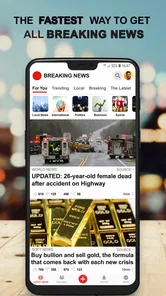
Right off the bat, the app's design is clean and intuitive. Navigating through US News: Breaking News & Local is a breeze, thanks to its user-friendly interface. The developers have done a stellar job ensuring that everything is where it should be, making it easy for users to find the news that matters to them.
Customized News Feed
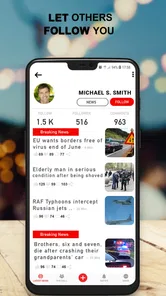
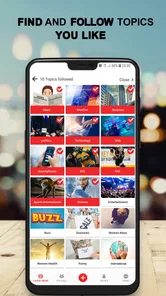
One of the standout features of the app is the customized news feed. You can tailor it to show news from specific categories or regions that interest you the most. Whether you're into politics, sports, or entertainment, you can adjust the settings to make sure your feed is always filled with the stories you care about. It's like having your own personal news editor!
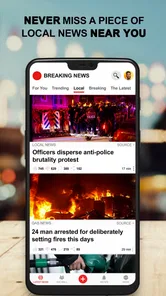
And let's not forget about the local news section. I found it incredibly useful to stay updated on what's happening close to home. From city council meetings to local sports events, the app ensures you're never out of the loop.
Real-Time Notifications
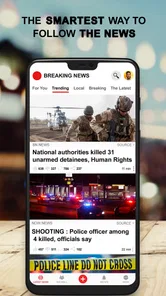
In today's fast-paced world, getting timely updates is crucial. The real-time notifications feature keeps you in the loop with breaking news alerts. I love how I can customize these alerts to avoid being bombarded with too many updates while still ensuring I don't miss out on critical information.
A useful way to judge whether the balance is right is to review which alerts you actually open over a few days. I would keep the ones that help with a real interest or decision and quiet the rest; a phone that buzzes for every headline can make important alerts easier to overlook. If you prefer to check news only when you choose, you can simply make the feed your main entry point and treat notifications as optional prompts.
Offline Reading
Another handy feature is offline reading. For those moments when you're on the go without internet access, you can save articles to read later. This feature has been a lifesaver during my morning commutes, allowing me to catch up on the news without burning through my data plan.
For the most reliable use of saved stories, I would prepare before leaving a strong connection: choose the articles I expect to have time for, save them, and make sure they are available before the commute starts. That turns offline reading into a planned buffer rather than something I count on discovering after the signal disappears. It is particularly handy for a regular route, but less suitable when I need the latest developments minute by minute.
Making a useful reading routine
I would use the feed differently from a social timeline: start with a quick scan, pick one or two stories that matter to the day, and leave the rest for a later check. For example, someone planning a drive could look at nearby coverage before setting out, then switch to a dedicated traffic or weather service for live route conditions. News can explain what is happening in a community, but it is not a substitute for tools built around immediate navigation decisions.
When a headline catches my attention, I find it more useful to open the full report before sharing it or making a decision. A short alert is an efficient pointer, but it can flatten a developing story into a few words. If the report is important, I would check the publication and timing, then seek another source for confirmation rather than treating a single notification as a complete account.
Choosing it over other news options
Compared with relying on a single newspaper app, this app’s appeal is the combination of local and national coverage in one place. That breadth can make a morning check faster, especially when I want to know both what is happening around me and what is dominating the wider news cycle. A publisher’s own app is usually the better choice when I care about its particular reporting, regular columnists, or a consistent editorial point of view.
Compared with newsletters, the app is more suited to checking in when I have a moment and seeing what is current. A newsletter can be calmer because someone has already selected a smaller set of stories, while a broad news feed leaves more choices to me. I would choose the feed for quick discovery and a newsletter when I want a more deliberate reading session without a stream of fresh prompts.
Who will get the most from it
US News: Breaking News & Local is an app in the news and magazines category, developed by Safe Apps Inc. It is free, rated for Everyone, and has a 4.5 average from around 100,000 ratings, with over 5 million installs. Its established audience makes it an easy option to try, but popularity alone cannot tell me whether its mix of headlines suits my interests.
The app was released on July 22, 2017, and its current version is 11.1.25, with Android 6.0 as the minimum operating system. I would recommend it to readers who want a quick combination of U.S. and local coverage and are comfortable checking news on a connected phone. Someone who needs specialist reporting, a carefully limited selection, or dependable access in places without service may be better served by a focused publisher, a newsletter, or a reading routine prepared in advance.
It is especially convenient for someone who has recently moved, is keeping an eye on a nearby community, or wants a quick sense of the national agenda without opening several separate apps. The local angle is useful for orientation, but I would still look to a city or county source for precise details about a public service, event change, or local procedure. That extra step matters when a headline might affect a practical choice rather than simply satisfy curiosity.
Readers who dislike interruptions can still make it work by opening the app on their own schedule and treating alerts as optional. On the other hand, anyone who wants every story filtered through a particular political, specialist, or deeply local editorial lens may find the broader mix less satisfying. I would skip it as my main source if I needed a narrow beat covered in depth every day.
Connectivity verdict
My overall take is that this app works best as a convenient front door to the day’s news, with connection quality shaping how fresh and immediate that experience feels. I would use its local and national coverage for quick orientation, keep alerts selective, and rely on a more focused source when a story deserves sustained attention. That is a useful balance for everyday readers, as long as they plan around the limits of mobile coverage rather than expecting every update to arrive instantly.
Wrapping It Up: A Must-Have for News Enthusiasts
All in all, US News: Breaking News & Local is a solid app for anyone looking to stay informed. Its user-friendly interface, customizable news feed, and real-time notifications make it a top choice for news enthusiasts. Whether you're an avid news reader or just someone who wants to stay in the know, this app has got you covered.
If you haven't already tried it, I highly recommend giving it a go. Who knows, it might just become your favorite news app too!
US Breaking News: Local & News Frequently Asked Questions
Can US News: Breaking News & Local help me follow both national headlines and stories near me?
US News: Breaking News & Local is a news app for people who want local and US breaking news on their phone. Its focus on news makes it relevant for readers looking to keep up with current events in one place. The app is free, and it is rated for Everyone.
What is US News: Breaking News & Local app?
US News: Breaking News & Local is a comprehensive news application designed to keep users updated with the latest happenings both locally and globally. It offers curated content from trusted sources, providing breaking news alerts, in-depth articles, and multimedia content such as videos and podcasts. With a user-friendly interface, it enables easy navigation through various news categories like politics, sports, entertainment, and more.
Is US News: Breaking News & Local app free to use?
Yes, the US News: Breaking News & Local app is free to download and use. However, it may offer optional in-app purchases or subscriptions to access premium content or remove ads. Users can enjoy a wide range of news articles and updates without any cost, but additional features or content may require payment.
What platforms is the US News app available on?
The US News: Breaking News & Local app is available for both Android and iOS devices. It can be downloaded from the Google Play Store for Android users and the Apple App Store for iOS users. This ensures that a wide audience can access and stay informed with the latest news irrespective of the device they own.
Does the US News app provide local news coverage?
Yes, one of the key features of the US News: Breaking News & Local app is its focus on providing localized news content. Users can personalize their news feed to receive updates pertinent to their specific region or city. This feature ensures that users are not only informed about national and international news but also about important events happening in their local area.
Pros
- Timely updates on breaking news.
- Customizable notifications.
- User-friendly interface.
- Comprehensive local news coverage.
- Ad-free experience with subscription.
Cons
- Limited personalization options.
- Occasional app crashes.
- Requires internet for updates.
- Subscription needed for premium features.
- Limited offline access.











