

Universal Studios Hollywood
- 542.00
- 3.3
- Installs
- 1.00M
- Price
- Free

Screenshots



Analysis by Reviewed
For a first visit to Universal Studios Hollywood, I’d treat the official app as a practical companion rather than a substitute for deciding what kind of day I want. It brings park information into one place, which is useful when the group is weighing a ride, a meal, or a show while already on the move. The app is free, is published by NBCUniversal Media, LLC, and is aimed at everyone. Its role is specific: helping you navigate a Universal Studios Hollywood visit, not serving as a general guide to Los Angeles attractions.
What to expect before you go
The app is in the Travel & Local category, and its focus is the park experience. It has a 3.2 average from around 2,000 ratings, so I would go in with sensible expectations: a useful planning tool, not something guaranteed to feel perfect on every phone or for every visitor. It has been installed over a million times, but popularity alone does not tell you whether its approach suits your day. If you want park-specific information close at hand, it makes sense to try; if you only need a broad city map, your usual navigation app may be simpler.
Getting set up without overplanning
If you're chasing the thrill of the movies and love immersing yourself in the worlds of your favorite films, then Universal Studios Hollywood is the app that should be on your radar. This app is like having a VIP pass to one of the most iconic film studios and theme parks right in your pocket.
Getting Started
So, first things first, downloading the Universal Studios Hollywood app was a breeze. Available on both Android and iOS, it's ready to guide you through an adventure-packed day. The user interface is sleek and intuitive, making it super easy to navigate. As soon as you open it, you're greeted with a vibrant home screen that showcases all the park's attractions, events, and even dining options. It's like having a personal tour guide!
Features Worth Exploring
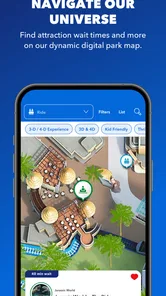
One of my favorite features has to be the interactive map. It's not just any map; it's your personal navigator. You can see your location in real-time, find the shortest routes to attractions, and even check the wait times for rides. This is a lifesaver for those who hate waiting in long lines!
To get a meaningful first result, I’d open the map and use it to choose one nearby destination instead of trying to plot the entire day immediately. That small step helps you learn how the map presents your position and routes before the park gets busy. Wait times can help with decisions, but I wouldn’t build a rigid schedule around them: treat them as a reason to compare options, then check again as plans change. A route that looks efficient on screen still has to fit your group’s pace and priorities.
Another cool feature is the ability to create a personalized itinerary. You can add shows, rides, and dining reservations, which helps in planning your day efficiently. Plus, the app sends you reminders so you don't miss out on anything.
More From Our News Desk

 Weather - By Xiaomi
Weather by Xiaomi Review: Clear at a Glance, Less Clear Up Close
Xiaomi’s weather app makes everyday forecasts quick to scan, but its calm surface can leave useful details and recovery paths harder to find than they should be.

 X
XX Under Pressure: Can It Recover When Posting Goes Wrong?
A resilience-focused review of X, examining setup, mistaken posts, interruptions, weak connections, and the gaps that matter when recovery needs to be dependable.

 Clash of Clans
Clash of Clans Is Won Between the Battles
Its raids are quick; its community is a long-term project of coordination, teaching, rivalry, and shared responsibility—with all the friction that entails.

 Android Auto
Android Auto Makes the Case for Quieter Car Software
The car interface is no longer judged by how much it can do, but by how quietly it helps. Android Auto shows what drivers now expect—and what still gets in the way.

 MobiOffice: Word, Sheets, PDF
MobiOffice: Transforming Mobile Productivity with Seamless Integration
MobiOffice: Word, Sheets, PDF is redefining mobile productivity with a surprising blend of functionality and innovation.

 EA SPORTS FC Soccer Mobile 26
EA SPORTS FC™ Mobile Soccer: Redefining Mobile Sports Gaming
Dive into EA SPORTS FC™ Mobile Soccer, where immersive gameplay and strategic depth transform mobile sports gaming.
Latest News



Making plans that survive a busy day
I’d use the itinerary as a flexible shortlist rather than a minute-by-minute promise. For example, a family arriving with one must-see ride and a meal in mind can add those anchors first, then leave gaps for changing wait times or an unplanned stop. This is also a useful way to keep a group aligned: agree on the next destination together, rather than having everyone search separately while walking. If reminders are part of your plan, make sure the items you care about are actually added; simply browsing a listing is not the same as committing it to an itinerary.
A phone-based guide has a trade-off: it can reduce the need to keep switching between printed information and separate searches, but it also makes your plan dependent on having your device available and usable. I’d check the app before setting out, make sure I can navigate the sections I expect to use, and avoid assuming that every detail will stay fixed during the visit. For a relaxed day with few planned stops, a map and a simple meeting point may be enough; for a group balancing rides, food, and shows, the itinerary is more worthwhile.
Dining and More
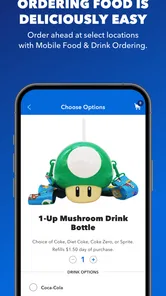
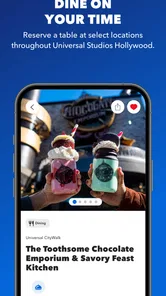
If you're a foodie, you'll love the dining section. It lists all the available restaurants, their menus, and even lets you make reservations. I tried it out, and it was seamless. I booked a table at the famous Three Broomsticks, and everything went smoothly. No more wandering around aimlessly when hunger strikes!
For a realistic use case, I’d check dining options before the group gets hungry, then use the menu details to narrow down where to head. That is more useful than waiting until everyone is tired and making a rushed choice on the spot. If a reservation matters to your plan, confirm that it appears as expected and keep the party’s timing in mind; the app can help organize a decision, but it cannot make a late group arrive on time. Visitors who prefer spontaneous meals may find the restaurant listings more helpful than building dining into a strict schedule.
And if you're someone who loves to shop, the app has got you covered too. It highlights all the retail locations and even offers some exclusive deals. It's a great way to snag a bargain on some cool merchandise.
Where the app fits—and where it doesn’t
Compared with a general-purpose map, this app is the more relevant choice when you need park attractions, dining, and visit planning in one place. A regular navigation app is better for getting around the wider area or handling errands beyond the park. Likewise, someone who mainly wants a broad travel guide may not need a dedicated park app. I’d recommend this one most to first-time visitors who want help choosing what to do next, and less to people who already know their route and prefer not to consult a phone throughout the day.
There is a learning curve in deciding which sections deserve attention. Trying to explore every listing before arriving can turn planning into another task, so I’d start with only the map, one or two priorities, and the meal plan. Then, once you’re there, use the app to answer the immediate question in front of you: what’s nearby, what could the group do next, or where might you eat? That focused approach makes the tool feel useful without letting it dictate the visit.
Making it work for different kinds of visits
The app is most valuable when your group has competing priorities. A first-time visitor may be eager to see several attractions, while someone else wants a meal break or would rather take the day at an unhurried pace. Keeping a few options visible can make those conversations easier, because the decision is based on what is nearby and relevant rather than on vague guesses. I would still let the group choose together; a map can inform the decision, but it cannot tell you which experience matters most to each person.
For a solo visitor, the map and wait-time information may be enough to make quick adjustments without coordinating with anyone. For a family, the itinerary can help keep key stops from being forgotten, especially when children are tired or plans shift. A group that splits up should agree on a meeting point and a time in advance rather than relying on everyone to keep checking messages or the same plan. The app can support coordination, but it is not a replacement for a clear group arrangement.
I’d also avoid treating every item shown in an itinerary as equally urgent. Add only the attractions, meal plans, or shows that genuinely shape the day. If the list becomes crowded, it stops being a helpful reference and starts feeling like homework. A short plan with room to change is more practical than trying to account for every possible stop before you arrive.
Small habits that prevent avoidable friction
Before the visit, I’d open the sections I expect to use and make sure I know where to find the map and itinerary. That simple familiarization matters more than polishing a detailed schedule: once the group is moving, searching through unfamiliar screens can be distracting. I’d also decide who in the group will check the app when a choice comes up, rather than having several people stop and look at their phones at once.
During the day, I’d check changing information when it affects a decision, not constantly. For instance, compare nearby options when the group is ready to move, then put the phone away while walking. That keeps the tool in its proper role as a reference rather than the center of the visit. If the route or wait information changes, use that as a prompt to reconsider, not as proof that the entire plan has gone wrong.
One practical trade-off is that a phone guide is only convenient while your phone is available. If you are conserving battery or prefer to spend the day away from screens, keep the most important decisions simple and agree on a meeting place. I wouldn’t depend on the app as the only way to remember every detail. A brief mental shortlist can make the day less stressful if you decide not to check it for a while.
What to do when the plan changes
A useful park plan needs to bend. If a ride’s wait time makes it less appealing, I’d check what else is nearby and choose between a different attraction, a meal, or a break. That is where a park-specific map can be more helpful than a city navigation app: the question is not how to cross town, but how to make a sensible next choice inside the visit. Still, the app should inform the choice rather than force the group to chase the shortest route or the most packed schedule.
If a planned meal or show no longer fits, adjust the itinerary instead of letting an old plan create pressure. The point of adding reminders is to help you remember priorities, not to turn a day out into a sequence of obligations. I’d keep one or two must-dos and treat everything else as optional. That approach works particularly well for mixed-age groups, where energy and interests can change during the day.
Visitors who want a highly detailed guide to the wider destination may prefer a broader travel resource alongside this app. The official park tool is a focused companion, not a substitute for planning transport, lodging, or other Los Angeles activities. Likewise, if you are comfortable navigating by signs and asking staff when needed, you may find that a phone-based plan adds little. The best reason to install it is a specific need for park information, not a feeling that every visitor must use an app.
Final Thoughts
Overall, the Universal Studios Hollywood app is a must-have for anyone planning a visit. It's packed with features that enhance your park experience, from cutting down wait times to ensuring you don't miss out on any must-see attractions. Whether you're a first-time visitor or a seasoned pro, this app makes navigating the park a whole lot easier.
Its current version is 7.10.0, and it supports devices running Android 9 or later. I’d still decide based on how you like to plan: if a park-focused map, itinerary, dining details, and shopping information sound useful, it is an easy companion to try before your visit. If you would rather keep your phone away and follow a loose plan, you can skip it without losing the ability to enjoy the day. My advice is to install it ahead of time, choose a small number of priorities, and use it as a guide when plans need adjusting—not as a checklist you have to complete.
In a nutshell, if you're heading to Universal Studios Hollywood, don't forget to download this app. It's like having a friendly guide leading the way, making sure you make the most of your visit. So, what are you waiting for? Grab your phone, download the app, and get ready for a day full of fun and adventure!
Universal Studios Hollywood Frequently Asked Questions
Is the Universal Studios Hollywood app free to download, and what should I know about payments?
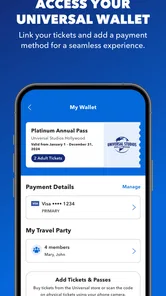
The Universal Studios Hollywood app is free to download. Some activities handled through the app, such as ticket purchases or dining reservations, may involve payment. Any transaction is separate from the cost of downloading the app, so review the details before completing a purchase. The app is a useful planning companion, but using it does not make park admissions or other paid services free.
What is Universal Studios Hollywood app and what can I do with it?
The Universal Studios Hollywood app is a comprehensive guide for visitors to the theme park. With the app, you can access real-time updates on wait times for rides, show schedules, and special events. It also provides an interactive map to help you navigate the park, make dining reservations, purchase tickets, and access exclusive offers and discounts. This app is designed to enhance your visit by providing all the necessary information at your fingertips.
Is the Universal Studios Hollywood app available for both Android and iOS devices?
Yes, the Universal Studios Hollywood app is available for download on both Android and iOS platforms. Whether you have a smartphone or tablet, you can easily find the app in the Google Play Store for Android devices or the Apple App Store for iOS devices. Ensure your device meets the minimum operating system requirements for a smooth experience.
Do I need to create an account to use the Universal Studios Hollywood app?
While you can access basic features without an account, creating an account on the Universal Studios Hollywood app unlocks additional benefits. With an account, you can personalize your experience, save your favorite rides and attractions, and receive tailored recommendations. It also allows you to purchase tickets and manage reservations directly through the app, making your visit more convenient.
Are there any costs associated with using the Universal Studios Hollywood app?
The Universal Studios Hollywood app is free to download and use. However, certain features, like purchasing tickets or dining reservations, will require payment. While the app itself doesn't charge for usage, any purchases or transactions made through the app will be billed according to the park's pricing policies. Be sure to check for any in-app offers or discounts that might save you money on your visit.
Pros
- Immersive theme park experience.
- Cutting-edge rides and attractions.
- Frequent updates with new content.
- Realistic movie-themed environments.
- Great for family entertainment.
Cons
- Expensive ticket prices.
- Long wait times for rides.
- Limited attractions for toddlers.
- Food and drinks are pricey.
- Crowded during peak seasons.













