Tubi: Free Movies & Live TV
- 642.96K
- 4.9
- Installs
- 100.00M
- Price
- Free

Screenshots





Analysis by Reviewed
Hey there, movie and TV lovers! If you’ve ever found yourself endlessly scrolling for something to watch, then let me introduce you to Tubi: Free Movies & Live TV. It’s like that hidden gem in the app world that you wish you had discovered sooner. So, kick back, grab some snacks, and let’s dive into what makes it a useful option for casual viewing.
Free viewing, with a trade-off
The central appeal is straightforward: Tubi gives you a way to watch movies and TV without a subscription fee. It is an entertainment app from developer Tubi TV, and its library spans genres such as comedy, drama, horror, and family viewing. There is also a live TV area, so you can choose between settling in for a title or putting on a channel when you would rather let programming run.
That free access comes with advertising. I’d treat it as a different kind of exchange from a paid streaming service: you spend viewing time on commercial breaks instead of paying a monthly subscription. If uninterrupted films are important to you, those breaks may be a deal-breaker. If you mainly want something easy to put on without adding another recurring bill, the trade can feel reasonable.
How browsing and saving work in practice
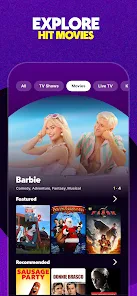
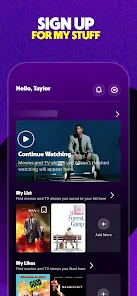
The interface is approachable, with categories to browse and trending titles for those moments when you have no specific pick in mind. Recommendations based on viewing habits can help narrow the field, though I wouldn’t rely on them as a perfect match for your taste. A useful habit is to browse when you have a spare minute, then save promising titles to your personal queue rather than trying to make a decision when everyone is already waiting on the couch.
The queue is especially handy for shared viewing. If a friend mentions a film or you spot something that might suit a family evening, saving it gives you a shortlist to return to later. The family zone also gives parents a more focused place to look for age-appropriate entertainment, rather than searching the whole catalog with a child beside them. I’d still check the specific title before handing over the screen, since a section label is not a substitute for a parent’s own judgment.
A realistic evening with the app
Picture a weeknight when you have half an hour before dinner and no idea what to watch. You can scan a genre or the trending area, add a couple of possibilities to your queue, and start one without first comparing subscription plans. If you want something in the background while you cook, a live channel may suit that mood better than choosing a film that needs your full attention. Later, when you have time to settle in, the saved list makes it easier to pick up where your browsing left off.
This is where the app’s free model is most useful: it lowers the commitment involved in trying an unfamiliar title. I’d use it for casual discovery, comfort viewing, or a backup when the household cannot agree on something from a paid service. It is less suited to a planned movie night where everyone expects a particular new release or wants a film with no interruptions.
More From Our News Desk

Weather by Xiaomi Review: Clear at a Glance, Less Clear Up Close

X Under Pressure: Can It Recover When Posting Goes Wrong?

Clash of Clans Is Won Between the Battles

Android Auto Makes the Case for Quieter Car Software

MobiOffice: Transforming Mobile Productivity with Seamless Integration

EA SPORTS FC™ Mobile Soccer: Redefining Mobile Sports Gaming
Where it fits among streaming choices
Compared with subscription streaming services, Tubi’s strongest difference is the lack of a subscription charge, balanced by ads and a catalog that is best approached as a place to browse rather than as a guaranteed source for a specific title. A paid service may be the better pick if your watchlist depends on particular shows or you want to avoid commercial breaks. Compared with ordinary live television, the on-demand library gives you more freedom to choose a movie or episode, while live channels are useful when you do not want to choose at all.
One practical tip is to decide what kind of viewing you want before opening the app: browse for a film, revisit your queue, or put on a live channel. That small choice can prevent aimless scrolling. Another is to treat recommendations as prompts, not instructions; if they miss, switching to a genre category can be a quicker route to something that fits your mood.
Making the most of a flexible catalog
I find it helps to approach the library with a mood rather than a title in mind. “Something light,” “a tense thriller,” or “a movie I can dip in and out of” gives the category browsing a useful direction without assuming the exact film you want will be available. This is a small but meaningful change in how I use the app: instead of searching repeatedly for one specific pick, I let the available selection shape the evening.
That approach is also useful when more than one person is choosing. Each viewer can add a candidate to the queue during the day, then the group can decide from a short list instead of debating from scratch. It does not guarantee everyone will agree, but it moves the discussion away from endless scrolling and makes the queue serve as a practical shared shortlist.
Choosing between a channel and a title
The live TV area and the on-demand library serve different kinds of attention. I’d choose a channel when I want something to accompany a meal or household chores and do not want to keep making decisions. For a focused watch, browsing for a movie or show makes more sense because I can settle on one thing. The useful question is not simply what is available, but whether I want to watch actively or have programming running in the background.
For example, if I have only a short break, starting a film may leave me more invested than the time allows. A channel is a more natural fit for that sort of casual viewing. When I have a longer stretch and want to follow a story, I would browse the on-demand options instead. Thinking about that distinction before opening the app can make the choice feel quicker and more satisfying.
What to expect from the viewing experience
Ads are part of the bargain, so I would not start a movie expecting the same uninterrupted experience as a paid, ad-free service. They can interrupt the rhythm of a story, especially when I am watching something that depends on suspense or careful pacing. For background viewing, the interruptions matter less to me; for a film I have been looking forward to, they are more noticeable. The right expectation makes a real difference to whether the free model feels like a fair trade.
I also would not treat the app as a dependable way to locate a particular title on demand. Its strengths are discovery and low-commitment viewing, not serving as a personal guarantee that a specific film or series will be there when you want it. If a planned evening depends on one named title, checking a service known to carry that title is the safer choice. If the goal is simply to find something worthwhile, browsing is where Tubi makes more sense.
What’s the Deal with Tubi?
First things first, what sets Tubi apart is that it’s completely free. Yes, you heard me right—free as a bird! No subscription fees, no credit card info, just loads of content ready to stream. The app offers a vast library of movies and TV shows across various genres, from comedy to drama, horror to family-friendly flicks. And let’s not forget the live TV feature, which includes news channels, sports, and even some quirky, niche content that’s surprisingly addictive.
Features That Keep You Hooked
One of the coolest things about Tubi is its user-friendly interface. It’s clean, simple, and easy to navigate, even if you’re technologically challenged like yours truly. You can browse by categories or check out what’s trending if you’re feeling adventurous. Plus, the app has a neat feature where it suggests movies and shows based on your watching habits. It’s like having a personal assistant who knows your taste better than you do!
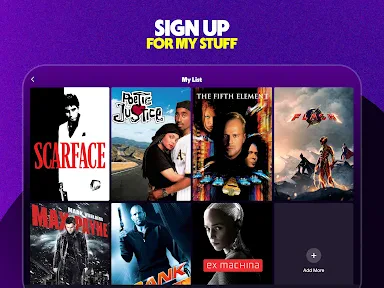
Another standout feature is the ability to create a personal queue. You can save movies and shows to watch later, so you’ll never forget that title you’ve been meaning to check out. And for those with kids, there’s a family zone where you can find age-appropriate content. It’s a lifesaver for those "I’m bored" moments.
Is It Really Free?
Now, you might be wondering, “How can something this good be free?” Well, the catch is that Tubi is ad-supported. But don’t worry, the ads are pretty sparse and way less intrusive than you’d expect. It’s like the occasional commercial break, and honestly, it’s a small price to pay for free access to so much content. Plus, it gives you a perfect excuse to refill your popcorn!
I’d be more cautious about choosing it as the only streaming option if you need a specific title on demand or strongly dislike interruptions. Its appeal is strongest when you are flexible about what to watch. That distinction also helps set expectations: think of it as a free discovery library and a source of casual live viewing, not a complete replacement for every paid service.
Who is likely to get the most from it?
Tubi is a good fit for viewers who want to explore without paying for another subscription, households looking for a simple shared queue, and anyone who enjoys having live channels as an alternative to picking a single title. It has a Teen content rating, is free to use, and has an average rating of 4.9 from around 2.3 million ratings, with over 100 million installs. It is available on devices running Android 9 or later.
If your priority is a tightly curated catalog of must-watch releases, ad-free viewing, or a particular show you already have in mind, I’d look at other options first. If you are happy to browse and accept commercial breaks in exchange for no subscription, this is an easy app to keep around. Its best use is not replacing every service you have; it is giving you a low-commitment way to find something entertaining when you are undecided.
Who may prefer another option
I would skip Tubi as my main choice if I regularly plan evenings around newly released titles, need a particular series to be available, or find commercial interruptions frustrating enough to spoil a film. In those cases, a paid service with the show I want or an ad-free viewing option is a better match. The same applies when I need a tightly controlled selection for a specific occasion: browsing an open-ended catalog is not as reliable as choosing a known title in advance.
It is a more natural fit for viewers who are curious, flexible, and comfortable letting the catalog provide the evening’s options. Someone who watches casually between other tasks may value the ability to switch between a channel and a title. A household that already pays for several services can also use it as a backup rather than treating it as a replacement; that is a realistic way to benefit from it without expecting it to cover every viewing need.
Age and household choices
The Teen content rating is worth keeping in mind when deciding who should use the app. The family zone can make it easier to look for more suitable choices, but I would still preview a title or check its details before a younger viewer watches. A broad section is a helpful starting point, not a substitute for knowing what a child is comfortable seeing. That extra check is especially useful when the app is being used for a family evening and different ages are sharing the screen.
For adults choosing something together, the same caution has a different purpose: it is worth checking a title’s tone before settling in, particularly if the group wants something light or suitable for everyone. I like having a shortlist in the queue for this reason. It gives me time to decide whether a candidate fits the audience before the television is already on and everyone is waiting.
Final Thoughts
So, is Tubi: Free Movies & Live TV worth downloading? Absolutely! It’s a treasure trove of entertainment that won’t cost you a penny. Whether you’re into binge-watching series, checking out movies, or just need some background noise, Tubi has got you covered. It’s perfect for those lazy Sundays or weekday evenings when you just want to relax and unwind. Give it a try, and you might just find your new favorite app!
Tubi: Free Movies & Live TV Frequently Asked Questions
Can I browse Tubi’s catalog before choosing something to watch?
Yes. You can explore Tubi’s entertainment library and see what catches your interest before settling on a title. The service brings together movies and TV shows, with live TV channels also available. Browsing first is a practical way to decide whether its selection suits your tastes, especially if you are looking for a particular kind of entertainment.
Does Tubi have content beyond movies and TV shows?
Tubi’s offering includes movies, TV shows, and live TV channels, so it is not limited to on-demand films. The live channels cover interests such as news, sports, and entertainment, while the on-demand library spans a variety of genres. That mix gives you different ways to find something to watch, depending on whether you want a specific title or a channel-style experience.
Can I use Tubi on a television as well as a phone?
Yes. Tubi is available on smartphones and tablets, as well as smart TVs and web browsers. You can choose a screen that suits the way you want to watch, rather than being limited to your phone. On mobile, the app is available through the Google Play Store or Apple App Store, while a web browser is another way to access the service.
Is Tubi free to download and use?
Yes. Tubi is a free entertainment app, and its store summary puts it simply: “Movies, Shows, (and Love) Don’t Cost a Thing!” The service is supported by ads, so commercials appear during viewing instead of a subscription fee. That makes it an option for people who want to watch without paying for a monthly plan, while keeping in mind that ad breaks are part of the experience.
What devices and software do I need to use Tubi?
Tubi is available for smartphones, tablets, smart TVs, and web browsers. On a mobile device, you can download the app from the Google Play Store or Apple App Store. The app’s minimum operating system requirement is version 9. If you plan to watch on more than one device, you can choose whichever supported screen suits you, rather than being limited to a phone.
Pros
- Vast library of movies and TV shows
- Completely free with no subscription
- User-friendly interface
- Available on multiple devices
- Minimal ad interruptions
Cons
- Limited offline viewing options
- Ads can be repetitive
- No premium upgrade available
- Some content may not be HD
- Content library varies by region
- Category
- Entertainment
- Version
- Varies with device











