Trusted Traveler
- 33.00
- 4.9
- Installs
- 50.00K
- Price
- Free

Screenshots
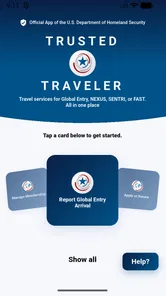
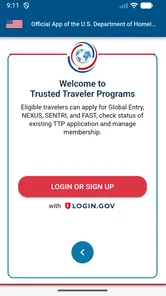
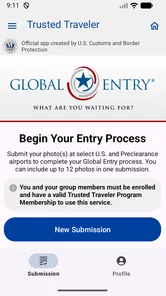
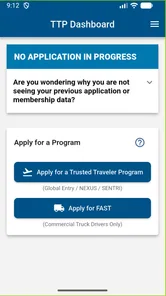
Analysis by Reviewed
Airport preparation is stressful enough without making travelers hunt through several government pages just to keep track of a Trusted Traveler Program. Trusted Traveler is aimed at that specific job: it gives members a place to manage their program information and supports smoother entry processing at airports. I see its value less as a general travel companion and more as a focused tool for people who already rely on a U.S. Trusted Traveler Program.
That narrow focus is also the key to deciding whether it belongs on your phone. It is a free Travel & Local app from U.S. Customs and Border Protection, rated for Everyone, and its current version is 1.30.0. The app has a 4.9 average from around 1.1 thousand ratings and more than 50 thousand installs. Those numbers suggest a positive reception, but they do not tell me whether its screens will suit every traveler’s needs. For that, the important question is how well the app fits into real travel routines and different ways of using a phone.
Before the airport: decide what you need it to do
The most useful first step is to connect the app to a concrete part of your routine. If you already participate in a relevant program, ask whether you often need to manage program information or simply want a mobile place to return to it. That distinction matters: a frequent flyer who revisits program details has a clearer reason to install it than someone who travels occasionally and already knows where to find the information they need.
I would also separate program management from trip management before deciding what to keep on your phone. A family may use one service for flight details, another for directions, and this app for its specific program-related purpose. That division can feel less convenient than a single all-in-one dashboard, but it is often easier to understand when each tool has a clear job. The trade-off is remembering which app handles which task.
For a traveler who helps a relative prepare, the app can be part of a shared checklist without becoming a reason to take over the relative’s account. Sit together, let the traveler make decisions about their own information, and agree on what they may want to check before leaving. This is especially useful when someone is less comfortable navigating apps: support can come from a calm walkthrough rather than hurried tapping on the way to the airport.
Finding your way through a focused travel tool
I find that the app’s narrow purpose is useful when I approach it with one clear question: where should I go on my phone to manage my Trusted Traveler Program? That focus can make the experience feel less cluttered than a travel organizer, while leaving trip planning to other tools. Next, I’d consider how the demands of airport use—and different ways of interacting with a phone—change the best time and manner to use it.
Readability and navigation
Trusted Traveler has a clearly defined purpose: managing Trusted Traveler Programs rather than planning an entire trip. That distinction can make it easier to approach than a broad travel app filled with hotel bookings, maps, itineraries, and deals. If you open it with a specific task in mind—such as checking or managing your program details—the scope is easier to understand.
More From Our News Desk

Weather by Xiaomi Review: Clear at a Glance, Less Clear Up Close

X Under Pressure: Can It Recover When Posting Goes Wrong?

Clash of Clans Is Won Between the Battles

Android Auto Makes the Case for Quieter Car Software

MobiOffice: Transforming Mobile Productivity with Seamless Integration

EA SPORTS FC™ Mobile Soccer: Redefining Mobile Sports Gaming
At the same time, a focused purpose does not automatically mean every step will be obvious. Government program terminology may be familiar to frequent members but less so to someone applying for the first time or helping a family member. I would take a moment to read labels carefully rather than assume the app handles every aspect of enrollment or explains the rules behind each program. Its role is program management and airport entry support, not a replacement for understanding the program itself.
A practical way to make the app easier to use is to open it at home, when you have time to read through the available options, rather than for the first time in a security queue. That small bit of preparation can help you identify where relevant information is kept before you are dealing with luggage, announcements, or a tight connection. It is especially useful if you are sharing travel responsibilities with another person, since you can agree in advance who will check the app and when.
For someone who prefers a single place for program-related tasks, the app is a more direct choice than searching through a browser history or switching among general travel services. But travelers who only need occasional information may find a bookmarked official web page just as straightforward. The app is most compelling when program management is something you expect to revisit, not when you want a complete trip dashboard.
Motor and sensory considerations
Airport use can be demanding even for people who are comfortable with their phones. One hand may be holding a passport, the other a bag; lighting changes as you move between terminal spaces; and announcements compete for attention. In that setting, I would treat Trusted Traveler as something to prepare with before travel, not a tool that should be explored while walking or rushing toward a checkpoint.
For travelers with limited dexterity or who find small touch targets difficult, the safest workflow is to complete any available management steps while seated and unhurried. Keep the phone stable, use the device’s own display and input settings if they help you, and avoid trying to make account changes in a crowded line. These are practical precautions rather than claims about specific accessibility controls inside the app.
People with low vision, cognitive fatigue, or sensory sensitivity may also benefit from separating preparation from the airport moment. Reviewing program details in a quiet place reduces the pressure to interpret unfamiliar language amid noise and movement. If you support a traveler who prefers verbal explanations, talk through the steps together before departure rather than relying on the app to communicate everything in a way that works for them.
I would not assume that a phone app alone resolves every access need. Some travelers need a larger screen, a keyboard, help from a trusted companion, or a slower route through official information. In those cases, the app can be one part of the process, while a browser or another person’s assistance may be more comfortable for certain tasks.
Using it in the right travel moment
Consider a traveler leaving early for a domestic airport after a busy workweek. The night before, they can open Trusted Traveler, review the program information they may need, and make sure they know how to reach it again. In the terminal, that preparation means less searching on the phone and less attention diverted from signs, boarding updates, or family members. The app’s usefulness comes from reducing a specific kind of last-minute uncertainty, not from replacing airport staff or guaranteeing a faster journey.
For frequent travelers, keeping program management close at hand can be more convenient than remembering which browser page or account to revisit. For a person who travels only once in a while, the benefit is more situational: the app may help with the program-related part of that trip, but it will not organize the rest of the journey. I would still keep essential travel documents and plans available through whatever method works best for you, rather than depending on one app as the sole source of trip information.
There is also a useful distinction between preparing at home and relying on mobile access at the airport. Before leaving, you can take time to check information and resolve questions. Once you are moving through a terminal, the phone may be harder to use because of poor connectivity, low battery, distractions, or simple time pressure. I recommend treating the app as a preparation aid and a convenient reference, while keeping your broader travel plan accessible independently.
Where it fits beside other options
Compared with a general travel app, Trusted Traveler is narrower and more official in purpose: it concentrates on program management and airport entry processing rather than flights, lodging, or sightseeing. Compared with a browser, it may be more convenient for someone who wants program-related access on a phone, while the browser can be preferable for reading longer explanations or working on a larger display. Neither approach is automatically best for everyone.
If you are already enrolled in a relevant program and travel through airports, the app is easier to justify. If you are still deciding whether a program suits you, start by understanding its requirements and benefits through official information; a management app is not a substitute for that decision. If you do not use a Trusted Traveler Program, a standard travel organizer will likely be more relevant to your everyday needs.
One useful trade-off is that specialization can reduce clutter but also limits what the app can do for a trip. You may appreciate not having unrelated booking features in the way, yet still need separate tools for itineraries, maps, airline updates, and accessibility planning. I would not expect this app to coordinate those other parts of travel simply because it supports airport entry processing.
Remaining barriers and sensible precautions
The biggest potential barrier is not necessarily the interface; it is whether the app matches your situation. It serves people managing Trusted Traveler Programs, so someone outside that group may open it and find little practical reason to keep using it. Even for members, it should be considered a companion to program participation, not a promise that every airport interaction will be effortless.
Another friction point is the context in which people tend to remember travel apps: when they are already under pressure. A rushed first-time setup or an attempt to locate an unfamiliar item in a noisy terminal can make a focused tool feel less helpful than it would at home. My advice is to install it before a trip, explore it calmly, and note which program-related information you actually expect to use. That is a more reliable plan than discovering its workflow while standing in line.
It is also worth considering who has access to the phone and account. If another person helps manage travel, decide how you will coordinate without casually sharing sensitive account access. For travelers who depend on assistance, a companion can help with navigation, but it is still sensible to let the traveler make choices about their own program information wherever possible.
The app is available at no cost, which makes trying it a low-commitment option for eligible travelers. It was released on July 23, 2026, and supports devices running Android 9 or later. Those details help with basic compatibility planning, but the more important test is whether your device is comfortable to use and whether the app’s purpose matches your travel routine.
What to check before relying on it
A sensible routine is to check the app well before departure, then decide what you still need in another format. If you are unsure whether it covers a task you have in mind, do not wait until travel day to find out; use official program information to clarify the process. This is a particularly useful distinction for first-time applicants, because the convenience of a management app should not be mistaken for a guide to every eligibility question or program rule.
Another practical question is whether you can comfortably use it with your own device and circumstances. Try reading the relevant screens at the size and brightness you normally use, and consider whether you would rather handle the task on a larger display. If you need to rely on the app in a terminal, think ahead about battery and connectivity as part of your broader travel preparation, not as problems the app itself can solve.
Who I would recommend it to
I would recommend Trusted Traveler to people who actively manage a U.S. Trusted Traveler Program and want program-related access on their phone. It is particularly sensible for frequent airport users who would rather prepare before departure than search for account information at the last minute. The strong average rating and the app’s focused role make it worth considering, though ratings cannot tell you how accessible or convenient it will feel on your own device.
I would suggest skipping it if you are looking for an all-purpose travel planner, do not participate in a relevant program, or prefer to handle everything on a larger screen. It may also be a poor fit if phone-based tasks are difficult for you and you already have a more comfortable way to manage your information. In that case, use the app only if it genuinely improves your workflow, and keep a browser or human assistance available for tasks that feel awkward.
My overall view is that this is a practical, specialized tool rather than an essential download for every traveler. Its strongest contribution is giving program members a dedicated mobile option for preparation and management; its main limitation is that it cannot address the many other needs that shape an accessible airport journey. Used calmly before travel, it can earn a place on the phone. Used as a substitute for trip planning, clear program understanding, or individualized assistance, it is the wrong tool.
Trusted Traveler Frequently Asked Questions
What is Trusted Traveler, and what is it used for?
Trusted Traveler is a travel-related app associated with trusted traveler programs, which can help eligible members access program information and manage parts of their travel experience. The exact features depend on the app’s publisher and the program it supports, so check the store listing and official program website before installing. It should not be assumed to replace required travel documents, airport procedures, or official government services.
Who can use Trusted Traveler?
The app may be intended for people enrolled in, or applying to, a particular trusted traveler program, but eligibility and available functions vary by program and country. Before downloading, confirm that the app is the official one for your program and that your membership is supported. Travelers who are not enrolled may find that some features are unavailable, and downloading the app does not itself grant trusted status or expedited screening.
Is Trusted Traveler safe to use, and what information might it request?
As with any travel app, review the developer, privacy policy, requested permissions, and store-page details before entering personal information. Depending on its features, it may ask for account or membership details and access to device functions needed to provide a service. Use the official download source, avoid sharing passwords through unofficial links, and contact the program’s official support channel if a request or sign-in page seems suspicious.
Does Trusted Traveler guarantee faster airport screening or travel?
No app can guarantee shorter lines, expedited processing, or a particular travel outcome. Any benefits generally depend on your active enrollment, the program’s rules, the airport or border facility, and current operational conditions. You should continue to follow instructions from airline, airport, and government staff and carry all required identification and travel documents. Check the relevant program’s official guidance for current eligibility and use requirements.
What should I check before downloading Trusted Traveler on Android or iOS?
Confirm that the app’s name, developer, and purpose match the trusted traveler program you use, then review its latest update date, compatibility requirements, ratings, and privacy disclosures in the official app store. Also check whether your device and operating-system version are supported and whether an account or existing membership is required. If the listing does not clearly identify the official provider, verify it through the program’s website before installing.
Pros
- Combines several travel-related programs in one place.
- Lets users check the status of submitted applications.
- Provides access to membership details while on the go.
- Can help frequent travelers keep track of program information.
- Useful for managing travel-program accounts without a desktop computer.
Cons
- Some features require an eligible program membership.
- Application decisions and enrollment still involve separate steps.
- Account access may depend on reliable internet connectivity.
- Not every traveler or travel program may be supported.
- Users may need to visit official websites for certain services.













