Trusted Traveler Programs
- 51.00
- 4.6
- Installs
- 100.00K
- Price
- Free

Screenshots
Analysis by Reviewed
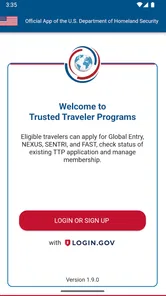
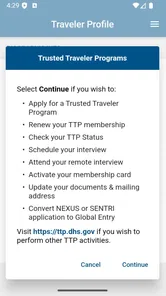
I approached Trusted Traveler Programs as the kind of app you open with a specific administrative job in mind, not as something you casually browse. It comes from U.S. Customs and Border Protection and is built for applying to and managing membership in Trusted Traveler Programs. That narrow purpose is also its biggest strength: instead of searching through unrelated travel information, I found a focused place for a process that can otherwise feel scattered and easy to postpone.
The app is free, aimed at everyone, and sits in the Travel & Local category. Its current version is 1.19.0, and it runs on Android 9 or later. Those details matter because this is an official government service rather than a private travel organizer. I would not install it expecting airport maps, fare comparisons, itinerary planning, or a digital passport wallet. I would install it when I need to deal with Trusted Traveler membership and want that task kept separate from the rest of my travel apps.
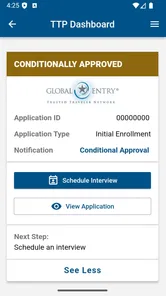
My overall impression is practical rather than flashy. The experience is most valuable when I already know why I am there: starting an application, checking the state of an existing membership, or handling account-related work connected with a program. The app does not turn the enrollment process into an instant approval, and it cannot remove the decisions or requirements involved. What it can do is give that process a dedicated mobile doorway, which is useful when travel planning happens away from a desktop.
How the app fits into a real travel routine
When several people in a household are preparing for travel, I find it helpful to separate the shared trip plan from each person’s Trusted Traveler paperwork. This section looks at how the app can fit into that routine without blurring individual account responsibilities, then turns to the practical boundaries I’d set before anyone uses it on a shared device.
A focused tool for a task people often delay
Trusted Traveler applications are not usually the exciting part of preparing for a trip. They are the administrative task that gets pushed aside until a flight is already booked. That is where this app makes sense. I can treat it as a single-purpose workspace: open it when I have the necessary personal details available, review the relevant membership task, and close it without sorting through a general-purpose travel dashboard.
A realistic example would be a frequent traveler who notices that an upcoming trip will involve repeated airport screening or border processing. Rather than waiting until the night before departure, that person can use the app to begin managing the Trusted Traveler process from a phone. The important practical lesson is to use it early. A mobile interface may make submitting or managing an application more convenient, but it does not make the underlying review process immediate.
I also see value for people who travel between work and home and do not always have access to a personal computer. A phone-based option means the task can be handled during a quiet moment, provided the user is comfortable entering sensitive information on a mobile device and has a stable connection. That convenience is not just about speed; it reduces the chance that a useful administrative task disappears from a desktop-only to-do list.
More From Our News Desk

Weather by Xiaomi Review: Clear at a Glance, Less Clear Up Close

X Under Pressure: Can It Recover When Posting Goes Wrong?

Clash of Clans Is Won Between the Battles

Android Auto Makes the Case for Quieter Car Software

MobiOffice: Transforming Mobile Productivity with Seamless Integration

EA SPORTS FC™ Mobile Soccer: Redefining Mobile Sports Gaming
What I would prepare before opening it
The best way to use this app is to prepare first. I would have my identifying information, travel-related details, and any membership information I may need close at hand. That sounds obvious, but it prevents the stop-and-start experience of opening the app, discovering that a detail is missing, and abandoning the process halfway through.
I would also set aside enough uninterrupted time to read each screen carefully. Government applications reward accuracy more than rushing. A small mistake or an incomplete answer can create more work later, so I would not treat the app like a quick form squeezed between two notifications. The phone format is convenient, but the responsibility for entering correct information remains with me.
Another useful habit is to keep a record of what I submitted and when I submitted it. I do not mean taking unnecessary screenshots of sensitive information. A simple private note about the task completed, the account used, and any next action can make later follow-up easier. This is especially helpful for people managing applications for a household, where several similar tasks can otherwise blur together.
Where it is better than the usual alternatives
The usual alternative is a web browser on a computer. A browser can still be preferable when I need a larger screen, want to compare information in several tabs, or find typing on a physical keyboard easier. For a first-time applicant with a complicated history to enter, a desktop may feel less tiring and make it easier to review long sections before submitting.
The app becomes more attractive when the task is occasional but important. A dedicated mobile experience is easier to find than a saved browser tab buried among travel bookings, airline accounts, and hotel pages. It also keeps the Trusted Traveler task visually distinct from commercial travel services. I appreciate that separation because airline and booking apps are designed around trips, while this one is designed around membership administration.
It is also a better fit than relying on a random third-party travel app for this particular job. The developer is U.S. Customs and Border Protection, so the app has a clear official identity. That does not mean I should stop reading carefully or assume every process is effortless, but it does make the source easier to recognize than an unofficial app using similar travel language.
The current experience and its boundaries
The current state feels intentionally narrow. The store summary describes applying and managing membership for Trusted Traveler Programs, and that is the lens through which I would judge it. Its usefulness comes from handling that defined area, not from trying to become a complete travel companion.
That boundary is important for expectations. If I want help choosing a flight, storing hotel reservations, monitoring a journey, or finding local attractions, this is not the right download. Even if I am already a member, I should think of it as a membership-management tool rather than a universal shortcut through every airport or border question.
The age rating of Everyone makes the app broadly accessible from a content-classification perspective, but that should not be confused with the application being equally relevant to every traveler. Its practical audience is people who need Trusted Traveler Program services. A casual vacationer who rarely travels and has no interest in membership may gain little from installing it.
What the version and release history tell me
The app was released on December 9, 2024, and the current version is 1.19.0. I read that as a sign that the product has moved beyond a first public build and is being maintained through successive version changes. That is useful context, but I would still separate what is visible now from what I might hope to see later. A version number alone does not prove that every part of the process has been redesigned or that every user issue has disappeared.
For someone who used an earlier release, the sensible approach is to update and then check the actual workflow rather than relying on assumptions about what changed. I would pay attention to whether familiar account tasks are easier to locate, whether saved progress behaves as expected, and whether the language on important screens is clear. Those are the changes that affect daily use more than a new version label by itself.
The release timing also means I would keep the app updated before beginning an important application. That is not because an update guarantees a smoother result, but because using the current release gives me the best chance of seeing the latest available fixes and adjustments. I would avoid starting a time-sensitive task immediately before a flight, regardless of the version installed.
What existing users may notice
For existing members, the main benefit is having a mobile place to return to instead of treating every interaction as a fresh web search. The value is strongest when I need to check or manage membership-related information while away from my computer. That can make the service feel more present in an ordinary travel routine, especially for people who already do nearly everything through their phones.
There is a trade-off, though. Mobile convenience can encourage me to open the app in unsuitable situations: in a crowded terminal, on weak public Wi-Fi, or while rushing between connections. I would not use it casually in those conditions. Membership administration deserves privacy and concentration, and a small screen makes it easier to overlook a field or misread a prompt.
Returning users should also resist the temptation to assume that a previous application or membership means every future task will be automatic. I would review the current instructions each time and confirm that the account details I am using are still appropriate. A dedicated app reduces friction around access, but it does not replace careful attention to the specific request in front of me.
One non-obvious advantage is organizational: I can separate “I need to manage my Trusted Traveler status” from “I need to prepare for this particular trip.” That distinction helps prevent a common mistake, which is assuming that a travel benefit is automatically ready simply because an application was started. I would keep the membership task and the flight itinerary as two separate checklists.
Privacy, accuracy, and the cost of convenience
Because this app relates to Trusted Traveler membership, I would treat every session as sensitive administrative work. I would use my own device, avoid entering information while someone can easily see the screen, and sign out or lock the phone when finished if the device is shared. These are habits I would apply even though the app is free and simple to download.
I would also verify that I am using the official app associated with U.S. Customs and Border Protection before entering personal information. The developer name is an important part of that check. A similar-looking third-party product may offer travel tools, but that does not make it the right place for a government membership application.
The free price removes a financial barrier, which I appreciate, but “free” should not be interpreted as “no commitment.” My time, attention, and accuracy still matter. If I am not ready to complete a form carefully, I would wait rather than create a rushed submission that needs correction.
Remaining gaps and when I would choose something else
The clearest limitation is specialization. This app cannot replace a browser when I need broad research, a keyboard-heavy workflow, or several reference pages open at once. I would choose a computer for a long first application if I found mobile typing tiring, and I would choose a general travel app for itinerary management or trip alerts.
I would also skip it if my only goal is to understand general border or airport procedures without managing a Trusted Traveler membership. A broader official information source may be more suitable for general policy research. This app is most useful once the question becomes personal and task-oriented: applying, accessing, or managing membership rather than simply reading travel advice.
Another limitation is psychological rather than technical. A dedicated app can make a complex process look deceptively simple. The interface may guide me through screens, but I still need to understand what I am submitting and allow time for the wider process. Anyone expecting an immediate travel shortcut will probably be disappointed.
For families, the app may be convenient, but I would not assume that one person’s account automatically solves every traveler’s needs. I would organize each person’s information carefully and avoid mixing details between applications. That extra discipline is easy to overlook when several household members are preparing for the same journey.
What I would watch in future updates
When a focused government app reaches a current version such as 1.19.0, I look for improvements that reduce uncertainty rather than merely adding visual polish. Clearer explanations around application progress, better recovery after an interrupted session, and easy-to-find account actions would have the greatest practical effect for me. These are the areas that determine whether a user finishes a task confidently or has to start searching elsewhere.
I would also watch how well the app handles the moments between visits. A membership tool is not useful only during the initial application; it needs to remain understandable when I return months later and have forgotten where a particular action lives. Consistent navigation and plain language would matter more to me than a crowded collection of extra travel features.
Existing users should watch the release notes and test the updated workflow before beginning an urgent task. After an update, I would open the app, confirm that I can reach my account area, and make sure I understand the current navigation. That quick check is a sensible precaution for any app tied to important travel administration.
The app already has a solid public footprint, with an average rating of 4.6 from over 400 ratings and more than 100 thousand installs. I see that as encouraging evidence that people are finding it useful, but not as a substitute for deciding whether its narrow purpose matches my needs. Ratings can tell me that the general direction works for many users; they cannot make a desktop-sized form feel comfortable on every phone.
My recommendation for different kinds of travelers
I would recommend it to a traveler who wants an official mobile route for Trusted Traveler Program applications or membership management, especially someone who prefers handling administrative work on a phone. It is also a sensible companion for frequent travelers who want this task kept separate from airline, hotel, and itinerary apps.
I would recommend using it alongside, not instead of, careful preparation. Have the necessary information ready, choose a private moment, review each answer, and keep track of what you completed. Those habits make the app more useful than simply installing it and hoping the process will take care of itself.
I would not recommend it as a general travel download. If I wanted local recommendations, booking tools, airport navigation, or a complete trip organizer, I would look elsewhere. Its strength is precisely that it does not try to do all of those jobs.
After using it as a focused Travel & Local utility, my opinion is favorable but measured. The best reason to install it is not entertainment or convenience in the abstract; it is having a recognizable official channel for a specific membership task. The free access and mobile format lower the effort needed to begin, while the narrow scope keeps the experience understandable. Just remember that the app can organize access to the process, not replace the patience, accuracy, and planning the process requires.
Trusted Traveler Programs Frequently Asked Questions
Is Trusted Traveler Programs an official app, and who develops it?
Trusted Traveler Programs is a Travel & Local app developed by U.S. Customs and Border Protection. Its purpose is to help users apply for and manage membership in Trusted Traveler Programs. It can be a convenient starting point for learning about these programs, while applicants should use official government channels for application decisions, current requirements, and other important account or enrollment actions.
What are Trusted Traveler Programs, and which programs are included?
Trusted Traveler Programs are U.S. government programs that provide expedited processing for preapproved, low-risk travelers at airports and international borders. The main options include TSA PreCheck for faster airport security, Global Entry for expedited entry into the United States, NEXUS for travel between the U.S. and Canada, and SENTRI for expedited entry from Mexico. Each program has different eligibility rules, benefits, and application procedures.
How does the Trusted Traveler Programs app help with the application process?
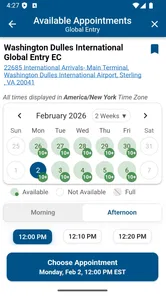
The app is designed to help users find information about available programs, review eligibility requirements, locate enrollment centers, and understand application steps. It can make the process easier by organizing essential details in one place, but it does not replace the official government application system. Applicants should always verify fees, requirements, appointment availability, and application status through official U.S. government sources.
Who is eligible to apply for a Trusted Traveler Program?
Eligibility depends on the specific program and the applicant’s citizenship, residency, travel history, and background. U.S. citizens and lawful permanent residents may qualify for several programs, while citizens of certain other countries may be eligible through international arrangements. Applicants must provide accurate personal information and may be denied for criminal convictions, immigration violations, false statements, or other security concerns.
How much do Trusted Traveler Programs cost, and are the fees refundable?
Trusted Traveler Program fees vary depending on the program and may change over time. Applicants generally pay a nonrefundable application fee, even if they are not approved or decide not to complete the interview. Some credit cards and travel-related benefits may reimburse eligible applicants, but this depends on the card issuer’s terms. Always confirm the current fee directly on the official program website before applying.
Pros
- Speeds up airport security and border processing for eligible travelers.
- Mobile access makes enrollment details and program information easy to review.
- Can reduce stress during frequent international or domestic trips.
- Several programs offer benefits across multiple airports and travel routes.
- Useful for travelers who value predictable
- streamlined airport procedures.
Cons
- Enrollment fees may be nonrefundable if an application is denied.
- Approval can require an interview and extensive identity documentation.
- Processing times may vary significantly depending on demand and location.
- Benefits are limited to participating airports
- airlines
- and border facilities.
- Membership must be renewed
- and personal information requires periodic updates.













