Mobile Passport Control
- 2.55K
- 4.9
- Installs
- 1.00M
- Price
- Free

Screenshots
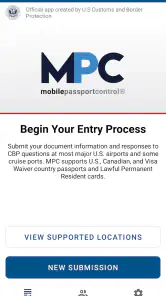
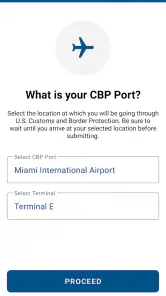
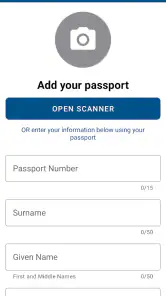
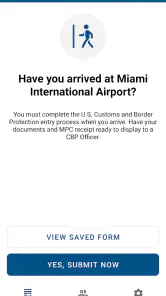
Analysis by Reviewed
I look at Mobile Passport Control as a travel helper for one specific, stressful moment: arriving in the United States and facing the customs process. It is a free app from U.S. Customs and Border Protection, so there is no purchase decision to weigh against a paid alternative. The real question is whether its focused role suits your trip and whether you are comfortable preparing information on your phone before approaching an officer.
What the free access is worth
For a no-cost tool, the appeal is practical rather than flashy. Mobile Passport Control is in the Travel & Local category, and its purpose is to let eligible travelers submit trip information and a customs declaration through a mobile workflow. That can be useful when you want to handle a small administrative task while waiting for luggage instead of trying to complete everything at the counter.
I would not treat free access as a promise of a shorter wait every time. Airport procedures and queues can vary, and using an app does not remove the need to follow instructions from Customs and Border Protection staff. Think of it as another way to prepare your arrival information, not a guaranteed shortcut or a replacement for the officer’s process.
Where it can fit into an arrival routine
A realistic use case is returning from a trip with a connection ahead. Once you have landed and can focus on the arrival steps, you can open the app, complete the trip submission, and keep the resulting confirmation ready to present as directed. I would do this before getting caught up in finding a gate or juggling bags; a calm moment in the terminal is better than trying to enter details while moving through a crowd.
One useful habit is to check your passport details before travel rather than waiting until arrival to discover a typo or a document-entry problem. Keep your passport accessible and your phone charged, too. These are simple preparations, but they reduce the chance that the digital route becomes an extra task at the busiest point of the journey.
Planning for a connection and other arrival pressures
For a traveler connecting onward, I would treat the app as one part of the arrival plan, not as a way to calculate whether a connection is safe. The time needed for inspection and airport movement can vary, so I would not book or approach a tight schedule on the assumption that submitting information digitally will make the whole process predictable. It may help organize the declaration step, but it cannot control queues, staffing, or the distance between arrival and the next gate.
Families or groups should also think through who will handle each person’s details before boarding the return flight. When several travelers are tired, carrying bags, and trying to stay together, deciding in advance who will use the phone and who will keep passports accessible can make the arrival less chaotic. I would avoid passing one unlocked phone around in a crowded area; complete the task deliberately and keep personal documents in hand.
More From Our News Desk

Clash of Clans Is Won Between the Battles

Android Auto Makes the Case for Quieter Car Software

MobiOffice: Transforming Mobile Productivity with Seamless Integration

EA SPORTS FC™ Mobile Soccer: Redefining Mobile Sports Gaming

How Microsoft OneDrive Became a Mobile Productivity Giant

How Google Translate Breaks Language Barriers Effortlessly
How it compares with the usual options
Compared with handling the same declaration entirely through the standard airport process, a mobile submission may make the information-entry part feel more organized. It is not the same as skipping immigration, and it does not make an airport’s normal instructions irrelevant. If you would rather avoid entering travel details on a phone, or if your battery is low, following the instructions available at the airport is the sensible fallback.
That distinction matters for travelers who expect every travel app to work like a boarding pass or a digital identity card. This one is narrower: it supports a particular part of U.S. entry, rather than managing flights, hotels, or an entire itinerary. I find that limited scope a strength when I need a focused tool, but it is not a reason to install it if your trips do not involve entering the United States.
Streamlining Your Airport Experience
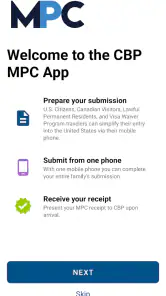
First things first, let's talk about what this app is all about. The Mobile Passport Control app is designed to expedite your entry into the United States. It's officially authorized by U.S. Customs and Border Protection, allowing you to submit your passport information and customs declaration form via your smartphone. The promise? Bypass those snaking lines at customs and move ahead like a VIP.
Getting Started – It’s a Breeze!
Setting up the app is straightforward and doesn't require a tech-savvy mind. Once downloaded, you create a profile by entering your passport details, which is as simple as scanning your passport. No more manually entering lines of information, which, let's admit, we all dread. The app is user-friendly, with a clean interface that even your grandma could navigate without a hitch.
Using the App – A Smooth Sailing
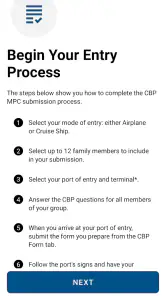
Once you’ve entered your details, the real magic happens when you land in the U.S. Open the app, and it will prompt you to complete a "New Trip." What I loved here was the speed at which it processed my information. Within seconds, I had my digital receipt, and I was ready to show it to the Customs officer. Trust me, this app is a time-saver, especially if you’re rushing to catch a connecting flight.
Because the Mobile Passport Control process is tied to an arrival, I would not wait until I am standing at the inspection point to sort out the basics. I’d make sure the profile is ready beforehand, then complete the trip step after landing and follow the airport’s directions about where to go and what to show. A receipt on a phone is helpful only if you can bring it up promptly, so keeping the device charged and the app easy to reach is a small but worthwhile part of the workflow.
Small workflow choices that matter
There is a useful difference between preparing a profile before travel and completing an arrival submission once you have landed. I would do the first step at home, when I can read passport details carefully, and save the arrival-specific work for a moment when I am stationary and able to focus. That separation reduces rushed typing without turning the app into something I have to manage throughout the trip.
I would also keep a practical fallback in mind: the phone is not the only thing that matters at inspection. Keep the passport available, pay attention to airport signs and staff, and do not assume a screen confirmation means you can walk past a checkpoint. If the phone is unavailable or the process does not fit the instructions at that airport, use the established procedure instead of losing time trying to force the digital route.
When a different approach is better
If you travel internationally only to destinations outside the United States, this app has little practical value for your usual routine. It is also not the right choice for someone who expects it to replace every document check or guarantee a fast lane. In those cases, the airport’s standard process is the dependable plan, and a general travel organizer may be more useful for the rest of the trip.
For eligible travelers, the app is most appealing when you are comfortable with a short digital step and want to arrive prepared. It has a 4.9 average from around 114,000 ratings, and more than a million installs; those figures suggest many people have found a reason to keep it on their phones, though they do not tell me how busy a particular airport will be. It is free, rated for Everyone, and currently at version 3.3.0, with U.S. Customs and Border Protection as its developer.
Security - Your Data Matters
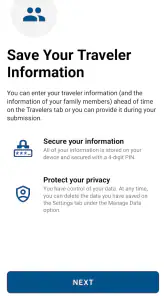
Now, I know what you’re thinking – "Is my personal information safe?" The app’s developers have taken this into account. The app uses secure encryption to protect your data, and it doesn't store any personal information on your device or share it with other entities. As someone who’s cautious about digital privacy, this reassurance was music to my ears.
Because passport details are sensitive, I would still use the app thoughtfully: download it through the official app store, keep access to my phone protected, and avoid entering personal information while distracted in a crowded area. A government-developed app can make the process feel more reassuring, but I still prefer to know what I am submitting and to keep my device in my control.
Who gets the most value from it
I would recommend trying it if you regularly return to the United States and are comfortable preparing travel information on a phone. Its value is clearest for people who want a dedicated tool for that specific arrival task, rather than another broad trip-planning app. For a first-time user, setting up the profile before departure and learning where the trip step fits into the arrival routine are sensible ways to avoid discovering the workflow under pressure.
It is less compelling for someone who rarely enters the United States, prefers to keep passport details off a phone, or does not want another step to manage while traveling. It also should not be the only part of an arrival plan if a traveler depends on certainty about queues or connection timing. In those cases, the usual airport process remains important, and a flight or itinerary organizer will be more useful for the rest of the journey.
Its rating is strong, but I would judge its usefulness by my own itinerary rather than popularity alone. The app was released on April 29, 2021, and requires Android 7.0 or later on Android devices. If you use an iPhone, check compatibility in its app store before relying on it for a trip; regardless of device, have your passport available and be prepared to follow the officer’s directions.
Although the app is currently limited to U.S. entry, it’s a game-changer for frequent travelers. Imagine breezing through customs while others are still queuing up. The Mobile Passport Control app is certainly worth trying if you’re traveling to the U.S. anytime soon. It’s like having a fast pass for the airport, minus the extra costs. So next time you pack your bags, make sure your phone is armed with this nifty app. Safe travels!
Mobile Passport Control Frequently Asked Questions
Is Mobile Passport Control the official app for U.S. entry processing?
Yes. Mobile Passport Control is an app from U.S. Customs and Border Protection, the U.S. agency responsible for border processing. Its purpose is to let eligible travelers submit passport and customs declaration information digitally as part of arriving in the United States. It can support the entry process, but travelers should still follow instructions from border officers and carry the required travel documents.
Where can I download Mobile Passport Control, and what should I check first?
Mobile Passport Control is available for Android and iOS and is free to download. Before installing, check that you are choosing the app developed by U.S. Customs and Border Protection and that your phone meets the operating-system requirements. The app is in the Travel & Local category, and its stated purpose is to streamline U.S. entry.
Who can use Mobile Passport Control when entering the United States?
Mobile Passport Control is intended for eligible U.S. citizens and Canadian visitors arriving in the United States. It provides a way to submit passport and customs declaration details digitally as part of the entry process. Before relying on the app for a trip, check that your traveler status and arrival plans fit the current CBP requirements; the app does not replace the need to carry your travel documents.
What is Mobile Passport Control?
Mobile Passport Control is a convenient app that allows U.S. citizens and Canadian visitors to expedite their entry process into the United States. By using the app, travelers can submit their passport information and customs declaration form via their mobile device, bypassing traditional paper forms and saving time at the airport.
How does Mobile Passport Control work?
Mobile Passport Control works by allowing travelers to submit their passport and travel information through the app before arriving at U.S. border control. Once the information is submitted, the app generates a QR code that travelers present to the customs officer upon arrival. This streamlines the process and helps avoid long lines.
Pros
- Streamlines airport security checks
- Eliminates paper forms at international arrivals
- Quick processing time for users
- Easy to use and navigate interface
- Reduces wait times significantly
Cons
- Limited to participating airports
- Requires stable internet connection
- No offline mode available
- Privacy concerns regarding data storage
- Non-transferable between devices
- Category
- Travel & Local
- Version
- 3.3.0