CBP Home
- 94.00
- 3.7
- Installs
- 100.00K
- Price
- Free

Screenshots


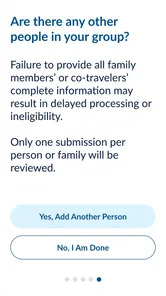
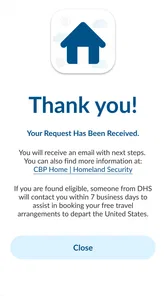
Analysis by Reviewed
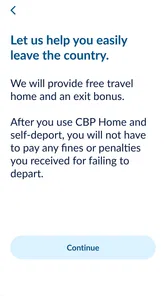
I approached CBP Home as a practical business app rather than something designed for everyday entertainment. Its purpose is narrow but important: it lets a person submit an intent to leave the United States. That focus immediately tells you what kind of value to expect. This is not a travel planner, a document wallet, or a general immigration information hub. It is a digital route for a specific declaration, developed by U.S. Customs and Border Protection.
In my experience, the strongest part of the app is also the easiest to overlook: it gives a clearly defined task its own mobile workflow. Instead of treating the process like a general web search, the app puts the submission action in a dedicated place. That can be useful when someone needs to organize their departure-related information and wants to work from a phone. At the same time, the narrow purpose means I would not install it expecting a broad collection of travel tools.
What the app actually offers and what free access means
The app is free to install and use in the basic sense presented by its listing, so there is no purchase decision comparable to choosing between a free and paid productivity suite. That matters here because the question is not whether the app is worth a subscription; it is whether a focused government service is useful enough to keep available when its particular task applies to you.
Its age rating is Everyone, which fits the straightforward administrative nature of the service. The app was released on May 21, 2025, and the current version is 1.25.0. It supports Android 8.0 and later, making it accessible on many older Android phones rather than reserving the process for recent hardware.
I would still separate “free app” from “free travel process.” Installing the application does not, by itself, answer questions about a person’s legal situation, travel documents, obligations, or what may happen after a submission. The useful financial fact is simply that the app itself does not require a listed purchase. Anyone deciding whether to use it should treat the digital tool as one part of a larger administrative process, not as a replacement for professional advice or official instructions relevant to their circumstances.
That distinction is especially important for people comparing this app with a search engine or a browser. A browser may help you read official guidance, but it does not automatically make a dedicated submission workflow easier to find or repeat. On the other hand, a browser can be better when your real need is research, explanation, or checking several related requirements. The app’s value comes from its focused action, not from covering every question around that action.
A focused workflow rather than a general travel companion
The store summary describes the central job plainly: submitting an intent to leave the United States. I found that clarity helpful because it sets a realistic boundary before you begin. You are opening the app for a specific administrative reason, not to browse destinations, compare flights, translate documents, or manage a complete itinerary.
More From Our News Desk

Weather by Xiaomi Review: Clear at a Glance, Less Clear Up Close

X Under Pressure: Can It Recover When Posting Goes Wrong?

Clash of Clans Is Won Between the Battles

Android Auto Makes the Case for Quieter Car Software

MobiOffice: Transforming Mobile Productivity with Seamless Integration

EA SPORTS FC™ Mobile Soccer: Redefining Mobile Sports Gaming
That narrow design can reduce distraction. When a person is handling a sensitive departure-related task, having a separate official application may feel more organized than searching through unrelated pages and advertisements. It also gives the task a recognizable home on the phone, which is useful if you need to return to it while preparing other travel arrangements.
The trade-off is that the app may feel underpowered if you expected a one-stop immigration assistant. I would not judge it harshly for lacking unrelated travel features, because those would make the product less focused. Instead, I would judge it on whether the submission path is understandable, whether the information requested is presented clearly, and whether the app helps you avoid careless mistakes. Those are the standards that matter for this particular tool.
A practical tip is to prepare before opening the app. Keep the personal and travel information you expect to need close at hand, use a stable connection, and avoid starting the process while rushing through an airport or sharing a phone with someone else. That is not a glamorous feature, but it is the kind of preparation that makes a focused government workflow less stressful.
Where it fits beside the usual alternatives
The most obvious alternative is using a mobile browser to find the relevant U.S. Customs and Border Protection page. A browser is more flexible and may be preferable when you need to read surrounding guidance, move between official pages, or investigate a situation that does not fit the app’s central purpose. It also avoids adding another application to your phone.
CBP Home makes more sense when you already know that the intent-to-leave submission is the task you need to address. The dedicated format can make the starting point easier to recognize, especially for someone who does not want to sort through general search results. In exchange, you give up the broad context and multitasking convenience of a browser.
Another alternative is asking a travel agent, attorney, community organization, or other adviser to explain the process. Human help is better when your circumstances are complicated or when you are unsure whether the process applies to you. The app cannot replace judgment from a qualified person who understands your individual case. Its role is more practical: it can provide a direct digital channel for the defined submission, while advice and interpretation may need to come from elsewhere.
I also would not compare it with commercial travel apps on the basis of visual polish or entertainment value. A flight app is built around schedules and bookings; a document app is built around storage; a government service app has a different responsibility. For CBP Home, a simple and unambiguous path is more valuable than a crowded dashboard.
Small decisions that can make the experience safer
One useful habit is to read each screen completely before moving forward rather than tapping through as if this were a routine sign-up form. Administrative submissions deserve a slower pace. Check names, dates, and identifying details against your documents before confirming anything. A dedicated app can make the process convenient, but convenience should not turn into automatic clicking.
A second practical insight is to distinguish the act of submitting an intent from the broader act of leaving the country. The app’s purpose is limited to the submission. It does not turn the phone into a complete departure checklist. I would separately organize transport, identity documents, personal belongings, communication access, and any advice that applies to the person’s situation. Keeping those tasks separate prevents the app from creating a false sense that every part of the departure has been handled.
A third is to think about access after submission. If you use the app during a stressful period, make a private note of what you submitted and when, using a secure method that does not expose sensitive information unnecessarily. Do not assume that simply installing an app means every future step will be visible in the same place. The exact follow-up you need may depend on your circumstances, so retaining your own careful record is a sensible organizational step.
Finally, use the official developer name as a trust check when locating the application. The developer is U.S. Customs and Border Protection. That does not mean every similarly named result is genuine, so I would avoid installing an imitation with a confusingly similar title or an unrelated publisher. For a government-related process, verifying the publisher before entering personal information is one of the most important steps.
How reliable does the public response look?
The app has an average rating of 3.7 from around 282 ratings, along with 94 written reviews. I read that as a mixed but meaningful signal rather than a guarantee. People are willing to use it, yet the experience is not universally smooth enough to produce an overwhelmingly strong score. For an administrative app, that usually makes me pay closer attention to clarity and friction instead of treating the rating as a simple recommendation.
It has passed the 100K+ install mark, which suggests that the need it addresses is real and that the app has reached a substantial audience. Still, popularity does not prove that it will fit your case. A person who needs the specific submission may find it valuable immediately, while someone merely looking for general travel or immigration information may gain very little from installing it.
The rating and install figures are best used as context. They tell me this is not an obscure experiment, but they do not tell me that every device, situation, or submission will feel identical. With a government workflow, even a small point of confusion can matter more than it would in a casual app, so I would keep expectations practical and read the screens carefully.
Who is most likely to benefit?
The clearest audience is someone who needs to submit an intent to leave the United States and prefers handling that defined task from an Android phone. It is also a sensible option for people who want a direct official channel rather than relying on a random third-party explanation. If your phone runs Android 8.0 or later, the technical entry barrier is relatively modest.
It may also help a family member or trusted support person understand where the task is being handled, provided the person using the app protects private information and remains the one making the relevant decisions. In a real everyday scenario, imagine someone preparing to leave while managing luggage, transport, messages, and paperwork. A dedicated app can give that one administrative action a clear place in the preparation routine instead of leaving it buried among dozens of browser tabs.
That scenario does not make the app a universal solution. If you are unsure whether you should submit an intent, if your circumstances involve legal complexity, or if you need an explanation of consequences, I would seek qualified guidance before relying on the app. The right choice may be to use professional help first and the application only for the digital step that you are instructed to complete.
I would also skip it if your goal is ordinary tourism planning. It will not be my recommendation for finding hotels, checking flight options, building an itinerary, or storing a broad set of travel documents. A browser or specialized travel application will serve those needs better. Installing a narrowly focused government tool “just in case” can add confusion when you do not have the specific task it was designed to handle.
Limitations worth considering before you begin
The first limitation is scope. Because the app centers on one submission, you may need other sources for context, preparation, and follow-up. That is not necessarily a design flaw, but it does mean the app should be treated as one component rather than the entire process.
The second is the sensitivity of the task. Any time you enter personal or travel information into a mobile application, you should pay attention to the publisher, the device you are using, and who can see the screen. I would avoid completing a sensitive submission on a public device or while connected to an unfamiliar network if I had a safer option. These are ordinary precautions, but they matter more here than they would in a recipe app.
The third is the possibility of friction when a person’s situation does not match a simple path. A focused workflow is efficient when your need is clear; it can be less reassuring when you have exceptions, uncertainty, or questions that require interpretation. In those cases, the app may still be useful, but it should not be the only resource guiding your decision.
The fourth is that a free download can create unrealistic expectations. There is no listed purchase to evaluate, but “free” does not mean the app can answer every related question or guarantee an outcome. I see the cost advantage as a reason to consider it, not as proof that it is sufficient for everyone.
My recommendation for deciding whether to use it
I would recommend CBP Home to a person whose immediate need matches its defined purpose and who wants an official, phone-based way to submit an intent to leave the United States. The free access, broad Android compatibility, and direct focus make it a reasonable tool to keep in mind for that situation. Its developer, U.S. Customs and Border Protection, also makes the app’s role clear rather than presenting it as a generic commercial service.
My recommendation comes with a firm condition: use it deliberately. Confirm that the task applies to you, prepare the information before starting, check every entry, and keep separate notes for the wider departure process. If your questions are legal, personal, or unusually complicated, get appropriate advice instead of expecting the app to interpret your circumstances.
For me, the moderate public rating is a reminder to value function over polish. I would not install it for a broad travel experience, and I would not treat it as a replacement for official guidance or professional assistance. But for the specific job it sets out to handle, a dedicated free app can be more convenient than hunting through general web pages.
My bottom line: use it when you genuinely need to submit an intent to leave the United States and want that action organized on your Android phone. Skip it when you are looking for general travel planning, broad immigration explanations, or personalized advice. The value is not in having many features; it is in giving one sensitive administrative task a clear digital starting point.
CBP Home Frequently Asked Questions
Is CBP Home free to download, and which devices can run it?
CBP Home is free to download and is rated for everyone. It is available for Android and iOS devices, with the Android version requiring operating system 8.0 or later. Before installing, check that your device meets the relevant system requirements and that you are downloading the official app published by U.S. Customs and Border Protection.
What is CBP Home, and what is it used for?
CBP Home is an official U.S. Customs and Border Protection mobile application designed to provide selected services and information for travelers and certain individuals interacting with CBP. Its store summary describes a function for submitting an intent to leave the United States. Available features can change, so users should read the official instructions carefully before relying on the app.
Is CBP Home an official and trustworthy application?
CBP Home is associated with U.S. Customs and Border Protection, a federal agency within the U.S. Department of Homeland Security. Before downloading, users should confirm that the developer shown in Google Play or the App Store is the official government publisher and that the download page uses the correct application name. Avoid unofficial copies, advertisements, or websites requesting sensitive information outside the app’s legitimate process.
What information or permissions does CBP Home require?
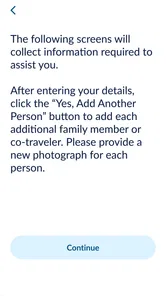
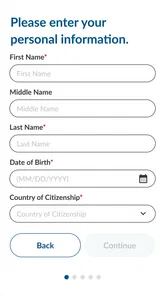
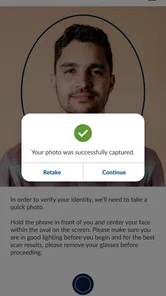
The information and permissions requested by CBP Home may vary according to the feature being used and the user’s circumstances. The app may ask for personal details, identity or travel information, photographs, location access, camera access, notifications, or other data needed to complete a government-related submission. Review each request carefully, provide accurate information, and check the app’s privacy notice before continuing.
Can CBP Home be used instead of contacting CBP or an immigration professional?
CBP Home should not automatically be treated as a replacement for speaking with a CBP officer, an attorney, an accredited immigration representative, or another qualified professional. The app can provide a digital way to complete specific procedures, but it does not guarantee approval, legal status, entry, departure, or any immigration outcome. Users with complicated cases should seek reliable professional advice and follow official instructions.
Pros
- Offers clear guidance for eligible travelers returning to the United States.
- Can help reduce paperwork compared with traditional border processing.
- Provides access to official CBP instructions and updates in one place.
- Useful for checking application details before beginning the travel process.
- Free to download from official app stores.
Cons
- Eligibility is limited and may not apply to every traveler or situation.
- Requires accurate personal and travel information to submit a request.
- An app submission does not guarantee approval or entry authorization.
- Availability and processing times may vary depending on CBP review.
- Some users may find identity verification and permissions inconvenient.













