The Home Depot
- 86.34K
- 4.6
- Installs
- 10.00M
- Price
- Free

Screenshots






Analysis by Reviewed
I reach for a home-improvement shopping app when a project has moved beyond “I should fix that” and into the practical questions: what part might solve it, what else will I need, and is a store trip worth making? The Home Depot app is most helpful at that point. It gives me a way to research items and prepare a shopping run from my phone, while still leaving room to check a part in person before I commit.
When a project starts with a missing piece
I find this app most useful when I already know the kind of job I’m tackling but need to turn a rough idea into a practical shopping trip. A repair that stalls because of one forgotten fitting is a familiar frustration, and checking products before leaving home can help me decide whether a store visit is worthwhile. It is less compelling if I only want broad inspiration or prefer comparing every retailer before choosing where to buy.
That distinction is worth thinking through before downloading it. If I have a specific task—patching a wall, replacing a fixture, or replenishing supplies—the app’s retail focus gives my search somewhere concrete to go. If I am still deciding whether to repaint a room or change its layout, I may get more value first from visual references, a measuring tool, or advice from someone who knows the space. This app helps me shop for a project; it does not make the project decision for me.
From search to a workable shopping list
The Home Depot, Inc. makes this free shopping app, which is rated for Everyone and has been available since March 15, 2011. Its current version is 7.56, and it requires iOS 8.0 or later. The app has a 4.6 average from around 854,000 ratings, with more than 10 million installs. Those figures suggest it has become a familiar tool for shoppers, though popularity alone does not make every part of a project easier.
My practical approach is to search for the main item first, then check related supplies before I head to the store. For example, if I’m replacing a door handle, I would verify the style and finish, then think through the screws or tools I might also need. A list is more useful when it separates the must-haves from the “check this before buying” items; otherwise, a quick browse can still leave room for a second trip. Use the app to prepare the trip, not as a substitute for checking that a part fits your specific project.
For a less obvious but useful workflow, I make the search more precise before trying different product terms. I write down what the item connects to, its visible dimensions, and any markings on the old part, then use those clues while browsing. That turns a vague search like “pipe fitting” into a more focused comparison and gives me useful details to show a store associate if I reach a dead end. It is a small step, but it can prevent the common mistake of choosing something that looks right in a photo yet does not match the existing setup.
Moving from phone research to a finished store trip
First off, let's talk about the shopping experience. We all know how overwhelming it can be to navigate through endless aisles at a physical store. With the The Home Depot app, you can browse their vast inventory right from your couch. The app's user-friendly interface makes finding what you need a breeze. Whether you're searching for a specific type of nail or exploring power tools, it’s all just a few taps away. The search function is robust, allowing you to filter products by department, brand, or price, which makes hunting for the best deal incredibly straightforward.
More From Our News Desk

Weather by Xiaomi Review: Clear at a Glance, Less Clear Up Close

X Under Pressure: Can It Recover When Posting Goes Wrong?

Clash of Clans Is Won Between the Battles

Android Auto Makes the Case for Quieter Car Software

MobiOffice: Transforming Mobile Productivity with Seamless Integration

EA SPORTS FC™ Mobile Soccer: Redefining Mobile Sports Gaming
In practice, I would use those filters to narrow a crowded results page, not to decide on a technical match by themselves. Filtering by department can cut out irrelevant options, while brand and price can help me compare a shorter list. I still read the item details carefully and treat product photos as a visual aid rather than a measurement. For an unfamiliar repair, narrowing choices is useful; assuming that the first result is the right one is not.
Project Planning Made Easy
One of the standout features of this app is its project planning tools. Have an idea but not sure where to start? The app provides project guides and tutorials that are super helpful. It’s like having a skilled handyman ready to give you advice at any time. Moreover, you can create shopping lists for your projects, ensuring you won’t forget a single item when you’re ready to roll up your sleeves and get to work.
I’d treat a guide as a starting point rather than a complete specification. A tutorial can help me organize the order of tasks and spot supplies I had not considered, but the right materials still depend on the surfaces, dimensions, and condition in my own home. A useful habit is to note measurements and the existing product details before browsing, then compare them against the item information rather than relying on a thumbnail or a broad product name.
Lists become more helpful when I use them as a decision tool instead of a simple pile of products. I can keep confirmed purchases separate in my mind from items that need a measurement, photo, or second opinion. For a weekend paint job, for instance, I might identify the paint and likely preparation supplies in advance, but wait to settle on quantities until I have checked the room and surface. That approach makes the list useful without pretending the app can inspect my walls.
In-Store Navigation
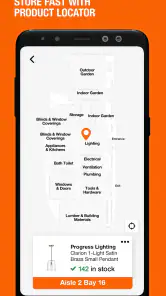
Now, for those who still enjoy the tactile experience of shopping in-store, the app has something for you too. With its in-store product locator, you can find out exactly where your desired item is located within your local store. No more wandering aimlessly through aisles; just check the app, and it’ll guide you directly to what you need. This feature is a total time-saver, especially if you're on a tight schedule.
That locator is most valuable when I arrive with a focused list and want to move through the store efficiently. I would check the item location before asking an associate, then use the physical product to confirm details such as size, finish, or compatibility. That handoff matters: the app can narrow the search, while the shelf gives me a chance to inspect what I am actually taking home.
A practical tip is to keep the trip flexible even when the aisle information looks clear. If I am buying several unrelated supplies, I can use the listed locations to plan a sensible route, but I would not build a tight schedule around an assumed walk from one item to the next. A store visit can still involve checking labels, comparing alternatives, or asking for help. The locator reduces aimless searching; it does not remove the value of looking carefully.
And if you're worried about availability, the app lets you check the stock status of items in real-time. So, you’ll know if that hot-ticket item is available before making the trip.
For a realistic example, imagine a dripping faucet discovered before work. I can look up a likely replacement part, build a list of the tools and supplies to investigate, and check the local store before setting out. If the listing or the shelf leaves me unsure about fit, I can pause and confirm the details rather than buying on a guess. That small checkpoint can save more time than rushing to the store with only a product name.
The same sequence works for less urgent jobs, such as replacing a broken cabinet pull. I can compare finishes at home, bring a note of the existing hardware’s measurements, and use the store visit to check the feel and appearance against the cabinet. The useful handoff is from screen to shelf: online browsing helps me narrow the choice, but seeing the item beside the old one can settle questions that a listing cannot answer as clearly.
Before leaving, I would also decide which items are essential today and which can wait. If the main repair part is unavailable or turns out to be the wrong fit, having a clearly marked list makes it easier to avoid buying unrelated extras just to feel that the trip was productive. The app is most valuable when it supports a good decision, including the decision to stop and verify something first.
Pro Perks and More
For the professionals out there, the app offers exclusive benefits that can make managing your projects even smoother. From special pricing to personalized offers, it’s like having a VIP pass to the best deals around. Plus, if you're a frequent shopper, you can track your purchase history and easily reorder supplies, saving you the hassle of remembering each item you need.
Purchase history is particularly handy for repeat jobs: instead of trying to recall which consumables or replacement items I bought last time, I can use past purchases as a reference and rebuild a list. I would still check current product details before reordering, since a previous purchase is a clue, not proof that the same item suits a different repair. For a contractor, this kind of record-keeping can support routine supply runs; for a one-off shopper, it may matter much less.
For someone who regularly buys the same supplies, that record can also help separate a recurring need from a one-time purchase. I might use it to remind myself which kind of consumable worked for a familiar job, then confirm that it is still appropriate before placing it on a new list. The trade-off is that convenience can encourage automatic reordering. A past choice should make the next search faster, not replace a fresh check when the material, task, or conditions have changed.
Where the shopping flow can break
Compared with a general marketplace app, this one is focused on Home Depot’s own shopping experience. That focus is convenient when I want to search its range, plan a store visit, or look back at purchases, but it is not the best tool for comparing the whole market across multiple retailers. A retailer’s app may also make it easy to browse, yet the store locator and project-oriented workflow here are more relevant when I intend to buy from Home Depot and collect or inspect items in person.
That makes the choice between apps fairly simple. If I already plan to shop at this retailer, using its own app can keep product research and the physical trip connected. If I am deciding where to buy a common item, a general shopping search or a competing retailer’s app may reveal alternatives more efficiently. I would not treat any one retailer’s catalog as a complete view of what is available elsewhere, especially when price or a particular specification matters more than convenience.
There are practical limits to keep in mind. Stock status is useful for deciding whether to make a trip, but I would not treat a screen check as a guarantee that an item will still be waiting when I arrive. Product names and images also cannot resolve every compatibility question, especially when a repair depends on exact dimensions or an existing component. If a job involves unfamiliar materials or a consequential installation, I would use the app to prepare questions and then seek a reliable in-person check rather than letting a convenient search result make the decision for me.
Another point to consider is how much of the task happens away from the phone. The app can help me prepare and locate products, but painting, fitting a replacement, or diagnosing a leak still depends on the actual space and materials. For some projects, I need measurements, a sample, or advice from a knowledgeable person more than I need another round of browsing. When that is the case, I use the app to organize what I already know and let the physical inspection guide the final choice.
The app is a strong fit for homeowners, DIY beginners who benefit from guides, and tradespeople who regularly shop at this retailer. I would skip it if I rarely buy home-improvement supplies, need neutral cross-store price comparisons, or prefer to choose everything only after seeing it in person. In those cases, a browser search or a visit to several stores may be a better starting point. For my own projects, the best use is a simple handoff: research and list-building on the phone, confirmation in the aisle, then the actual work at home.
So, would I use it for every home project? No. For a quick supply run, a recurring purchase, or a repair where I can identify the item and verify the fit, it is a practical companion. For a complex job where the correct material depends on conditions I cannot describe confidently, I would start by getting informed advice and use the app afterward to organize the shopping. That boundary keeps its convenience in perspective and helps me avoid treating a retail search as technical guidance.
In conclusion, the The Home Depot app is a powerhouse of features that cater to both DIY enthusiasts and professional contractors. Its intuitive design, coupled with its practical tools, makes it an essential app for anyone looking to tackle home improvement projects with confidence and ease. So, next time you’re planning a project, let the app take some weight off your shoulders and help you bring your vision to life.
My recommendation is more specific: I would install it if Home Depot is already part of how I shop for repairs or supplies, because it can make the path from a rough list to a focused store visit less scattered. I would keep one rule in mind throughout: use the phone to research, organize, and find; use measurements, the product itself, and informed help to confirm. With that division of labor, the app earns its place as a useful shopping companion without asking it to solve every part of the project.
The Home Depot Frequently Asked Questions
Can I search for products in The Home Depot app before visiting a store?
Yes. The app is built for searching and browsing a large range of products, so you can look for items and review your options before heading to a store. That can make it easier to plan a project and decide what you need in advance. The Home Depot app is a shopping app, but you can use its catalog to research products without completing a purchase.
Is The Home Depot app suitable for planning a home improvement project?
It can be useful when you are gathering ideas or making a shopping list for a project. The app lets you search, browse, and shop products directly from The Home Depot, giving you a place to explore items relevant to your plans. You can use it at your own pace and decide what to buy later, rather than placing an order as soon as you open the app.
Can I browse The Home Depot app without making a purchase?
Yes. The app lets you search and browse products without requiring you to place an order. You can explore the catalog and use it to research items for a home improvement project before deciding whether to buy. Shopping is its main purpose, but simply looking through products can also help you prepare for a store visit or compare options at your own pace.
Which devices can run The Home Depot app?
The Home Depot app is available for Android and iOS devices. On Android, it requires version 8.0 or later, so it is worth checking your device’s operating system before downloading. The app is rated for Everyone and is designed for shopping, with product browsing and ordering tools for customers who want to shop from a phone or tablet.
What features does The Home Depot app offer?
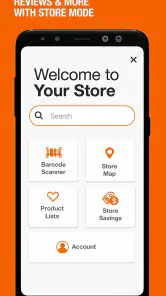
The Home Depot app provides a range of features designed to enhance your shopping experience. It allows you to browse products, check inventory levels at your local store, and place orders for pick-up or delivery. Additionally, you can access exclusive promotions, track your order status, and even use the barcode scanner for quick product information. It's a comprehensive tool for planning and executing your home improvement projects.
Pros
- Extensive inventory for home improvement needs.
- User-friendly interface for easy navigation.
- Loyalty program offers exclusive discounts.
- In-app tutorials for DIY projects.
- Real-time inventory updates and availability.
Cons
- Limited delivery options for some areas.
- Occasional app crashes reported by users.
- Push notifications can be overwhelming.
- Requires a strong internet connection.
- Some users find the search function lacking.
- Category
- Shopping
- Version
- 7.56












