Workforce Tools
- 4.69K
- 3.2
- Installs
- 500.00K
- Price
- Free

Screenshots

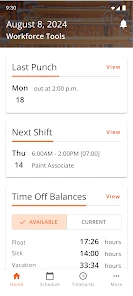
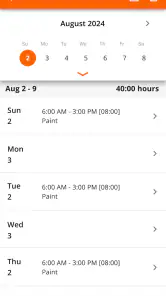
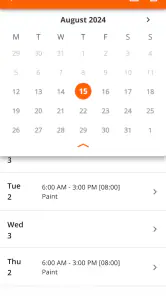
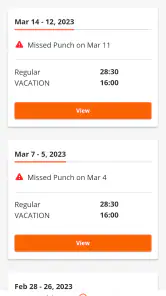
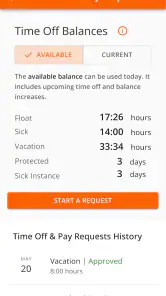
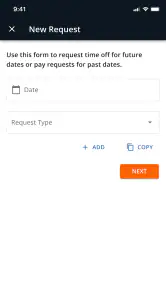

Analysis by Reviewed
I see Workforce Tools as most useful when an employer already relies on it to keep staff schedules and time records in one place. It can make the ordinary workday easier to coordinate, but it is not a general-purpose planner or a replacement for every workplace system. The key question is whether your team uses it: without that, its value is limited.
Start with the workplace, not the download
Before installing any work scheduling app, I would find out which system my manager treats as authoritative. That small check is more useful than judging an app by its screenshots or feature claims. If the team posts the official schedule in Workforce Tools, it can become a straightforward daily reference. If updates are actually passed around in another channel, the app may be one more place to check without giving you a dependable answer.
This distinction matters most when a shift affects something costly or difficult to rearrange, such as a ride, a childcare handoff, or an appointment. I would verify a significant change through the workplace’s normal process before acting on it. That is not a criticism unique to this app; it is a sensible boundary for any employee-facing schedule tool, where the accuracy of the information depends on how the employer uses it.
Making a workplace schedule easier to manage
As a free business app from The Home Depot, Inc, Workforce Tools is designed around scheduling, timekeeping, and a work calendar. I would approach it as a practical companion for checking when I am expected at work and keeping relevant work details close at hand, rather than as a broad productivity suite. It is rated for Everyone, has been available since July 3, 2018, and has an average rating of 3.2 from around 49,000 ratings. That mixed score is a useful reminder to keep expectations measured: a workplace tool can be convenient and still depend heavily on how well it fits an employer’s processes.
Where it can earn a place in your routine
For a shift-based employee, a dependable schedule view can reduce the small uncertainties that tend to pile up during a busy week. I can see the appeal of checking a calendar before making plans, then returning to it when a shift or work commitment needs attention. The strongest case for the app is this practical, repeated use: it puts work timing at the center instead of asking staff to piece together details from messages, printed notices, and a personal calendar.
A realistic example is a worker who needs to plan a ride home and family errands around changing shifts. Checking the work calendar before committing to an appointment can prevent an avoidable clash. My tip would be to make a quick schedule check part of the same routine as reviewing the next day’s plans, rather than assuming an older note or screenshot is still current. A phone app is helpful for access, but it only helps if you check the current information when plans change.
Turning schedule checks into a useful workflow
I would use the calendar as a first step, not as the entire planning process. At the start of a week, I would look over the shifts that affect transport, family arrangements, or other fixed commitments. Then I would put only the important personal conflicts into my usual calendar. This keeps the work schedule as the source for work timing while still giving me one view of the parts of life that compete for the same hours.
More From Our News Desk

Clash of Clans Is Won Between the Battles

Android Auto Makes the Case for Quieter Car Software

MobiOffice: Transforming Mobile Productivity with Seamless Integration

EA SPORTS FC™ Mobile Soccer: Redefining Mobile Sports Gaming

How Microsoft OneDrive Became a Mobile Productivity Giant

How Google Translate Breaks Language Barriers Effortlessly
There is a practical trade-off here: copying every shift into a second calendar can make your plans easier to see, but it also creates a duplicate that can go stale. If a shift changes, both places need attention. I would either keep the personal calendar entry limited to the commitments that matter or make schedule review a deliberate habit whenever the workplace changes a shift. A screenshot is convenient for a quick glance, but it is a poor substitute for checking the current schedule when something important depends on it.
What it does not replace
Workforce Tools should not be mistaken for a universal calendar or a complete team communication platform. A personal calendar remains better for combining work with medical appointments, school events, and other commitments, while a team’s established communication channel may be better for conversations that need wider context. I would use the work app as the reference point for work scheduling and keep personal planning in the tool I already trust. That division also avoids scattering every part of life across workplace software.
There is a trade-off in relying on an employer-oriented app: its usefulness depends on the workplace actually using it and keeping schedules current. If your manager shares shifts elsewhere, or your team handles changes through a different process, maintaining two versions can create confusion rather than reduce it. Before depending on it for an important appointment or commute, I would confirm that it is the channel your workplace expects staff to use.
How it compares with familiar alternatives
A paper rota can be easy to understand and visible to everyone who passes the noticeboard, but it is not much help when you are away from work or trying to plan on the move. A personal calendar is stronger for seeing work beside appointments and family commitments, yet it can become a manual copy of a schedule that may change. Workforce Tools makes the most sense as the workplace-facing reference when the employer has chosen it, rather than as a reason to abandon those other tools.
For teams already coordinating shifts through an established system, switching between that system and this one may add friction instead of removing it. I would not choose an app simply because it is available; I would choose the process that coworkers and managers actually maintain. The useful comparison is therefore not which tool has the longest feature list, but which one gives staff a shared, dependable place to check work timing.
Who is likely to benefit most
I would recommend trying it to employees whose work involves scheduled shifts and whose employer has made it part of the routine. It is also a reasonable option for someone who wants a focused place to check work timing without turning a personal calendar into a noticeboard. Managers may find a shared scheduling tool useful for keeping staff aligned, though the day-to-day experience still depends on how the workplace handles updates and requests.
It is less compelling for someone with a stable, conventional workday who already gets clear information through a reliable calendar, or for a worker whose employer does not use this system. In those cases, a regular calendar may be simpler. I would also avoid treating any scheduling app as the sole record of an important change until I had checked that the update is reflected in the workplace’s normal process.
With over 500,000 installs and around 4,700 reviews, the app has reached a substantial audience, though those figures alone do not tell me whether it will suit a particular employer. The rating suggests a mixed experience rather than an obvious recommendation for everyone. I would judge it by whether it keeps my own work week clearer, not by its popularity.
What to expect from an employer-linked tool
One question a new user may reasonably have is whether downloading it alone is enough to make it useful. In my view, the answer depends on whether the employer has put it into the team’s routine and made clear how staff should use it. An employee can install an app, but the value of a shared schedule comes from everyone relying on the same process. I would ask a manager where schedule changes are posted and whether staff should check the app before each shift.
The same principle applies to timekeeping. Since the app is intended for timekeeping as well as schedules, it may fit a workplace where those tasks are already organized through it. I would still follow the employer’s instructions for recording work time and resolving discrepancies, rather than assuming the app replaces every formal workplace procedure. That is especially important for someone who is new to the team or has not yet learned how schedule and time records are handled.
How I would use it alongside other tools
Compared with a paper rota, a work scheduling app is easier to check while away from a noticeboard. Compared with a general calendar, it can keep workplace scheduling in its own lane, but a personal calendar is still the better place to see work alongside everything else. The useful middle ground is to check the work schedule first, then add only the commitments you need to your personal planning system. That is especially helpful when arranging childcare, transport, or appointments around shifts.
One practical habit is to review the upcoming work calendar before the week gets busy and again before making a commitment that depends on a particular day off. Another is to treat schedule changes as something to verify through your team’s accepted process, rather than relying on memory. These small checks matter because the app’s main benefit is coordination; it cannot prevent confusion if coworkers are using different sources.
Why the reception calls for measured expectations
The app is free and has attracted over 500,000 installs, but reach does not guarantee that it will suit every workplace or every employee. Its 3.2 average from around 49,000 ratings points to a mixed reception, so I would not describe it as an automatic win. For an employee deciding whether to use it, the more revealing test is whether their employer actively maintains the schedule there and whether checking it makes daily planning clearer.
That context also helps explain why individual experiences can differ. A focused work tool is only as useful as the routine built around it: a current schedule and consistent team use make it helpful, while scattered updates can undermine its purpose. I would give it a fair trial if the workplace has adopted it, but I would not expect the app itself to fix an unclear scheduling process.
My verdict
Overall, I see Workforce Tools as a focused workplace utility, not a must-have for every employee. It makes the most sense when an employer uses it consistently and staff need a convenient way to stay oriented around work schedules and timekeeping. If you want one place to organize your whole life, or your team already has a process that works well, another calendar or the existing workplace channel may be a better fit. For a shift worker whose workplace depends on it, though, keeping the schedule within easy reach can make routine planning feel less uncertain.
Ever found yourself tangled in the complexities of managing your work schedule, checking your paystubs, or making last-minute shift changes? Fear not, because the Workforce Tools app swoops in like a superhero to save the day. This handy app has become my go-to for managing all things work-related, and believe me, it makes life a lot easier!
Streamlining Work-Life Balance
Let's dive right into what makes the Workforce Tools app a must-have for anyone juggling the demands of work and life. First off, the app is all about convenience. Imagine all your work-related tasks bundled up in one neat little package on your phone. Whether it's checking your schedule, swapping shifts with a colleague, or even requesting time off, it's all just a tap away. The interface is super intuitive, which means you don't need to be a tech wizard to navigate through it. That's a win-win in my book!
Features That Pack a Punch
One of my favorite features is the real-time schedule updates. Gone are the days of being caught off guard by a shift change. With this app, any change made by your employer reflects instantly, keeping you in the loop 24/7. Plus, it's a breeze to communicate with your team. Need to send a quick message or coordinate a shift swap? The built-in messaging feature has got you covered.
Another standout feature is the ability to access your pay information. No more waiting for paper stubs or logging into clunky websites. With a few taps, you can view your earnings, deductions, and even download pay statements. It's like having your personal finance assistant right in your pocket!
Why You'll Love It
Besides its practicality, what truly makes this app shine is its focus on improving work-life balance. By having everything work-related organized and accessible, you can spend less time stressing over work logistics and more time doing what you love. Whether you're a shift worker, a manager, or just someone who appreciates efficiency, this app caters to all.
And let's not forget about its performance. It's reliable and runs smoothly without those pesky crashes that some other apps are infamous for. Plus, it works on both Android and iOS, so no one gets left out. It's like the universal remote for your work life!
In conclusion, the Workforce Tools app is a game-changer for anyone looking to streamline their work-related tasks. It's efficient, user-friendly, and incredibly handy. If you haven't already, give it a spin and see how it transforms the way you manage your work commitments. Trust me, you'll wonder how you ever managed without it!
Workforce Tools Frequently Asked Questions
What kind of app is Workforce Tools?
Workforce Tools is a business app from The Home Depot, Inc. Its stated purpose centers on scheduling, timekeeping, and calendar tasks, so it may be worth considering if you want those work-related functions in a mobile app. The short description is simply “Workforce Tools,” while the store summary gives a clearer idea of its core focus.
Who publishes Workforce Tools, and who might want to install it?
Workforce Tools is published by The Home Depot, Inc. and is aimed at people looking for a mobile way to handle workforce scheduling, timekeeping, and calendar tasks. Employees or managers who deal with work schedules may find that focus relevant. Its Everyone content rating means the app’s content classification is not limited to adults.
Is Workforce Tools free to download?
Workforce Tools is free to download. It is a business app from The Home Depot, Inc, focused on scheduling, timekeeping, and calendar tasks. Before installing it, consider whether those functions fit what you need from a workforce app; the app’s free price makes it possible to try its core purpose without paying for the download.
Who is Workforce Tools designed for?
Workforce Tools is designed for people who need a mobile way to handle workforce scheduling, timekeeping, and calendar tasks. Its business focus makes it relevant to employees and managers whose work involves coordinating schedules or keeping track of time. The app is rated for Everyone, so its content rating does not restrict it to adults.
What is Workforce Tools and what does it offer?
Workforce Tools is an all-in-one mobile application designed to streamline workforce management for businesses. It offers features such as shift scheduling, time tracking, task management, and seamless communication within teams. The app aims to enhance productivity by providing real-time updates and easy access to vital work-related information, making it an essential tool for businesses of all sizes. Its store summary describes it as a scheduling, timekeeping, and calendar app.
Pros
- Streamlines employee scheduling efficiently.
- User-friendly interface for easy navigation.
- Integrates well with other business tools.
- Real-time updates enhance productivity.
- Customizable features to fit various needs.
Cons
- Occasional syncing issues with servers.
- Limited offline functionality.
- Some users report slow loading times.
- Initial setup can be time-consuming.
- Requires regular updates for bug fixes.
- Category
- Business
- Version
- Varies with device












