The Guardian - US & World News
- 20.84K
- 4.6
- Installs
- 5.00M
- Price
- Free

Screenshots






Analysis by Reviewed
I judge a news app by what it helps me understand, not by how many headlines it can put on screen. The Guardian - News & Sport works best when I want a mixture of quick updates and reporting I can spend time with. It is not a neutral-feeling ticker or a substitute for every source I might consult; its strength is giving me a substantial daily read across world news, opinion, sport and more.
Useful when I want context, not just a breaking alert
In a typical morning, I might open the app while having coffee, skim the main coverage, and mark a developing story to read properly later. That two-stage habit suits the way the app brings immediate news together with analysis: I can get oriented first and return for more context when I have the time. It is a more satisfying routine than scrolling through isolated alerts, although I still compare coverage elsewhere when a major story is changing quickly.
The Guardian is a free news app from Guardian News & Media Ltd. Its mix of reporting, opinion, analysis, sport, podcasts and puzzles gives it a broader feel than a feed built only around breaking headlines. The app has a 4.6 average from around 405,000 ratings, but for me the more important question is whether its editorial approach and range fit the way you like to follow current events.
What a focused reading routine can do
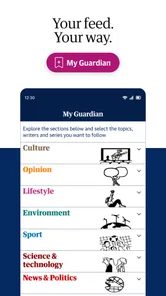
I get more out of the app when I treat it as a place to choose what deserves my attention, rather than an endless feed I have to clear. Following a small number of subjects or writers can make returning to the app feel more purposeful. If I add every interest, however, the mix can become harder to scan. My practical tip is to begin with only a few topics and adjust after noticing what I actually read.
That approach is handy for someone who follows both public affairs and sport. I can move from a major news story to match coverage without opening a second app, while still having room for commentary rather than only a score. But the trade-off is focus: anyone who mainly wants rapid scores or detailed match-specific tools may be better served by a dedicated sports app. This one makes more sense when sport is part of a wider reading habit.
Choosing alerts instead of letting alerts choose for me
Notifications are most useful when I reserve them for subjects where timing matters. I would not enable every available alert just because it is offered; a stream of interruptions can make even worthwhile news feel like noise. I prefer to let the phone surface only the updates I genuinely want promptly, then open the app at a convenient moment for the rest.
That distinction also answers a practical question: can I use it without allowing news to take over my day? Yes, if I keep alerts limited or leave them off and check in at set times. Readers who need constant live updates may choose a more alert-heavy setup, but anyone trying to protect work, study or family time should start conservatively and see whether the notifications add value.
More From Our News Desk

Weather by Xiaomi Review: Clear at a Glance, Less Clear Up Close

X Under Pressure: Can It Recover When Posting Goes Wrong?

Clash of Clans Is Won Between the Battles

Android Auto Makes the Case for Quieter Car Software

MobiOffice: Transforming Mobile Productivity with Seamless Integration

EA SPORTS FC™ Mobile Soccer: Redefining Mobile Sports Gaming
Reading ahead when the connection is unreliable
The offline reading option is especially useful when I know I will be away from dependable internet. Before a commute, I can prepare a couple of articles while connected and return to them on a train or during a wait. The important detail is to do that in advance: offline reading helps with stories already prepared, not with discovering a new breaking update after reception disappears.
I also find that this changes how longer pieces fit into an ordinary day. Rather than waiting for an uninterrupted hour, I can use a quiet stretch of travel to continue reading. It is a good match for people who like considered reporting but rarely sit down with it at home. If you mainly use news apps for live updates, this benefit may matter less than speed and a compact headline view.
What works well, and where it asks for patience
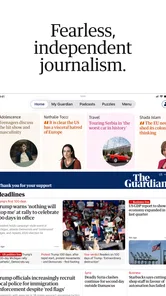
First things first, the user interface is super sleek. You know how some apps just make you want to throw your phone against the wall? Well, not this one. The design is intuitive and easy to navigate, which means I can find the stories that interest me without any hassle. Whether you're a tech wizard or someone who struggles with the basics, The Guardian - News & Sport has you covered.
Content Galore
The app offers a wide array of content, from breaking news to in-depth analysis. I particularly enjoy the sports section. Whether it's football, cricket, or tennis, the app keeps you updated with live scores and expert commentary. It’s like having a sports analyst right in your living room. Plus, the ability to personalize your feed to follow specific topics or writers is a massive bonus.
That flexibility is most useful when I use it deliberately: following a few subjects or writers makes the feed feel more relevant, while adding too many interests can make it harder to tell what deserves my attention. I also like having sport alongside general reporting, since I can move between a major news story and a match without switching apps. If all you want is a score ticker, though, a dedicated sports app may be faster and more focused; this one makes more sense when commentary and wider coverage matter too.
Notification Heaven
Now, I know what you’re thinking: notifications can be annoying. But hear me out. The notifications from this app are actually useful. You can customize them to only alert you about the topics you care about, which means no more random buzzes about things you couldn’t care less about. It’s a lifesaver for those of us who want to stay informed without being overwhelmed.
I would still start with a restrained set of alerts rather than turning on every topic. A practical setup is to reserve notifications for stories I genuinely want to hear about promptly, then open the app when I have time for everything else. That keeps urgent updates useful instead of letting a steady stream of news interrupt work or family time. Readers who prefer a quiet phone can skip alerts altogether and make checking the app part of a chosen routine.
Offline Reading
One of the standout features for me is the offline reading option. I often find myself in places with spotty internet connection, and being able to download articles to read later is a feature I didn’t know I needed until I had it. It’s perfect for long commutes or flights where Wi-Fi is a myth.
A good everyday use is to queue up a couple of articles before leaving home, then read them on a train or during a wait when reception is unreliable. I’d make that a habit before the connection drops rather than assuming I can load a story at the last moment. This also makes the app useful for readers who want longer pieces in small pockets of free time, not just for people following live events.
Who will get the most from it
I’d recommend it to readers who want international news with room for explanation, and to sports fans who value reporting and commentary as well as scores. It can also suit someone trying to build a more thoughtful news routine: choose a few subjects, keep alerts selective, and use saved reading time for longer pieces. The app has over five million installs and is rated for Everyone 10+, which may help families decide whether its intended audience fits their household, though parents should still use their own judgment about the stories children encounter.
It is less suited to anyone who wants only brief headlines, a completely neutral-feeling feed, or a specialist service devoted to one subject. Opinion and analysis are part of the experience, so readers who want strictly bare-bones updates may prefer an aggregator or a wire-focused source. I also keep in mind that the app offers in-app purchases, with listed items ranging from $0.99 to $144.99; it is free to download, but I would review any purchase prompt before proceeding rather than assuming every extra is included.
How it compares with other ways of following the news
Compared with a general news aggregator, this app gives me a more coherent editorial destination, but less of the deliberately mixed-source perspective an aggregator can provide. That difference is useful rather than automatically good or bad. If I want to browse coverage from several outlets side by side, I reach for an aggregator; if I want to spend time with a connected range of Guardian reporting and commentary, I open this app. For an important developing event, using both approaches can help me separate the facts being reported from the emphasis each outlet gives them.
It also occupies a different space from a short-form breaking-news feed. A compact feed can be better when I have seconds to check what happened, while this app has more appeal when I want to follow a subject beyond the first alert. I would not expect every visit to be equally quick: choosing an article, reading its argument and moving into related coverage can turn a brief check into a longer session. That is a strength for curious readers, but a poor fit if the goal is simply to clear a few headlines and get back to something else.
Making the mix work for different readers
Podcasts and puzzles give the app options beyond scanning written stories, which can make it feel less like a single-purpose headline reader. I would use those parts selectively: a podcast may suit a walk when reading is inconvenient, while a puzzle is a lighter change of pace. The benefit is variety within one news destination; the trade-off is that someone who wants a dedicated podcast player or puzzle collection may prefer tools designed around those activities.
For a household, the Everyone 10+ rating is a useful starting point, not a promise that every story will suit every child. News can cover difficult or upsetting events, so I would make the decision based on the child’s maturity and read together when appropriate. Adults who want to share the app with younger readers should treat the age guidance as one consideration rather than a replacement for their own judgment.
My final take
Overall, The Guardian - News & Sport app offers a comprehensive and engaging way to stay on top of what's happening in the world. It’s not just about consuming news; it’s about experiencing it. And for that, it gets a big thumbs up from me!
It has been available since September 7, 2011, and that long-running presence is less important to me than the balance it strikes today: a broad mix of subjects, thoughtful reading and practical ways to keep up. I’d choose it when I want more than a headline stream, while pairing it with another source when a story calls for comparison. If that sounds like the way you like to read, it is an easy app to try; if you want only instant, stripped-back alerts, a simpler news feed will probably fit better.
The Guardian - US & World News Frequently Asked Questions
What kind of coverage can I expect from The Guardian - Live World News?
The Guardian app focuses on independent global news, with opinion and analysis alongside sport. It is intended for readers who want more than a stream of headlines and are interested in a range of perspectives and subjects. Its editorial mix makes it possible to follow current events while also exploring commentary and sports coverage in the same app.
Can I follow sports coverage in The Guardian - Live World News?
Yes. Sport is part of the app’s broader mix of content, alongside independent global news, opinion and analysis. That makes it a useful option if you like keeping up with current events and sports coverage in one place. The app also includes podcasts and puzzles, giving it a wider range of material than a news-only feed.
Is The Guardian - Live World News a good choice for someone who wants a range of news and magazine content?
The Guardian sits in the News & Magazines category and brings together reporting, opinion and analysis, as well as sport, podcasts and puzzles. This variety can suit people who want to move between following the news, reading commentary and exploring other editorial content. If you prefer an app focused on just one topic or format, its broader mix may be more than you need.
Can I listen to podcasts or enjoy puzzles in The Guardian - Live World News?
Yes. The Guardian app brings together more than breaking headlines: its offering includes podcasts and puzzles alongside news, opinion, analysis and sport. That mix makes it useful when you want to listen to a story or take a break with a puzzle, as well as catch up on current events. It is a broad reading and listening companion rather than a single-purpose headline feed.
Who develops The Guardian - Live World News, and what kind of app is it?
The app is developed by Guardian News & Media Ltd and sits in the News & Magazines category. Its focus is independent global news, opinion and analysis, with sport, podcasts and puzzles included too. If you are looking for a source that combines reporting with commentary and other editorial features in one place, this app is designed to cover those interests.
Pros
- Comprehensive global news coverage
- User-friendly interface
- Customizable news alerts
- High-quality journalism
- Offline reading available
Cons
- Frequent ads in free version
- Limited access without subscription
- Occasional app crashes
- Some content behind paywall
- Heavy data usage for video content











