TCL Android TV Remote
- 431.00
- 4.6
- Installs
- 500.00K
- Price
- Free

Screenshots
Analysis by Reviewed
I find a phone remote most useful when it solves a small, recurring annoyance rather than trying to replace everything I already do. TCL Android TV Remote is aimed at TCL Android TV owners who want another way to control the television, especially when the regular remote is out of reach or typing a search with its buttons feels slow. Its appeal is easy to understand; whether it earns a lasting spot on your phone depends on how often those moments come up in your home.
The first-week appeal
The appeal is immediate if you already reach for your phone while watching TV. A missing remote stops being a search mission, and entering a long title becomes less tedious when you can use a phone keyboard instead of tapping letters one at a time. I’d keep the physical remote nearby at first, though: the app is a handy alternative, not a reason to assume every household member will want to change their habits.
That first stretch is also a good time to test the app in the room and routine where you expect to use it. Try a few ordinary tasks rather than judging it only by a successful connection: move around the TV interface, adjust the volume, and search for something you would genuinely watch. If those actions feel natural on your phone, the app has a practical role. If you keep reaching for the remote anyway, that is useful information too.
For a shared home, I would make the trial low-pressure. One person might enjoy using a phone to type, while someone else may prefer dedicated buttons and a familiar layout. Keeping both options available avoids turning a convenience app into a household rule. The best early test is not whether the phone can control the television once, but whether it is easier for the people who will actually use it.
Getting Started with Ease
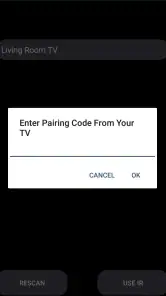
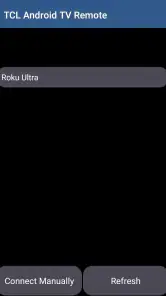
First off, setting up the TCL Android TV Remote app is as breezy as a Sunday morning. Just download it from the Play Store, sync it up with your TCL Smart TV via Wi-Fi, and boom, you're in business. No more hassling with those pesky batteries or searching for the right angle to change the channel. It’s all about convenience here.
Intuitive Interface
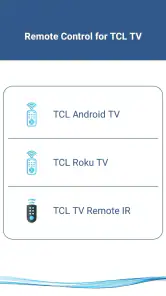
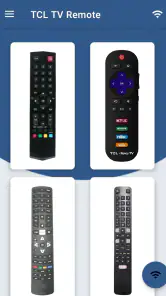
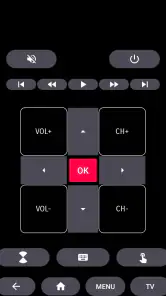
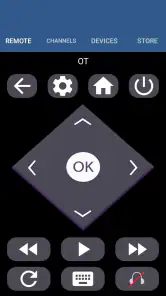
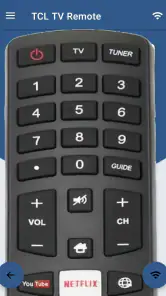
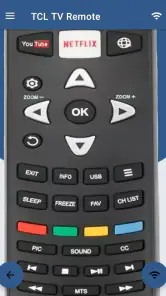
The app’s interface is sleek and straightforward, which makes navigation a breeze. The home screen is clutter-free, offering easy access to your TV controls. You can change channels, adjust the volume, and even access your favorite streaming services all from your smartphone. The touchpad feature is especially nifty when you want to browse through apps without the clunky feel of a traditional remote.
Touch navigation is a different kind of control, not automatically a better one. I find it most helpful when moving through menus or using the phone as a pointer-like surface, while physical buttons have an advantage when I want a specific action without looking down. A useful habit is to hold the phone where you can glance at it, rather than expecting to operate the touchpad entirely by feel. That small adjustment can make browsing less awkward.
More From Our News Desk

Clash of Clans Is Won Between the Battles

Android Auto Makes the Case for Quieter Car Software

MobiOffice: Transforming Mobile Productivity with Seamless Integration

EA SPORTS FC™ Mobile Soccer: Redefining Mobile Sports Gaming

How Microsoft OneDrive Became a Mobile Productivity Giant

How Google Translate Breaks Language Barriers Effortlessly
The app’s phone-based layout also changes how I think about a quick adjustment. A conventional remote can stay on the sofa and be used immediately; a phone may be in another room, locked, or occupied with something else. So I would not treat the app as a shortcut for every button press. Its value is strongest when the phone is already nearby and the task benefits from a screen or keyboard.
Voice Control and More
What really blew my mind is the voice control feature. Just press the mic button on your phone, and you can tell your TV what to do. "Open Netflix," "Turn up the volume," or even "What’s the weather like?" It's like having a personal assistant ready to cater to your TV needs. This feature alone makes it worth trying out.
Voice input is best treated as an option to test, not the only way to interact. In a quiet room, speaking can be faster than navigating a menu; when other people are talking, or you do not want to say a search aloud, typing may be more comfortable. I would try both methods early and settle on the one that fits the room. That keeps the app useful without making every interaction depend on voice.
There is a simple privacy and comfort consideration here: a voice command is audible to people nearby, while a typed search is quiet. In a shared living room, that can matter more than speed. If you are watching late or searching for something personal, keyboard entry is the more discreet route. If you are alone and want to open an app quickly, voice can be convenient, provided it responds as expected.
Another cool aspect is the keyboard input. Typing out search queries on a TV remote can be a pain, but with this app, you can use your phone’s keyboard, which is a huge time-saver. It’s one of those things you didn’t know you needed until you have it.
Using it in everyday routines
A realistic use is searching for a film after dinner: I can type a title on the phone, then hand navigation back to the familiar remote if someone else prefers its buttons. For a shared living room, that split approach matters. Phone control suits quick searches and occasional volume changes; the physical remote can still feel more natural for repeated channel hopping or for viewers who do not want to unlock a phone.
Another practical moment is when the remote has slipped between cushions just as everyone is ready to watch. Instead of pausing to search, I can see whether the phone app is ready on the home network and use it to get started. I would still look for the remote afterward, especially if other people rely on it, but the phone can take the pressure out of that immediate interruption. It works best as a way to keep a small inconvenience from derailing the evening.
For a search-heavy evening, I would use the phone for the part it handles especially well—entering a title or phrase—and then put it aside once playback begins. That avoids the common trap of keeping a bright phone in hand throughout a show when I only needed its keyboard for a minute. The app can complement the viewing routine without making the phone itself the center of it.
It also helps to think about the home Wi-Fi as part of the setup, rather than treating the app like a universal remote. Since the connection is through Wi-Fi, I’d check that the phone and TV can communicate on the home network before relying on it during a busy evening. If the television is away from the network or the connection is having a bad day, the ordinary remote is the sensible fallback.
If you are setting up a home for guests or family members, I would explain that the app is an alternative rather than assuming everyone should install it. A person who already uses the physical remote may have no reason to change. For someone who often searches for titles or wants a backup, a short demonstration of the keyboard and basic controls is more useful than asking them to learn every feature at once.
Seamless Connectivity
The app maintains a stable connection with your TV, which is crucial. I’ve tested it extensively, and I didn’t experience any lag or disconnects. It’s refreshing to have a remote app that doesn’t add more frustration to your viewing experience.
Connection is the main condition to keep in mind when deciding whether this can be your fallback. Before relying on it, I would make sure it works in the places and at the times you normally watch, then leave the regular remote accessible. If the phone and television cannot communicate over the home network, the app cannot take over that moment. Having the physical control close by makes the overall arrangement more dependable.
Month-to-month value and upkeep
The lasting value is less about novelty and more about the moments when the phone is already in your hand. Keyboard entry can save time when searching, while a spare control option is reassuring if the remote goes missing. Naba’s app is free, and its current version is 20.0; it has a 4.6 average from around 38,000 ratings and over 500,000 installs. That level of adoption makes it an established option, though it does not guarantee a perfect fit for every TCL setup.
Its category is home-focused rather than entertainment in the broad sense: the job is to help with a specific television, not to organize every device or service in a household. Naba develops the app, which is free to install and rated for Everyone. It was released on May 1, 2022, and supports Android 4.4 or later. Those basics make it approachable for many Android users, but the important practical question remains whether your particular TCL television works with it.
For month-to-month use, I would judge it by how often it rescues a real task. If you regularly type searches, misplace the remote, or want a second control option, those small conveniences can keep adding up. If you only use the TV briefly and the standard remote is always where you left it, the app may sit unused after the first few tries. There is no benefit in keeping another icon on your phone unless it makes your own routine easier.
For maintenance, I’d keep the app available but avoid making it the only way to control the TV. A phone may be charging, out of reach, or being used by someone else. If the app stops connecting, first check the shared Wi-Fi connection and whether the TV is available on that network; switching back to the regular remote is a practical workaround while you sort it out. I would not install it for a television from another brand expecting the same result, since this is specifically a TCL Android TV remote.
A sensible low-effort routine is to keep the app installed if you use its keyboard or backup role, but not to spend time maintaining it as though it were essential equipment. If it becomes unreliable, check the network and retry the familiar physical remote before assuming the TV itself is at fault. If it remains unused, removing it is a reasonable choice; its value is convenience, not a requirement for watching television.
Where convenience can wear thin
The trade-off is that using a phone for basic controls can mean unlocking it, opening the app, and navigating a touch surface when a physical button would be quicker. Voice input is useful when it suits the room, but it is not always the best choice around other people or when you want to search quietly. I’d skip this app if you rarely misplace the remote, dislike using a phone while watching TV, or need a control method that works independently of home Wi-Fi.
It is also not the right fit if you want one app to control a mixture of televisions and other living-room equipment. A TCL-specific remote has a clear purpose, but that focus is also a boundary. Someone who wants a single control system across devices may be better served by the physical remotes already matched to each device or a suitable general-purpose alternative. I would choose the TCL app for a compatible television, not as a promise of whole-room control.
Another source of fatigue is simply screen time. Reaching for a phone to change the volume can tempt you into checking messages or other apps, which is a distraction the dedicated remote does not create. If you prefer to leave your phone aside while watching, that is a good reason to use the app only for searches or as an occasional backup. Convenience should reduce friction, not add a new one.
Compared with a standard remote, the app is strongest for text entry and as a backup; the remote remains straightforward for quick, repeated button presses. Compared with a general-purpose remote app, the TCL-specific focus is appealing if your television is compatible, but it is not a universal solution for every device in the living room. The practical tip is to try the controls you actually use—navigation, volume, search, and voice—before deciding whether it deserves a permanent place on your home screen.
If you are unsure whether it is worth trying, I would start with the task that frustrates you most. Search for a title using the phone keyboard, then see whether navigation and volume feel comfortable enough to keep using. If the connection is dependable and that one task is noticeably easier, you have a good reason to leave it installed. If you mainly want tactile buttons, or your home network makes the connection inconvenient, the standard remote is likely the better everyday choice.
For a household with different preferences, there is no need to pick one winner. The person who searches often can use the phone, while everyone else can keep using the supplied physical remote. That division is not a compromise so much as a sensible match between the control method and the task. It also means the app can earn its place through occasional, specific usefulness instead of having to replace a familiar habit for everyone.
In conclusion, the TCL Android TV Remote app is an absolute must-have for any TCL TV owner. It transforms your smartphone into a powerful remote control, packed with features that make your TV watching experience more enjoyable and efficient. Whether it's the intuitive interface, the voice control, or the seamless connectivity, this app ticks all the right boxes. So why not give it a whirl? You might just find yourself wondering how you ever lived without it.
TCL Android TV Remote Frequently Asked Questions
Can I install TCL Android TV Remote on an iPhone or iPad?
The listed system requirement is Android 4.4 or later, so this version is intended for Android phones and tablets. The app’s description also mentions iOS availability, but before downloading on an Apple device, check the app page in the store you use to confirm that a compatible version is offered. Your television must also be a compatible TCL Android TV for the remote-control purpose described.
Does my phone need an internet connection to use the app?
The app communicates with the television over Wi-Fi, so your phone and TV need a working network connection for remote control. A stable connection can make it easier for the devices to find and communicate with each other. Before downloading, consider whether your phone can join the same Wi-Fi network as the TV; this is part of the setup described for pairing.
What devices do I need before downloading TCL Android TV Remote?
TCL Android TV Remote is a phone or tablet app intended to control a compatible TCL Android TV. The app is free, is rated for Everyone, and supports Android devices running version 4.4 or later. Before downloading, check that your mobile device meets that system requirement and that your television runs Android TV, so the app fits the setup you want to use.
Who develops TCL Android TV Remote, and how popular is it?
The app is developed by Naba and is listed in the House & Home category. It has an average rating of 4.6 from around 38,000 ratings, with 431 reviews and over 500,000 installs. Those figures suggest that many people have tried it, although ratings and reviews reflect individual experiences and do not guarantee how well it will work with a particular TV or phone.
What is the TCL Android TV Remote app?
The TCL Android TV Remote app is a mobile application designed to enhance your experience with TCL Android TVs. It acts as a virtual remote control, allowing users to navigate their TV interface, switch channels, adjust volume, and access various features of their Android TV directly from their smartphone or tablet. This app is particularly useful if you've misplaced your physical remote or prefer using your mobile device for TV control.
Pros
- Easy to set up and connect with the TV.
- User-friendly interface with intuitive controls.
- Supports voice commands for hands-free operation.
- Offers a touchpad for easy navigation.
- Compatible with various TCL TV models.
Cons
- Occasional lag in response time.
- Limited functionality compared to physical remote.
- Requires Wi-Fi connection to operate.
- Ads can be intrusive at times.
- May not support older TCL TV models.
- Category
- House & Home
- Version
- 20.0











