

Element Smart TV Remote
- 43.00
- 4.5
- Installs
- 50.00K
- Price
- Free
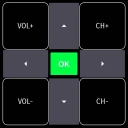
Screenshots
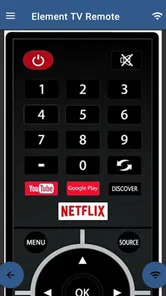
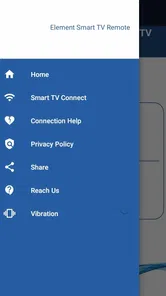
Analysis by Reviewed
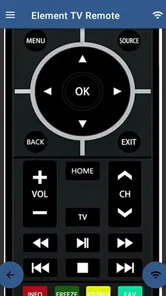
I tried Element Smart TV Remote as a practical replacement for a misplaced physical controller, and my first impression was straightforward: this is a focused House & Home app built around one job, controlling an Element Smart TV from a phone connected to the same Wi-Fi network. It is free to use, aimed at Everyone, and developed by Naba. That narrow purpose is also its main strength. You are not opening it for streaming recommendations, smart-home automation, or a large entertainment hub. You are opening it because the television remote is missing, out of batteries, or simply less convenient than the phone already in your hand.
The app has a 4.5 average from around 431 ratings, with roughly 43 written reviews and more than 50 thousand installs. Those figures suggest that the basic idea works well enough for a sizeable group of users, but they should not be mistaken for a guarantee that every Element television will behave identically. A phone remote depends on the television, the home network, and the way the device discovers compatible equipment. In my experience, understanding that relationship is more useful than expecting the app to behave exactly like a universal infrared controller.
What using the remote is really like
The important setup detail is the same-Wi-Fi requirement. Your phone and the Element Smart TV need to be connected to the same local network before the app can communicate with the television. This sounds simple, but it explains many of the first-use problems people encounter. A phone using mobile data while the television is on home Wi-Fi will not provide the same conditions. Likewise, a guest network can separate devices even when both connections appear to come from the same router.
I recommend checking the television’s network connection before blaming the app. If the TV has recently been reset, moved to another room, or connected to a different router band, discovery may not happen immediately. My practical routine would be to leave the TV powered on, connect the phone to the household Wi-Fi, close unrelated network-heavy apps, and then try the remote again. This is not a complicated workflow, but it avoids the common mistake of treating a network issue as a broken button.
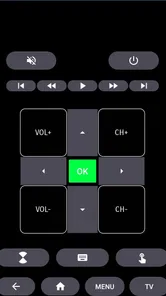
Once the television is reachable, the appeal is obvious. A phone is usually nearby, and it can be easier to find than a small black remote under cushions. The useful everyday controls are the ones I would expect to reach for repeatedly: changing volume, navigating menus, selecting content, and handling basic television interaction without standing up to search for the original controller. The app’s value is highest when it removes that small but annoying interruption from an ordinary evening.
A realistic example is a shared living room. Someone has left the physical remote in another room, the TV is already on, and you want to lower the volume without interrupting a conversation. If the phone and television are on the same Wi-Fi connection, a mobile controller is more convenient than searching through drawers. It is also handy when the original remote has worn buttons or when several people in the home need a quick backup.
That convenience has a boundary: this is not automatically a replacement for every kind of television remote. A conventional infrared controller can often operate a device without Wi-Fi, while this app depends on network communication. If the router is offline, the TV has lost its connection, or the phone is isolated from the television by network settings, the app may be unavailable at exactly the moment you need it. I would keep the physical controller somewhere accessible rather than treating the phone as the only emergency option.
More From Our News Desk

 Gmail
GmailGmail in a Busy Inbox: Who Benefits Most?
From first account to crowded workday, Gmail earns its place through dependable search and flexible sorting—but its best fit depends on how much inbox maintenance you can tolerate.

 Prime Video
Switching to Prime Video: What Changes in Your Viewing Routine
Prime Video can make a compelling second home for streaming, but switching means learning a different catalog, rental layer, and route from browsing to playback.

 Universal TV Remote Control
Universal TV Remote Control Works Best as a Reliable Backup
A phone remote earns its place through quick setup and reliable habits. Here is how to get more from Universal TV Remote Control—and where its limits show.

 Weather - By Xiaomi
Weather by Xiaomi Review: Clear at a Glance, Less Clear Up Close
Xiaomi’s weather app makes everyday forecasts quick to scan, but its calm surface can leave useful details and recovery paths harder to find than they should be.

 X
XX Under Pressure: Can It Recover When Posting Goes Wrong?
A resilience-focused review of X, examining setup, mistaken posts, interruptions, weak connections, and the gaps that matter when recovery needs to be dependable.

 Clash of Clans
Clash of Clans Is Won Between the Battles
Its raids are quick; its community is a long-term project of coordination, teaching, rivalry, and shared responsibility—with all the friction that entails.
Latest News



Where the same-Wi-Fi design helps and hurts
The same-network approach is pleasant in a stable home because it avoids pointing the phone at the television. You can hold the device naturally and use it from a position that is more comfortable than aiming at a sensor. It also fits homes where the TV is tucked into a cabinet or positioned at an awkward angle. The trade-off is that network setup becomes part of the remote experience.
One detail worth checking is whether your phone has switched to a different saved network. Modern phones can move between home Wi-Fi, a mesh access point, a guest network, and mobile data without making the change feel important. For this app, that change matters. If control suddenly stops working after it was reliable earlier, I would first inspect the phone’s active Wi-Fi rather than repeatedly tapping the same control.
The same advice applies after a router replacement. The television may still remember its previous network while the phone joins the new one, or both devices may connect to the new router but remain separated by its settings. A fresh connection is often a better starting point than assuming the app itself has changed. This is one of the less obvious realities of phone-based TV control: the app is only one part of the path between your finger and the screen.
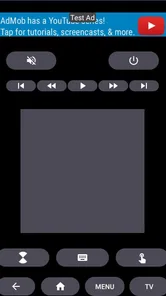
I also found that a phone keyboard and touch interface can feel different from a physical remote. A dedicated controller gives immediate tactile feedback, while a phone screen asks you to look down and confirm where your finger is. That difference becomes noticeable when you are navigating quickly or trying to control the TV in a dark room. The app is more convenient for availability, but the original remote can still be better for speed and muscle memory.
Trust, permissions, and what I would check first
Because this app controls a television over a local network, I would pay attention to the permission prompts and choices shown during installation and first use. I would not approve a request automatically just because the app is a remote. If Android presents a permission that seems unrelated to discovering or controlling the TV, I would pause and read the explanation before continuing. The safest habit is to grant only what is clearly needed for the function you intend to use.
The app is free, which removes a purchase decision from setup, but “free” does not by itself explain how an app handles information. I would review the privacy details visible on the platform before installing, then revisit the app’s permissions if the phone offers a permissions manager. This is especially sensible for a utility that may be used only occasionally. A remote should not become an excuse to ignore what the phone is being asked to expose.
I also prefer testing the app with a spare or less sensitive network situation before making it part of a household routine. For example, I would connect the phone and TV to the normal home network, verify that the controller works, and then check whether any account sign-in is requested. If an app can perform its basic job without an account, I generally prefer that simpler path. If a sign-in screen appears, I would read what it is for instead of entering details reflexively.
There is a useful distinction between controlling a device and managing personal content. A TV remote may need to send button actions to the television, but that does not mean I would assume it should have access to contacts, messages, photos, or unrelated accounts. I would treat every system prompt as a decision point. My rule is simple: allow only access that has a clear connection to remote control, and keep control of the rest.
The developer is Naba, and the app is listed as a free utility rather than a paid hardware accessory. That makes it easy to try, but I still think trust should come from visible choices, not from the low commitment of a free download. I would check the app page, the operating system’s permission panel, and any in-app settings before settling into regular use. Those checks are quick and give me a clearer sense of what I am agreeing to.
Small habits that make the app less frustrating
My first tip is to test the remote while the TV is already awake. A television in a deep standby state may not respond in the same way as one that is fully on, and a failed wake-up attempt can make the app appear unreliable. If the app works once the screen is active, that tells you something important about the boundary between network control and power management.
My second tip is to keep the phone’s Wi-Fi connection stable during use. Battery-saving behavior, automatic network switching, or a weak signal can interrupt a session. I would avoid testing from the farthest corner of the house and would not use a guest network unless I already knew that it allowed local devices to communicate. This is a practical distinction between a remote that is technically compatible and one that is dependable in your particular home.
My third tip is to use the app as a backup rather than immediately discarding the physical remote. If the television needs network troubleshooting, the original controller can help you open settings and reconnect it. That makes the two tools complementary: the hardware remote helps recover the TV, while the phone app helps when the hardware is missing or inconvenient.
A fourth useful habit is to close the controller when you are finished, especially if you are trying to reduce unnecessary background activity. I would also avoid leaving the phone unlocked on a sofa where another person could accidentally press controls. That is not a flaw unique to this app; it is simply a consequence of turning a personal device into a shared household controller.
If you live in a home with multiple Element televisions, I would be careful during discovery and selection. Choose the intended screen before changing volume or navigating menus. A phone remote is convenient precisely because it can find a networked television, but that convenience means you should confirm which device is active rather than tapping through controls without looking.
Who should use it, and who should choose something else
This app makes the most sense for an Element Smart TV owner who regularly misplaces the physical remote, wants a backup on a phone, or prefers network control from a nearby device. It is also a reasonable option for a household where several people already understand the home Wi-Fi setup. The free price makes experimentation easy, and the Everyone age rating keeps the intended use broad and uncomplicated.
I would be more cautious about recommending it to someone who wants a universal remote for several brands or older televisions. The app is specifically presented as an Element Smart TV remote, so its purpose is narrower than a multi-brand controller. If your main need is to operate an air conditioner, sound system, streaming box, and television from one place, a broader remote solution may be a better fit.
It is also not my first choice for a person who has unreliable Wi-Fi or who frequently controls a TV away from home. The same-network requirement is central, not a minor detail. A physical remote is better for a disconnected television, and an infrared phone accessory may be more suitable where network discovery is inconvenient. Those alternatives sacrifice some of the app’s flexibility, but they can be more predictable in the right environment.
People who dislike looking at a screen while controlling a TV may prefer the tactile certainty of a hardware remote. With a physical controller, you can often feel the volume or navigation buttons without taking your eyes off the program. The phone app is better when availability matters more than tactile feedback. That is a personal trade-off, and I would not pretend the mobile interface replaces the feel of dedicated buttons for everyone.
On the other hand, the app is a strong fit for temporary situations. If you have just moved into a home and the remote is packed away, if a roommate took it to another room, or if the original controller has a dead battery, the phone becomes a practical bridge. I like that use case because it does not require the app to become the center of your entertainment setup. It only needs to solve a specific problem when that problem appears.
Version, compatibility, and the long-term question
The current version is 5.0, and the listed minimum operating system is Android 4.4. That broad compatibility makes the app approachable for older Android phones that may no longer handle newer, heavier applications comfortably. At the same time, compatibility with the phone’s operating system is only one part of the experience. The Element television, router configuration, and local network still determine whether the remote can be discovered and controlled.
The app was released on April 19, 2022, so I would approach it as an established utility rather than a brand-new experiment. Its install count is above 50 thousand, which gives some context about adoption without telling me whether it will work with a particular TV model. Before relying on it for a household where the physical remote is unavailable, I would test the exact television and network combination during a calm moment.
Updates can also change how an app behaves with newer Android versions or television software. If control stops working after a phone, router, or TV update, I would work through the basics in order: confirm both devices are on the same Wi-Fi, restart the app, wake the TV with the hardware remote if possible, and reconnect the television to the network. This sequence is more useful than immediately deleting the app because it separates connection trouble from compatibility trouble.
I would also keep expectations realistic about what a phone remote can do. Its strongest role is everyday control once the TV is reachable. It should not be treated as a replacement for television setup tools, router administration, or hardware repair. If the screen cannot connect to Wi-Fi or the TV is not responding to any controller, an app cannot solve the underlying hardware or network problem.
My cautious verdict after using it
I see Element Smart TV Remote as a sensible convenience app with a clearly defined job. It can save a trip across the room, provide a backup when the original controller disappears, and make an Element Smart TV easier to operate from a device that is usually close by. The experience is most convincing in a stable home network where the phone and television remain on the same connection.
Its limitations are equally clear. Network dependence can be more fragile than infrared control, the phone interface lacks the tactile feel of dedicated buttons, and users should pay attention to permissions, account prompts, and privacy choices rather than treating a free utility as automatically risk-free. I would not rely on it as my only way to recover a disconnected TV, and I would choose a broader remote app or physical solution for mixed-brand equipment.
For an Element owner who wants a free backup and understands the same-Wi-Fi requirement, I think it is worth trying. The 4.5 average and growing install base support the impression that it has found a useful place for many users, while the practical caveats explain why results can vary from one home to another. My recommendation is to install it, test it with your actual television, review every visible permission and account choice, and keep the original remote available. Used that way, it is a helpful household tool rather than something you need to depend on blindly.
Element Smart TV Remote Frequently Asked Questions
Can I control more than one Element TV with the app?
If you have multiple compatible Element televisions, you may be able to connect to them one at a time by selecting the TV you want to control during setup. The experience depends on whether each television supports network control and is reachable on the same Wi-Fi network as your phone. Check that the correct TV is selected before using controls, especially in rooms with several televisions.
What should I check before installing Element Smart TV Remote?
Before downloading, confirm that your phone meets the app’s minimum operating-system requirement and that your Element TV can connect to your home network. The app is free, is rated for Everyone, and is categorized under House & Home. Also make sure you can access the same Wi-Fi network from both devices, since that is central to the app’s stated remote-control setup.
What is Element Smart TV Remote, and how does it work?
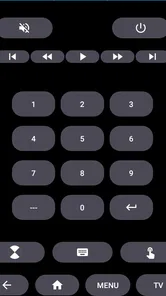
Element Smart TV Remote is a mobile application designed to control compatible Element televisions from an Android or iOS device. After installing it, your phone generally needs to be connected to the same Wi-Fi network as the TV. Depending on the model, the app may provide virtual navigation buttons, volume controls, power functions, input selection, and access to smart-TV menus.
Is Element Smart TV Remote compatible with every Element television?
Compatibility can vary considerably between Element TV models, operating systems, and connection methods. Newer smart televisions with network-control support are more likely to work with a remote app, while older or basic models may require an infrared-capable phone or a physical remote. Before downloading, check the app listing and test whether your specific TV model appears during setup.
Does the app require Wi-Fi, Bluetooth, or an infrared sensor?
Most smart-TV remote applications communicate through the local Wi-Fi network, meaning the phone and Element television must usually be connected to the same router. Some versions or devices may support infrared control, but this depends on the phone having an IR blaster. Bluetooth is not always available for every function, so the connection requirements should be checked before installation.
Pros
- Works with many Element TV models and is easy to set up.
- Offers essential controls like volume
- channels
- input
- and power.
- A convenient backup when the physical remote is lost or damaged.
- Lightweight design makes navigation simple for most users.
- Can reduce the need for extra replacement remote hardware.
Cons
- Requires a compatible phone with an infrared sensor or supported network setup.
- Some features may not work with every Element TV model.
- Advertisements can interrupt use in the free version.
- The phone must stay connected or pointed correctly during operation.
- Typing and advanced TV controls may be limited compared with the original remote.









