Tattoo Maker - Tattoo Design
- 46.00
- 4.0
- Installs
- 1.00M
- Price
- Free
Screenshots
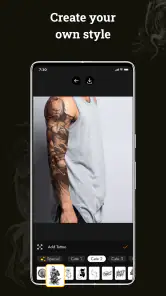
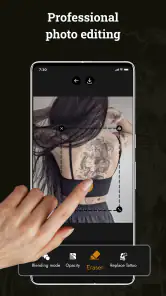
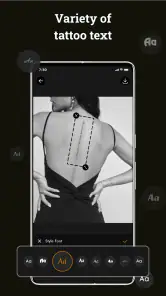
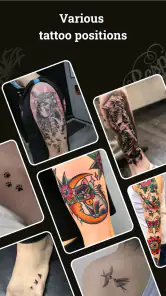
Analysis by Reviewed
If you’re like me and have always been fascinated by the art of tattoos but are a bit too chicken to actually go under the needle, then Tattoo Maker - Tattoo Design might just be your next favorite app. This app is a playground for those who love tattoos but prefer to keep their skin pristine. Let me take you on a little tour of this nifty tool and let’s see if it’s worth the download.
Unleashing Your Inner Tattoo Artist
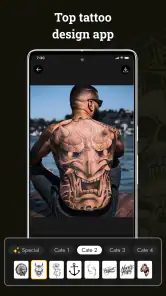
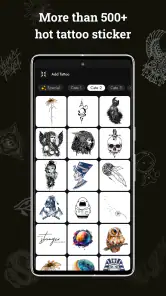
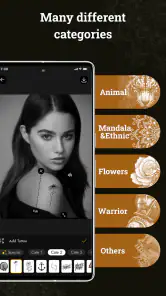
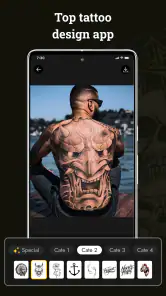
When I first opened Tattoo Maker - Tattoo Design, I was greeted with a sleek and intuitive interface. Right off the bat, the app offers a wide range of tattoo designs. Whether you're into tribal patterns, minimalist designs, or something a bit more elaborate, this app has it all. The best part? You can try them all on without worrying about lifelong commitment.
Feature-Packed Playground
One of the standout features for me was the ability to customize tattoos. You can tweak the size, color, and even layer multiple designs to create something truly unique. It’s like having a tattoo studio right in your pocket! Plus, if you’re feeling creative, the app allows you to draw your own designs. This feature really lets your creativity run wild.
Another cool aspect is the augmented reality (AR) feature. It lets you see how the tattoo would look on your skin in real-time. I must admit, seeing a fierce dragon wrapped around my arm, even if virtually, was quite thrilling!
User Experience
Using the app is as straightforward as it gets. The developers have done an excellent job in making sure that everything is easily accessible. The navigation is smooth, and I didn’t encounter any annoying ads interrupting my creative flow, which is always a plus.
However, I did notice that some of the more intricate designs require a bit of a learning curve to master, especially if you’re not used to digital drawing apps. But hey, practice makes perfect, right?
Final Thoughts
All in all, Tattoo Maker - Tattoo Design is a fantastic app for anyone interested in tattoos, whether you’re an artist, a tattoo enthusiast, or just someone curious about how they’d look with ink. Its user-friendly interface, combined with its robust features, makes it a must-try. So, if you’re itching to get a tattoo but not ready to commit, give this app a whirl. Who knows, you might just discover a hidden talent for tattoo design!
More From Our News Desk

Clash of Clans Is Won Between the Battles

Android Auto Makes the Case for Quieter Car Software

MobiOffice: Transforming Mobile Productivity with Seamless Integration

EA SPORTS FC™ Mobile Soccer: Redefining Mobile Sports Gaming

How Microsoft OneDrive Became a Mobile Productivity Giant

How Google Translate Breaks Language Barriers Effortlessly
Tattoo Maker - Tattoo Design Frequently Asked Questions
What is Tattoo Maker - Tattoo Design app all about?
Tattoo Maker - Tattoo Design is an innovative app that allows users to explore their creativity by designing custom tattoos. Whether you're a tattoo enthusiast or a professional artist, this app provides a platform to create, edit, and visualize tattoo designs on a digital canvas. With a user-friendly interface and a wide range of tools and templates, it caters to both beginners and seasoned designers, making it a versatile choice for anyone interested in tattoo artistry.
How user-friendly is the Tattoo Maker - Tattoo Design app?
Tattoo Maker - Tattoo Design is designed with user experience in mind, featuring an intuitive interface that makes navigation seamless for users of all skill levels. The app includes tutorials and step-by-step guides to help beginners get started, while offering advanced tools and customization options for more experienced users. The app's layout is clean and organized, ensuring that users can focus on their creative process without distractions.
Are there any in-app purchases or subscriptions required for using Tattoo Maker - Tattoo Design?
While Tattoo Maker - Tattoo Design offers a variety of free tools and features, there are also premium options available through in-app purchases. These include access to exclusive design templates, advanced editing tools, and an ad-free experience. Users can choose to purchase these features individually or opt for a subscription model that provides access to all premium content, allowing for a more enhanced design experience.
Can I share or export my tattoo designs from the Tattoo Maker - Tattoo Design app?
Yes, Tattoo Maker - Tattoo Design allows users to easily share and export their creations. Users can save designs in high resolution and share them directly to social media platforms like Instagram and Facebook, or send them via email. Additionally, the app supports exporting designs in various formats, ensuring compatibility with other design software, which is particularly beneficial for professional tattoo artists and designers.
Is Tattoo Maker - Tattoo Design available for both Android and iOS devices?
Tattoo Maker - Tattoo Design is available for download on both Android and iOS platforms, ensuring a wide reach for users across different devices. The app is optimized for both operating systems, providing a consistent and high-quality user experience regardless of the device being used. Updates and support are regularly provided to ensure the app runs smoothly on both platforms.
Pros
- User-friendly interface for beginners
- Wide variety of tattoo designs available
- Customizable design options
- High-quality graphics and detail
- Regular updates with new features
Cons
- Limited free design options
- In-app purchases can be pricey
- Requires constant internet connection
- Ads can be intrusive
- Occasional app crashes
- Category
- Art & Design
- Version
- 2.1.5













