

3D Battery Charging Animation
- 22.00
- 4.3
- Installs
- 1.00M
- Price
- Free
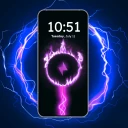
Screenshots
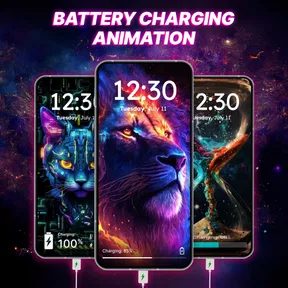
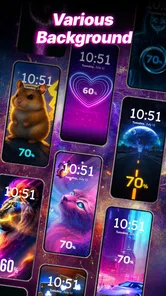
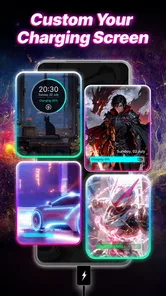
Analysis by Reviewed
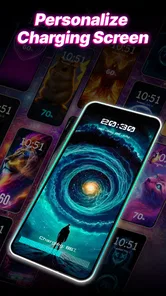
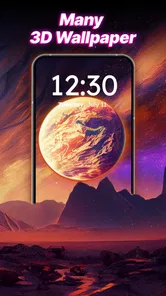
Ever wondered how to make charging your phone a bit more exciting? Well, I feel you! Let me introduce you to the 3D Battery Charging Animation app, a quirky little gem that's sure to bring a dash of fun to your daily charging routine. Imagine plugging in your phone and being greeted by a vibrant 3D animation that dances across your screen. Sounds cool, right? Let’s dive into what makes this app tick.
A charging routine that stays simple
My most useful way to judge a charging-screen app is to treat it as a small extra, not a new battery-management system. Plug in as usual, let the animation add a visual cue, and keep the phone’s normal charging habits unchanged. That distinction matters: a lively screen can make charging feel more personal, but it is not a reason to leave a device connected longer than you otherwise would.
A realistic use is a quick top-up at a desk or bedside table, where I can glance at the phone and see that charging has begun. If I charge in a shared room, at work, or somewhere I want the screen to stay unobtrusive, I would keep the experience low-key or simply rely on the phone’s ordinary charging display. The app makes most sense for people who enjoy a little visual personality during a routine they already have.
That makes the app easiest to judge in the places where you charge most often. At a desk, a brief animation can be a pleasant signal that the cable is seated; in a dark bedroom, the same movement may feel like unnecessary light. I would decide which setting matters more to me before choosing a style, rather than expecting one animation to suit every room and time of day.
First Impressions and Setup
When I first stumbled upon the 3D Battery Charging Animation, I was intrigued. I mean, who wouldn’t want to jazz up something as mundane as charging? Installing the app was a breeze, with a quick download and easy setup. The app doesn’t bombard you with unnecessary permissions, which is always a relief. Once installed, you’re greeted with a straightforward interface that lets you choose from a variety of animations. From futuristic graphics to serene nature scenes, there’s something for everyone.
Because this is a personalization app from Govo Tech, I’d approach setup as a choice about screen style rather than a way to improve charging speed or battery capacity. It is free to install, while optional in-app purchases range from $1.99 to $9.99 per item, so I’d explore the available choices before paying for anything. The age rating is Everyone, and the app is listed for Android 7.0 and later; its current version is 2.2.5.
I would start by checking what is available at no cost and whether the options I actually like are included before considering a purchase. A paid item is only worthwhile if I expect to keep using that particular look; buying extra choices just because they are there can turn a tiny novelty into an unnecessary expense. The app’s basic appeal is visual, so my decision would come down to whether its style makes charging more enjoyable for me.
More From Our News Desk

 Gmail
GmailGmail in a Busy Inbox: Who Benefits Most?
From first account to crowded workday, Gmail earns its place through dependable search and flexible sorting—but its best fit depends on how much inbox maintenance you can tolerate.

 Prime Video
Switching to Prime Video: What Changes in Your Viewing Routine
Prime Video can make a compelling second home for streaming, but switching means learning a different catalog, rental layer, and route from browsing to playback.

 Universal TV Remote Control
Universal TV Remote Control Works Best as a Reliable Backup
A phone remote earns its place through quick setup and reliable habits. Here is how to get more from Universal TV Remote Control—and where its limits show.

 Weather - By Xiaomi
Weather by Xiaomi Review: Clear at a Glance, Less Clear Up Close
Xiaomi’s weather app makes everyday forecasts quick to scan, but its calm surface can leave useful details and recovery paths harder to find than they should be.

 X
XX Under Pressure: Can It Recover When Posting Goes Wrong?
A resilience-focused review of X, examining setup, mistaken posts, interruptions, weak connections, and the gaps that matter when recovery needs to be dependable.

 Clash of Clans
Clash of Clans Is Won Between the Battles
Its raids are quick; its community is a long-term project of coordination, teaching, rivalry, and shared responsibility—with all the friction that entails.
Latest News



Features That Stand Out
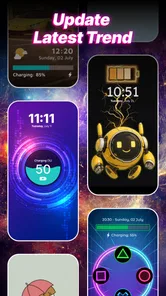
One thing I love about this app is its customization options. You can select different animations based on your mood or even the time of day. Feeling zen? Go for a calming wave animation. Want something energetic? The electric pulse animation has got you covered. What’s more, the app updates regularly, so there’s always a fresh animation to try out.
A practical habit is to pick one animation and live with it for several charging sessions before changing it. That gives you a fair sense of whether it remains pleasant when you see it repeatedly, rather than choosing only by the first impression. If you share a room or charge near other people, a calmer look may be a better everyday fit than a bright, attention-grabbing effect. I’d also check the app’s own settings after installation and make only the adjustments I actually want; a charging animation should not need constant tuning to be useful.
There is a small but useful distinction between browsing for fun and finding a dependable everyday choice. I would browse when I have time, settle on one animation, then leave it alone during normal charging. That keeps the visual change from becoming a distraction and makes it easier to tell whether the effect is genuinely comfortable in my space. If a style feels tiring after a few uses, changing it is more sensible than forcing myself to keep it because it looked impressive at first.
The animations themselves are crisp and vibrant, adding a colorful touch to your screen. They don’t just look good; they’re also designed to be easy on your battery. I was pleasantly surprised to find that the app doesn’t drain your battery life, which is crucial for any charging-related app. It runs smoothly in the background and doesn’t interfere with other functionalities of your phone.
There is a trade-off with any effect that makes a screen more noticeable: it may be less welcome when you are trying to keep a room dark or avoid visual distractions. I would think about where the phone usually charges before choosing a style, and use the phone’s regular screen controls when I want less light. The animation is best treated as decoration, not as a replacement for the battery information and controls already built into the device.
For a shared household, I’d also consider whether the phone is likely to be left face-up where someone else can see it. A colorful charging display may be fun in a personal workspace but distracting on a table beside someone who is resting or working. This is not a complicated problem to solve: choose a subtler look, position the phone differently, or use the ordinary charging screen when the animation is out of place.
User Experience
Using the app is as simple as it gets. The interface is user-friendly, and navigation is a breeze. You don’t need to be tech-savvy to figure things out, which makes it accessible to everyone. I also appreciate the lack of intrusive ads. There are ads, yes, but they’re not overwhelming or disruptive, allowing you to enjoy the app without constant interruptions.
For a faster routine, I’d make the initial choice once, then leave the app alone unless I genuinely want a different look. That avoids turning a small personalization into another task to manage. Compared with the usual alternative—keeping the phone’s standard charging screen—this app offers more visual character, while the default screen is the simpler option for anyone who prefers fewer extras. If your priority is detailed battery monitoring, charge scheduling, or practical power controls, I’d choose a dedicated tool for that instead of expecting an animation app to provide those functions.
A useful way to keep the experience predictable is to make any changes while the phone is unplugged, then see how the chosen look behaves during your next ordinary charge. That separates the selection process from the moment you actually need to charge. I would avoid changing several preferences at once, because if the result feels too bright or distracting, it is easier to identify which choice I want to undo.
The app has an average rating of 4.3 from around 2.8 thousand ratings, with over one million installs. Those figures suggest it has found an audience, but they would not decide the matter for me; the better test is whether the available animations suit your taste and remain comfortable in your usual charging spots. If you dislike animated screens, want no advertising, or prefer not to add a separate personalization app, the phone’s built-in charging view is likely the better fit.
For someone who already uses a battery utility, I would keep the roles separate: use that tool for information and controls, and use this one only if a decorative charging screen adds something you enjoy. Running two apps with overlapping promises is not a reason to assume either will improve battery health. The practical question is whether the animation earns its place on your phone; if the default screen already tells you what you need, there is no need to add another layer.
Another cool feature is the notification system. The app sends you a gentle reminder when your battery is fully charged, which is a handy touch. No more overcharging and worrying about battery health! It's little things like this that make the app feel polished and thoughtful.
I’d treat a full-charge reminder as a prompt to check the phone, not as a guarantee of battery protection or a substitute for the device’s own charging safeguards. For example, if I plug in before bed, I can use the reminder as a nudge when I’m awake, but I wouldn’t rely on it to manage a long overnight charge. This is also a good point to check whether notifications suit your routine; reminders are useful when they help, and easy to ignore if you do not need another alert.
In a busy daytime routine, a reminder can be more useful than the animation itself: I might plug in while answering messages, return to another task, and appreciate a nudge to check the phone later. But if I already keep an eye on charging or mute most app alerts, it may add little. I would consider notification preferences as part of the setup, not an obligation to keep every prompt enabled.
Final Thoughts
So, is the 3D Battery Charging Animation worth a try? Absolutely! It’s a fun and functional app that adds a splash of personality to your device. Whether you’re looking to brighten up your day or simply want a practical app that doesn’t compromise your phone’s performance, this one’s a winner. Give it a go, and you might just find yourself looking forward to plugging in your phone!
My recommendation is strongest for someone who wants a more expressive charging screen and is happy to spend a moment choosing an animation. I’d skip it if you want charging analytics, stronger control over battery behavior, or the quietest possible screen experience. For everyone else, the best way to get value from it is simple: choose a style that fits your space, keep expectations focused on personalization, and let it become a small, optional part of charging rather than something you need to manage.
The clearest test is whether you still enjoy the animation after the novelty wears off. If you find yourself looking forward to seeing it when you plug in, it has done its job; if you routinely dismiss it or prefer a dark, quiet screen, switching back to the phone’s standard display is a perfectly sensible choice. I see this as a small personal touch, not an essential utility, and that is exactly the expectation that makes it easiest to recommend to the right person.
3D Battery Charging Animation Frequently Asked Questions
What does the app’s age rating mean for families?
3D Battery Charging Animation is rated for Everyone, making it suitable for a broad audience. It is a personalization app focused on changing the look of the charging screen, so families can consider it as a cosmetic phone feature. As with any app, parents may want to review its settings and any purchase prompts with younger users before downloading.
Which devices can install 3D Battery Charging Animation?
The app is listed for Android devices running version 7.0 or later. Before downloading, check your phone’s Android version in its settings to make sure it meets that requirement. The app is developed by Govo Tech and is intended to personalize the charging screen with 3D animation. Compatibility can also depend on how your particular device handles charging-screen overlays.
What is 3D Battery Charging Animation and how does it work?
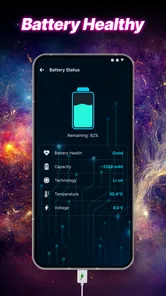
3D Battery Charging Animation is a mobile application designed to add dynamic and visually appealing animations to your device's charging screen. When you plug in your phone to charge, the app activates and displays a vibrant 3D animation, which not only enhances the aesthetic appeal of your device but also provides real-time information about the charging status. This app works by using your phone's sensors and battery data to update the animation and charging status in real-time.
Is 3D Battery Charging Animation safe to use on my device?
Yes, 3D Battery Charging Animation is safe to use on Android devices that meet its system requirements. The app does not interfere with the normal functionality of your phone's operating system or its charging process. It simply overlays an animation during the charging period. The app is designed to consume minimal resources and does not affect the battery life adversely. However, it's always recommended to download apps from official app stores to ensure safety against malware.
Can I customize the animations in 3D Battery Charging Animation?
Absolutely! 3D Battery Charging Animation offers a wide range of customization options. Users can choose from various animation styles, themes, and colors to match their personal preferences or device aesthetics. Additionally, the app often updates with new animations and themes, giving users fresh content to customize their charging experience. This feature ensures that your phone's charging screen remains exciting and personalized.
Pros
- Visually stunning animations enhance charging experience.
- Customizable themes add personal touch.
- User-friendly interface ensures easy navigation.
- Battery optimization tips included.
- Supports multiple languages for global users.
Cons
- May consume more battery due to animations.
- Limited free themes available.
- Occasional ads disrupt user experience.
- Requires regular updates for new features.
- Some animations may lag on older devices.













