T Shirt Design - T Shirts Art
- 401.00
- 4.6
- Installs
- 5.00M
- Price
- Free
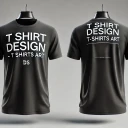
Screenshots
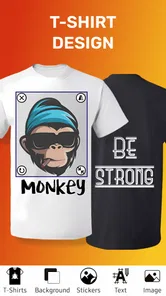
Analysis by Reviewed
My first-week test of T Shirt Design - T Shirts Art would start with a simple goal: make a shirt graphic that looks deliberate, not like a pile of stickers. The app is aimed at people who want to sketch out clothing ideas on a phone, whether that means a one-off gift, a team design, or a possible small business concept. I like that the basic idea is easy to grasp, but the real question is whether it remains useful after the first burst of experimenting.
From first experiments to a repeatable design habit
In its first sessions, a template can be a helpful starting point rather than a finished answer. I’d use one to test a phrase, then change the type, colors, and artwork until the result feels personal. That is a more practical way to approach a phone-based design tool than beginning with a completely blank page when I only have a few minutes. The app is free to install, and its Everyone age rating makes it accessible for casual family or group projects, though in-app purchases are available for people who want to spend more.
What works well when an idea is still rough
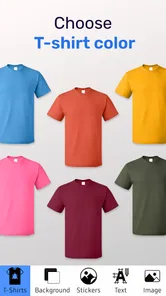
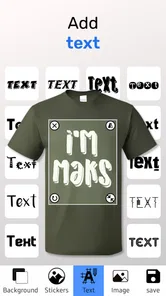
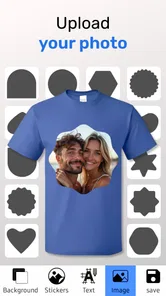
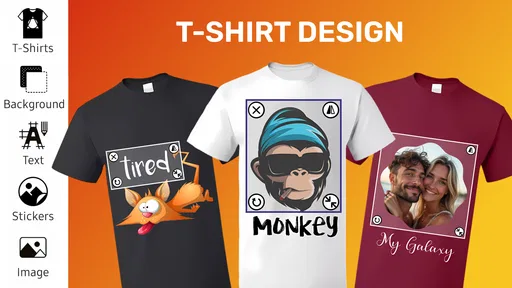
The first thing you'll notice about T Shirt Design - T Shirts Art is how user-friendly it is. The interface is super intuitive, making it easy for anyone to dive in and start creating. Once you open the app, you're greeted with a blank canvas and a plethora of design tools at your fingertips. From selecting the perfect font to adding quirky graphics, the possibilities are endless. You can even upload your own images if you want something truly unique!
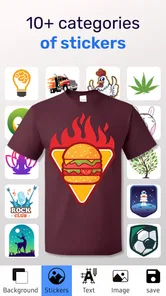
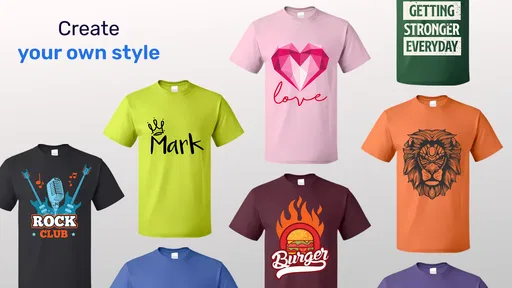
One of the standout features is the variety of pre-designed templates that you can customize. This is perfect if you're in a rush or just need a little inspiration. The app also offers a wide range of colors, fonts, and clipart, ensuring your designs are as vibrant as your imagination. Plus, with the layering feature, you can easily stack elements to create depth and complexity in your designs.
For a practical workflow, I’d keep the first draft deliberately limited: choose one focal graphic, one short line of text, and a restrained color palette. Then use layers to separate those elements and adjust them independently. This makes it easier to catch crowding and alignment problems before they become part of a finished design. A useful habit is to check the design at a smaller on-screen size; details that look clear when zoomed in can disappear when viewed as a shirt graphic from a normal distance.
Uploading an image is useful when a design needs a personal touch, such as a hand-drawn emblem or a club symbol. I would prepare that artwork cleanly before importing it, because a low-quality or busy image can undermine the rest of the layout. In practice, the app is best treated as a convenient composition space, not a substitute for carefully preparing every source image. If the artwork needs precise cleanup, I’d do that in a dedicated image editor first and bring the more finished asset into the shirt design.
Seeing the idea on a shirt—and checking the handoff
Another cool feature is the 3D preview. Before you commit to your design, you can see how it will look on an actual t-shirt. This little touch helps you visualize your creation and make any necessary tweaks. It's like a virtual fitting room for your designs!
More From Our News Desk

 Gmail
Gmail in a Busy Inbox: Who Benefits Most?
From first account to crowded workday, Gmail earns its place through dependable search and flexible sorting—but its best fit depends on how much inbox maintenance you can tolerate.

 Prime Video
Switching to Prime Video: What Changes in Your Viewing Routine
Prime Video can make a compelling second home for streaming, but switching means learning a different catalog, rental layer, and route from browsing to playback.

 Universal TV Remote Control
 Works Best as a Reliable Backup
A phone remote earns its place through quick setup and reliable habits. Here is how to get more from Universal TV Remote Control—and where its limits show.

 Weather - By Xiaomi
Weather by Xiaomi Review: Clear at a Glance, Less Clear Up Close
Xiaomi’s weather app makes everyday forecasts quick to scan, but its calm surface can leave useful details and recovery paths harder to find than they should be.

 X
X Under Pressure: Can It Recover When Posting Goes Wrong?
A resilience-focused review of X, examining setup, mistaken posts, interruptions, weak connections, and the gaps that matter when recovery needs to be dependable.

 Clash of Clans
 Is Won Between the Battles
Its raids are quick; its community is a long-term project of coordination, teaching, rivalry, and shared responsibility—with all the friction that entails.
Latest News



I find a mock-up most useful for judging placement and overall balance, not for predicting every detail of a real garment. A graphic that seems centered on a screen may feel too high, too large, or visually heavy once it sits on a shirt shape. I’d compare the preview with the flat design and check the main artwork at a glance before sharing it. A 3D view is a decision aid; it should not replace checking the exported artwork or asking a printer what file setup it needs.
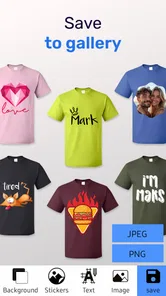
Once you're happy with your masterpiece, the app makes it a breeze to share your designs. You can easily post them on social media or send them directly to a printing company. If you’re worried about quality, don’t be! The app supports high-resolution exports to ensure that your design looks crisp and professional when printed.
For a real-world example, imagine I’m putting together shirts for a weekend get-together. I could start with a template, add a short shared phrase, and bring in a small custom illustration. I’d keep separate versions for different color ideas rather than repeatedly overwriting the one I like, then review each in the shirt preview before sending anything to a printer. That modest versioning habit matters when a group is choosing between options: it makes feedback concrete and reduces the chance that a last-minute tweak spoils the draft everyone preferred.
For those who want to take their designs from digital to physical, the app connects with several printing services. This means you can get your designs printed and delivered straight to your doorstep. How cool is that?
Even with a convenient handoff, I’d treat printing as a separate production step. A preview can show composition, while the printer determines whether the artwork fits its requirements and the chosen garment. Before placing an order, I’d confirm the intended size, placement, and output format with the service, especially if the shirt is for a paid project or a group order. That small check is more useful than assuming a design that looks polished on a phone will automatically be production-ready.
Where it fits among design tools
As an Art & Design app from o16i Apps, this is focused on getting a t-shirt concept together without the learning curve of a full desktop graphics program. That focus is its appeal: templates, text, clipart, layers, and a shirt preview keep the work close to the final use. A general-purpose drawing or layout app can offer more control over intricate illustration and exact typography, but it may take longer to build a shirt mock-up from scratch. I’d choose this app for quick apparel concepts and a broader graphics tool when fine detail, complex editing, or strict production controls matter more.
The app has a 4.8 average from around 25,000 ratings, and it has passed 5 million installs. Those figures suggest it has found a sizeable audience, but they don’t answer the more personal question of whether it suits my workflow. I’d judge it by how easily I can return to a project, make a specific revision, and get an image ready to share. For an occasional custom shirt, convenience may be enough; for a regular design business, I’d test the export and printer workflow on a sample before relying on it for routine orders.
Keeping the app useful after the novelty
The value month to month depends on whether I have a recurring reason to make shirt graphics. A school event, a family celebration, a hobby group, or a small run of promotional clothing can give the app a practical place in my routine. If I only wanted to make one design, the novelty might fade once that project is done. I would not keep opening it just to browse templates; I’d keep it because a new occasion gives me a reason to adapt an old idea or build a fresh one.
Maintenance is light in the sense that a simple design habit does not require a complicated setup: I can keep source artwork organized, label drafts clearly, and save the version that is ready to share. The current version is 2.1.1.1 and the minimum OS is 7.0, so it can suit devices running that system version or later. For repeat projects, I’d keep a copy of original images and final exports outside the design session as well. That gives me a fallback if I want to reuse an emblem or compare an earlier layout without rebuilding it from memory.
There are also sensible reasons to skip it. If I need detailed vector drawing, exact garment specifications, or a tightly controlled commercial prepress workflow, a dedicated professional design tool and direct printer guidance are a better fit. The same goes for someone who dislikes working on a small screen: arranging text and images by touch is convenient, but it is not as comfortable as a larger canvas for extended, fine-grained editing. I’d use the phone app to explore or communicate an idea, then move to a more specialized tool when precision becomes the main requirement.
One possible source of fatigue is the temptation to keep adding elements simply because templates, fonts, and clipart make experimentation easy. The result can become less readable rather than more original. I’d set a stopping point: if the shirt’s central message is clear at a glance and the preview feels balanced, save a draft and walk away before adding decoration for its own sake. Another trade-off is that optional purchases range from $0.99 to $99.99 per item, so I’d check what an item costs before committing and decide whether it solves a real design need.
The developer, o16i Apps, has kept the app positioned as a focused clothing-design tool rather than a general creative suite. That narrow purpose is useful when I know I want a shirt concept, but it also means I should not expect it to replace every stage of visual production. It is free to start, with purchases available in the app, and its broad age rating makes it approachable for shared projects. For a group, I’d still have one person manage the master draft and collect feedback separately; several people making competing edits on one phone can quickly turn a simple design into a confusing compromise.
My verdict after the first burst of creativity
In a nutshell, T Shirt Design - T Shirts Art is a fantastic tool for anyone looking to dip their toes into the world of t-shirt design. It's got all the bells and whistles you need to create professional-looking designs without any hassle. Whether you’re designing for fun or for business, this app has got you covered. So, why not give it a whirl and see what amazing creations you can come up with?
Remember, the only limit is your imagination, so get those creative juices flowing and start designing today!
Who is most likely to keep using it?
I’d recommend it to someone who wants to turn a quick idea into a shirt mock-up, make a personalized gift, or prepare a few options for friends to discuss. It is also a reasonable starting point for a new seller who wants to explore designs before investing time in a more elaborate workflow. For that person, I’d treat it as a sketch-and-presentation tool first and validate the complete print process before taking customer orders.
If I were choosing an app for a child or a mixed-age family activity, the Everyone rating is reassuring as a broad content classification, while the in-app purchases still make it sensible for an adult to supervise spending. A casual user can begin without paying for the app itself; someone considering paid items should decide in advance what they need rather than buying extras just because they appear during experimentation. That keeps the app’s role clear and the creative session focused.
It is less compelling for someone who rarely makes visual projects, expects automatic professional results, or wants a dedicated fashion-design system for garment construction. This is about creating artwork for a shirt, not replacing every tool involved in designing and producing clothing. If I mainly wanted to draw detailed illustrations, I’d choose an illustration app; if I needed exact production files for a substantial order, I’d prioritize professional software and the printer’s requirements.
What I would check before making it a routine
When deciding whether to keep using the app, I’d test a complete small project rather than judging it by a few minutes of browsing. Create a draft, revise it after viewing the shirt preview, export or share it, and confirm that the next person in the process can use it. That reveals whether the app fits the whole path from idea to handoff, not merely the enjoyable first stage. If that path feels smooth for the kind of projects I actually make, its low-friction approach can earn a regular place on my phone.
My lasting impression is that its strongest value is speed and approachability. A phone is always nearby when a phrase or group idea comes up, and templates plus a shirt preview help turn that thought into something others can react to. Its limits become clearer when a project demands precise finishing, extensive editing, or production certainty. I’d keep it for occasional and early-stage apparel concepts, while bringing in a more specialized tool when the work becomes technical.
After the novelty fades, I would not expect the app itself to create a design habit; the occasions do that. But if I regularly need graphics for gifts, gatherings, clubs, or early product ideas, it offers a straightforward place to start and a practical way to compare concepts. My recommendation is conditional but positive: use it for the parts it handles well, keep drafts organized, and verify the print handoff before spending money on a finished run.
T Shirt Design - T Shirts Art Frequently Asked Questions
Can I use T Shirt Design - T Shirts Art on an iPhone or iPad?
T Shirt Design - T Shirts Art is an Android app, so it is intended for compatible Android devices rather than iPhones or iPads. If you are choosing a design tool for a particular device, check that you are looking at the Android version and that your phone or tablet meets the minimum operating-system requirement. This helps avoid downloading an app that is not suited to your device.
Who is the developer of T Shirt Design - T Shirts Art, and what is its content rating?
T Shirt Design - T Shirts Art is an Art & Design app from o16i Apps. It has an Everyone content rating, making it suitable for a broad audience. The app is focused on creating T-shirt designs, so it may appeal to people exploring apparel design as a hobby as well as those looking for a way to develop visual ideas.
Who developed T Shirt Design - T Shirts Art, and what devices can run it?
T Shirt Design - T Shirts Art is an Art & Design app from o16i Apps. It runs on Android devices using version 7.0 or later, so checking your device’s operating system before downloading is a sensible first step. The app is intended for creating T-shirt designs, and its Everyone content rating makes it suitable for a broad audience.
What is T Shirt Design - T Shirts Art app used for?
T Shirt Design - T Shirts Art is a creative application designed to help users craft personalized t-shirt designs with ease. It offers a variety of tools and features that allow users to customize their designs with text, images, and various graphic elements. This app is perfect for both hobbyists and professionals looking to create unique apparel designs.
Is T Shirt Design - T Shirts Art free to use?
The T Shirt Design - T Shirts Art app is free to download and use, but it may offer in-app purchases. These purchases can enhance the user experience by providing access to premium features, exclusive design templates, or additional graphic elements. Users can choose to enjoy the free version or opt for paid features depending on their needs.
Pros
- User-friendly interface for beginners.
- Wide range of design templates.
- Supports high-quality image exports.
- Customizable fonts and colors.
- Integrated social media sharing.
Cons
- Limited free features.
- Occasional app crashes.
- Ads in free version can be intrusive.
- Some designs require in-app purchases.
- Limited support for non-standard T-shirt sizes.