Mirror App - Makeup Mirror
- 166.00
- 4.7
- Installs
- 1.00M
- Price
- Free
Screenshots
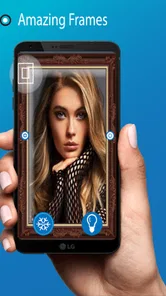
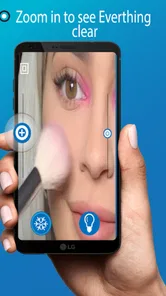
Analysis by Reviewed
When I need to check a quick detail and there isn’t a mirror nearby, I like having a simple backup on my phone. Mirror App - Makeup Mirror turns that everyday problem into a straightforward task: open the app, use the front-facing camera, and check your reflection. It is a focused beauty utility rather than a photo editor or a full makeup-planning tool, which is exactly what makes it easy to understand.
A practical mirror for small moments
The app is free to install, is rated for Everyone, and comes from o16i Apps. It has an average rating of 4.8 from around 8,800 ratings, with over a million installs. Those figures suggest it has found a clear audience, though I would judge it by whether it fits your routine: it is useful when a pocket mirror is missing, not a replacement for every kind of mirror.
A realistic use is a quick check before walking into a meeting: I can look for lipstick smudges, tidy a stray hair, or see whether something is caught between my teeth. For a more deliberate makeup touch-up, the magnified view helps me inspect a small area, while brightness control can make the screen easier to use in a dim room. I would still treat the image as a close-up aid, not a perfect preview of how makeup looks from a normal viewing distance.
Transform Your Phone into a Mirror
With the Mirror App - Makeup Mirror, your phone's screen becomes a high-quality mirror. The app takes full advantage of your device's front camera, turning it into a reflective surface. It's like carrying a compact mirror in your pocket, but even better because it doesn't take up any physical space.
Features That Stand Out
What I love most about this app is its simplicity and functionality. The interface is intuitive, allowing you to access the mirror with just a tap. There's no need to fumble through settings or deal with complicated features. It's designed for quick and easy use, perfect for those on-the-go moments when you need to check your makeup or adjust your hair.
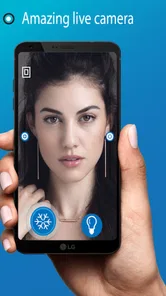
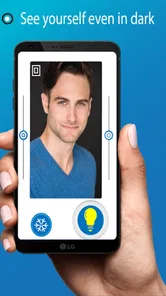
One standout feature is the zoom capability. You can easily zoom in to get a closer look at specific areas, which is incredibly useful for detailed makeup application. Additionally, the app offers brightness controls, so you can adjust the lighting to match your environment, ensuring you always get a clear reflection.
Making the most of the camera view
For a steadier close-up, I hold the phone at a comfortable distance first, then use magnification rather than pushing the device right up to my face. That makes it easier to keep the area in view and avoids turning a quick check into an awkward balancing act. Brightness is worth adjusting before judging a color: a brighter screen can help visibility, but it does not recreate every lighting condition accurately.
More From Our News Desk

 Gmail
Gmail in a Busy Inbox: Who Benefits Most?
From first account to crowded workday, Gmail earns its place through dependable search and flexible sorting—but its best fit depends on how much inbox maintenance you can tolerate.

 Prime Video
Switching to Prime Video: What Changes in Your Viewing Routine
Prime Video can make a compelling second home for streaming, but switching means learning a different catalog, rental layer, and route from browsing to playback.

 Universal TV Remote Control
 Works Best as a Reliable Backup
A phone remote earns its place through quick setup and reliable habits. Here is how to get more from Universal TV Remote Control—and where its limits show.

 Weather - By Xiaomi
Weather by Xiaomi Review: Clear at a Glance, Less Clear Up Close
Xiaomi’s weather app makes everyday forecasts quick to scan, but its calm surface can leave useful details and recovery paths harder to find than they should be.

 X
X Under Pressure: Can It Recover When Posting Goes Wrong?
A resilience-focused review of X, examining setup, mistaken posts, interruptions, weak connections, and the gaps that matter when recovery needs to be dependable.

 Clash of Clans
 Is Won Between the Battles
Its raids are quick; its community is a long-term project of coordination, teaching, rivalry, and shared responsibility—with all the friction that entails.
Latest News



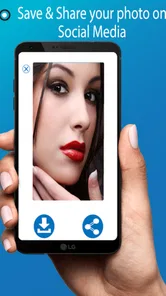
The capture option is useful when I want to pause and inspect a detail instead of holding the phone in place. It also creates a small trade-off: a saved image can be easier to examine, but it is less immediate than a live mirror, and I may prefer not to keep a close-up on my device. I use that option selectively and return to the live view for ordinary checks.
Where it fits among mirror alternatives
Compared with opening the regular camera, a dedicated mirror app is appealing when I want a direct reflection-oriented tool with magnification and brightness controls in one place. The camera app may be the better choice if I need its broader photo tools, while a physical mirror remains more dependable for judging appearance at a natural distance or in consistent room lighting. This app works best as a portable backup, not as a substitute for those situations.
It is especially suited to people who often touch up makeup away from home, commuters who want a quick check before arriving, or anyone who has found themselves without a compact mirror. I would skip it if I mainly need to take polished photos, compare makeup looks, or assess colors under controlled lighting; a camera or a real mirror is a better fit for those jobs. For a simple glance, though, the focused approach saves me from navigating a more complicated tool.
Why You Should Download It
In a world where convenience is king, the Mirror App - Makeup Mirror shines brightly. It's a free app that's lightweight and doesn't take up much space on your device. Plus, it's compatible with both Android and iOS, making it accessible to a wide range of users.
But it's not just about practicality. The app is also a lifesaver in emergency situations. Ever had lipstick on your teeth during a meeting or a piece of spinach stuck after lunch? This app has got you covered. It's these little things that make it an essential tool for everyday life.
Version, value, and what to expect
The app's current version is 1.2.1, and it first appeared on June 2, 2019. I see those details as context, not a promise about a particular update history: the useful question is whether the present tool still meets a basic need. It supports Android 7.0 and later, and optional in-app purchases range from $0.99 to $99.99 per item, so I would check the purchase screen carefully before confirming anything. The mirror function is the central reason to try it; I would not assume paid options are necessary for a quick reflection.
If you already use it, your everyday routine need not change: keep it for fast checks, and use a physical mirror when you need a wider view. If you are deciding whether to install it, expect a compact mirror utility rather than a beauty suite. I would watch for whether future changes preserve that quick, uncomplicated feel and keep magnification and brightness easy to reach; that is the balance that makes this kind of app worth keeping.
Choosing it for a real routine
The best way to think about this tool is as an on-demand check, not something that needs to stay open throughout a whole makeup routine. I would use it after applying lipstick, once the rest of my face is finished, or when I have a few minutes between leaving home and arriving somewhere. That order matters: a phone screen is handy for spotting a small, obvious problem, but it is not the best way to assess the overall balance of a look.
For example, imagine getting off a bus and heading straight into a lunch with a client. I could open the mirror, raise the brightness enough to see my face, and use magnification to check one specific area. If I needed to decide whether my foundation shade matched my neck, I would wait until I could use a regular mirror in more neutral light. The app helps me answer “Is there something visibly out of place?” far better than “Does this color look exactly right?”
Small workflow choices that make it more useful
I find it helps to decide what I am checking before turning on magnification. A narrow view is useful for a lipstick edge or a stray brow hair, but it can make it harder to keep track of where that detail sits on the rest of the face. I start with the broader live view, locate the spot, then zoom in briefly. Returning to the wider view afterward is a simple way to avoid overcorrecting a tiny detail that is barely noticeable at normal distance.
Brightness is another control I would use with a light touch. Raising it can make the display easier to see in a dim hallway, but a very bright screen can make skin or makeup appear different from how it looks in the room. I treat brightness as a visibility adjustment rather than a lighting simulator. If color accuracy is important, I step toward a window or use a physical mirror instead of trying to compensate with the screen.
The capture function suits a different moment from the live view. I would use it when my hands are steady and I want to inspect a detail without continuing to hold the phone in position. For a quick check while walking between places, live viewing is less fussy. If I capture an image, I also make a point of considering whether I want that close-up to remain on my phone; a frozen view can be convenient, but it is not automatically better than a brief glance.
What the phone changes about the experience
A phone mirror depends on the front camera, screen, and the way I hold the device, so the experience is not identical to looking into glass. The phone has to be at an angle that lets me see the screen while the camera is pointed toward me, and that can feel awkward when I need both hands for a touch-up. For simple checks, that compromise is minor. For careful application that needs both hands and a stable view, a tabletop mirror is more comfortable.
There is also a practical difference in viewing scale. A physical mirror gives me a familiar view of my whole face at once, while magnification encourages attention to one small area. That close inspection can be useful, but it can also tempt me to keep fixing details that do not matter from conversational distance. I use the app to identify a clear issue, then step back from the close-up rather than treating every tiny texture or line as something that needs correcting.
Who will appreciate it, and who may not
I would recommend it most to someone who already reaches for a phone in short gaps during the day and wants a mirror-like view without carrying another item. It makes sense for commuters, people who move between work and social plans, and anyone who wants to check a small makeup detail away from home. Its value comes from being available at the exact moment a compact mirror is not.
It is less suited to someone who wants tutorials, product recommendations, virtual makeup try-ons, or a way to save and compare finished looks. Those are different jobs from checking a live reflection. It also may not be a satisfying replacement for a full-length or wall mirror: the screen is small, the phone must be held, and the view is centered on the face rather than the whole outfit. Knowing that boundary beforehand makes the app easier to appreciate for what it does.
How I would judge its value over time
Because the basic task is so narrow, I would not expect a long learning curve or a complex daily habit. I would keep it only if I actually reach for it in situations where a mirror is inconvenient. If it sits unused because I always have a compact mirror nearby, there is little reason to make it part of my routine simply because it is on my phone.
The app is free to install, though optional purchases are available, so I would pause at any purchase screen and decide whether the item addresses a need I genuinely have. The central mirror use is the reason I would try it; I would not spend money on an option without first understanding what it changes. That is particularly sensible for a utility whose main appeal is quick access rather than a large collection of tools.
What the version details mean for existing users
For current users, the practical question is whether the app still opens quickly and whether the camera view, capture control, magnification, and brightness adjustment remain easy to use on their device. The version number and release date provide a point of reference, but they do not tell me by themselves how the app has changed over time. I would judge a future change by its effect on the everyday task: does it preserve a clear, direct mirror experience, or make a simple check harder to reach?
Someone considering it on an older Android phone should note that support begins with Android 7.0. That is useful when deciding whether the app is compatible, but compatibility alone does not guarantee that every device will feel equally convenient. A larger screen may make the view easier to inspect, while a smaller one can be easier to handle one-handed; either way, the most important test is whether the controls and image are comfortable for your own routine.
Final Thoughts
To sum it up, the Mirror App - Makeup Mirror is a must-have for anyone who values convenience and preparedness. Whether you're a makeup enthusiast or just someone who likes to be prepared, this app is a game-changer. So, next time you find yourself without a mirror, remember there's an app for that. Download it today and never be caught off guard again!
Mirror App - Makeup Mirror Frequently Asked Questions
Is Mirror App - Makeup Mirror suitable for quick touch-ups while traveling?
Yes. Mirror App - Makeup Mirror is designed to make a mirror readily available on your phone, which can be handy when you are away from home or need to check your appearance on the go. Its screen brightness control and magnifying mirror view help with a closer look, while the image capture feature lets you take a snapshot. The app is in the Beauty category and is rated for Everyone.
What is the Mirror App - Makeup Mirror and how does it work?
The Mirror App - Makeup Mirror is a digital tool that turns your smartphone into a convenient makeup mirror. It utilizes the front-facing camera of your device to display your reflection on the screen, providing various features to enhance your experience. Users can zoom in for detailed views, adjust lighting levels to simulate different environments, and even take snapshots to review their makeup application. This app is particularly useful for on-the-go touch-ups and ensures you always have a mirror handy.
Is the Mirror App - Makeup Mirror free to use?
Yes, the Mirror App - Makeup Mirror is available as a free download on both Android and iOS platforms. While the basic functionality of the app is free, it may offer in-app purchases for additional features or to remove ads. These purchases might include premium features like advanced lighting options or the ability to save and share images without watermarks. Users can choose to use the free version or upgrade as per their needs.
What features does the Mirror App - Makeup Mirror offer?
The Mirror App - Makeup Mirror offers a variety of features designed to enhance your makeup application experience. Key features include adjustable lighting to mimic different environments such as daylight or evening settings, zoom functionality for closer inspection, and the ability to take and save photos of your makeup looks. Some versions may also offer filters or frames to add fun elements to your images. These features make it a versatile tool for makeup enthusiasts.
How does the lighting adjustment feature work in the Mirror App - Makeup Mirror?
The lighting adjustment feature in the Mirror App - Makeup Mirror allows users to simulate various lighting conditions to ensure their makeup looks flawless in any setting. This feature uses your device's screen brightness and color temperature adjustments to replicate environments like natural daylight, office lighting, or dim evening settings. Users can manually adjust these settings to suit their preference, making it easier to apply makeup with confidence.
Pros
- High-quality magnification feature.
- Bright LED light for dark environments.
- User-friendly interface.
- Free to download with no ads.
- Real-time zoom capabilities.
Cons
- Limited to front-facing camera only.
- No photo capture feature.
- Requires high battery usage.
- Not available offline.
- Limited customization options.