Remove Objects - Photo & Video
- 459.00
- 4.4
- Installs
- 10.00M
- Price
- Free

Screenshots
Analysis by Reviewed
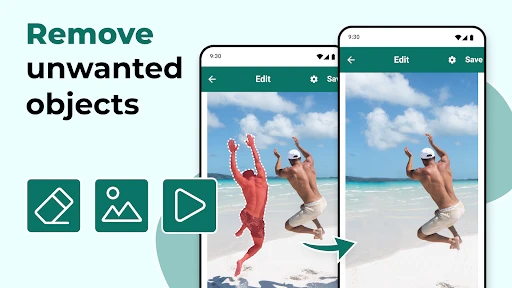
I think the best way to judge a retouching app is not by whether it can make an object disappear, but by whether it lets me make that change deliberately and check the result before I keep it. That matters when an image includes a stranger, a private detail, or a background that tells more about a place than I want to share. Remove Objects - Photo & Video is focused on removing unwanted elements from photos and videos, so I see it as a practical editing tool rather than a full creative suite.
A focused tool, not a whole editing studio
Made by o16i Apps, this free editing app has a 4.4 average from around 41,000 ratings and more than 10 million installs. It is rated for Everyone, and its current version is 2.6.1. Those figures suggest it has found a broad audience, but popularity alone does not tell me how a particular edit will look. I would still judge each result at normal viewing size and zoom in around the altered area before sharing it.
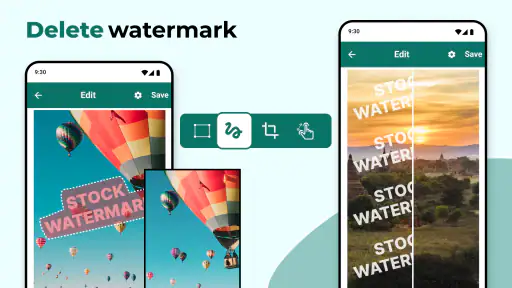
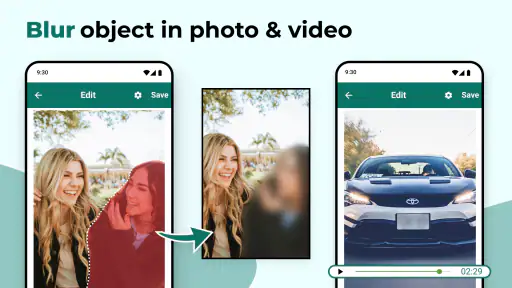
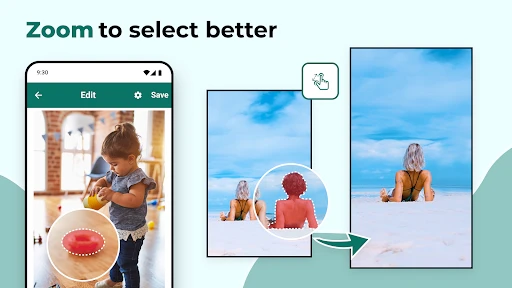
The useful distinction is the selection step: the app offers rectangle and lasso selection, giving me a choice between marking a compact object quickly and tracing a less regular shape more carefully. A rectangle is convenient for a sign or small background item, while a lasso gives better control around a person or object with an uneven outline. Neither choice guarantees a clean result; the surrounding texture and lighting have a lot to do with whether the removed area blends in.
What to check before keeping an edit
I would treat removal as a visual change that deserves a quick review, not an automatic fix. Repeating patterns, sharp edges, shadows, and moving details can make a patch noticeable, especially when the selected object overlaps something important. For a more reliable result, I would select only the unwanted area rather than drawing a very broad outline, then inspect nearby lines and textures. If the scene is busy, a different crop or a conventional photo editor may preserve more detail than object removal.
For a short clip, I would also decide whether the distraction is worth removing from the video at all. A small object that stays in one place may be a reasonable target; an object moving across the frame is a tougher visual problem because the surrounding scene changes too. The app’s video-editing purpose is appealing for quick fixes, but I would not assume that a result that looks convincing in one still frame will look equally natural throughout a clip.
Privacy is part of the editing decision
When I edit a photo of a receipt, a home, or another person, I think about the file itself as well as the finished image. Removing something from view is not the same as removing sensitive information from every copy or earlier version. I keep the original until I am satisfied with the edited result, and I avoid using a retouching tool as my only privacy safeguard when an image contains details I should not share.
I also pay attention to the choices an app presents while I use it, such as what image I select and what result I choose to keep. I would not treat the ability to edit a file as evidence of how an app handles it behind the scenes. If privacy is the deciding factor, I would first review the app’s current disclosures and the access choices shown on my device, then decide whether the image is appropriate to edit there.
More From Our News Desk

Clash of Clans Is Won Between the Battles

Android Auto Makes the Case for Quieter Car Software

MobiOffice: Transforming Mobile Productivity with Seamless Integration

EA SPORTS FC™ Mobile Soccer: Redefining Mobile Sports Gaming

How Microsoft OneDrive Became a Mobile Productivity Giant

How Google Translate Breaks Language Barriers Effortlessly
Who will get the most from it?
This is most appealing if I want a narrow, straightforward way to clean up a picture or try removing a distraction from a video without opening a desktop editor. It is less suitable when I need precise professional retouching, detailed control over many layers, or dependable reconstruction across complicated moving footage. In those cases, a more capable editor—or simply reframing the shot—may be the better choice.
Getting Started with Ease
First things first, downloading Remove Objects - Photo & Video is a breeze. Available on both Android and iOS, I had it up and running in no time. The interface is pretty intuitive, which is a big plus. No need to be a tech wizard here. Within seconds, I was diving into my gallery, ready to give my photos a makeover.
How Does It Work?
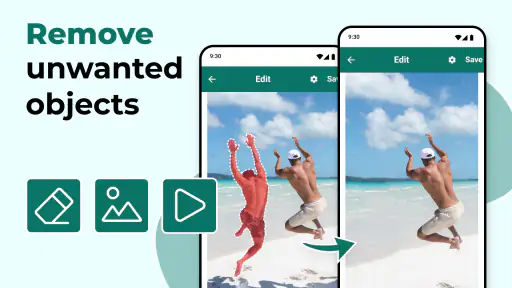
Using the app is as simple as pie. You just select the photo you want to edit, highlight the object you want to disappear, and voila! The app does its thing, and the unwanted object is gone. It’s like it was never there. The app uses some pretty nifty technology that’s way beyond my comprehension, but all I care about is that it works, and it works well. The edits are seamless, and unless you’ve got a magnifying glass, you wouldn’t know anything had been removed.
Beyond Just Photos
But wait, there’s more! This app doesn’t just stop at photos. You can also edit videos, which is pretty cool if you’re into creating content. Imagine being able to remove distractions from your videos with the same ease. It’s a game-changer, especially for someone who loves capturing moments without the hassle of editing software.
Performance and Reliability
I’ve tried quite a few apps that promise similar results, and I’ve often been left disappointed with laggy performance or crashes. Thankfully, this wasn’t the case here. The app runs smoothly, edits are done in a jiffy, and I haven’t faced any annoying crashes that make you want to pull your hair out.
And let’s talk about quality. The edits look professional, and more importantly, they look natural. You won’t end up with weird patches or obvious signs that something was removed. Everything just blends in perfectly, which is exactly what you want.
Making a careful choice for casual edits
A realistic use is a vacation photo where a bin or passerby distracts from the main subject. I would try a tight selection, compare the edited image with the original, and keep the untouched file until I am happy. For a moving clip, I would preview the whole relevant passage rather than judge a single frame; a mark that seems minor at the start may become conspicuous as the scene changes.
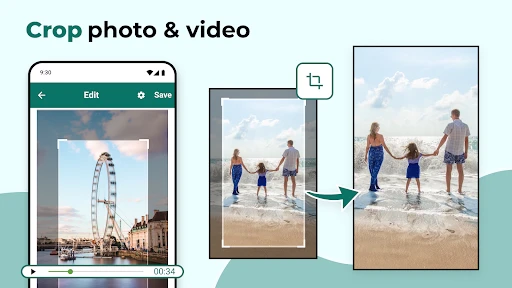
Compared with a general photo editor, this app’s appeal is its narrower purpose: it is aimed at removing an unwanted object, with rectangle or lasso marking instead of asking me to learn a large collection of editing tools. That focus can save time for a quick cleanup. The trade-off is that someone who wants layers, extensive color adjustments, or fine manual retouching may be better served by a broader editor. For a simple crop, cropping is often even safer and quicker, provided it does not cut out something important.
Cost, compatibility, and expectations
The app is free to download, with in-app purchases listed from $0.99 to $99.99 per item. I would check the purchase screen carefully before confirming anything, especially if I only need an occasional edit; a free download does not mean every optional item is free. It requires Android 5.0 or later, which helps older Android users assess compatibility before installing. The app sits in the video-player and editor space, though its distinctive job is visual cleanup rather than playback.
One practical question is whether it suits a quick one-off task or a regular workflow. I would start with a non-sensitive image and a small, clearly separated object, then decide whether the selection and result feel manageable for my needs. If the removal leaves a repeated pattern visibly broken, I would stop rather than keep enlarging the selection and risk damaging more of the scene. That restraint is useful: not every distraction needs to be erased, and sometimes changing the crop makes a more honest, better-looking image.
Choosing the right image and workflow
For a quick everyday cleanup, I would begin with the original photo and identify what actually draws the eye. If it is a small object at the edge, a crop may solve the problem without altering the scene at all. If cropping would remove a useful person or detail, I would use the rectangle tool for a compact, box-shaped distraction; for an irregular outline, the lasso gives me a more considered boundary. I would avoid selecting a wide area just to make the first pass easier, since that can erase useful texture along with the target.
A useful test case is a group photo taken outdoors where a sign or bin sits behind the people. I would first check whether the object overlaps hair, clothing, or a strong line in the background. If it does, I would expect a harder edit and compare the result at both full view and close zoom. If the repair looks acceptable only when I squint or shrink the image, I would keep the original and try a crop or a different frame instead. That check helps me avoid turning a minor distraction into a more obvious patch.
Photos, clips, and practical limits
For video, I would pick a short section in which the unwanted item stays relatively still and inspect the whole passage after editing. This is a more useful workflow than pausing at the cleanest frame: motion can reveal a mark that is hard to see in a screenshot. If the subject or camera moves, or if the object crosses a detailed background, a dedicated video editor with more precise tools may be a better use of time. I would not choose this app expecting it to reconstruct complex footage as if the object had never been there.
The same judgment applies to photos with fine patterns, such as railings, brickwork, or text. A removed object can leave a mismatch in repeated lines, and a tight selection does not guarantee that the surroundings will join naturally. In those cases, I would decide whether the edit needs to be invisible or simply less distracting. For a casual social image, a subtle imperfection may be acceptable; for an image where accuracy matters, I would preserve the original composition or use a more controlled editor.
Trust, choices, and sensitive images
I find it useful to separate two questions: whether the visual edit works, and whether I am comfortable handling that particular file in the app. A clean-looking result does not tell me how an image is processed or retained. Before using personal material, I would review the disclosures available for the app and the access prompts on my device, granting only the access I am comfortable with. I would also avoid treating object removal as a way to securely redact information; a visible edit is not a substitute for a dedicated redaction workflow.
For an ordinary travel shot or a non-sensitive clip, I would be more relaxed about testing a small edit. For a photo that reveals a home address, a child’s school details, or private paperwork, I would think twice before importing it and would use a purpose-built privacy process if the goal is to prevent disclosure. Keeping the original separate is also sensible, since it lets me undo a disappointing result and compare what changed rather than relying on memory.
Who should try it—and who should pass
I would recommend giving it a try if you mainly want to tidy occasional photos, are comfortable checking your edits, and prefer a focused tool over a full editor. The free download makes it possible to assess the basic workflow before deciding whether any optional purchase is relevant, but I would read the purchase screen rather than assume every function has no cost. The app is also a reasonable starting point for someone curious about removing a small distraction from a clip, as long as expectations stay modest.
I would pass if your usual work involves detailed retouching, complex scenes, repeated edits that need consistent precision, or video where objects move against changing backgrounds. A general editor gives more room for layers and manual adjustments, while a crop can be the cleaner answer when the unwanted item is near the edge. The best choice depends less on the size of the app and more on whether your target sits against a simple, forgiving background.
A cautious recommendation
To wrap it up, Remove Objects - Photo & Video is a fantastic tool for anyone who loves taking photos and videos but hates dealing with unwanted elements. It’s user-friendly, efficient, and delivers on its promises. So, if you’re like me and want your memories to look as good as they feel, give this app a whirl. It’s definitely a must-have in your digital toolbox!
My more measured recommendation is to try it when the distraction is small, the background is reasonably simple, and a quick cleanup matters more than deep editing control. I would skip it for sensitive material until I had reviewed the choices and disclosures presented on my device, and I would use a more advanced editor for complex scenes. That makes it a handy option for casual fixes, as long as I treat each removal as an edit to inspect—not a guarantee that the original scene can be reconstructed perfectly.
Remove Objects - Photo & Video Frequently Asked Questions
Does Remove Objects - Photo & Video support both Android and iOS?
Remove Objects - Photo & Video is an app in the Video Players & Editors category, and it is designed for mobile editing. Before downloading, check that your device meets the minimum operating-system requirement of Android 5.0. The app is free to download, with in-app purchases available for users who want to explore paid options.
What is Remove Objects - Photo & Video and how does it work?
Remove Objects - Photo & Video is an innovative app designed to help users edit their photos and videos by removing unwanted objects seamlessly. Using advanced AI algorithms, the app detects and erases objects from your media, ensuring a clean and natural look without any noticeable distortion. It's user-friendly and perfect for both amateurs and professionals looking to enhance their visual content.
Is Remove Objects - Photo & Video free to use?
The app offers a free version with basic features suitable for general use. However, for users seeking more advanced editing tools and capabilities, a premium version is available through in-app purchases. This premium version unlocks additional features and provides an ad-free experience, making it a worthwhile investment for frequent users. In-app purchases range from $0.99 to $99.99 per item.
What types of objects can be removed using this app?
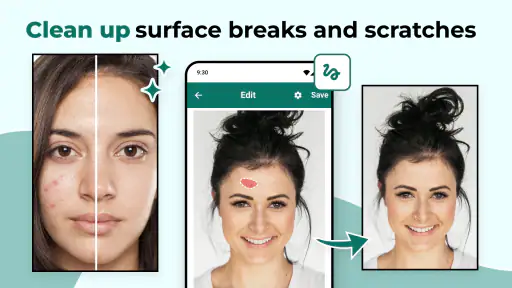
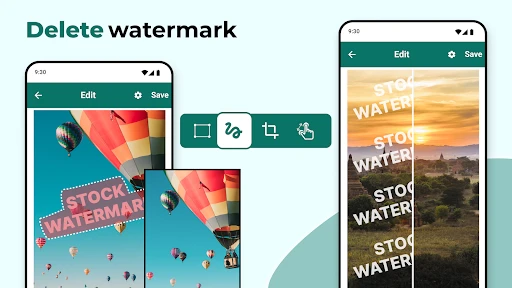
Remove Objects - Photo & Video is capable of removing a wide range of objects from your media. Whether it's unwanted people in the background, distracting text, or unwanted elements like wires or blemishes, the app's powerful AI can handle them all. It’s a versatile tool for improving the overall aesthetics of your photos and videos.
Do I need any technical skills to use Remove Objects - Photo & Video?
No technical skills are required to use Remove Objects - Photo & Video. The app is designed with an intuitive interface that guides users through the process of object removal. With easy-to-follow instructions and user-friendly tools, even beginners can achieve professional-looking results with just a few taps.
Pros
- Easy to use interface for quick edits.
- Supports both photos and videos.
- High-quality output after removal.
- Fast processing time for edits.
- Offers a variety of editing tools.
Cons
- Limited free version features.
- Occasional glitches reported.
- Can be resource-intensive on older devices.
- Subscription required for full features.
- May alter original image quality slightly.

- Category
- Video Players & Editors
- Version
- 2.6.1