

Perfect Guitar Tuner
- 391.00
- 4.6
- Installs
- 5.00M
- Price
- Free
Screenshots
Analysis by Reviewed
Before opening any tuning app, I like to decide what I need from the check: a quick return to familiar tuning, a deliberate move to another setup, or simply confirmation that one string has drifted. That small pause prevents guesswork once I start turning pegs. Perfect Guitar Tuner is most useful when I treat it as a clear pitch reference rather than expecting it to make every tuning decision for me.
Start with the guitar you actually have
My first step is to confirm which tuning the instrument is meant to be in. That sounds obvious, but it matters when a guitar has been used for a different song or passed between players. I check the chosen tuning before touching a peg, then work through the strings one by one. If I am unsure what notes an alternate tuning calls for, I look them up separately instead of guessing from the shape of the tuning controls.
For a shared guitar at a lesson, this order is especially helpful: ask whether the last player changed the tuning, check the instrument, then make only the adjustments needed. It avoids returning a guitar to standard tuning when someone intentionally set it up differently. The app can tell me whether a pitch matches its target, but I still need to know which target is appropriate for the music.
A quieter check gives a cleaner reading
Phone-based tuning depends on the sound reaching the phone, so placement and surroundings are part of the routine. I keep the phone close enough to hear the plucked string clearly and avoid letting the other strings ring. If the display seems unsettled, I pause, damp the strings I am not checking, and pluck again at a steady volume rather than immediately making a larger peg adjustment.
This is also why I would not use a loud rehearsal as the first place to make a major tuning change. A brief check in a quieter corner can establish a better starting point; then I can confirm the guitar in playing position. That approach is more dependable than treating every moving needle as a command to turn a peg.
Ever found yourself at a campfire or a jam session, only to realize your guitar is horribly out of tune? Fear not, for Perfect Guitar Tuner is here to save the day! This app is a nifty little tool that’s become an absolute necessity in my musical toolkit. Let me walk you through my experience with it.
Getting Started with Perfect Guitar Tuner
First things first, downloading the app was a breeze. It’s available for both Android and iOS, just a quick search away in your app store. Once you’ve got it installed, you’re greeted with a clean and straightforward interface. No frills, just the essentials. I appreciate this simplicity; it means I can get straight to the tuning without jumping through any hoops.
More From Our News Desk

 Gmail
GmailGmail in a Busy Inbox: Who Benefits Most?
From first account to crowded workday, Gmail earns its place through dependable search and flexible sorting—but its best fit depends on how much inbox maintenance you can tolerate.

 Prime Video
Switching to Prime Video: What Changes in Your Viewing Routine
Prime Video can make a compelling second home for streaming, but switching means learning a different catalog, rental layer, and route from browsing to playback.

 Universal TV Remote Control
Universal TV Remote Control Works Best as a Reliable Backup
A phone remote earns its place through quick setup and reliable habits. Here is how to get more from Universal TV Remote Control—and where its limits show.

 Weather - By Xiaomi
Weather by Xiaomi Review: Clear at a Glance, Less Clear Up Close
Xiaomi’s weather app makes everyday forecasts quick to scan, but its calm surface can leave useful details and recovery paths harder to find than they should be.

 X
XX Under Pressure: Can It Recover When Posting Goes Wrong?
A resilience-focused review of X, examining setup, mistaken posts, interruptions, weak connections, and the gaps that matter when recovery needs to be dependable.

 Clash of Clans
Clash of Clans Is Won Between the Battles
Its raids are quick; its community is a long-term project of coordination, teaching, rivalry, and shared responsibility—with all the friction that entails.
Latest News



A reliable starting routine
My most dependable routine is to tune in a quiet spot, pluck one string at a time, and let the reading settle before I adjust the peg. I use a gentle, consistent pluck rather than striking the string hard; a forceful attack can make the pitch jump around and tempt me to turn the peg too far. After each adjustment, I pluck again instead of trusting the first reading. That small habit helps avoid chasing a brief fluctuation rather than the string’s settled pitch.
For a quick check before playing, I begin with the strings I expect to use most and then scan the others. If I have just moved the guitar between rooms or taken it out of its case, I check again after playing for a short while. Strings can shift as the instrument settles, so a single successful pass is not always the end of the job. The tuner makes that repeatable check simple without replacing the useful habit of listening for how the strings sit together.
Ease of Use
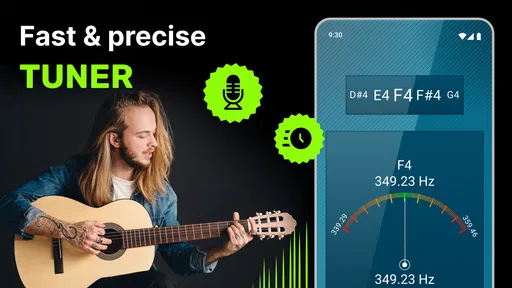
Using Perfect Guitar Tuner is as easy as pie. You simply pluck a string, and the app tells you if you’re sharp, flat, or perfectly in tune. It’s incredibly responsive, and I’ve found it to be quite accurate. What stands out is its versatility—it’s not just for standard tuning. Whether you’re into drop D or experimenting with open tunings, this app has got you covered.
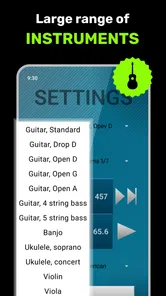
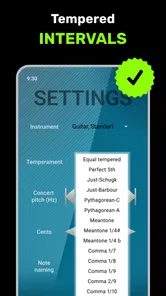
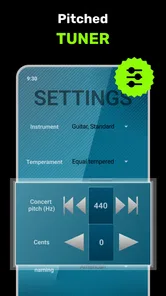
Settings and tuning choices
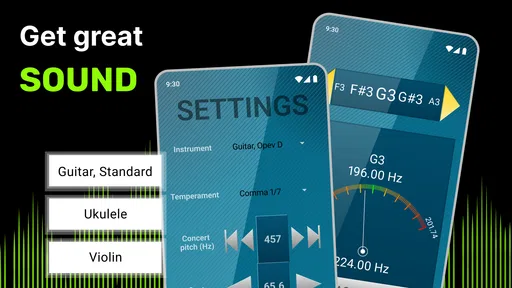
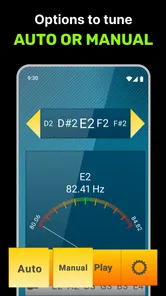
The practical first choice is whether to follow a familiar guitar tuning or use the chromatic option when you need to check a pitch outside that routine. I’d choose the mode before starting, especially when switching between a standard setup and an alternate tuning; otherwise it is easy to make a string match the wrong target. If you are learning an unfamiliar tuning, keep a reference for the intended notes nearby and work through the strings deliberately rather than relying on memory.
Alternate tunings are useful, but they also change string tension and can make a guitar feel different under the fingers. I treat the app as a pitch guide, not an instruction to make abrupt changes or force a stubborn peg. If a string feels unusually tight, stop and check that you are adjusting the correct one and moving toward the intended note. This cautious approach is particularly helpful for beginners, who may not yet recognize when a string is being tightened too far.
Features That Stand Out
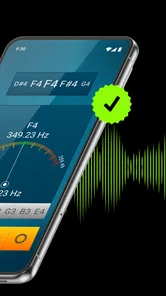
One of the highlights is the visual cues. The app uses a needle-style interface, similar to physical tuners, which turns green when your string is in tune. This visual feedback is especially helpful in noisy environments where it might be hard to hear subtle changes in pitch. Plus, it offers a range of tuning modes and a chromatic tuner for those who like to explore different musical landscapes.
Making tuning quicker in everyday use
When I have only a minute before a lesson or a casual rehearsal, I avoid changing several strings at once. I check a string, make a small adjustment, and confirm it before moving on. That reduces the chance of losing track of which peg caused a reading to shift. If the room is loud, I move the phone closer to the guitar and pluck clearly, while keeping other strings from ringing; stray vibrations can make it harder to focus on the one being checked.
For a weekly practice routine, I also note which alternate tuning I last used, rather than assuming the guitar is still in standard tuning. This is a simple personal reminder, not an app feature, and it prevents a familiar chord shape from sounding unexpectedly wrong. The app is handy for a quick reset, but consistency in how I pluck and adjust is what makes the process feel fast and repeatable.
Where a phone tuner fits—and where it doesn’t
Compared with tuning by ear alone, a visual tuner gives beginners a clear target and helps experienced players make a quick correction between songs. Compared with a clip-on tuner, a phone app is convenient when the phone is already at hand, and the needle is easy to read. A clip-on can be the better choice on a loud stage or when you want a dedicated device attached to the instrument. For especially noisy conditions, a pickup-based tuner may also suit a player better than relying on sound reaching a phone microphone.
That distinction matters at a campfire: the app can be useful before people start talking and singing, but a busy crowd may make any microphone-based phone tuner less convenient. I would tune somewhere quieter first, then do a brief check once the guitar is in playing position. In a silent bedroom, the visual display is straightforward; in a band room, I would not expect it to eliminate every source of interference.
Why Every Guitarist Needs It
Let’s be honest, tuning by ear is a skill that takes time and practice to master. Perfect Guitar Tuner cuts down that learning curve significantly. It’s perfect for beginners who are still getting the hang of their instrument, but also a handy tool for seasoned players who want to ensure they’re always in perfect harmony. It’s like having a personal tuning assistant right in your pocket!
It is a free music and audio app from o16i Apps, with a 4.5 average from around 15,000 ratings and more than a million installs. Its Everyone age rating makes it suitable for a broad audience, while optional in-app purchases range from $0.99 to $99.99 per item. I would look at the purchase details in the app before buying anything; the basic appeal is the straightforward tuning workflow, so there is no need to assume an extra purchase is required for an ordinary check.
Practical limits and who should choose another tool
The app is best for someone who wants a quick visual reference, is comfortable using a phone beside the instrument, and does not need a dedicated piece of stage gear. It may be less convenient if your phone is across the room, if you need to tune amid very loud music, or if you prefer not to handle a phone while setting up. In those situations, a clip-on or pedal tuner can be a more direct fit. And while the app can guide alternate tunings, it does not replace learning the notes you are aiming for or using your ears to judge how the guitar sounds in context.
The current version is 4.0.1, and the listed minimum operating system is version 8.0. It has been available since June 10, 2014, and has accumulated around 286 written reviews. Those details give a sense of an established, widely used utility, but my recommendation is based on the kind of job it does: getting a guitar close to its intended pitch without a complicated setup.
Another great thing? You don’t need an internet connection to use it. This makes it the perfect companion for outdoor gigs or those spontaneous street performances.
Final Thoughts
All in all, Perfect Guitar Tuner is a must-have for any guitarist. It’s user-friendly, versatile, and incredibly reliable. Whether you’re just starting out or you’ve been playing for years, this app is a fantastic addition to your musical arsenal. Give it a try, and you might just find yourself wondering how you ever lived without it!
If you’re ready to take your guitar playing to the next level, don’t hesitate to download the app and start tuning like a pro. Happy strumming!
Build a routine that catches drift
A useful everyday pattern is to check before practice, play for a few minutes, and then revisit any string that sounds unstable. I find this more informative than repeatedly checking every string after each song. It helps distinguish a guitar that simply needed a small initial correction from one whose tuning is changing during play. If the same string keeps moving, the tuner can reveal the drift, but the cause may involve the instrument, strings, or technique rather than the app.
For a new set of strings, I would be especially patient: tune in small steps, play gently, and check again rather than expecting one pass to hold. The tuner gives me a consistent reference during that process, while the repeated checks show whether the guitar is settling. This is a practical way to use a phone tuner without mistaking a temporary pitch change for a reading problem.
Choosing the right tool for the moment
For home practice, beginners, and songwriters trying a different tuning, this app makes sense because the phone is already useful for other parts of practice and the visual target is easy to follow. It is also a sensible backup to keep available when a dedicated tuner is not nearby. A player who performs regularly in loud rooms may prefer a clip-on or pedal unit as the primary tuner, since those tools are designed to stay with the instrument and avoid depending on room sound in the same way.
It is less compelling for someone who already owns a tuner that fits their stage setup and wants specialized performance controls. Likewise, a player who wants to train their ear should use the display as a check after listening, not as a replacement for listening altogether. I like the app most when it removes uncertainty from a quick adjustment while leaving the musical judgment to me.
A sensible way to explore alternate tunings
When trying an unfamiliar tuning, I would change one string at a time and keep the intended note sequence visible in a separate reference. After each change, I check the string again and listen to how the open strings relate. That makes it easier to catch a mistaken target before the whole guitar has been retuned around it. It also keeps the app’s useful role clear: it measures the pitch I produce, while I decide whether that pitch belongs in the arrangement.
If the guitar is shared, I would leave a brief note for the next player about the tuning rather than assuming they will check before playing. This small handoff avoids confusion during a lesson or informal session and makes the app a practical part of a repeatable setup, not just a last-second rescue tool.
What to expect from the experience
The app’s appeal is its directness: choose a suitable tuning approach, pluck a string, read the visual response, and make a careful correction. That is enough for many ordinary practice sessions. The trade-off is that the result depends on a clear sound and sensible use; a phone tuner cannot make a noisy room quiet, identify the right tuning for a song on its own, or substitute for a properly maintained guitar.
My overall recommendation is for players who want an accessible, no-fuss way to check guitar pitch and are happy to build a careful habit around it. I would choose a dedicated tuner for demanding stage conditions, and I would consult a note reference before experimenting with unfamiliar setups. Used within those limits, it is a practical tool that makes tuning less intimidating without pretending that the instrument or the player no longer matters.
Perfect Guitar Tuner Frequently Asked Questions
Is Perfect Guitar Tuner suitable for tuning instruments other than a guitar?
Perfect Guitar Tuner is presented as an app for tuning musical instruments, with its short description highlighting guitar use. If you play another instrument, consider whether the available tuning options match what you need before downloading. For guitarists, it is intended to make tuning quick, but the best fit depends on your instrument and how you prefer to tune.
What should I check before using Perfect Guitar Tuner for the first time?
Before starting, make sure your device meets the app’s operating-system requirement and that its microphone can pick up your instrument clearly. Choose a reasonably quiet spot and play one string at a time so the sound is easier for a tuner to distinguish. These simple checks can help make your first tuning session smoother and more useful.
Is Perfect Guitar Tuner free to download, and does it include in-app purchases?
Perfect Guitar Tuner is free to download, so you can try it without paying an upfront price. It also offers in-app purchases, with items ranging from $0.99 to $99.99. If you prefer to avoid extra spending, check the purchase options before using them and review any confirmation prompts in your app store.
What devices can run Perfect Guitar Tuner?
Perfect Guitar Tuner is available for mobile devices running Android or iOS, and the listed minimum operating-system requirement is version 8.0. Before downloading, check that your device meets the requirement and has a working microphone, since the app uses your device’s microphone for tuning. The app is rated for Everyone.
What features does Perfect Guitar Tuner offer for beginners?
Perfect Guitar Tuner offers a range of features that are ideal for beginners. It includes an easy-to-use interface with step-by-step instructions on how to tune different types of guitars. The app provides visual and auditory feedback, ensuring that even novices can tune their instruments accurately. Additionally, it offers tutorials and tips on guitar maintenance, making it a comprehensive tool for beginners.
Pros
- User-friendly interface
- Accurate tuning capabilities
- Supports various string instruments
- Lightweight and fast app
- Free with no hidden costs
Cons
- Contains ads
- Limited advanced features
- Requires microphone access
- No offline mode
- Occasional minor bugs













