Beauty Camera: Selfie Editor
- 21.00
- 4.1
- Installs
- 1.00M
- Price
- Free
Screenshots

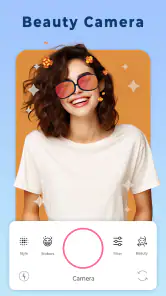

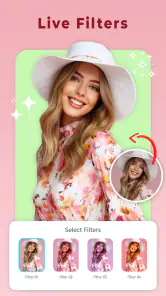
Analysis by Reviewed
I usually judge a selfie editor by what happens after the first burst of experimenting: does it still help when I need one quick, natural-looking fix, or does it become another app I open once and forget? Beauty Camera: Selfie Editor is aimed at people who want beauty-focused touch-ups, filters, stickers, and photo editing in one place. Its first-week appeal is easy to understand, but its lasting value depends on how much you enjoy shaping selfies before sharing them.
A quick start for casual edits
For a first try, I’d keep the workflow simple: choose a selfie, make one or two restrained adjustments, then compare the result with the original. Beauty tools can be tempting to push too far, especially when a change looks striking on a small screen. Checking the image at full size before saving is a useful habit; it can reveal softened details or edges that are less convincing than they first appeared.
The app is free to download, and it comes from o16i Apps. It has a 4.1 average from around 6,200 ratings and has been installed over a million times. That gives a new user a sense of its reach, though popularity alone can’t tell you whether its editing style will suit your taste. The app is rated for Everyone, while optional in-app purchases range from 49 cents to $99.99 per item.
Unleashing Your Inner Photographer
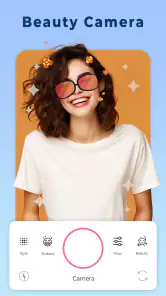
First things first, let's talk about the user interface. The Beauty Camera: Selfie Editor is incredibly user-friendly. The moment you open the app, you're greeted with a clean and simple layout that makes navigation a breeze. Whether you're tech-savvy or a bit of a newbie, you'll find this app easy to maneuver. Trust me, you won’t need a manual to figure things out!
Features That Shine
Now, onto the fun stuff—features. This app is packed with tools that let you enhance your photos in just a few taps. From smoothing out skin tones to brightening your eyes, it offers a wide range of editing options. Personally, I love the "Magic Retouch" feature; it's like having a magic wand that transforms your selfies from "meh" to "marvelous" in seconds.
Another cool feature is the "Background Editor." Ever wanted to look like you're lounging on a tropical beach when in reality you're stuck at home? Yep, this app's got you covered! You can change your photo's backdrop effortlessly, and it blends so naturally that no one will ever know.
Getting a result you’ll still like later
For a realistic everyday use, imagine taking a quick portrait before a video call or sharing a group photo after lunch. I’d make a light correction, save a version that still looks like me, and avoid stacking several strong effects just because they’re available. Keeping the original untouched is a sensible safeguard, particularly if you may want a different look later. A natural edit also tends to age better than a dramatic filter when you revisit the picture.
More From Our News Desk

Clash of Clans Is Won Between the Battles

Android Auto Makes the Case for Quieter Car Software

MobiOffice: Transforming Mobile Productivity with Seamless Integration

EA SPORTS FC™ Mobile Soccer: Redefining Mobile Sports Gaming

How Microsoft OneDrive Became a Mobile Productivity Giant

How Google Translate Breaks Language Barriers Effortlessly
Background changes call for a little extra care. They can make a casual portrait feel more polished, but hair, shoulders, and other fine edges are where a replacement can look less seamless. I’d zoom in around those areas before sharing, and use a new backdrop only when it improves the photo rather than distracting from the person in it. That small check is more useful than applying another effect to cover a rough edge.
Who will get the most from it
I see the strongest fit for someone who takes occasional selfies and wants a straightforward way to make a portrait feel finished, not for someone planning a detailed retouching session. A student choosing a profile picture, a friend preparing a birthday post, or someone tidying a photo for a family chat can get value from having touch-ups, filters, and stickers together. The appeal is practical: choose a face-focused edit, make a quick adjustment, and move on without turning a casual picture into a project.
It may also suit people who enjoy a playful look as much as a polished one. Stickers and filters can shift a photo’s mood without requiring a separate design app, which is useful when the goal is a lighthearted message rather than a carefully consistent feed. I’d still use those effects selectively. A sticker that fits a joke or occasion can make a picture more personal; adding one by habit can make the result feel busy.
If your main interest is landscape photography, color grading, batch editing, or precise control over a large set of images, I would skip this as my primary editor. Beauty Camera is oriented toward selfies, so its convenience matters most when a face is the subject. A photographer who wants consistent adjustments across many pictures will likely be better served by a general photo editor designed around that kind of workflow.
A useful routine for real-life photos
Consider a familiar situation: I take a selfie in uneven indoor light before meeting friends. Rather than trying to rescue every part of the picture, I’d first decide whether the lighting is distracting or whether I simply want a slightly more finished portrait. Then I’d apply the smallest correction that addresses that specific concern, compare it with the untouched image, and check the result at full size. That sequence helps me keep the photo believable and avoids spending time on changes that do not improve it.
For a group photo, I’d be even more cautious with face adjustments. A strong treatment on one person can make everyone else look different by comparison, and a background replacement may draw attention away from the group. If the aim is to share a memory, a modest overall look is often more fitting than trying to make every face match an idealized style. I’d save the original separately so I can return to it if I change my mind.
A less obvious benefit of keeping the edit focused is that it makes later decisions easier. If I change only one or two things, I can tell which adjustment helped. When I layer several treatments at once, it becomes harder to identify what made the picture feel artificial. That simple comparison is a good way to learn which kinds of retouching suit your own photos, rather than relying on the strongest-looking preview.
Why It Stands Out
What sets this app apart from the countless others in the market is its ease of use combined with professional-level editing tools. Plus, the app runs smoothly without any annoying lags, even on older smartphones. And can we talk about how it doesn’t bombard you with ads every two seconds? That’s a major win in my book!
Furthermore, the app supports both Android and iOS platforms, which means you can enjoy its features irrespective of your device preference. In a world where apps sometimes favor one platform over the other, this is genuinely refreshing.
Where it fits among editing options
Compared with a basic photo editor, Beauty Camera puts more emphasis on portrait polish and playful finishing touches than on a broad, technical workflow. That makes it a convenient choice when I want a selfie ready without learning a complicated editing process. If I were adjusting a landscape, correcting a set of images consistently, or aiming for precise control over every tone, I’d reach for a general-purpose editor instead. This app makes the most sense when the subject is a face and speed matters more than fine-grained control.
It is also worth deciding what you want to keep using. The current version is 16.1, and the app requires Android 6.0 or later on Android devices. Optional purchases may matter if you prefer to avoid spending inside free apps, so I’d check the available choices before committing to a paid item. You can start without paying, then decide whether the tools you actually return to justify any purchase; there is little value in paying for effects you only test once.
That comparison also helps set expectations about what “all in one place” means for this kind of app. It can save me from switching between a selfie retoucher and a sticker tool for a quick social image, but it is not automatically the better choice for every photo. If I want to make a careful edit to a scenic shot, a dedicated general editor gives me a more suitable starting point. If I only need a portrait cleaned up before sharing, Beauty Camera’s narrower focus is the advantage.
For anyone weighing whether to install it, the practical question is not how many effects are available, but whether the core portrait workflow feels comfortable. I’d try it on an ordinary selfie rather than a once-in-a-lifetime picture. That gives you room to explore the interface, assess how the adjustments look on your own face, and decide whether the style feels like you. If the first result takes too much fiddling or seems overly polished, that is a useful sign that another editor may suit your taste better.
Month-to-month value and the editing habit
The app earns a lasting place on my phone only if I use it for small, repeatable jobs: a quick portrait touch-up, a filter that suits a particular photo, or a sticker when the tone is intentionally playful. I wouldn’t make it part of every photo routine. Leaving some images untouched keeps edits from feeling uniform, and it helps me notice when a beauty adjustment is no longer improving the picture.
One practical way to avoid editing fatigue is to set a simple stopping point: make the correction you opened the app for, compare before and after, and stop if the change already works. The abundance of choices can otherwise turn a ten-second fix into a long session of trying alternatives. If you find yourself repeatedly undoing edits or chasing a perfect version, a simpler editor—or no edit at all—may be the better fit.
That stopping rule matters especially when I’m editing several pictures from the same outing. It is tempting to give every image an identical treatment, but different lighting and expressions can call for different choices. I’d use one photo as a reference for the overall feel, then judge each image on its own instead of blindly repeating every adjustment. It takes a little more attention, but it prevents a set of memories from looking like they all came through the same heavy preset.
Another way to keep the app useful is to think of it as a finishing step rather than the place where every photo begins and ends. I can choose the strongest frame first, then open the editor only when a small portrait-specific improvement would help. That keeps the habit intentional and reduces the chance of editing images simply because the tools are there. For me, a good editor should make sharing easier, not make me feel that every picture needs work.
The purchase options are worth treating with the same restraint. Since the app can be tried without paying, I’d spend time with the tools I naturally reach for before considering an optional item. If a feature becomes part of a regular routine, a purchase may feel worthwhile; if it was only entertaining during the first few minutes, the novelty alone is a poor reason to spend. The wide range of possible item prices makes checking the specific choice important rather than assuming every paid option costs the same.
Where the novelty can wear off
Beauty edits can lose their appeal when every portrait starts to look alike. If I repeatedly smooth, brighten, and filter without asking what the particular photo needs, the result can feel less like a memory and more like a template. I’d use the tools to solve a visible problem or express a deliberate mood, then leave the parts of the image that already work alone. That approach keeps the app’s variety from becoming a routine that flattens different moments into one look.
There is also a trade-off between quick results and control. The app’s simple approach is a plus when I want to finish a selfie quickly, but it may not satisfy someone who enjoys adjusting every detail with precision. Background editing illustrates the difference: a new setting can change the feel of a portrait, yet it asks me to inspect edges carefully and decide whether the altered scene makes sense. When realism is important, an imperfect cutout can be more distracting than the original background.
My advice is to judge the finished photo in the place you will actually use it. A filter that looks appealing in an editing preview may feel too strong once the image is viewed at normal size or alongside other pictures. Before posting, I’d pause, step away for a moment, and look again with fresh eyes. If I still notice the effect before I notice the person or the moment, I would dial it back or choose a simpler treatment.
There is a separate question of routine and upkeep: the app needs to earn attention each time I open it. Keeping it installed is easy to justify if I regularly prepare selfies or playful portraits, but less so if I mostly take scenery or prefer unedited photos. I would not keep it simply because I once enjoyed testing its effects. A useful phone app should answer a recurring need, and this one’s recurring need is specifically quick, face-centered editing.
In Conclusion
In summary, Beauty Camera: Selfie Editor is a must-have for anyone who loves taking selfies and wants to add a touch of glam to their photos. Whether you're posting on social media or just sharing with friends, this app ensures you always put your best face forward. So go ahead, give it a try, and let your selfies shine with brilliance!
Remember, every photo tells a story, and with this app, you can make sure it’s a beautiful one. Happy snapping!
Beauty Camera: Selfie Editor Frequently Asked Questions
Is Beauty Camera: Selfie Editor compatible with my Android device?
Beauty Camera: Selfie Editor is an Android beauty app, and its minimum operating system requirement is Android 6.0. Before downloading, check which Android version your device is running so you can confirm it meets that requirement. The app is free to download, though some optional features are offered through in-app purchases.
Who makes Beauty Camera: Selfie Editor, and is it suitable for all ages?
The app is developed by o16i Apps and is rated Everyone, making it suitable for a general audience according to its content rating. It focuses on selfie editing, makeup effects, filters, and stickers. As with any photo-editing app, parents may still want to review how a child uses photo-sharing features and any purchases available in the app.
What features does Beauty Camera: Selfie Editor offer for enhancing selfies?
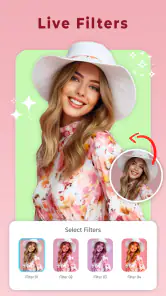
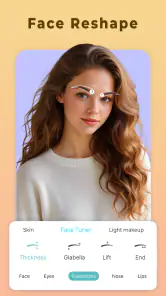
Beauty Camera: Selfie Editor provides a robust suite of features designed to enhance your selfies. Users can enjoy skin smoothing, blemish removal, teeth whitening, and a variety of filters to suit different moods and lighting conditions. Additionally, the app offers tools for reshaping facial features, adjusting brightness and contrast, and applying makeup effects such as lipstick and eyeshadow.
Is Beauty Camera: Selfie Editor free to use, or are there in-app purchases?
Beauty Camera: Selfie Editor is free to download and offers a range of basic features at no cost. However, for access to premium tools and filters, users can opt for in-app purchases or subscribe to a premium plan. These additional features often include advanced editing capabilities and exclusive filter packs. In-app purchase prices range from $0.49 to $99.99 per item, so review the purchase details before confirming any transaction.
Can I share my edited photos directly from the Beauty Camera: Selfie Editor app?
Yes, Beauty Camera: Selfie Editor allows users to share their edited photos directly from the app. Once you've perfected your selfie, you can easily upload it to popular social media platforms like Instagram, Facebook, and Twitter, or send it via messaging apps. This seamless sharing feature helps users showcase their enhanced photos with ease.
Pros
- User-friendly interface for quick edits.
- Wide range of beauty filters available.
- Real-time skin smoothing feature.
- Easy sharing options to social media.
- Lightweight app with fast performance.
Cons
- Contains ads in the free version.
- Limited features without in-app purchases.
- May over-beautify images if not careful.
- Requires permissions for full functionality.
- Occasional crashes on older devices.

- Category
- Beauty
- Version
- 16.1