Substack
- 12.34K
- 4.8
- Installs
- 10.00M
- Price
- Free

Screenshots
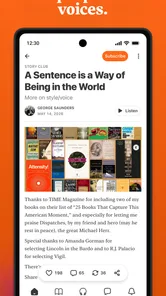
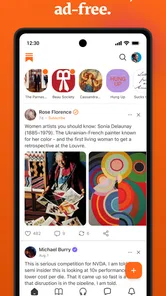
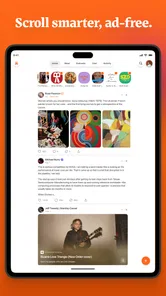
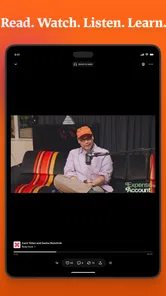
Analysis by Reviewed
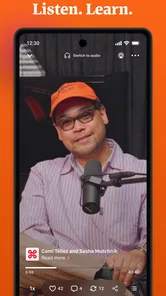
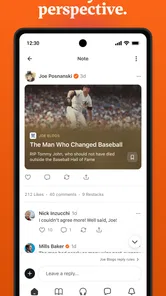
I think the best way to understand Substack is as a reading destination first and a publishing tool second. I can open it to follow writers and shows I care about, then move between written posts, audio and video without treating each format as a separate app. That mix is useful when I want a more personal stream than a broad news feed, though it also means the experience depends heavily on choosing the right people to follow.
A more personal kind of news feed
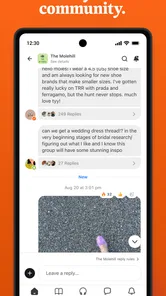
As a News & Magazines app from Substack Inc., it sits somewhere between a newsletter inbox, a creator platform and a social reading space. I like it most when I use it deliberately: follow a small group of writers on subjects I actually want to understand, rather than subscribing to everything that catches my eye. The result can feel more considered than scrolling through headlines, but it is not a substitute for a conventional news service if I need broad, fast coverage of the day.
The app is free to download, and its Teen age rating makes it accessible to a wide range of readers. Its average rating is 4.8 from around 183,000 ratings, with roughly 9,200 written reviews and over 5 million installs. Those figures suggest it has found a substantial audience, but they do not tell me whether its style suits a particular reader. I would judge that by the writers and publications available for the subjects I follow.
What the current version tells us
Substack was released on October 3, 2022, and the current version is 2.77.1. That gives me a useful snapshot of a product that has continued to receive version updates, but a version number alone does not reveal which individual features changed or how the interface has evolved. I would not assume that a particular update introduced a tool unless I could see that change directly.
For someone already reading Substack publications by email, the app offers a more focused way to keep that reading together. For a new user, it can be a low-friction place to explore independent voices and decide whose work deserves regular attention. I would still take time to tune the feed: following a broad mix can quickly make a personal reading space feel as noisy as the platforms it is meant to replace.
Who will get the most from it
Substack makes the most sense for readers who enjoy following individual writers and are happy to let those subscriptions shape what they see. It also gives creators a route to publish writing and other media, build a direct relationship with readers, and offer paid subscriptions. That combination is appealing if you want one place for both reading and publishing, although creators should remember that an easy publishing setup does not automatically bring an audience.
I would skip it if I mainly want a quick scan of breaking headlines, a tightly edited newspaper front page, or a feed ranked around a broad range of sources. In those cases, a traditional news app or a general-purpose feed reader is likely to be a better fit. Substack is strongest when I have chosen the voices myself, not when I expect it to make every editorial choice for me.
More From Our News Desk

Weather by Xiaomi Review: Clear at a Glance, Less Clear Up Close

X Under Pressure: Can It Recover When Posting Goes Wrong?

Clash of Clans Is Won Between the Battles

Android Auto Makes the Case for Quieter Car Software

MobiOffice: Transforming Mobile Productivity with Seamless Integration

EA SPORTS FC™ Mobile Soccer: Redefining Mobile Sports Gaming
Getting Started with Substack
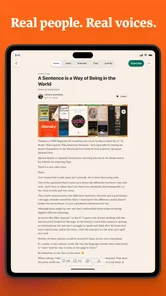
Alright, so let's talk about the first impression. Setting up on Substack is a breeze. I mean, if you've ever signed up for anything online, you can handle this. The app guides you through creating your account with the kind of simplicity that makes you feel like it’s your best buddy. Once you're in, you're greeted with a clean, minimalist interface that's easy on the eyes and not overwhelming at all.
Creating Your Content
Here's where the magic happens. Whether you're a seasoned writer or just someone with a lot to say, Substack makes it super easy to start writing. The editor is straightforward with all the basic tools you need. No distractions, just you and your words. I found myself typing away and losing track of time. It's almost therapeutic.
Plus, you can add images, links, and even embed videos to spice up your newsletters. It’s all about making your content pop and keep your readers engaged. And if you're like me and love to tinker with formatting, the options here are just enough to keep things interesting without getting too complicated.
Connecting with Your Audience
Now, what's the point of writing if no one reads it, right? This is where Substack shines. It’s all about building your community. You can easily share your newsletters and reach your audience directly through email. The analytics feature is pretty neat too, letting you see who’s reading, clicking, and subscribing. It gives you that dopamine rush seeing those numbers climb!
Monetization is also a big deal here. If you’ve got content that people are willing to pay for, Substack provides a platform to offer paid subscriptions. It's a great way to turn your passion into a paycheck, and I think that's pretty empowering for any creator out there.
Final Thoughts
So, would I recommend Substack? Absolutely! Whether you’re a writer looking to share your thoughts with the world or someone wanting to start a side hustle, Substack offers the tools and platform to make it happen. It’s user-friendly, efficient, and has a certain charm that makes writing feel less like a chore and more like a conversation with your audience.
To wrap it up, if you've got something to say and an audience you want to build, give Substack a shot. Who knows, you might just find your voice and a community that's eager to listen. Happy writing!
A routine that makes the app useful
For a practical reading habit, I’d use Substack in short, intentional visits. On a commute or during a lunch break, I can catch up on one saved-for-later article or listen to a publication I already trust, instead of opening the app and endlessly browsing. A useful tip is to treat each new follow as an editorial choice: ask whether I want that writer in my regular reading mix, not just whether one post was interesting. That keeps the feed manageable and helps me notice when my interests have shifted.
Creators can use a similar routine in reverse. I’d draft a clear, focused post, add only media that genuinely helps explain it, and then check engagement after sharing rather than refreshing numbers throughout the day. The reader and subscriber signals can help identify which subjects resonate, but they are feedback, not a promise of growth or income. If email is central to how an audience follows a publication, it is worth thinking about how each post will read in that format as well as inside the app.
What to weigh before making it a habit
The main trade-off is that a creator-led feed can be thoughtful and distinctive, yet uneven: each publication has its own cadence, style and depth. I would not rely on it as my only source for urgent updates, and a reader who prefers one editor to select and prioritize stories may feel they have too much curation work to do. Likewise, someone who wants a broad library of established publications in a single subscription may prefer a newspaper or magazine service built around that model.
For a prospective writer, the key question is less “Can I publish?” and more “Do I have a clear point of view and a reason for readers to return?” The tools lower the practical barrier, but writing consistently and earning attention still take work. Paid subscriptions can suit creators with a committed audience; they are less compelling as an immediate plan for someone who has not yet tested whether readers want more of their work.
What I would watch over time
At minimum OS 7.0, version 2.77.1 is the current reference point for the app, while the release history begins on October 3, 2022. I see that as evidence of an actively versioned product, not proof of any specific improvement. Existing users should evaluate changes by whether their everyday reading and publishing routines become clearer or more reliable, rather than expecting a version number to signal a particular new capability.
Choosing what deserves your attention
A useful way to try the app without letting it take over your reading time is to start with a narrow subject and a handful of publications. I would give each one a fair sample, then decide whether its usual posts are worth a place in my routine. One appealing article is not always a sign that I want a steady stream from its author; checking the tone and frequency of later posts helps avoid filling the feed with subscriptions I quickly ignore.
For example, on a busy weekday I might use a short break to read one essay from a writer I follow, then leave longer pieces for a quieter evening. If the same publication also shares audio or video, I can choose the format that fits the moment instead of treating every item as something I must consume immediately. That flexibility is a real strength, but it works best when I set my own stopping point rather than chasing every new post.
How it differs from other ways to follow news
Compared with a conventional newspaper app, Substack gives me more control over the individual voices in my reading mix, but less of the unified editing and prioritization that make a front page convenient. Compared with an email inbox, it can bring reading and other media into a dedicated place, though readers who already have a tidy newsletter routine may not need another destination. A general feed reader is often better for collecting links from many kinds of sites; this app makes more sense when the publications I care about are part of its creator-centered ecosystem.
That distinction matters for people deciding whether to install it or simply keep reading newsletters where they arrive. If I mostly want to read a few occasional email updates, the app may add little. If I want to discover writers, follow their work in one place and switch between formats, the dedicated experience is easier to justify. Neither approach is automatically better; it depends on whether I value a separate reading space enough to build a habit around it.
Small choices that make publishing smoother
For a creator, I would treat each post as something a reader might encounter in more than one context: through email, in the app, or via a shared link. A clear opening and a useful description of any attached media make it easier for someone to decide whether to continue. I would also keep the post focused instead of adding an image or video simply because the editor allows it. Extra formats help when they add explanation or personality; otherwise, they can distract from the point.
Analytics are most useful when I compare patterns across my own posts rather than reading too much into one result. A click or subscription is a signal, not a full explanation of what a reader thought. I would use those signals to choose a sensible next topic or improve how I present a post, while resisting the temptation to write only for the numbers. That balance matters especially for a small publication, where a handful of responses can feel more conclusive than they really are.
Deciding whether it belongs in your routine
Readers who enjoy independent commentary, specialist subjects or a continuing relationship with particular writers are the clearest fit. It can also suit someone who wants to experiment with publishing without first assembling a complicated website. On the other hand, people who prefer a single trusted newsroom, broad breaking-news coverage or an entirely hands-off recommendation system may be happier elsewhere. A reader who dislikes subscription-based creator publishing should also think carefully before treating paid newsletters as the main reason to join.
The practical question for a new reader is whether following selected voices feels more valuable than having an editor make the selection. For a new writer, it is whether there is a specific idea and a realistic schedule behind the urge to publish. I would try the free app as a reader first, learn which publications I return to, and only then decide whether its publishing or paid-subscription tools suit a real project.
Substack Frequently Asked Questions
Is Substack free to download, and do I have to pay to read everything?
Substack is free to download, and you can follow publications that offer free content. Some writers also offer paid subscriptions, so access to every post or publication may depend on what you choose to follow. The app brings together independent creators, and their subscription options can differ. You can explore available content before deciding whether a paid subscription is right for you.
What devices and operating systems can I use Substack on?
Substack is available as a mobile app for Android and iOS. On Android, the minimum operating system requirement is version 7.0, so check your device settings before installing. The app is developed by Substack Inc. and is free to download. Once installed, you can use your phone to explore publications and creators, including writing, videos, and podcasts.
Can I use Substack on both Android and iOS?
Substack is a mobile app for following writing, videos, podcasts, and other creator content. Before downloading, check that your device meets the operating system requirement: the listed minimum is Android 7.0. The app is free to install, and Substack is developed by Substack Inc. Once you have an account, you can use it to explore publications and creators from your phone.
Is Substack suitable for younger users?
Substack is rated Teen, so its content may be appropriate for teenagers, but the platform hosts material from many independent writers and creators. Topics and presentation can vary between publications. If you are choosing the app for a younger user, it is sensible to look at the specific writers they plan to follow and discuss how to evaluate online content before they subscribe or engage with it.
What is Substack and how does it work?
Substack is a platform that allows writers to create newsletters and monetize their content by offering subscription-based services. Writers can publish directly to their subscribers through email, and build a dedicated audience. Users can subscribe to various newsletters, both free and paid, and enjoy a wide range of content from independent writers on diverse topics.
Pros
- User-friendly interface
- Supports multimedia content
- Enables direct reader interaction
- Offers customizable newsletters
- Free to start using
Cons
- Limited design customization
- Subscription costs for premium features
- No built-in analytics
- Depends on email deliverability
- Lacks social media integration