Stremio
- 1.67K
- 3.9
- Installs
- 10.00M
- Price
- Free

Screenshots


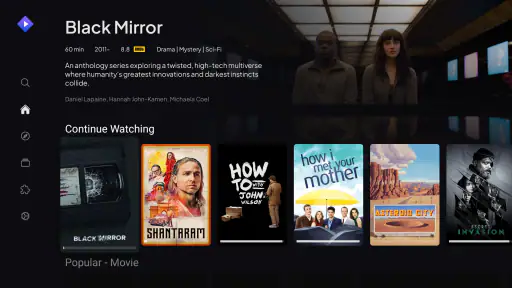
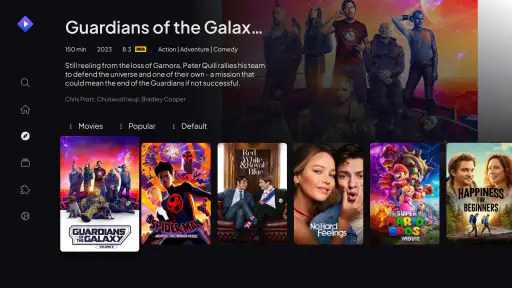
Analysis by Reviewed
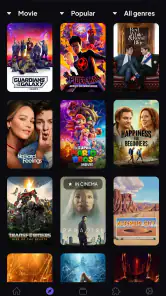
My main reason for reaching for Stremio is that it gives me one place to browse what I might want to watch instead of making me begin with a particular streaming service. That shift sounds small, but it changes the first step of a viewing session: I can start with a title or an idea, then work out where it fits, rather than opening apps one by one and hoping something catches my eye.
A single browsing hub, not a replacement for every service
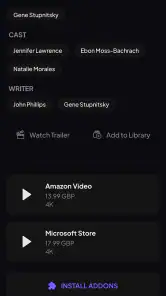
It helps to think of the app as a discovery and organization layer, not as a magic pass that makes every show available without limits. Its add-ons shape what appears and how you connect with content, so the experience depends in part on which ones you choose and what services you already use. I would still expect to rely on the relevant service when a title requires it; the convenience is in bringing the search and browsing experience together.
That distinction is useful before you set it up. If you want one subscription to unlock a complete library, this is not the same thing. If you already have services and mainly want a less scattered way to explore them, the central-hub idea is much more appealing. I find that framing keeps expectations realistic and makes the app’s strongest use clearer.
How I’d make the add-ons work for me
I’d begin with the services and content sources I actually use, rather than installing every add-on that looks interesting. A smaller, relevant set is easier to understand when results appear, and it makes it simpler to notice which source is responsible for a listing. If an add-on becomes unreliable, I’d treat that as a reason to review that source rather than assume the whole app is broken.
This is also where a little patience pays off. Add-ons can vary in reliability, so I wouldn’t make a last-minute movie night depend on an unfamiliar one. I’d explore new options when I have time, then keep the setup that works for my usual viewing. That practical habit turns the community-discovery element into a choice rather than an ongoing troubleshooting job.
A useful fit for the shared “what should we watch?” moment
Picture a weekday evening: I have a short window, someone else is in the room, and neither of us has a title in mind. Instead of checking separate apps in sequence, I can browse from one hub, follow a promising listing toward its source, and decide whether it is worth watching now. The calendar feature can also help me keep track of episodes I’m following, so browsing and keeping up with a show are not entirely separate tasks.
Compared with opening each service directly, that approach can reduce the repetitive search and make it easier to spot options across a mixed collection. The trade-off is that a service’s own app may still be the better place to manage its account, explore its full interface, or start watching when I already know exactly what I want. I see this as a companion to those apps, not a reason to uninstall them.
More From Our News Desk

Weather by Xiaomi Review: Clear at a Glance, Less Clear Up Close

X Under Pressure: Can It Recover When Posting Goes Wrong?

Clash of Clans Is Won Between the Battles

Android Auto Makes the Case for Quieter Car Software

MobiOffice: Transforming Mobile Productivity with Seamless Integration

EA SPORTS FC™ Mobile Soccer: Redefining Mobile Sports Gaming
Discovering Your New Best Friend in Streaming
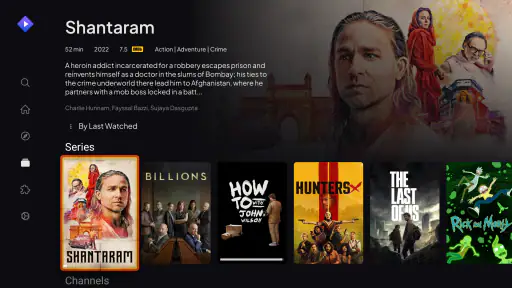
Let’s face it, juggling multiple subscriptions can be a headache. With Stremio, all those worries seem to fade away. The app acts as a central hub for all your favorite content, pulling from services like Netflix, Amazon, and even some lesser-known gems. Upon opening the app, you're greeted with a slick and intuitive interface, which is, honestly, a breath of fresh air. Everything is neatly organized, and finding what to watch next is as easy as pie.
Features That Make You Go Wow
One of the standout features is the add-ons. Imagine having access to a plethora of content without the need to switch between apps. With a few taps, you can integrate your existing services, and enjoy a seamless viewing experience. Seriously, it’s like magic! Plus, there’s a community-driven side to it, where you can discover new add-ons created by other users. It’s like a treasure hunt, and you never know what hidden gems you’ll find.
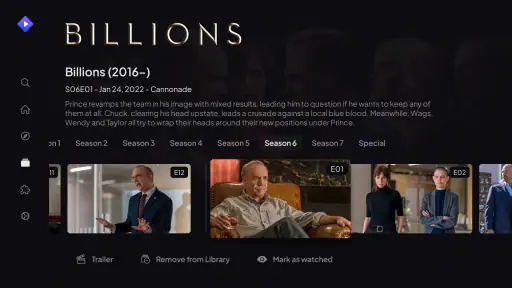
Another cool aspect is the calendar feature. Never miss an episode again! The app automatically updates your calendar with new episodes of your favorite shows, so you’re always in the loop. It's like having a personal assistant dedicated to your TV schedule.
Making discovery useful rather than endless
For me, the practical value of a shared catalogue depends on what I do with it. If I open the app with no idea at all, a larger pool of titles can still leave me scrolling. I get more out of it when I narrow the search first: a particular actor, a series I have been meaning to continue, or a rough mood for the evening. Then the hub has a job to do—help me compare possibilities—rather than simply presenting more choices.
That small change in habit matters when watching with someone else. We can each name one or two things we would be happy to watch, then use the browsing view to see which option is worth pursuing. It does not remove the need to agree or guarantee that every title is ready to play, but it gives the conversation a more useful starting point than opening one service, finding nothing quickly, and repeating the same search elsewhere.
My Experience with Stremio
So, what’s it like using Stremio day-to-day? In a word, seamless. I’ve been able to cut down on the time I spend searching for something to watch, which is a win in my book. The streaming quality is top-notch, and I haven’t experienced any buffering issues, which is a miracle, considering my sometimes dodgy internet connection. And let’s not forget the joy of discovering new shows and movies recommended by the app. It’s like having a friend who always knows what you’re in the mood to watch.
However, it’s not all sunshine and rainbows. Like any app, it has its quirks. Some add-ons can be a bit unreliable, but that’s part of the charm, right? It feels like being part of an exclusive club where you get the inside scoop on the best and sometimes, not-so-best content.
What to check before settling into a show
A useful point to keep in mind is that finding a title and being able to watch it are separate steps. I would treat a result as a lead to investigate, not a promise that it is included in a service I already pay for or ready to play through the same route. When I have a specific film in mind, I check where the listing takes me before I build the evening around it. That is especially worthwhile if time is tight or other people are waiting for a decision.
The same care helps when exploring community add-ons. I prefer to try unfamiliar options during a casual browsing session, when I can see how they behave, instead of relying on them for a planned watch. If something stops working, I can then narrow down whether the issue seems tied to one source. This is a more useful troubleshooting approach than changing several parts of the setup at once and losing track of what actually helped.
Who is likely to get the most out of it?
I think the best match is someone who watches across several services, likes browsing before choosing, and is willing to spend a little time shaping the add-on setup. Stremio is a free entertainment app from developer Stremio, rated Teen, with a 3.9 average from around 72,000 ratings and more than 10 million installs. That reach suggests plenty of people are curious about the hub approach, though a popular app is not automatically the right fit for every household.
It is less suited to someone who wants a tightly controlled, single-service experience or dislikes adjusting settings and checking where a listing leads. Parents should also take the Teen age guidance into account and make their own decision about whether the app is appropriate for younger viewers. I’d choose a provider’s own app when I want its account tools and familiar browsing flow; I’d choose this one when the hard part is deciding what to watch across several sources.
Where it sits beside familiar streaming apps
Compared with using one provider’s app as my entire starting point, this approach is most helpful when my viewing is spread across services and I have not chosen a title yet. A provider’s app usually makes more sense once I know what I want to watch there: its account features and service-specific browsing are already in front of me. Stremio is more useful earlier in the decision, when I want to look across sources and get a sense of the options before committing to one destination.
There is a real trade-off in that division of labor. Keeping a separate hub means one more app to learn and a setup that may need attention as sources change. If I only use one streaming service, its own search and recommendations are likely simpler. If I regularly move between several, the extra step can be worthwhile because it gives browsing a common starting point. I would judge it by whether that saves effort in my own routine, not by how many sources I can add.
Small habits that make the experience smoother
One helpful routine is to use the calendar as a follow-up tool rather than expecting it to choose your next show. I’d browse and settle on a series first, then use the schedule to remember when new episodes are due. For a household with different tastes, I’d also keep discovery intentional: search around a specific mood or title instead of treating every recommendation as a must-watch. That reduces the feeling of endless scrolling and makes the app more useful in short sessions.
The other practical question is whether it will work well on your device. The app supports Android versions starting with 5.1, and it is free to try, so the simplest test is to install it, add only the sources you recognize, and see whether its browsing flow suits you. The key is not to judge it by how many add-ons you can collect, but by whether it helps you reach a sensible viewing choice with less app-hopping.
Who should pass, and what I would try first
If I were recommending it to a friend, I would first ask how they normally choose something to watch. Someone who already knows the service and title they want may gain little from another browsing layer; opening that provider directly is quicker and keeps the whole session in one familiar place. Someone who likes comparing what is available across a mixed set of services is much closer to the audience this app suits. The difference is not simply how much someone watches, but whether finding the next title is a recurring hassle.
For a first trial, I would keep the setup modest and use a familiar title to see how the listing connects to its source. Then I would try a short browsing session for something new and add the calendar only if I am following a show. This gives a clearer sense of whether the hub is genuinely useful without turning setup into its own project. Because the app is free and supports Android 5.1 and later, that low-commitment test is a sensible way to decide whether it belongs in your routine.
My final take
In conclusion, if you’re tired of hopping between apps just to find something to watch, give Stremio a try. It’s a nifty little app that simplifies your streaming life, bringing all your favorite shows and movies under one roof. Despite a few hiccups here and there, its benefits far outweigh the downsides. So, go ahead, embrace the future of streaming, and let Stremio guide your viewing adventures!
Stremio Frequently Asked Questions
Can I use Stremio to organize the video content I already enjoy?
Stremio is designed to bring video content together in one place, making it an option for people who want a central way to explore entertainment. Its usefulness depends on the sources and services you choose to access. Before downloading, consider whether a single app for discovering and organizing video content fits the way you prefer to watch.
Who develops Stremio, and what kind of app is it?
Stremio is an entertainment app developed by Stremio. Its central idea is to bring video content together in one place, rather than focus on a single title or genre. If you are looking for an app to explore video entertainment from different sources, that approach may suit you; the content available can depend on the services you use.
What should I know about Stremio’s age rating before downloading?
Stremio is an entertainment app rated Teen, so it may not be suitable for younger children without parental guidance. The app brings video content together from different sources, and what users can access may vary depending on the services and providers they choose. Parents should consider the age rating and review how the app will be used before installing it for a child.
What is Stremio and what does it offer?
Stremio is a multimedia app that allows users to stream and organize video content from various sources. The app offers a diverse range of movies, TV shows, web channels, and live TV, all in one place. Its user-friendly interface and integration with other services like YouTube and Netflix make it a popular choice for entertainment enthusiasts.
Is Stremio free to use, or are there any subscription fees?
Stremio is free to download and use. However, while the app itself does not charge subscription fees, it may require users to access certain third-party services or content providers, which might have their own subscription models. It's essential to check each service's terms to understand any potential additional costs.
Pros
- User-friendly interface design
- Supports multiple streaming services
- Offers personalized recommendations
- Available on various platforms
- Free to use with optional premium features
Cons
- Limited offline viewing options
- Occasional buffering issues
- Some features require premium subscription
- Ads can be intrusive at times
- Limited parental control settings
- Category
- Entertainment
- Version
- Varies with device











