

Sound Booster・Increase Volume
- 23.09K
- 4.8
- Installs
- 10.00M
- Price
- Free
Screenshots

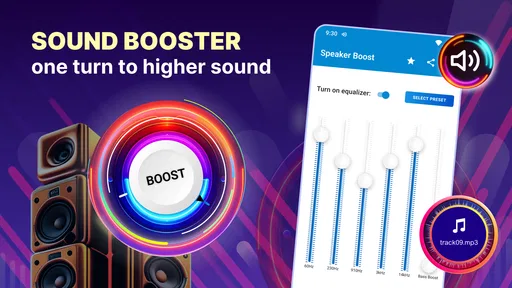
Analysis by Reviewed
I tried Sound Booster・Increase Volume as a practical listening tool rather than treating it like a full audio-production app. Its purpose is straightforward: help make a phone, tablet, or connected speaker sound louder when the normal volume range feels too quiet. That makes it most useful at the moment an audio idea needs to be heard clearly, whether I am checking a rough voice recording, reviewing a music draft, or trying to follow a video in a noisy room.
This is a free Music & Audio app from Prometheus Interactive LLC, with a 4.8 average from around 420 thousand ratings and more than 10 million installs. Those figures suggest that the simple problem it addresses is common. I also like that it is rated for Everyone, so it is easy to consider for a shared family device. The current version is 3.7.4 and works from Android 5.0 onward, which gives it a broad compatibility range.
From a quiet idea to something I can actually hear
I focus on the simple job this tool is meant to do: make playback easier to hear when a phone or connected speaker feels too quiet. That can be useful while checking a voice memo or music draft, but louder listening is not the same as repairing a recording. Next, I look at how I would fit that distinction into an everyday creative workflow.
Starting a creative task with more audible headroom
When I am working on anything involving sound, the first useful question is not whether an app can make audio dramatically louder. It is whether I can hear enough detail to make a sensible decision. A quiet playback level can hide a clipped word in a voice memo, make a transition seem weaker than it is, or leave background noise unnoticed. A volume booster can help at that early checking stage, and that is where this app makes the most sense.
I would use it before making a final judgment about a recording. For example, if I record a short narration on my phone and the playback seems too soft, I can raise the listening level and check whether the problem is really volume or whether the recording itself needs editing. That distinction matters. Louder playback does not repair a distant microphone, remove room echo, or restore detail that was never captured.
The app is also handy when I am comparing a rough music arrangement on a small device. A quiet phone speaker can make bass, percussion, or spoken material difficult to judge. Increasing the output can reveal whether an element is present, but I would still use headphones or proper monitors for serious mixing. It is a listening aid, not a replacement for an audio workstation.
How the making process feels in everyday use
The appeal is the short path between opening the tool and hearing a stronger output. I do not need to bring a project into a complicated editor just to test whether a clip is audible. That makes it suitable for quick checks during a creative workflow: reviewing a draft while commuting, listening back to an interview in a busy café, or checking a social video before sending it to someone else.
More From Our News Desk

 Gmail
GmailGmail in a Busy Inbox: Who Benefits Most?
From first account to crowded workday, Gmail earns its place through dependable search and flexible sorting—but its best fit depends on how much inbox maintenance you can tolerate.

 Prime Video
Switching to Prime Video: What Changes in Your Viewing Routine
Prime Video can make a compelling second home for streaming, but switching means learning a different catalog, rental layer, and route from browsing to playback.

 Universal TV Remote Control
Universal TV Remote Control Works Best as a Reliable Backup
A phone remote earns its place through quick setup and reliable habits. Here is how to get more from Universal TV Remote Control—and where its limits show.

 Weather - By Xiaomi
Weather by Xiaomi Review: Clear at a Glance, Less Clear Up Close
Xiaomi’s weather app makes everyday forecasts quick to scan, but its calm surface can leave useful details and recovery paths harder to find than they should be.

 X
XX Under Pressure: Can It Recover When Posting Goes Wrong?
A resilience-focused review of X, examining setup, mistaken posts, interruptions, weak connections, and the gaps that matter when recovery needs to be dependable.

 Clash of Clans
Clash of Clans Is Won Between the Battles
Its raids are quick; its community is a long-term project of coordination, teaching, rivalry, and shared responsibility—with all the friction that entails.
Latest News



One realistic scenario is a small creator preparing a short product demonstration. The video may already be edited, but the spoken explanation sounds faint on a phone. Instead of immediately rebuilding the project, the creator can use the booster to inspect the playback at a higher level. If the words become understandable, the issue may be the playback environment. If the speech remains muddy, the next step should be editing the original file rather than simply adding more volume.
That workflow saves time because it separates two jobs: making a file louder and deciding whether the file itself is well made. I found that distinction important. Many people reach for a volume control when the real issue is uneven recording, excessive background sound, or poor placement of the microphone.
The usual alternative is the device’s built-in volume slider. That remains the safest and simplest first step, and it is enough when the system is merely set too low. This app becomes more interesting when the ordinary maximum still feels insufficient. Compared with a full audio editor, it is much quicker for playback checks, but it offers far less control over individual tracks, equalization, compression, or mastering.
Iteration without confusing loudness with quality
Creative work improves through repeated listening, and a booster can change what I notice during those passes. At a higher level, a quiet consonant may become easier to catch, or a background hum may become more obvious. That can guide the next edit. I might return to the original recording, adjust the voice level there, and then listen again at a normal setting to see whether the improvement holds up.
My main tip is to compare at more than one listening level. If a voice only sounds acceptable when the booster is pushed high, the source probably needs attention. A good workflow is to listen once at an ordinary level, once with extra amplification for detail checking, and then once more through the intended destination device. This prevents me from mistaking a louder preview for a better final mix.
There is another useful trade-off when working with Bluetooth speakers. A wireless speaker may already have its own volume controls, and the phone may also apply system-level limits. The app can be helpful when those layers leave the result quieter than expected, but the final outcome depends on the whole chain. I would adjust the phone, the app, and the speaker gradually rather than moving everything to maximum at once.
That gradual approach is not just about comfort. Strong amplification can make distortion more noticeable, especially with small phone speakers or material that is already heavily compressed. If the sound becomes harsh, rattly, or tiring, I would lower the level immediately. More volume can expose flaws as easily as it exposes detail.
For headphones, I would be even more careful. A louder signal can make a short listening session feel impressive while increasing listening fatigue. I would not use this tool to overcome a poor seal, a damaged cable, or a noisy environment indefinitely. In those cases, better-fitting headphones or a quieter place may solve the real problem more effectively.
Using the app while refining spoken and musical material
For spoken content, the app can help me answer a practical question: can someone understand this without repeatedly increasing their device volume? I can play a voice memo, podcast draft, lecture recording, or video narration and listen for words that disappear between louder passages. If the answer is yes, I would edit the source rather than rely on boosted playback for the audience.
For music, I use extra loudness as a rough translation check, not as a mastering measurement. A chorus that feels weak may need arrangement changes, automation, or better balance rather than simple amplification. A snare that suddenly becomes unpleasant at higher output may be too aggressive in the original mix. The app helps reveal these reactions, but it does not tell me which track to change or why.
This is where the difference from a conventional audio editor becomes clear. An editor lets me alter the material itself and prepare a controlled file for delivery. Sound Booster・Increase Volume is better suited to the monitoring side of the process. It can support a decision, but it does not replace the decision-making tools used to shape the recording.
I would also avoid judging a final upload from a boosted preview alone. Streaming services, messaging apps, and social platforms may process audio differently. A file that sounds fine through amplified phone playback can still be too quiet, too compressed, or unbalanced after publishing. The app is useful before handoff, but it should not be the only checkpoint.
Preparing a handoff or final listening check
When I am ready to send a clip to a client, friend, or audience, I want to know whether the important content survives ordinary conditions. The booster gives me an additional listening perspective. I can use it to inspect a quiet voice, a low-level musical passage, or a video whose dialogue competes with ambient sound. That is valuable for quality control, especially when I am away from a computer.
Still, the handoff itself should happen through the original creative app or file-management workflow. This tool is not something I would choose as the place to edit a project, arrange tracks, or create a polished master. Its role is closer to a temporary monitoring aid: listen, notice a problem, return to the source, make the correction elsewhere, and test again.
That workflow answers an important practical question: will the app permanently make my exported file louder? I would not assume that. Raising playback volume is different from changing the audio file. If the goal is to deliver a louder recording, I would use the editor that created the recording and adjust the source there, then export and test the new version. The booster is best used to hear what is already being played, not to replace the export step.
Another question is whether it works for every kind of sound. I would expect the greatest benefit with material that is simply difficult to hear through a limited speaker. It cannot turn a low-quality speaker into a studio monitor, and it cannot create missing bass or restore detail lost during recording. Its value depends on the device, the audio source, and the listening environment.
What I would watch before relying on it
The free price makes trying it easy, although in-app purchases range from $0.99 to $99.99 per item. I would pay attention to what is available without spending money and avoid assuming that every possible control is included at no cost. Since the basic need is simple, I would first test whether the free experience solves my particular volume problem before considering any purchase.
I would also treat the app as a situational utility rather than something that needs to run constantly. If the phone already plays comfortably through its built-in controls, adding another layer may not improve anything. For people who regularly produce music, edit podcasts, or publish videos, a dedicated editor will usually be the better long-term investment because it works on the material itself.
There are users I would specifically tell to skip it. Anyone looking for noise reduction, equalization, multitrack editing, vocal cleanup, file conversion, or professional loudness preparation will likely be disappointed. The same is true for someone who wants a louder file to send to an audience; playback amplification alone does not guarantee that the recipient will hear the same result.
On the other hand, I think it fits people who need a quick answer in the moment. If a phone speaker seems unusually quiet, a Bluetooth speaker does not feel strong enough, or a draft recording needs a closer listen, the app offers a focused way to investigate. Its Everyone rating also makes it approachable for general household use, provided adults help younger listeners avoid excessive levels.
My creator verdict
After using it as part of a listen-and-revise routine, I see Sound Booster・Increase Volume as a convenient supporting tool rather than a complete creative solution. It earns its place when I need to hear a draft more clearly without opening a full editor, especially during quick reviews away from a desk. The strongest benefit is speed: it helps me test audibility before I spend time changing a project that may not actually be broken.
The trade-off is equally clear. It can increase the apparent strength of playback, but it does not fix the recording, improve the mix, or prepare a professional export. I would keep a normal volume comparison in every workflow, watch for distortion and listening fatigue, and make permanent changes in the original editing app.
With a 4.8 average and over 10 million installs, it is clearly a widely used answer to a familiar problem, and its free entry point makes experimentation uncomplicated. My recommendation is specific: try it if your immediate concern is hearing audio more clearly from a phone or connected speaker. Choose a dedicated editor instead if your real goal is to repair, shape, publish, or deliver the audio itself. For quick creative checks, it is useful; for end-to-end production, it is only one small step in the process.
Sound Booster・Increase Volume Frequently Asked Questions
Is Sound Booster・Increase Volume available for iPhone and iPad?
Sound Booster・Increase Volume is a Music & Audio app developed by Prometheus Interactive LLC, and the listed minimum operating-system requirement is Android 5.0. Check your device’s app store to see whether a compatible version is offered for your device before downloading. Audio results can also differ between devices, so compatibility with a particular phone, tablet, or audio accessory is not guaranteed by the app’s general description.
What does the app’s “max volume booster” description mean in everyday use?
The app is presented as a way to make speaker audio louder, including Bluetooth speaker sound. In practice, a volume booster applies software processing to audio output, and how noticeable the effect is depends on the phone, speaker, media source, and system limits. It is worth treating “max” as a description of the app’s purpose rather than a promise that every device will reach the same loudness.
Who develops Sound Booster・Increase Volume, and what devices can install it?
Sound Booster・Increase Volume is a Music & Audio app developed by Prometheus Interactive LLC. It is available for devices running Android 5.0 or later, and its content rating is Everyone. Before downloading, check that your device meets the operating-system requirement and that the app is offered for your device in its app store. Compatibility with individual audio hardware can still vary.
What is Sound Booster・Increase Volume and how does it work?
Sound Booster・Increase Volume is an audio-enhancement app designed to make music, videos, games, podcasts, and other media sound louder on a compatible device. It generally works by applying software amplification or equalization to the audio output. The actual improvement depends on your phone, headphones, media player, and operating-system limits, so it may not increase every sound equally or bypass all device restrictions.
Can Sound Booster・Increase Volume make my phone louder than its normal maximum volume?
The app may provide additional software amplification beyond the standard volume slider, but the result is not guaranteed on every Android or iOS device. Some phones impose hardware or system limits that third-party apps cannot overcome. Increasing the volume too far can also cause distortion, especially with small built-in speakers, so it is best to raise the level gradually and reduce it if the sound becomes harsh or unclear.
Pros
- Boosts quiet audio beyond the device’s standard volume limit.
- Simple controls make volume adjustments quick and easy.
- Works with music
- videos
- podcasts
- and many other media apps.
- Useful for improving clarity on speakers with low maximum output.
- Lightweight design uses minimal storage and system resources.
Cons
- Excessive amplification may cause speaker distortion or crackling.
- High volume levels can potentially damage headphones or device speakers.
- Results vary depending on the phone model and Android audio system.
- May not increase volume in every app
- especially those with audio restrictions.
- Some features or controls may require in-app purchases or display ads.













