리디 - 웹툰, 만화, 웹소설, 전자책 모두 여기에!
- 225.00
- 4.3
- Installs
- 5.00M
- Price
- Free

Screenshots







Analysis by Reviewed
I usually open a reading app with one simple goal: find something that fits the time and attention I have right now. A short webtoon episode works on a commute; a novel suits a quieter evening. 리디 - 웹툰, 만화, 웹소설, 전자책 모두 여기에! is built around that kind of choice, bringing comics, web novels, and e-books into one reading space. That breadth is its clearest appeal, though it also means the experience is best for readers comfortable choosing among several formats rather than settling into a single-purpose app.
Choosing what fits the moment
For a realistic day, I might browse a webtoon while waiting for a train, then switch to a longer book at home without moving to a separate service. Keeping different kinds of reading together can make it easier to follow changing moods. It is also useful when I want to sample a format I do not read often: I can look beyond comics without treating the app as a completely different destination.
The trade-off is that a broad catalog is not automatically the same as a perfect match. If I already know the exact book or comic I want, a specialist service focused on that format may feel more direct. RIDI makes more sense when variety is part of the point and I am willing to browse before choosing.
All Your Favorite Reads in One Place
One thing I absolutely love about 리디 is how it brings together all kinds of reading materials in one convenient spot. Imagine having a library that fits right in your pocket! From gripping webtoons to classic novels, the selection is incredibly vast. You’ll find popular titles that everyone’s talking about, as well as hidden gems waiting to be discovered.
A User-Friendly Experience
Let’s talk about the user interface for a sec. Navigating through the app is a breeze. The layout is clean and intuitive, making it super easy to find what you’re looking for. Whether you’re a tech-savvy youngster or someone who’s not so familiar with technology, you’ll have no trouble getting around.
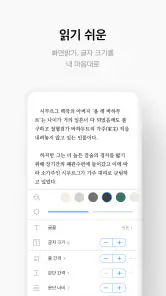
The app also offers personalized recommendations, which is a neat feature. It’s like having your own personal librarian suggesting titles based on your reading history. And the best part? You can customize your reading environment. Want bigger fonts? Done. Prefer a dark mode for those late-night reading sessions? You got it!
From browsing to a reading routine
I’d use recommendations as a starting point, not as the whole discovery process. When one catches my eye, I can check whether I want a quick illustrated read or something longer, then make that choice before settling in. That small pause matters: it keeps a long list of appealing options from turning into an impulse to start everything at once.
More From Our News Desk

Weather by Xiaomi Review: Clear at a Glance, Less Clear Up Close

X Under Pressure: Can It Recover When Posting Goes Wrong?

Clash of Clans Is Won Between the Battles

Android Auto Makes the Case for Quieter Car Software

MobiOffice: Transforming Mobile Productivity with Seamless Integration

EA SPORTS FC™ Mobile Soccer: Redefining Mobile Sports Gaming
Reading preferences also depend on the setting. Larger text can make a longer session more comfortable, while a darker display may suit a dim room. For a shared household or a reader who switches devices, I would check how the app handles the account and reading progress before relying on a seamless handoff; I would not assume every personal setting transfers exactly as expected. The useful habit is to treat the app as a place to organize reading choices, then confirm the practical details that matter to your own routine.
Quality Content at Your Fingertips
One might think that offering such a wide range of content could compromise quality, but that’s definitely not the case here. Every piece I’ve read so far has been of top-notch quality. The webtoons are beautifully illustrated, and the novels are well-written. It’s clear that the creators put a lot of effort into providing quality content for their users.
Another highlight is the app’s offline reading capability. If you know you’re going to be without internet access, simply download your favorite reads beforehand and enjoy them anywhere, anytime. It’s super convenient, especially during long commutes or travels.
Making offline reading work
For a trip, I would prepare before leaving: choose the titles I genuinely expect to read and download them while connected, rather than waiting until a weak signal makes browsing frustrating. That turns a train journey or a flight into reading time instead of troubleshooting time. It also encourages a useful distinction between browsing and reading: explore when connectivity is reliable, then keep a small, intentional queue for later.
Offline access is valuable, but it does not remove every constraint. It requires a little planning, and a reader who prefers to discover each next title in the moment may still need a connection to browse. If a download is important for a particular journey, I would open the item beforehand and make sure it is ready rather than assuming that every part of the catalog is already available on the device.
Making the handoff between formats
The best way to use a mixed reading library, in my view, is to give each format a job. I might keep a webtoon for a short, interruptible break and reserve an e-book or web novel for a stretch when I can focus. That division is more practical than trying to make every title fit every moment. A comic is easy to pick up and put down, while prose often rewards a calmer session; having both kinds of reading nearby lets me choose deliberately rather than scrolling through the same format out of habit.
There is also a useful handoff between discovery and commitment. I can browse when I have time to compare possibilities, then return to a chosen story when I want to read rather than shop. If I am choosing something for a commute, I would decide before leaving and prepare any offline material then. If I am reading at home, I have more room to explore and change my mind. The app’s range supports both approaches, but the reader still has to create a little order for themselves.
Where RIDI fits among reading apps
Compared with a dedicated comic reader, RIDI’s attraction is the chance to move from illustrated stories to prose and e-books without making another app the center of the routine. A specialist comic service can be the better choice if nearly all your reading is comics and you want a focused catalog experience. Likewise, someone who only reads conventional e-books may prefer an e-reader organized around that single habit. I see RIDI as the more compelling option for a reader whose interests overlap, not as a reason every specialist app should be replaced.
That distinction also helps set expectations about browsing. In a single-format service, the next choice is usually within a familiar lane. Here, the mix can broaden discovery, but it can also make the decision less immediate: a recommendation for a comic and a suggestion for a novel ask for different moods and amounts of time. I would use the variety as a way to find a change of pace, while keeping a short list of what I actually want to read instead of treating every recommendation as a task.
Who will get the most from RIDI?
The app is a strong fit for readers who move between illustrated stories and text, and for anyone who likes having a few different kinds of reading ready for different parts of the day. It may be less suitable if you only want a basic e-book reader, dislike browsing a mixed catalog, or prefer to keep spending tightly predictable. RIDI is free to download, but optional in-app purchases range from $0.99 to $189.99 per item, so I would check the price of a specific purchase before confirming it rather than treating the whole catalog as free.
It is developed by RIDI Corporation and sits in the comics category, though its reading mix reaches beyond comics alone. The app has a 4.3 average from around 37,000 ratings and over 5 million installs. Those figures suggest an established audience, but they do not tell me whether any one title will suit my taste. I would use a sample session to judge the actual reading experience instead of treating popularity as a guarantee.
A practical evening and a realistic limit
Picture getting home after a busy day with only a little energy left. I might open the app intending to read one short episode, spot a prose title that suits a longer stretch, and decide to save it for the weekend. That is a small but genuine advantage of having formats side by side: I can match the next choice to the time I have instead of forcing myself to continue a book when I want something visual. On another evening, I might do the opposite and use a quiet hour for a longer read, with font size adjusted to make the screen easier to settle into.
The limit is that abundance can become another form of distraction. If I spend the whole break browsing across categories, the app has not helped me use that time well. My practical fix is to arrive with a purpose—read a saved title, find one new series, or choose something for an upcoming journey—rather than expecting the catalog to make the decision for me. This is especially useful for readers who tend to start several stories and finish few.
Keeping purchases and age suitability in view
For a first-time user, the key question is not simply whether the app costs anything to install, but how to approach paid reading. I would treat browsing and purchasing as separate steps: explore titles first, then check the individual item’s cost and decide whether it is worth continuing. The wide range of optional purchase prices makes that pause worthwhile, particularly for someone who wants a predictable entertainment budget. If avoiding purchases is important, I would be careful about confirmation screens and make sure I understand what I am selecting before proceeding.
Families have a separate decision to make. The Teen rating gives a broad age signal, but it does not replace judging a particular comic or novel for the person who will read it. I would choose titles together with a younger reader rather than relying on a single app-level label to settle every suitability question. That is a sensible approach for any mixed catalog: the right choice depends on the individual story and the reader, not only on the platform that holds it.
A few practical checks before settling in
RIDI is rated Teen, which is a helpful first signal for families, not a substitute for checking whether an individual story is suitable for a particular reader. I would review the title itself before handing over a device, especially when a younger reader is choosing independently. The app is on version 25.11.2 and requires Android 9 or later, practical details worth checking before installation on an older phone.
One question readers often have is whether they can use it without paying. The app is free to download, while some purchases cost extra; I would browse with that distinction in mind and make a deliberate choice before buying. Another is whether it suits a short break or a long session. Its mix of comics and longer reading makes both plausible, while font and display adjustments help tailor text-based sessions. For journeys without reliable internet, preparing downloads in advance is the safer workflow.
A Few Final Thoughts
All in all, 리디 - 웹툰, 만화, 웹소설, 전자책 모두 여기에! is a fantastic app for anyone who loves to read. It’s versatile, user-friendly, and packed with amazing content. Whether you’re a casual reader or a bookworm, there’s something for everyone. So why not give it a try? You might just find your next favorite story waiting for you.
Oh, and did I mention that the app is free to download? Yep, you heard that right. So, what are you waiting for? Dive into the world of 리디 and get lost in the pages of your next great read!
리디 - 웹툰, 만화, 웹소설, 전자책 모두 여기에! Frequently Asked Questions
Can I use 리디 in English, or is it mainly for Korean readers?
리디 brings together webtoons, comics, web novels, and e-books, with a strong focus on Korean digital reading. The app’s name and store description are in Korean, so it may feel most natural to readers who are comfortable navigating Korean-language content and menus. If you are looking for stories in a particular language, check the title details before choosing what to read.
What kind of reading experience does 리디 offer across its different formats?
The app combines illustrated stories with text-based reading, bringing webtoons and comics together with web novels and e-books. That variety is useful if you like switching between visual storytelling and longer-form books without using separate apps. Your experience will depend on the format and title you choose, so browsing the catalog can help you see which kinds of stories suit your reading habits.
Is 리디 free to download, and are there additional costs?
리디 is free to download, so you can install it and explore the app without an upfront purchase. Some content and features involve in-app purchases, with prices ranging from $0.99 to $189.99 per item. This means your overall spending depends on what you choose to read or buy, so check the price of a title before completing a purchase.
What devices and operating systems does 리디 support?
리디 is available for Android and iOS devices, including smartphones and tablets. The Android version requires OS 9 or later, so check your device’s software before downloading. With the app available across both major mobile platforms, readers can use a compatible device to browse its collection of digital stories and books.
What is 리디 and what content can I find on it?
리디 is a comprehensive digital platform offering a wide range of content including webtoons, comics, web novels, and e-books. Users can explore numerous genres and titles, making it a go-to app for Korean literature and graphic storytelling enthusiasts. The platform is designed to cater to diverse tastes and preferences, ensuring there's something for everyone.
Pros
- Diverse content for various tastes.
- User-friendly interface and navigation.
- Regular updates with new content.
- High-quality graphics and design.
- Supports multiple devices seamlessly.
Cons
- Limited free content availability.
- Some content may require in-app purchases.
- Ads can be intrusive at times.
- Requires stable internet connection.
- Limited language options for content.
- Category
- Comics
- Version
- 25.11.2












