Recover Deleted Messages
- 1.03K
- 4.2
- Installs
- 10.00M
- Price
- Free

Screenshots

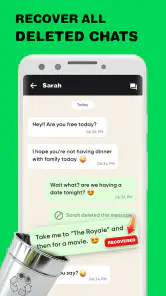
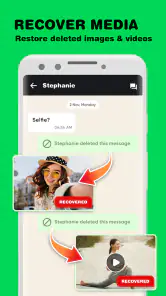
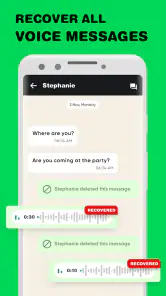

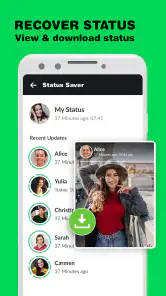

Analysis by Reviewed
If you are choosing a way to retrieve something removed from WhatsApp or WA Business, the first question I’d ask is whether you want a recovery aid for future mishaps or a dependable archive of everything you send and receive. Those are not quite the same job. Recover Deleted Messages is a free social app from Gurru Technology aimed at recovering messages and media; I’d treat it as a practical safety net, not a substitute for a deliberate backup routine.
What to check before relying on it
Recovery tools have an important limitation: they can only help when the information was available to the app in the first place. If a message or photo was never captured or otherwise saved, installing a recovery app afterward may not bring it back. I’d set up and understand the app before an accidental deletion, then test its workflow with something unimportant. That small check is more useful than assuming every lost conversation can be restored.
It is also worth deciding what you actually need back. A short text may be easy to identify, while a media file can be harder to track down among personal photos and downloads. Previewing an item before restoring it, as the published description of this app’s workflow suggests, is a sensible habit: check that it is the right conversation or file before adding anything back to your phone.
Where this recovery app makes sense
The strongest reason to consider it is a specific, everyday problem: you notice that a WhatsApp message or a photo shared in a chat has disappeared and want a straightforward recovery option to try. For someone who does not routinely keep a separate archive, that focused purpose is more approachable than sorting through broad phone-cleanup or file-management tools. The same idea can matter to people using WA Business when a deleted customer exchange or shared image is worth checking for.
For example, imagine deleting a chat attachment while clearing space, then realizing later that it contained a delivery detail you still need. I’d first look in the chat and the phone’s own photo or file locations, then use a recovery tool as another place to check. This order avoids spending time restoring duplicates and makes it easier to judge whether the recovered item is actually useful.
When a different option is better
If your main goal is long-term record keeping, the backup options built into your messaging routine are usually the better starting point. They are meant to preserve conversations rather than search for individual items after the fact. If you deleted something before a backup included it, though, that route may not solve the immediate problem, which is where a recovery-focused app can be worth trying.
I’d also skip this app if you expect a guaranteed rescue for every old message, or if you are uncomfortable giving a recovery tool access to the information it needs to do its job. Messaging settings, device backups, and a simple habit of saving important attachments may be a better fit. For sensitive conversations, take a moment to consider what you are restoring and where you want that file to remain.
You May Like

Clash of Clans Is Won Between the Battles

Android Auto Makes the Case for Quieter Car Software

MobiOffice: Transforming Mobile Productivity with Seamless Integration

EA SPORTS FC™ Mobile Soccer: Redefining Mobile Sports Gaming

How Microsoft OneDrive Became a Mobile Productivity Giant

How Google Translate Breaks Language Barriers Effortlessly
Value, compatibility, and expectations
The app is free to install, with optional in-app purchases listed from $3.99 to $39.99 per item, so I’d check the purchase screen carefully before choosing anything paid. It has a 4.2 average from around 666,000 ratings and more than 10 million installs, which suggests plenty of people have tried it, but popularity cannot promise that a particular deleted item will be recoverable. It is rated for Everyone, runs on Android 6.0 or later, and its current version is 1.6.2.
There is also a real switching cost to consider. If you have already built a routine around phone backups or saving important attachments manually, adding another tool may create a second place to check rather than a cleaner system. I would use it for a targeted recovery need, not as a reason to stop backing up chats or organizing files. A recovery app is most useful when it complements those habits instead of replacing them.
For a social app with a focused job, its appeal is easy to understand: it gives people a place to try when WhatsApp messages or media go missing. I’d recommend it to someone who wants that extra recovery option and is willing to check its results carefully. If you need guaranteed preservation, prefer a planned backup; if you have one missing item, this is a reasonable tool to try, with realistic expectations.
Getting Started with Ease
When I first downloaded Recover Deleted Messages, I was pleasantly surprised by how easy it was to set up. The installation was quick, and the app immediately guided me through its simple interface. No need to be a tech wizard here; even your grandma could navigate this one!
A Lifeline for Lost Texts
The core functionality of the app is, of course, to help you retrieve those mistakenly deleted messages. Whether it’s an important conversation with your boss or sweet nothings from your loved one, this app has got your back. I tested it out by deleting a few texts and, lo and behold, they were back in my inbox with just a few taps. It felt like magic!
Compatibility and Performance
I was curious about how well it would perform across different devices. Turns out, Recover Deleted Messages works seamlessly on both Android and iOS platforms. The app didn’t lag or crash, which is a huge plus in my book. It’s also regularly updated, ensuring it stays compatible with the latest operating systems.
Beyond Just Messages
What’s even cooler is that the app doesn’t limit itself to just text messages. It can also recover deleted media files, which is a blessing if you’ve ever lost a precious photo or video. I tried it with some old WhatsApp pictures and was thrilled to see them restored to my gallery.
User-Friendly Features
The developers really thought of everything. The app includes features like a backup option, so you can prevent future message mishaps. Plus, there’s a neat little function that lets you preview messages and media before restoring them. This saves you from cluttering your phone with unwanted data.
Why I Recommend It
All in all, Recover Deleted Messages is a handy tool that brings peace of mind. It's not just about recovering data; it's about knowing that your digital conversations are safe. Whether you're prone to accidental deletions or just want a safety net, this app delivers on its promise. Give it a try, and you might just find it's an essential part of your mobile toolkit.
Make the First Test Count
I would approach the first session as a small experiment, not a rescue mission. Choose a low-stakes message or image, learn how the app presents possible results, and check whether the item is recognizable before restoring it. That gives you a practical sense of the app’s workflow while there is no pressure to recover something irreplaceable. If the result is confusing, you can pause and compare it with the conversation or saved files you already have.
This is especially useful if you share a phone with family or use it for both personal and work conversations. A recovered item can be easy to misread when several chats contain similar images or short messages. I’d take a moment to confirm the sender and context, rather than assuming that a file with the right appearance belongs to the conversation I had in mind.
Keep Recovery Separate from Archiving
One important distinction is that searching for something already lost is different from maintaining a reliable archive. Recovery is reactive: it helps you investigate after an accidental deletion. A backup routine is preventive and is the better choice when you cannot afford to lose a conversation. For an important work exchange, I’d make sure the information is preserved through the messaging app’s own backup options or another suitable record-keeping habit instead of relying on a recovery attempt later.
That difference also helps set expectations around timing. If you have just noticed a missing item, it makes sense to check the conversation, your existing backups, and the phone’s saved media before trying another route. If the loss happened long ago and the item was never captured, there may be nothing for a recovery app to find. I would not pay for an upgrade on the assumption that it can overcome that basic limitation.
Who Is Likely to Get the Most from It?
I can see the appeal for someone who regularly receives useful photos, voice-of-the-moment details, or short instructions through WhatsApp and occasionally deletes things while tidying a chat. It may also suit a small business user who wants another place to check for a customer message or shared image that was removed by mistake. In both cases, the value is in having a focused recovery option ready, not in treating it as a complete record system.
It is less compelling for someone who rarely loses messages, already saves important files as they arrive, or expects every deleted conversation to be restored on demand. Those users may be better served by a consistent backup habit and ordinary file organization. I’d also think twice if the information involved is highly sensitive and I am not comfortable with a separate app handling access needed for its recovery purpose. Convenience matters, but so does being deliberate about private material.
How It Compares with Other Ways to Find a Lost Item
The usual alternatives fall into a few different groups. Messaging-app backups are the natural choice for preserving conversations over time; a phone’s gallery or file locations are worth checking when the missing item is a photo or document; and manual saving is simple when only a handful of files matter. A dedicated recovery app occupies a narrower space between those options: it gives you another place to look after something disappears, without replacing the archive or the original chat.
That narrow focus is both its advantage and its trade-off. You do not need to reorganize your whole phone just to investigate a missing WhatsApp item, but you also should not expect a recovery tool to behave like a searchable, permanent archive. If you are trying to find one attachment, checking the phone’s own folders first can be faster. If you need a dependable history of conversations, planned backups are the more appropriate foundation. I’d use this app when those first checks do not settle the question.
A Sensible Order for Checking
When an item goes missing, I’d avoid immediately restoring every result that looks vaguely familiar. First, reopen the relevant chat and confirm what was deleted. Then check whether the attachment is already in the phone’s photos or files, since saving it again could create clutter. After that, use the recovery app to look for the specific message or media you need, and preview candidates before restoring. This simple sequence limits duplicate files and reduces the chance of mixing up similar items.
For a business conversation, I’d add one more step: once you find the useful detail, record it in the appropriate work system or save the relevant attachment somewhere you can locate later. A recovered message can solve today’s problem, but it does not automatically create a lasting business record. The same applies to a personal photo you would be upset to lose again; after retrieving it, make a deliberate copy or backup rather than depending on a second recovery attempt.
What to Consider Before Paying
The free starting point makes it possible to decide whether the app fits your habits before spending anything. Since paid in-app items are available at different price points, I would read each option carefully and ask what practical benefit it gives me before confirming a purchase. A purchase is only sensible if the app has already shown useful results for the kind of recovery I need; paying in advance cannot guarantee a particular message or file will be found.
I’d also avoid making a decision while worried about losing something important. In that moment, it is easy to treat any paid option as insurance. Take a breath, check your backups and saved folders, and establish whether the missing item is actually available to recover. If it is not, spending more may not change the outcome. If the app has helped with a low-risk test and you understand its limits, you can judge the cost with a clearer head.
Privacy and Practical Boundaries
Messages can include addresses, business discussions, family photos, and details that should not be handled casually. Before using any recovery tool, I’d consider whether I am comfortable giving it the access needed for its purpose and avoid restoring material simply because it appears in a results list. Previewing first is not just a way to avoid clutter; it is also a moment to make sure I am retrieving the right content and that it belongs on this device.
For shared or borrowed phones, I would be especially cautious. A recovery attempt could surface personal material that is not mine to browse or restore. If the phone is used by more than one person, the right next step may be to ask the owner rather than searching through recovered content. That is a small but meaningful boundary, particularly when the missing material comes from private chats.
My Recommendation
My recommendation is straightforward: consider this as a targeted helper for WhatsApp and WA Business, not as a promise that deleted data can always be brought back. It makes the most sense when you have a particular missing message or media file, have checked the obvious places, and are willing to verify anything it finds. The simple setup and preview-oriented workflow are useful qualities, but careful expectations matter more than a reassuring interface.
If you depend on chat history for work, family arrangements, or important records, build a backup routine first and use recovery as a secondary option. If you mostly want to retrieve an occasional attachment after a mistake, this app is a reasonable tool to keep in mind. I would skip it if you need certainty, dislike adding another app to a sensitive messaging workflow, or already have a reliable way to preserve what matters. For everyone else, the best approach is to test it calmly, restore selectively, and save anything important somewhere dependable once you find it.
Recover Deleted Messages Frequently Asked Questions
Does Recover Deleted Messages require an internet connection to recover content?
If you are considering Recover Deleted Messages, it is reasonable to ask whether recovery can be done offline or whether the app needs an internet connection. Its stated purpose is recovering deleted messages and media files for WhatsApp and WhatsApp Business, but that does not establish how every recovery step works. Check the app’s current permissions and prompts during setup, and avoid assuming that an internet connection alone can restore content that is no longer available on your device.
What permissions might Recover Deleted Messages request?
A recovery app may need access to relevant device information or files to look for content, so review each permission request carefully when setting up Recover Deleted Messages. Grant only permissions that make sense for the feature you intend to use, and check your device’s settings if you later want to change them. The app focuses on deleted messages and media for WhatsApp and WhatsApp Business, so consider that purpose when deciding whether a requested permission is appropriate.
Does Recover Deleted Messages work with WhatsApp and WhatsApp Business?
Recover Deleted Messages is intended to recover deleted messages and media files for WhatsApp and WhatsApp Business. Its store summary highlights those services, so it is a relevant option if you want to try restoring content from either one. Recovery can still depend on what was saved on your device and whether the content remains available to the app; installing it cannot guarantee that every deleted item will return.
What should I check before installing Recover Deleted Messages?
Check that your device meets the app’s Android requirement of version 6.0 or later, and consider whether its WhatsApp-focused recovery features match what you need. The app is free to download, but it also offers in-app purchases priced from $3.99 to $39.99 per item. Reviewing those details before installing can help you decide whether the free option is enough for your intended use.
What is Recover Deleted Messages and how does it work?
Recover Deleted Messages is an app designed to help users retrieve text messages that have been accidentally deleted from their smartphones. It works by accessing the phone's storage to recover message data before it is permanently erased. The app scans for traces of deleted messages and attempts to restore them to a readable format. It's important to note that the success of recovery may vary depending on how long ago the messages were deleted and whether they have been overwritten by new data.
Pros
- Easy to recover lost messages.
- Supports multiple messaging platforms.
- User-friendly interface.
- Fast recovery process.
- No technical skills required.
Cons
- Limited free version features.
- May not recover all message types.
- Requires app permissions.
- Occasional ads in free version.
- No support for old devices.

- Category
- Social
- Version
- 1.6.2











