RainDrop: Virtual Rain Gauge
- 557.00
- 4.2
- Installs
- 100.00K
- Price
- Free

Screenshots
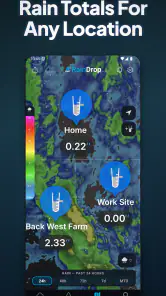
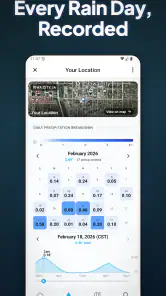
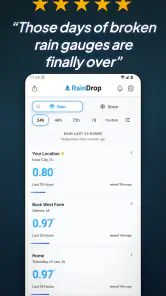
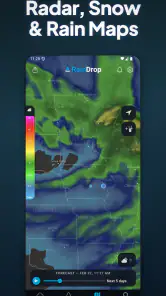
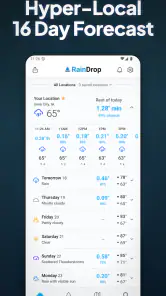
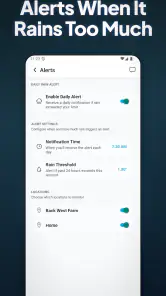
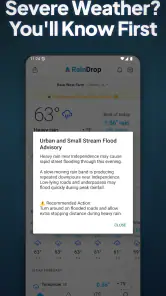
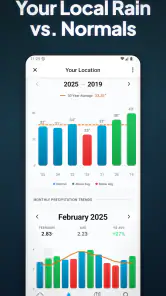
Analysis by Reviewed
I approached RainDrop: Virtual Rain Gauge as a practical weather tool rather than another app for glancing at a forecast. Its purpose is narrower and more useful for the right person: helping you keep track of rainfall totals in a simple way. After spending time with it, I think the app makes the most sense when you care about what actually fell at your location, not just whether a forecast icon shows rain.
That distinction matters in everyday life. A forecast can tell me that showers are likely, but it does not always answer the question I have later: did enough rain fall to affect the garden, a construction task, a muddy path, or an outdoor plan? This app is built around that rainfall-tracking habit. It is free to begin using, aimed at Everyone, and developed by RainDropGauge.
What to expect before you begin
The first thing to understand is that this is a focused weather app. I would not install it expecting a complete replacement for a broad weather service with extensive forecasts, radar layers, severe-weather alerts, or a long list of atmospheric readings. Its appeal is the rain gauge idea: concentrating on rainfall totals instead of making you search through a crowded weather dashboard.
That focused approach is also its main strength. When an app has one clear job, it can become part of a routine. I can open it after a storm, check the rainfall record, and use that information for a decision. Someone caring for plants may want to know whether watering can wait. A homeowner may want a quick sense of how much rain reached the property. Someone planning outdoor work may use the record as one small piece of evidence when deciding whether the ground is likely to be wet.
The app has built a noticeable audience, with more than one hundred thousand installs and an average rating of 4.2 from around two thousand ratings. Those figures suggest that the basic idea is connecting with people, while also leaving room for the normal differences in expectations that come with a weather utility. A rain tracker is only as useful as the way you interpret its readings, so I would treat it as a helpful record rather than an unquestionable replacement for a physical gauge.
RainDropGauge released the app on June 4, 2024, and the current version is 3.1.58. It works on devices running Android 7.0 or later. The app itself is free, although in-app items range from $2.99 to $99.99 each. For a first-time user, that means I would start with the free experience and only consider an optional purchase after deciding whether the tracking workflow fits my routine.
Getting through the first setup without overthinking it
My advice is to begin with one clear question: what do I want to learn from the rainfall record? If the answer is “how much rain my area received after a storm,” keep the first session simple. Avoid trying to turn the app into a complete personal weather station immediately. A focused first goal makes it easier to tell whether the information is useful.
More From Our News Desk

Clash of Clans Is Won Between the Battles

Android Auto Makes the Case for Quieter Car Software

MobiOffice: Transforming Mobile Productivity with Seamless Integration

EA SPORTS FC™ Mobile Soccer: Redefining Mobile Sports Gaming

How Microsoft OneDrive Became a Mobile Productivity Giant

How Google Translate Breaks Language Barriers Effortlessly
After installing it, I would look through the main screen slowly and identify where rainfall totals are shown, where the relevant location is represented, and how the app presents the time period being viewed. Those details are more important than rushing into every available control. A total without a clear period can be misleading, especially after several rainy days, so I always want to know whether I am looking at a recent event, a daily figure, or a broader accumulation.
One practical habit is to choose a consistent checking point. For example, I might look once after the rain has stopped and again the following morning. The first check gives me an immediate sense of the event, while the second helps me avoid making a decision while rain is still being recorded. This is a small but valuable distinction: a number can change while the weather event is still underway.
If the app asks me to make choices during setup, I would select the location that best represents the place I actually care about. That could be home, a garden, or another regular site. A nearby city may not always experience the same rainfall as a rural property or a different side of town. This is one of the unavoidable limitations of relying on location-based weather information: even a well-presented total may not perfectly describe the exact patch of ground where I am standing.
I also recommend noting how the app displays units before comparing a reading with a physical rain gauge or another weather source. A mismatch in units can make two equivalent measurements look different. If I am recording figures in a notebook or sharing them with someone else, I would write down the unit alongside the total rather than relying on memory.
Your first meaningful result: checking rainfall after a real event
The most reassuring way to test the app is to wait for a genuine period of rain rather than judging it during dry weather. Before the rain begins, I would open the app and notice the starting state. Once the shower or storm has passed, I would return and check the updated rainfall total. That gives me a simple before-and-after comparison and turns the first session into something concrete.
Imagine that I am deciding whether to water a row of plants. Instead of relying on the sound of rain against the window, I can check the recorded total and combine it with what I see outdoors. If the ground is still dry beneath the surface, the app alone should not persuade me to skip watering. If the soil is damp and the rainfall record supports that observation, I have a more informed reason to wait.
This is where I think the app is more useful than a standard weather forecast. Forecasts are designed to help me prepare for upcoming conditions; a rain gauge app helps me review what happened. Those are different jobs. I would use a forecast service to decide whether to carry an umbrella tomorrow and use RainDrop to understand the rainfall that has already affected my location.
For outdoor work, the same workflow can be surprisingly practical. Suppose I want to paint a fence or move equipment across a yard. The rainfall total does not tell me whether every surface is ready, but it gives me context. I can compare the recorded rain with the condition of the ground, the forecast for the next few hours, and the material involved. The useful insight is not the number by itself; it is the way the number helps me make a better judgment.
I would also avoid checking only once and assuming the first visible result is final. Rain can arrive in several bursts, and the total may continue changing. A second look after the weather clears is a better habit than treating the first update as the complete event. This is one of the app’s less obvious lessons: rainfall tracking rewards consistency more than occasional curiosity.
Where first-time users may become confused
The phrase “accurate rain tracker” can create an expectation of laboratory-level precision at every individual address. I would keep that expectation realistic. A virtual rain gauge is not the same as placing a calibrated physical cylinder in the garden. Local terrain, distance from the reporting point, wind, and the uneven nature of showers can all affect how closely an app’s reading matches what happened on one property.
That does not make the app pointless. It means I use the figure as a useful estimate for decisions and comparisons, not as proof that every corner of my property received exactly that amount. If I need formal measurements for agricultural records, scientific work, drainage planning, or a dispute, I would choose a dedicated physical instrument or a more specialized service instead.
Another possible source of confusion is the difference between rainfall total and rainfall intensity. A total tells me how much rain accumulated over a period. It does not automatically explain whether that rain arrived as a gentle, steady shower or a short, heavy burst. Those patterns can have very different effects: a sudden downpour may cause runoff, while a longer light rain may soak into soil more gradually.
That is why I would not use one total to answer every weather question. If I am concerned about flooding, slippery roads, or whether a roof gutter was overwhelmed, I need to observe the situation itself and use suitable weather information alongside the app. The rain record is valuable context, but it is not a complete safety system.
Location is another detail worth checking carefully. A reading for the wrong place can still look perfectly reasonable, which makes this error easy to miss. Before trusting a result, I would confirm that the selected location matches the home, property, or area I intend to monitor. This is especially important when I travel or move between a city address and a rural site.
I would also pay attention to the time frame shown with any total. Comparing today’s figure with a multi-day accumulation can lead to an incorrect conclusion about how wet the latest storm was. My simple rule is to say the period out loud: “this is the total since the rain began,” or “this is the wider accumulation.” That small mental label prevents many bad comparisons.
How I would build the app into a useful routine
RainDrop becomes more valuable when I treat it as a record rather than a one-time novelty. I would check it at consistent moments, especially after weather events that matter to me. A gardener could review the total before watering. A property owner could look after heavy rain and then inspect drainage. Someone managing outdoor projects could use it when reviewing whether the ground has had time to dry.
One of my favorite practical approaches is to pair the app with direct observation. I might note the rainfall total, then check the soil a few centimeters below the surface, look at puddles, and inspect whether water has collected in problem areas. This combination is better than relying on either source alone. The app gives me a consistent reference, while the physical check tells me how that rain affected my specific surroundings.
For people who keep gardening notes, the app can support a lightweight log. I would record the date of a meaningful storm, the displayed total, and what I did afterward. Over time, that creates a personal history that is more useful than trying to remember whether last week’s rain was “a lot.” I would not claim that this replaces professional rainfall records, but it can make household decisions more deliberate.
A second non-obvious use is checking whether my impression of a storm is reliable. Heavy noise and strong wind can make a shower feel larger than it was, while quiet overnight rain can be easy to forget. Looking at the total afterward helps separate perception from accumulation. That is useful when deciding whether to water, clean outdoor surfaces, or postpone a task.
I would resist checking the app every few minutes. That creates activity without improving the decision. A better workflow is to check at the beginning or end of an event, then again when I actually need to act. This keeps the app from becoming another source of notification fatigue and makes each visit purposeful.
Where it fits beside ordinary weather apps and physical gauges
Compared with a general weather app, this one is appealing because it keeps rainfall at the center. A broad weather app is usually better when I need hourly forecasts, temperature trends, wind, radar, or alerts. If my main question is whether I should leave home with a coat, I would probably reach for that broader tool first.
Compared with a physical rain gauge, RainDrop is easier to consult and does not require me to place, level, clean, and read a device outdoors. That convenience is its clearest advantage. A physical gauge, however, measures the rain that reaches its exact position, which can be more meaningful for a garden or property. It also gives me a tangible reference that does not depend on interpreting a virtual reading.
For casual household use, I prefer the app’s convenience. For precise site-specific records, I would favor a physical gauge, possibly using the app as a second reference. The best choice depends on whether I value easy access or exact local measurement more. There is no reason the two approaches cannot coexist.
I would also compare it with simply looking out the window. Visual observation is immediate but poor at estimating totals. It can tell me that the ground is wet, not how much rainfall accumulated or how one event compares with another. The app adds consistency, though it cannot tell me everything about soil absorption, runoff, or local damage.
The free starting price makes experimentation straightforward, but the in-app purchase range deserves a sensible approach. I would not pay for an item merely because I want more information in general. I would first use the free version during several different weather situations and decide whether its presentation, location handling, and rainfall records genuinely improve my routine. If the core workflow does not feel clear, purchasing more will not solve that basic problem.
Who will benefit most, and who should choose something else
I think RainDrop is a good match for people who want a dedicated way to follow rainfall without navigating a busy weather interface. Gardeners, homeowners, outdoor hobbyists, and anyone curious about local rain totals can get practical value from it. It is also approachable for a first-time user because the central idea is easy to understand: check what rain has accumulated and use that information in context.
It is less suitable for someone who wants a full weather command center. If I need detailed forecasts, radar animation, storm warnings, wind information, or a broad climate dashboard, I would install a more comprehensive weather app alongside it or choose that type of app instead. RainDrop’s narrow focus should be seen as a deliberate trade-off, not a missing substitute for every weather feature.
I would also hesitate to recommend it as the only tool for high-stakes decisions. Flood preparation, professional crop management, formal environmental records, and safety-critical planning call for more than a rainfall total. In those situations, I would combine official warnings, local observations, and appropriate measuring equipment.
The age rating of Everyone makes it suitable for a broad audience, but simplicity should not be confused with automatic accuracy for every location. A child, older relative, or casual user can understand the basic reading, while a technically minded user may still want to verify how the location and time period relate to a real-world measurement.
My recommendation after using it
I see RainDrop: Virtual Rain Gauge as a useful specialist tool with a clear place in a weather routine. Its best moment is not when I am deciding whether rain might arrive; it is after rain has arrived and I want a consistent way to think about what happened. That makes it particularly handy for watering decisions, outdoor planning, and building a simple personal record.
My recommended first test is straightforward: install it, confirm the location, observe the starting display, wait through a real rain event, and return after conditions settle. Then compare the reading with what you see on the ground. If that process answers a question you regularly have, the app has earned a place on your phone.
The key is to use the rainfall total as evidence, not as the entire decision. Pair it with the condition of your soil, paths, gutters, and outdoor plans. Used that way, the app feels more dependable and more useful than a quick glance at a rain icon.
With its free entry point, broad age rating, support for Android 7.0 and later, and focused design from RainDropGauge, it is easy to try without committing to a complicated weather system. I would recommend it to anyone who specifically wants rainfall tracking. I would skip it only if I need detailed forecasting, exact on-site measurement, or professional-grade weather records. For everyday users who want to understand how much rain their area has received, it is a sensible and approachable addition to a broader weather toolkit.
RainDrop: Virtual Rain Gauge Frequently Asked Questions
Can I use RainDrop: Virtual Rain Gauge to keep rainfall records for more than one location?
RainDrop: Virtual Rain Gauge is intended for tracking rainfall, which can be useful when you want to follow conditions beyond a single garden or property. Whether you can save several locations, switch between them, or compare their records depends on the features available in your version. Check the app’s feature details before downloading if managing multiple places is important to you.
What devices can run RainDrop: Virtual Rain Gauge?
RainDrop: Virtual Rain Gauge is a weather app for mobile devices, and its minimum operating-system requirement is version 7.0. Before downloading, check that your phone or tablet meets that requirement and that the app is offered for your device through its app store. Keeping your operating system compatible can help you install and use the app as intended.
Is RainDrop: Virtual Rain Gauge suitable for children?
The app has an Everyone content rating, so its content is considered suitable for a broad audience. It focuses on tracking rainfall, which may also make it a practical weather tool for families. As with any app, a parent or guardian can review its permissions and features before a child uses it, particularly if location access or account-related options are involved.
What is RainDrop: Virtual Rain Gauge used for?
RainDrop: Virtual Rain Gauge is designed to help you monitor and record rainfall in a simple way. It can be useful for gardeners, farmers, weather enthusiasts, and anyone who wants a personal rain log. Depending on the version and available features, the app may let you view measurements, track rainfall over time, and compare data from different days or locations.
Does RainDrop: Virtual Rain Gauge measure rainfall directly from my phone?
You should not assume that the app can physically detect rain using the phone alone. Most virtual rain gauge applications rely on weather services, user-entered observations, or location-based data rather than a built-in rain sensor. Before downloading, check the app description and permissions to understand whether measurements come from online weather information, manual input, or a compatible external device.
Pros
- Simple interface makes rainfall data easy to understand.
- Useful for monitoring local precipitation over time.
- Helpful for gardeners
- farmers
- and weather enthusiasts.
- Rain tracking can support irrigation and outdoor planning.
- Lightweight concept with a clear focus on rainfall information.
Cons
- Accuracy depends on the quality of available local weather data.
- Coverage may vary significantly between regions.
- Some features may require location access to work properly.
- Rainfall estimates can differ from readings at nearby stations.
- Limited usefulness for users seeking a complete weather forecast.
- Category
- Weather
- Version
- 3.1.58











