

Prepia PTCB PTCE Exam Prep
- 32.00
- 4.7
- Installs
- 10.00K
- Price
- Free

Screenshots

Analysis by Reviewed
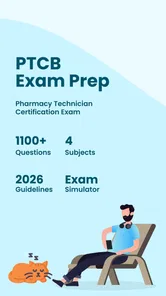
Preparing for a pharmacy technician exam is difficult enough without wasting time on a study tool that feels confusing or demanding to use. I spent time with Prepia PTCB PTCE Exam Prep, an education app from Prepia Inc, and found its main value in turning exam preparation into short practice sessions. It is built for people working toward the Pharmacy Technician Certification Board exam, with practice tests centered on the kind of repeated question work that many learners need.
The app is free to install and suitable for everyone, although it includes optional purchases ranging from $4.99 to $59.99 per item. That combination makes it easy to try before committing money, which I appreciate. The important question is not simply whether it contains practice questions, but whether its presentation works for different people, different study environments, and different levels of confidence. My experience is that it can be useful for focused revision, but it should be treated as a practice companion rather than a complete replacement for a structured pharmacy technician course.
How clearly the app presents practice material
My first impression was that the app’s purpose is easy to understand. It is not trying to be a general medical reference, a flashcard collection for every healthcare subject, or a full classroom platform. Its focus is PTCB and PTCE preparation. That narrow purpose helps reduce the decision-making that often slows down studying: I can open it with the intention of answering questions rather than searching through unrelated lessons.
The app’s current version is 2.1.020, and the basic experience is approachable for someone who is comfortable using a phone. The most useful way to approach it is to treat each session as a small diagnostic exercise. Instead of rushing through a large block of questions, I recommend answering a manageable set, noting which subjects caused hesitation, and then returning to those areas with a textbook, class notes, or another trusted learning source.
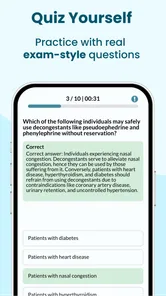
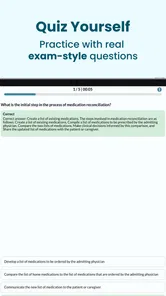
The clearest strength is its low-friction practice loop: open the app, work through questions, notice weak spots, and repeat the process later. That is especially helpful for learners who become overwhelmed by long study plans. A short session during a break can still reveal whether a problem comes from terminology, calculations, drug knowledge, or simply reading the question too quickly.
Readability matters more in exam preparation than many people realize. A question can be technically correct yet difficult to use if the wording feels crowded or the answer choices are hard to distinguish. On a phone, I found it sensible to use the largest comfortable system text setting and keep the screen free from distractions. If you normally read with enlarged text, use a screen magnifier, or depend on a particular display contrast, test the app early rather than assuming every question will remain equally comfortable at your preferred settings.
The app is best suited to learners who can read standard digital text and interact with conventional mobile controls. It may also be easier for people who prefer visual question-and-answer practice over audio instruction. I would not choose it as my only study method for someone who needs spoken explanations, highly adjustable typography, or a lesson structure that explains every concept before testing it.
More From Our News Desk

 Gmail
GmailGmail in a Busy Inbox: Who Benefits Most?
From first account to crowded workday, Gmail earns its place through dependable search and flexible sorting—but its best fit depends on how much inbox maintenance you can tolerate.

 Prime Video
Switching to Prime Video: What Changes in Your Viewing Routine
Prime Video can make a compelling second home for streaming, but switching means learning a different catalog, rental layer, and route from browsing to playback.

 Universal TV Remote Control
Universal TV Remote Control Works Best as a Reliable Backup
A phone remote earns its place through quick setup and reliable habits. Here is how to get more from Universal TV Remote Control—and where its limits show.

 Weather - By Xiaomi
Weather by Xiaomi Review: Clear at a Glance, Less Clear Up Close
Xiaomi’s weather app makes everyday forecasts quick to scan, but its calm surface can leave useful details and recovery paths harder to find than they should be.

 X
XX Under Pressure: Can It Recover When Posting Goes Wrong?
A resilience-focused review of X, examining setup, mistaken posts, interruptions, weak connections, and the gaps that matter when recovery needs to be dependable.

 Clash of Clans
Clash of Clans Is Won Between the Battles
Its raids are quick; its community is a long-term project of coordination, teaching, rivalry, and shared responsibility—with all the friction that entails.
Latest News



Using practice questions as a study map
One of the more useful ways to get value from this app is to stop treating every incorrect answer as an isolated mistake. I would keep a simple paper or digital log with three columns: the topic, the reason for the error, and the action needed next. “Forgot the fact” requires a different response from “misread the dosage unit” or “eliminated the correct answer too quickly.” This workflow turns practice into information about how you study, not just a score.
That distinction is important because question apps can create a false sense of progress. Answering familiar questions repeatedly may feel productive while leaving an untested weakness untouched. I recommend alternating between questions you feel comfortable with and questions that expose uncertainty. When the app presents a difficult item, pause before looking at the result and explain your reasoning to yourself. If you cannot explain why the correct option is right, mark it for review even when you guessed correctly.
Another practical tip is to use the app at two speeds. During a learning session, read carefully and write down the point you misunderstood. During a later review session, answer under mild time pressure. The first mode helps with comprehension; the second shows whether the knowledge is available quickly enough for an exam setting. This two-stage approach is more revealing than chasing a perfect result in one sitting.
Motor and sensory considerations during study
Mobile exam preparation naturally involves repeated tapping, scrolling, and reading. For users with limited hand movement, tremors, joint pain, or fatigue, even a short question session can become uncomfortable if it requires frequent precise actions. I found it more practical to study in brief blocks, keep the phone supported on a stable surface, and avoid holding it in one hand for long periods. A stand can reduce strain and leave the other hand free for notes.
The app’s usefulness for motor accessibility depends partly on the device it runs on and the learner’s normal setup. Someone who already uses system-level interaction tools may find the experience manageable, while another person may prefer a larger tablet or a physical keyboard for written notes beside the app. I would test the complete routine—opening a session, selecting answers, moving through questions, and reviewing mistakes—before purchasing any optional content.
For users with visual sensitivities, brightness and surrounding light can make as much difference as the app itself. I had a better experience studying away from glare and lowering screen brightness to a comfortable level rather than using the phone outdoors. If visual fatigue is an issue, shorter sessions with deliberate breaks are more realistic than trying to complete a long practice run in one sitting.
People who are deaf or hard of hearing may not lose much from a primarily text-based study experience, provided the important material is available visually. However, learners who depend on audio explanations should be cautious. A practice question can tell me whether an answer is correct, but that is not the same as receiving a spoken lesson or a detailed explanation in an alternative format. For that reason, I would pair this app with resources that match your preferred way of processing information.
Users with dyslexia or other reading-related difficulties may benefit from slowing down and separating the question from the answer choices. I found it helpful to read the final question sentence first, identify exactly what it asks, and then return to the full prompt. This is not a special app feature; it is a study technique that reduces the chance of being distracted by extra wording. If the app’s text presentation does not work well with your reading tools, a course platform designed around adjustable lesson layouts may be a better primary choice.
Studying in real-life situations
The strongest everyday use case is the learner who has an irregular schedule. Imagine working a pharmacy shift, commuting home, and having only a small amount of energy left for study. A short practice session can fit into that routine more easily than opening a large textbook and deciding where to begin. I would use it during a quiet break or after dinner, then record one or two topics that deserve deeper review on the weekend.
It can also work well for a student who already attends a preparation class. In that situation, the app is not the teacher; it is the repetition layer. After covering a topic in class, I would use the practice questions to check whether the material has moved from recognition to recall. If the same type of question remains difficult, I would return to the instructor’s explanation rather than repeatedly guessing inside the app.
Travel and connectivity are practical concerns for any mobile study tool. I would not build an important revision plan around assuming that every feature will behave identically in a basement, on a flight, or in a busy building with unreliable service. Before depending on it away from home, test the exact study routine in the places where you expect to use it. That simple check prevents a last-minute surprise when you have set aside time but cannot access the material as expected.
Studying in a shared environment also changes the experience. A phone is discreet, but notifications, noise, and interruptions can make a question session less effective. I recommend using a quiet mode on the device and setting a clear stopping point before beginning. For learners with attention difficulties, a small target such as completing one topic-focused session is easier to manage than an open-ended promise to “study for a while.”
For people who are not native English readers, the app may be useful for becoming familiar with exam-style wording, but practice alone does not guarantee language comprehension. I would keep a glossary of unfamiliar pharmacy terms and distinguish vocabulary problems from knowledge problems. That distinction helps decide whether the next step should be more questions, language support, or a lesson that explains the underlying concept more slowly.
Where the app fits beside other study options
Compared with a printed workbook, this app is more convenient for quick practice and easier to carry from place to place. A workbook may still be better for learners who like writing extensive notes in the margins, reviewing a complete explanation beside each question, or avoiding screen fatigue. I would choose the app for portability and repetition, and print or handwritten material for deeper annotation.
Compared with a video course, the app is more active but usually less reassuring for someone who needs a teacher to explain a topic from the beginning. Video lessons can demonstrate calculations or clarify confusing terminology step by step, while question practice shows whether I can apply what I have learned. Neither format fully replaces the other. The right combination depends on whether your current problem is understanding or recall.
Compared with a general flashcard app, a PTCB-focused tool has a clearer exam purpose. General flashcards can be customized more extensively, but they require the learner to create or find suitable material and maintain it. This app is more convenient when I want to start answering relevant questions immediately. The trade-off is that a focused question bank may not provide the same flexibility as a system built around personal cards, spaced repetition, or custom tagging.
The app’s public reception is encouraging, with a 4.7 average from around 280 ratings and over 10K installs. I see that as a reason to take the product seriously, not as proof that it will suit every learner. Ratings do not reveal whether the interface works for your particular reading, motor, or sensory needs, so a personal trial remains more valuable than popularity alone.
Remaining barriers and sensible limits
The biggest limitation is the difference between practicing answers and learning pharmacy. A question bank can reveal gaps, but it cannot automatically repair them. If you do not understand why an option is correct, repeating similar questions may strengthen guessing rather than knowledge. I would always keep a reliable reference, instructor, or course nearby for concepts that remain unclear.
Optional purchases also deserve careful consideration. The app is free to start, but individual in-app items range from $4.99 to $59.99. Before paying, I would identify exactly what kind of additional material I need and whether it addresses a genuine weakness. Buying the largest option simply because it appears comprehensive is not necessarily efficient if your main problem is one narrow subject or difficulty reading on a small screen.
Another barrier is cognitive fatigue. Exam preparation apps encourage the idea that one more question will always help, but tired practice can produce careless errors and frustration. I found it more useful to stop when I could no longer explain my choices clearly. A short, attentive session is better than a long run in which I tap answers automatically.
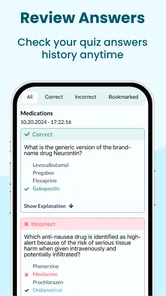
Learners who need detailed feedback should pay close attention to how they use results. A correct answer without a clear explanation may confirm a fact, but it does not necessarily build transferable understanding. I would write my own explanation after each uncertain response and compare it with a trusted study source. This takes longer, yet it makes the app more valuable for people who need reasoning rather than simple answer checking.
I would also skip this app as a primary resource if your study plan requires live tutoring, individualized accommodation, extensive audio content, or a formal course sequence. It is a better match for independent learners who can identify their weaknesses and bring additional resources when a question exposes a gap. That is not a flaw in the app so much as a boundary around what a compact practice tool can reasonably do.
Who should try it first
I would recommend starting with this app if you are already familiar with basic pharmacy technician subjects and want regular exam-style practice. It is particularly suitable for a learner who studies in short bursts, prefers answering questions to watching long lessons, and wants a portable way to check retention. It can also help someone returning to study after a break because the first session quickly shows which areas still feel familiar.
I would be more cautious if you are beginning from zero, have significant reading or motor barriers that your device settings do not solve, or need every answer explained in depth. In those cases, use it as a supplement only after confirming that its presentation is comfortable. A structured course, accessible tutoring arrangement, or larger-format resource may serve as the foundation, with this app providing extra practice.
Because the content rating is Everyone, it is appropriate for a broad audience from an age-classification perspective. That does not mean every learner will have the same experience. A younger student, an older career changer, and someone studying in a second language may all need different pacing and supporting materials even while using the same questions.
My inclusive verdict
Prepia PTCB PTCE Exam Prep is a focused education app that makes sense when the immediate goal is repeated practice for the PTCB or PTCE. I like its portability, its straightforward purpose, and the way it can turn spare minutes into useful diagnostic study. The free entry point makes it reasonable to test the reading and navigation experience before considering the optional purchases.
Its inclusive value is strongest for people who can work comfortably with standard text-based mobile practice and who are willing to adapt their surroundings, device settings, and study rhythm. Supporting it with a stand, larger screen, quiet environment, personal error log, or external explanations can make a meaningful difference. Those steps are especially useful for learners managing fatigue, visual strain, attention challenges, or an unpredictable schedule.
My honest recommendation is to use it as a practice layer, not as your entire preparation plan. Start with a few sessions, observe whether the wording and controls are comfortable, and judge progress by the quality of your reasoning rather than by the number of questions completed. If the app helps you identify weak areas and return to them deliberately, it earns a place in your routine. If you need teaching, accessibility options, or personalized feedback beyond question practice, choose a more comprehensive resource and let this app play a smaller supporting role.
Prepia PTCB PTCE Exam Prep Frequently Asked Questions
Is Prepia PTCB PTCE Exam Prep free to download, and are there paid features?
Prepia PTCB PTCE Exam Prep is free to download, so you can try the app before deciding whether to pay for additional content or features. In-app purchases range from $4.99 to $59.99 per item. Review the purchase details in the app before confirming anything, especially if you are comparing study options or want to keep your preparation within a specific budget.
What is Prepia PTCB PTCE Exam Prep?
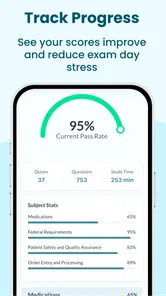
Prepia PTCB PTCE Exam Prep is a mobile study app designed for people preparing for the Pharmacy Technician Certification Board’s Pharmacy Technician Certification Exam (PTCE). It typically combines practice questions, topic-based quizzes, explanations, progress tracking, and review tools in one place. The app is intended to support independent study, but it should be used alongside official PTCB information and reliable pharmacy-training materials.
Does Prepia cover the main topics included in the PTCE?
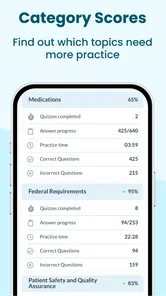
The app is designed to help learners review the knowledge areas commonly tested on the PTCE, such as medications, federal requirements, patient safety and quality assurance, and order entry or processing. Its practice content can be useful for identifying weak areas and becoming familiar with exam-style questions. However, users should compare the available topics with the current official PTCE content outline because exam requirements and emphasis may change.
Is Prepia PTCB PTCE Exam Prep suitable for beginners?
Yes, the app can be useful for both beginners and pharmacy technicians who already have practical experience. Beginners may benefit from studying one subject at a time, reading the explanations carefully, and building a regular revision routine. More experienced users can use timed quizzes and mixed practice sessions to test their readiness. Still, the app is a preparation aid rather than a replacement for formal education or supervised pharmacy training.
Can I use the app offline, and does it require an account or subscription?
Offline access, account requirements, and premium limitations depend on the version of Prepia available on your Android or iOS device. Some study features may work without a constant internet connection, while progress synchronization or certain question sets may require connectivity. Before downloading or subscribing, check the store listing and in-app terms for details about free content, paid plans, trial periods, automatic renewal, and cancellation procedures.
Pros
- Focused practice for the PTCB PTCE exam
- Includes questions covering key pharmacy technician topics
- Useful for reviewing concepts during short study sessions
- Helps identify weak areas through repeated practice
- Convenient study option for Android and iOS users
Cons
- Some advanced features may require a paid subscription
- Question quality may vary across different topic areas
- It should supplement
- not replace
- official PTCB materials
- Limited value for learners seeking extensive video lessons
- Requires consistent self-study and may feel repetitive over time













