

Pregnancy Tracker: Baby Growth
- 0.00
- 0.0
- Installs
- 500.00K
- Price
- Free

Screenshots


Analysis by Reviewed
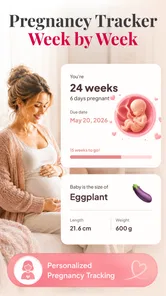
I think Pregnancy Tracker: Baby Growth makes the most sense as a small, shared point of reference during pregnancy: one person follows the weekly changes, then brings a useful detail into a conversation with a partner or relative. Its appeal is the combination of a pregnancy timeline and 3D visuals, rather than a complicated family-planning system. That distinction matters. I’d consider it for keeping up with baby’s development, but I wouldn’t assume that sharing, separate profiles, or coordinated reminders are part of the experience.
Following the weeks together
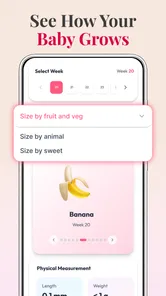
In a household, pregnancy information often arrives in fragments: an appointment, a question over dinner, or a message from someone who wants to know how things are progressing. A week-by-week tracker gives those conversations a shared starting point. The 3D presentation can also make growth easier to picture than a short text update, especially for someone who finds abstract descriptions hard to visualize.
A realistic use is checking the current stage together after a routine appointment, then using the visual as a prompt to talk about what the pregnant person has learned or wants to ask next. I like that kind of low-pressure use: the app can help make a developing pregnancy feel more understandable without turning every day into a checklist. The pregnant person should remain the authority on what they want to share; a visual tracker is a conversation aid, not a reason for others to expect constant updates.
The app is a free parenting app from Tools for Everyday - AI Tasks, with a Pregnancy Tracker focus. It has over 500,000 installs, which suggests that many people have been willing to try it, though popularity alone doesn’t tell me whether its presentation suits a particular household. Its current version is 1.0.1, so I’d approach it as a straightforward tracker rather than assume it has the depth of a long-established pregnancy platform.
What the 3D view is useful for
The most practical value of a 3D growth view is communication. A partner who isn’t following pregnancy information every day may find a visual easier to engage with than a list of weekly facts. It can give you something concrete to look at together, while leaving room to discuss how the pregnant person is actually feeling. The visual is best treated as an illustration for understanding, not a medical measurement or a substitute for clinical guidance.
There is a trade-off, though. A visual can feel engaging at first, but it may not be enough for someone who wants detailed articles, appointment planning, symptom logging, or a personalized record of questions. If those are the main reasons you want an app, compare trackers based on those specific tools rather than choosing by 3D imagery alone. Pregnancy Tracker: Baby Growth is most compelling when the weekly progression itself is what you want to follow.
Keep the setup personal
Before using a pregnancy tracker on a shared phone or tablet, I’d decide whose pregnancy information the device is meant to represent. If several people in a household use the same device, a saved timeline or an open app could create confusion about whose dates and progress are being viewed. I would keep use centered on the pregnant person’s own device or make a simple habit of checking that the right person is using it, rather than assume there are separate household profiles.
More From Our News Desk

 Instagram
Instagram’s Power Comes From Its Place in Your Phone
A close look at how Instagram turns Meta’s reach, recommendation systems and everyday camera habits into durable platform power—and what that costs users.

 Gmail
GmailGmail in a Busy Inbox: Who Benefits Most?
From first account to crowded workday, Gmail earns its place through dependable search and flexible sorting—but its best fit depends on how much inbox maintenance you can tolerate.

 Prime Video
Switching to Prime Video: What Changes in Your Viewing Routine
Prime Video can make a compelling second home for streaming, but switching means learning a different catalog, rental layer, and route from browsing to playback.

 Universal TV Remote Control
Universal TV Remote Control Works Best as a Reliable Backup
A phone remote earns its place through quick setup and reliable habits. Here is how to get more from Universal TV Remote Control—and where its limits show.

 Weather - By Xiaomi
Weather by Xiaomi Review: Clear at a Glance, Less Clear Up Close
Xiaomi’s weather app makes everyday forecasts quick to scan, but its calm surface can leave useful details and recovery paths harder to find than they should be.

 X
XX Under Pressure: Can It Recover When Posting Goes Wrong?
A resilience-focused review of X, examining setup, mistaken posts, interruptions, weak connections, and the gaps that matter when recovery needs to be dependable.
Latest News



That boundary also makes the experience more comfortable. Pregnancy is personal, and a partner’s interest doesn’t automatically mean they should control the tracking or expect access to every detail. A useful arrangement might be that one person checks the week and chooses what to share in conversation. If someone wants private notes or a record that only they manage, they should assess whether the app’s available tools fit that need before relying on it for sensitive personal information.
I’d also avoid treating the app as the household’s definitive calendar. A tracker can help you follow a general progression, but real appointments, clinician advice, and the pregnant person’s own records belong in the places the family already trusts for those tasks. That separation prevents a visual week-by-week app from becoming an accidental source of authority when a practical decision needs a professional answer.
Coordination without assuming shared controls
For coordination, the simplest workflow is often more reliable than trying to make every family member use the same app. The pregnant person can check the current stage, then tell a partner what matters: a question to remember, a topic they’d like to discuss, or simply a visual they found interesting. That keeps the information useful without depending on unconfirmed sharing or notification features.
A concrete example: one person might look at the tracker during a quiet moment, then mention at dinner that they would like help preparing for an upcoming conversation with their care provider. The partner can respond to that request rather than interpreting the app’s timeline as a list of tasks. This is a small but important distinction. Use the tracker to support a conversation, not to assign responsibilities or monitor someone else’s pregnancy.
If several relatives want updates, I’d choose one person to share what the pregnant person has agreed to share, instead of passing a device around or letting everyone treat the tracker as a family dashboard. That approach keeps coordination human and avoids blurring personal boundaries. It is also a better fit for a lightweight tracker than expecting it to handle household scheduling or group communication.
Age context and trust
The app is rated Everyone, and its subject is pregnancy, so it may be suitable for a household where older children are curious about a new sibling. A parent can use the 3D visuals to start an age-appropriate conversation, while deciding how much detail makes sense for that child. The rating is not a substitute for parental judgment: the right explanation still depends on a child’s age, questions, and family preferences.
I would keep the conversation grounded in what the image can and cannot tell you. A child can understand that the app shows a general stage of growth without being asked to interpret it as a precise picture of the baby or a promise about what will happen next. For younger children, a parent may prefer to show only the visual and explain it simply; for older children, the app can be a starting point for questions they can bring to a trusted adult.
Trust also means not using a pregnancy tracker to pressure the pregnant person into sharing. A partner or relative may be enthusiastic, but the person carrying the pregnancy should choose when to open the app and what to discuss. I’d skip a shared-device approach if it makes someone feel watched, or if a household needs clear private accounts and access controls that the family has not established elsewhere.
Costs, alternatives, and fit
Pregnancy Tracker: Baby Growth is free to download, with in-app purchases ranging from $2.99 to $11.99 per item. I’d begin with the free experience and decide whether its core week-by-week tracking and visuals answer the question I actually have. Before paying for anything, check what the purchase offers and whether it adds a feature you’ll use; a paid item is not automatically worthwhile just because pregnancy lasts many months.
Compared with a basic pregnancy calendar, the app’s distinguishing emphasis is the 3D view alongside weekly growth. Compared with a more comprehensive pregnancy organizer, it may be a less natural choice for someone whose priority is collecting personal notes, managing appointments, or coordinating lots of tasks. Those are different jobs. If your main need is visual context and an easy way to follow progression, this app is a more focused option; if your main need is planning and record keeping, choose a tool that clearly supports those workflows.
It is available for devices running Android 8.0 or later. That makes the minimum system requirement worth checking before installing, particularly if the household device is older. The free starting point lowers the commitment, but I would still keep expectations proportionate: a tracker can make information easier to follow, yet it cannot tell you what a symptom means or replace a conversation with a healthcare professional.
My household verdict
I’d recommend Pregnancy Tracker: Baby Growth to someone who wants a simple visual companion for following pregnancy week by week, especially if a partner or family member will enjoy looking at the 3D presentation together. Its strongest household use is as a shared conversation prompt controlled by the pregnant person, not as a family account system or a source of medical decisions.
I’d skip it if you need robust shared profiles, private multi-person records, a detailed appointment planner, or a clinical reference you can rely on for personal advice. I’d also avoid putting it on a shared device unless everyone understands whose information is being tracked and who chooses what gets discussed. Used with those boundaries, Pregnancy Tracker: Baby Growth can make weekly progress easier to picture and talk about. If your priorities are broader organization or stronger separation between household users, another kind of pregnancy app will likely serve you better.
A practical routine for deciding whether it fits
I’d treat the first few checks as a trial of the app’s role in the household, not just a test of whether the visuals are appealing. Open it when there is a real reason to look—perhaps after an appointment or when a child asks how the baby is growing—and notice whether the week-by-week view makes the conversation clearer. If it becomes a habit only because everyone expects an update, that is a sign to reset the boundaries rather than increase app use.
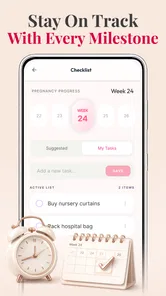
One useful approach is to keep the tracker separate from tasks that need follow-through. If a question comes up while looking at a visual, write it in the notes or calendar tool the pregnant person already relies on, if that suits their routine, rather than assuming the tracker will preserve it. This avoids a common pregnancy-app trap: remembering where an interesting fact appeared but not where an important question was recorded.
Choosing the right person and device
For a first-time parent who enjoys visual explanations, a personal phone may be the simplest place to use the app. Someone sharing a tablet with children or relatives may prefer to open it together and close it afterward, especially if the device is regularly passed around. These are ordinary habits rather than special app controls, but they can prevent confusion about whose pregnancy is being followed.
I would also think about who gets value from the visual. A partner who learns best by seeing a changing illustration may find the weekly view more approachable than reading long articles. Someone who prefers concise written guidance, detailed research, or a structured record may find that the visual element is not enough and should compare it with an app built around those needs. The best choice depends less on how impressive a screen looks and more on whether it helps with the next conversation or decision.
Keeping expectations grounded
Because pregnancy can bring questions that feel urgent, I would not use a general growth tracker to interpret symptoms or decide whether something is normal. Its appropriate role is to make the passage of weeks easier to follow and provide a visual point of reference. For medical concerns, the useful next step is to contact a qualified care provider, not to infer an answer from an illustration or a general timeline.
The app is rated for Everyone, but that does not mean every family will want to show every screen to every child. I’d use the parent’s judgment about timing and explanation, especially when a child is anxious or likely to take a general image literally. A calm, brief explanation can make the visual helpful; if it creates worry or invites questions the adult is not ready to discuss, there is no need to make it part of the conversation.
My overall view remains that Pregnancy Tracker: Baby Growth is best understood as a focused visual companion, not an all-purpose pregnancy organizer. Its free entry point makes it reasonable to try for someone who wants a simple way to follow development, while the optional purchases call for checking that an item solves a real need before spending. With a clear device boundary and the pregnant person deciding what gets shared, it can fit naturally into household conversations without pretending to replace the practical tools or professional support that pregnancy also requires.
Pregnancy Tracker: Baby Growth Frequently Asked Questions
What can I do with Pregnancy Tracker: Baby Growth?
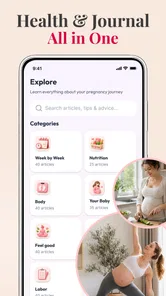
Pregnancy Tracker: Baby Growth is designed to help you follow your pregnancy over time. Depending on the app’s available features, it may offer week-by-week information about your baby’s development, updates about changes in your body, and tools such as a pregnancy calendar or notes. Check the app’s current description and settings to confirm which features are included in your version, since offerings can vary by device, region, or update.
How accurate are the pregnancy dates and baby size estimates?
Pregnancy trackers generally calculate gestational age and estimated due dates from information you enter, such as the first day of your last menstrual period or a due date provided by a clinician. Baby size comparisons are illustrative, not measurements of your individual baby. Cycle timing can differ, so treat these dates and estimates as general reference points and ask your healthcare professional to interpret your pregnancy timeline.
Can Pregnancy Tracker: Baby Growth replace medical advice or prenatal care?
No. An app can provide general educational information and help you keep track of dates or questions, but it cannot assess your health, diagnose a condition, or replace appointments with a qualified healthcare professional. Pregnancy symptoms and needs vary from person to person. Contact your clinician about concerns, and seek urgent medical care for symptoms that may require immediate attention rather than relying on an app.
Is Pregnancy Tracker: Baby Growth free, and does it include ads or in-app purchases?
The price and available features can depend on the app version, platform, and region. Before downloading, review its Google Play or App Store listing for the current price, advertisements, subscriptions, and in-app purchases. Also check whether any optional paid features renew automatically and how cancellation works. Store listings are the best source for current billing terms, as these can change after an app update.
What information should I consider before entering personal pregnancy details?
You may be asked to provide sensitive details, such as pregnancy dates or health-related information. Before entering them, read the app’s privacy policy and the data safety or privacy disclosures on its store listing. Look for details about what is collected, whether information is shared with third parties, how it is stored, and how to request deletion. You can also review permissions and avoid sharing details you are uncomfortable providing.
Pros
- Tracks pregnancy progress by week with helpful stage-by-stage information.
- Includes tools for monitoring symptoms and other pregnancy details.
- Offers reminders that can help you keep up with appointments and milestones.
- Provides a convenient place to review pregnancy-related notes and updates.
- Simple layout makes key information easy to find.
Cons
- Pregnancy estimates may differ from your clinician’s dating and measurements.
- Some features or content may require a subscription or in-app purchase.
- Health information is general and should not replace professional medical advice.
- Frequent notifications may feel intrusive unless carefully adjusted.
- The app’s usefulness depends on entering updates and personal details regularly.












