Emoji Battery & Shimeji Pet
- 316.00
- 4.2
- Installs
- 1.00M
- Price
- Free

Screenshots



Analysis by Reviewed
I like the idea behind Emoji Battery & Shimeji Pet: it gives a familiar phone detail—the battery icon—a playful makeover, while adding the charm of a small screen pet. Its pitch is simple, and that matters. Personalization should be easy to understand before you decide whether it suits your phone, especially when you want a more expressive home screen without taking on a complicated setup. In my view, the app’s appeal is strongest for people who enjoy cute visual touches and want to make everyday device use feel a little more personal.
A playful idea with everyday appeal
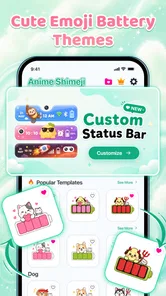
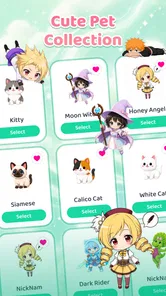
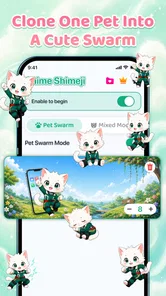
Emoji Battery & Shimeji Pet is a free personalization app from Tools for Everyday - AI Tasks. The store summary describes its focus as making a phone adorable with a Shimeji screen pet and a custom emoji battery icon. That combination gives the app two clear jobs: add a decorative character to the screen and bring an emoji-inspired look to the battery display. Rather than presenting itself as a broad collection of phone tools, it centers its identity on these visual details.
The concept is easy to grasp even if you have never tried a screen pet before. Battery icons are part of normal phone use, so changing their appearance can make a familiar element feel less plain. A screen pet adds a separate decorative idea, aimed at people who enjoy seeing a character as part of their device’s look. Put together, the two elements make the app feel like a small personalization package rather than a single-purpose battery utility.
That distinction is worth keeping in mind. I would approach it as a visual customization app, not as a way to improve battery life or change how the phone works. The name and presentation point toward appearance, and that is where its value lies. If you enjoy customizing your screen, the idea is appealing; if you are looking for a practical battery-management tool, this may not be the experience you have in mind.
Finding your way through the experience
For an app with a straightforward concept, readability and navigation should feel uncomplicated. The two central ideas—an emoji battery icon and a Shimeji pet—are recognizable without a tutorial-heavy explanation. That clarity is a positive starting point for users who prefer to make decisions from clear labels and familiar terms instead of exploring a maze of unrelated options.
At the same time, clarity of purpose is not the same as confirmed accessibility. I can describe what the app is designed to offer, but I would not assume that every control, screen, or visual choice works equally well for every person. People who rely on larger text, strong contrast, screen readers, or simplified layouts may have different needs, and those needs depend on how the interface behaves on their own device. It is sensible to check the app’s presentation after installation and decide whether its labels and controls are comfortable to use.
The visual nature of the app also means that people may approach it with different priorities. One person may care most about spotting the battery state quickly; another may mainly want a cute decorative character. I think the strongest experience will be for users who see the customization as an optional layer and are happy to keep the phone’s ordinary indicators in view where needed. A playful design should add personality without making routine information harder for someone to notice.
More From Our News Desk

 Instagram
’s Power Comes From Its Place in Your Phone
A close look at how Instagram turns Meta’s reach, recommendation systems and everyday camera habits into durable platform power—and what that costs users.

 Gmail
Gmail in a Busy Inbox: Who Benefits Most?
From first account to crowded workday, Gmail earns its place through dependable search and flexible sorting—but its best fit depends on how much inbox maintenance you can tolerate.

 Prime Video
Switching to Prime Video: What Changes in Your Viewing Routine
Prime Video can make a compelling second home for streaming, but switching means learning a different catalog, rental layer, and route from browsing to playback.

 Universal TV Remote Control
 Works Best as a Reliable Backup
A phone remote earns its place through quick setup and reliable habits. Here is how to get more from Universal TV Remote Control—and where its limits show.

 Weather - By Xiaomi
Weather by Xiaomi Review: Clear at a Glance, Less Clear Up Close
Xiaomi’s weather app makes everyday forecasts quick to scan, but its calm surface can leave useful details and recovery paths harder to find than they should be.

 X
X Under Pressure: Can It Recover When Posting Goes Wrong?
A resilience-focused review of X, examining setup, mistaken posts, interruptions, weak connections, and the gaps that matter when recovery needs to be dependable.
Latest News



Motor and sensory comfort
Personalization can be enjoyable without demanding lengthy or precise interaction, but it is important not to assume how this app handles every action. The core concept sounds approachable, yet the comfort of using it depends on the actual controls and screen layout. For someone with limited dexterity, small tap targets or repeated adjustments can make customization tiring. For someone who prefers fewer movements or simpler choices, a direct route to the desired appearance would matter more than a large set of options.
Sensory preferences vary just as much. Some users love animated or character-based visuals; others find movement, bright colors, or persistent decorative elements distracting. A screen pet may be delightful in one context and too visually busy in another. I would treat the app as something to try in a low-pressure way: see whether its look feels pleasant, whether it competes with important information, and whether you can comfortably keep or remove the elements you choose.
That is not a claim that the app offers specific motion, contrast, sound, or accessibility controls. It is a practical way to evaluate any visual customization app when sensory comfort matters. The best personalization is the kind that feels like yours rather than something you have to tolerate. If the style makes everyday phone use less comfortable, the decorative benefit is not worth much.
Different situations, different needs
A phone is used in many settings: at home, on the move, in a bright outdoor space, or during a quick glance between other tasks. A custom battery icon and screen pet may suit relaxed browsing, where there is time to appreciate the design. In a rushed moment, users often want battery information to be immediately legible. That makes it useful to consider not just whether a customization looks attractive in a still view, but whether it remains comfortable during ordinary use.
People also share devices, use different screen sizes, and adjust their phones to suit work or personal routines. A playful appearance can be a welcome change on a personal device, while a more restrained look may be preferable in a professional or distraction-sensitive setting. I see this as a personal choice rather than a flaw: the app’s theme is deliberately cute, so it will naturally fit some tastes and contexts better than others.
It is also worth thinking about how a visual change fits alongside a person’s existing phone settings. Users who already rely on particular display preferences may want to check that the app’s appearance does not make key information less comfortable to perceive. The safest expectation is modest: the app offers a decorative concept, and each person can judge whether it complements their own setup. That approach avoids treating one design as universally suitable.
What to consider before installing
The app is listed as free, with in-app purchases ranging from $2.99 to $19.99 per item. That makes it possible to try the basic idea without an upfront purchase, while also signaling that some items may involve optional spending. I would take a moment to review any purchase prompt before confirming it, particularly if someone else uses the device or manages its spending. A clear distinction between free use and paid items helps people decide at their own pace.
It is rated for Everyone and has a broad audience, but an age rating does not tell you whether the visual experience is right for a particular person. Parents and caregivers may want to look at the app together with a child, especially when deciding whether its look is suitable and whether in-app purchases should be available. That is ordinary good judgment for a personalization app, not a reason to assume that the app is unsuitable.
Compatibility is another everyday consideration. The listed minimum operating system is Android 8.0, so people using older software should check whether their device meets that requirement before planning around the app. The current version is 1.0.7. These details are useful when deciding whether the app can fit into an existing setup, but they do not determine whether its design will feel comfortable or appealing once it is running.
Popularity and expectations
The app has a 4.2 average rating from around 67 thousand ratings, with 316 written reviews and over one million installs. Those figures suggest that many people have taken an interest in the concept, but popularity does not guarantee a perfect fit for every user. I would treat ratings as one signal among several: the app’s stated purpose, its appearance on your own device, and how comfortable you find it are more useful for making a personal decision.
Its release date is June 17, 2026, which is a detail worth noting when considering how long it has been available. I would not read too much into that on its own. A newer app can still be useful, and a popular app can still leave individual needs unmet. What matters here is whether a cute battery icon and a screen pet are the kinds of changes you actually want, and whether the experience works well with the way you use your phone.
For searchers comparing options, the clearest description is that this is an emoji battery customization app paired with a Shimeji screen pet. It is not presented as a general accessibility product or a battery-saving tool. Keeping that distinction in mind helps set realistic expectations: its main purpose is personal expression, and its usefulness depends on whether that visual style adds something positive to your daily phone experience.
A thoughtful fit, not a universal one
My inclusive take is that Emoji Battery & Shimeji Pet has an approachable, easy-to-understand idea, but people should judge the actual interface and visual effect against their own needs. Its focus on cute personalization can be a genuine plus for anyone who enjoys expressive phone styling. For users who need highly legible battery information, minimal visual distraction, or especially comfortable controls, it makes sense to test the app carefully rather than assume that a decorative design will work for them.
The app is free to start, offers a focused personalization concept, and has attracted a substantial audience. Those are useful reasons to consider it if you want a screen pet and an emoji-style battery icon. The in-app purchases are a factor to keep in mind, and the visual theme will not suit every taste or situation. I would call it a promising choice for people who want their phone to feel a little more cheerful, with the practical reminder that comfort and clarity should come before decoration.
Overall, Emoji Battery & Shimeji Pet is best approached as a playful visual add-on rather than an essential phone utility. Its strongest point is the simple pairing of a custom emoji battery icon with a Shimeji pet, while its most important consideration is whether that look remains clear and comfortable in your everyday settings. If you enjoy cute personalization, it is worth exploring; if you prefer a quieter interface, you may decide that a more restrained setup suits you better.
Emoji Battery & Shimeji Pet Frequently Asked Questions
What does Emoji Battery & Shimeji Pet do?
Emoji Battery & Shimeji Pet combines battery-level information with decorative emoji and animated pet characters, often called shimeji. Depending on the version and device, it may display a themed battery indicator and let a small character appear on screen. These features are primarily for personalization and entertainment; check the app’s listing and settings to confirm which options are available on your device.
How do I set up the battery display and choose a shimeji pet?
After installing the app, open it and review its available themes, characters, and display options. You may need to enable a battery widget or grant permission for an overlay before an indicator or pet can appear outside the app. The exact setup can vary across Android versions, manufacturers, and app releases, so follow the prompts shown on your device and turn off any feature you do not want.
Does Emoji Battery & Shimeji Pet work on iPhone and Android?
Availability and functionality depend on the specific app version and the platform supported by its developer. Android generally allows more flexible home-screen widgets and on-screen overlays, while iOS restricts how apps can place animated characters across other apps. Before downloading, check the official store listing for supported devices, the latest compatibility notes, and whether the features you want are actually available on your phone.
Does the app affect battery life or phone performance?
Animated characters, frequent screen updates, and persistent overlays can use some processing power and battery, although the impact varies with the device and settings. If you notice faster battery drain, lag, or interruptions, try reducing animation activity, removing the overlay, or disabling the app’s background features. You can also check your phone’s battery-usage settings to see how much power the app is consuming.
What permissions and privacy details should I check before installing?
Review the app’s requested permissions and its privacy information on the relevant app store before installing. An overlay permission may be needed to show a pet above other apps, while notification or other access should have a clear purpose. Avoid granting permissions you are uncomfortable with, and check the developer’s disclosures for details about data collection, sharing, advertising, and deletion options.
Pros
- The battery indicator adds a playful touch to the home screen.
- Shimeji pets offer a more personal look than a standard battery widget.
- Emoji designs make battery status easy to recognize at a glance.
- The pet theme can make routine battery checks more enjoyable.
- Customization options let users choose a style that suits their screen.
Cons
- Animated pets may consume extra battery or system resources.
- Some features may require permissions that users prefer not to grant.
- The overlay can distract from other icons or screen content.
- Customization choices may be limited in the free version.
- Compatibility can vary across Android versions and device launchers.