Precip – Rain Totals & Weather
- 911.00
- 4.7
- Installs
- 100.00K
- Price
- Free

Screenshots
Analysis by Reviewed
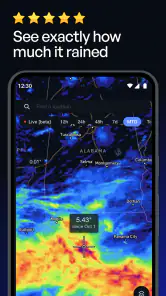
Rain forecasts usually answer a broad question: will it rain in my city today? Precip – Rain Totals & Weather takes a narrower, more practical approach. It is a weather app from Precipitation Inc. that focuses on rainfall and snowfall totals at specific points on a map. I found that difference important because “some rain nearby” and “enough rain at my location to change my plans” are not the same thing.
My experience with it was less about browsing a long list of weather details and more about checking a place with a clear purpose. I could think in terms of a home, a trailhead, a sports field, a work site, or another pinpoint location rather than relying only on a city-wide forecast. That makes the app especially interesting for people who need precipitation information in a particular spot.
It is free to download, rated for Everyone, and available on Android devices running version 7.0 or later. The app was released on March 26, 2024, and its current version is 4.2.8. The store page shows a 4.7 average from around 4K ratings, with over 100K installs, so it has already attracted a meaningful audience without feeling like an overloaded mainstream weather suite.
Readable map-first design and everyday navigation
The strongest part of the experience is the map-centered idea. Instead of making me interpret a dense hourly forecast first, the app encourages me to begin with a location. That is a useful design choice for anyone who thinks visually or wants to compare nearby places. A neighborhood, a park, and a destination across town can have different practical conditions, and a map makes that relationship easier to understand than a single city label.
I also appreciate that the app’s purpose is easy to grasp. Its short store description is simply “Precip,” while the longer summary explains the focus on accurate rainfall and snowfall totals for pinpoint locations. That narrow identity helps reduce the usual weather-app clutter. I am not opening it expecting a complete replacement for every weather tool; I am opening it to investigate precipitation at a place.
For readability, the main advantage is the visual connection between a selected point and the information attached to it. This can be more comfortable than scanning several forecast cards, particularly when the decision depends on location rather than time alone. Someone planning an outdoor activity can first find the venue, then inspect the precipitation information for that exact area instead of mentally translating a regional forecast.
There is a trade-off, though. A map is not automatically easier for everyone. People who prefer a simple text list may need more effort to orient themselves, especially when several nearby places look similar. If I only want a quick yes-or-no answer for my current location, a conventional weather app with a prominent home-screen forecast may feel faster. Precip is most coherent when the map itself is part of the question.
More From Our News Desk

Clash of Clans Is Won Between the Battles

Android Auto Makes the Case for Quieter Car Software

MobiOffice: Transforming Mobile Productivity with Seamless Integration

EA SPORTS FC™ Mobile Soccer: Redefining Mobile Sports Gaming

How Microsoft OneDrive Became a Mobile Productivity Giant

How Google Translate Breaks Language Barriers Effortlessly
I would recommend beginning with one repeatable habit: use the same point on the map whenever you check a familiar place. That avoids comparing one day’s result for a building entrance with another day’s result for a nearby road or open area. The distinction matters when precipitation totals are the reason you opened the app in the first place.
Why pinpoint checking changes the decision
In my view, the app becomes more valuable when a forecast needs context. Imagine I am deciding whether to take a child to a soccer field after school. A city forecast might say rain is possible, but that does not tell me whether the field’s location is likely to receive enough precipitation to make the outing unpleasant. I can inspect the field on the map, check the expected rainfall, and then make a decision based on the actual destination rather than a broad label.
The same workflow applies to a dog walk, a picnic, gardening, cycling, or a visit to a cemetery. The app does not remove uncertainty from weather, but it gives the question a better shape: how much rain or snow is expected here? That is a more useful starting point than treating an entire city as if it had identical conditions.
For users with limited attention or cognitive fatigue, this focused purpose can be helpful. I do not have to decide which of ten weather panels matters before getting to the central information. On the other hand, anyone who needs air quality, radar interpretation, wind planning, or a broad emergency-weather picture will probably still need another source. A focused precipitation tool should not be mistaken for an all-purpose weather dashboard.
Motor, sensory, and situational access
Touch interaction is central to a map-based app, so motor comfort matters. In practice, using a map can require controlled taps, dragging, and zooming. For someone with tremors, reduced dexterity, or difficulty making precise gestures, selecting a small point may be tiring. I would use a larger device, increase the system’s display size where possible, and avoid trying to inspect a location while walking or traveling.
That last point is more than a convenience issue. A map demands visual attention, and checking it in bright sunlight, rain, or a moving vehicle is a poor experience regardless of ability. I found the app better suited to a deliberate stop: check the destination before leaving, save the conclusion mentally, and put the phone away. This is a simple workflow, but it makes the product safer and less frustrating in real life.
For users with low vision, the map may present a mixed experience. Visual location selection can be intuitive when landmarks are easy to distinguish, but map details can also become crowded or difficult to interpret. Enlarging the display may make labels easier to read while showing less surrounding context. That creates a genuine trade-off: more legibility can mean more panning and zooming.
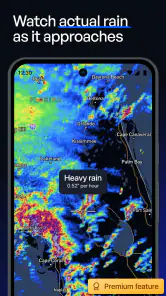
Users with color-vision differences should be cautious about relying on color alone when interpreting precipitation layers or map distinctions. I would confirm the numerical or textual information associated with a point rather than assuming that a shade by itself communicates the full meaning. This is good weather practice generally, but it is particularly important when visual contrast is the main way a map communicates intensity.
For blind users or people who depend heavily on screen readers, the practical question is whether the map interaction and location-specific results are exposed clearly through the device’s accessibility tools. I would not choose this app solely on the assumption that every map element will be equally usable without sight. A conventional weather app with a strong text-first layout may be a better primary tool, while Precip could still serve as a secondary option if its selected-location details are accessible in the user’s setup.
Hearing-related access is less central here because the app’s purpose is visual and location-based rather than dependent on spoken alerts or sound. That can be an advantage for people who do not want audio cues. It also means the app should not be treated as a substitute for a broader warning system when severe weather awareness is important.
Different users, different useful workflows
I can see several groups getting real value from this approach. A gardener may check a planting area before watering. A parent may inspect a school pickup location. A photographer may compare two outdoor spots before choosing one. Someone managing a property may want to think about precipitation at the property itself rather than at the nearest named town. These are small decisions, but they are exactly where broad forecasts can feel vague.
For people who are neurodivergent or easily overwhelmed by crowded interfaces, the narrow subject may be welcome. The app’s identity is not buried under a long list of unrelated weather tools. I found it easier to form a repeatable routine: choose the place, inspect the precipitation information, decide whether the plan still makes sense. That predictability can be more useful than a feature-rich app that constantly presents extra data.
At the same time, a map can increase cognitive load for users who struggle with spatial orientation. If I do not recognize the surrounding streets or landmarks, I may spend more time confirming that I selected the correct place. For those users, typing or selecting a saved home location in a traditional forecast app could be less demanding. Precip is inclusive in its purpose, but its map-first interaction will not suit every thinking style.
One practical tip is to check the app before a decision becomes urgent. If I wait until I am standing at an unfamiliar location in poor weather, map navigation becomes harder and touch input becomes less comfortable. Checking from home gives me time to compare the point carefully and decide whether I need a second weather source for context.
Where the focused design still leaves barriers
The app’s biggest limitation is also its defining feature: it concentrates on rainfall and snowfall totals. That is excellent when precipitation is the deciding factor, but incomplete when I need a full picture of comfort or safety. Temperature, wind, visibility, storm development, and warnings can all change an outdoor decision. I would not rely on this app alone for a hike, a long drive, or a situation where changing conditions could create risk.
There is also a financial detail worth noticing. The app is free, but in-app purchases range from $14.99 to $599.99 per item. That wide range means I would review any purchase screen carefully before committing, especially if I only need occasional precipitation checks. Casual users may find the free experience sufficient, while people considering advanced or recurring use should first decide whether the extra cost matches their workflow.
The age rating of Everyone makes the app approachable for households, but an age rating does not guarantee that every interaction will be equally comfortable for children, older adults, or people with disabilities. A child may understand the map quickly but still need help judging what a precipitation total means for an activity. An older user may prefer the app’s focused subject but need a larger display or more time to select a point accurately.
Another barrier is the difference between precision and certainty. A pinpoint location can feel authoritative, yet weather remains variable. I would treat the app’s result as a better-targeted estimate, not a promise that every part of a property will experience identical conditions. This is especially important for large parks, rural areas, hills, and places where a few streets can make a practical difference.
People who want widgets, extensive notifications, radar animation, or a complete daily planning dashboard may be happier with a broader weather application. Precip is not the right choice simply because it has a weather label. It is the right choice when the central question is specifically about rain or snow at a chosen point.
My inclusive verdict after using it
I like Precipitation Inc.’s decision to build around a concrete question instead of trying to become every weather tool at once. The map-first approach gives location-aware precipitation a clear role, and it can make everyday planning more precise. For me, the app is most useful when a destination matters more than a city-wide forecast: a field, garden, trail access point, or outdoor venue.
Its accessibility story is strongest for people who are comfortable with touch maps, visual landmarks, and focused information. It may also help users who prefer a smaller amount of relevant data rather than a crowded forecast screen. The weaker cases are equally clear: people who need text-first navigation, people who find spatial interfaces tiring, and anyone looking for comprehensive weather warnings should consider a different primary app or pair this one with another source.
I would also keep the purchase model in mind. Free access makes it easy to test the basic workflow, but the listed in-app purchase range is substantial at the upper end. I would only move beyond casual use after confirming that the features offered at the chosen price genuinely improve my routine.
Overall, I recommend it to anyone who regularly makes outdoor decisions based on rainfall or snowfall at a specific location. I would not recommend replacing a complete weather service with it, but I do think it fills a useful gap. When I need to know whether precipitation is likely to affect one exact place, rather than an entire city, this focused tool is easier to reason with than the usual general forecast.
Precip – Rain Totals & Weather Frequently Asked Questions
Can I use Precip to check snowfall as well as rain?
Yes. Precip is focused on precipitation totals, including both rainfall and snowfall, so it may be useful when you need to understand how much precipitation has fallen or is expected at a particular place. The app presents this information around locations on a map, making it relevant for everyday planning as well as winter weather checks.
What is Precip – Rain Totals & Weather used for?
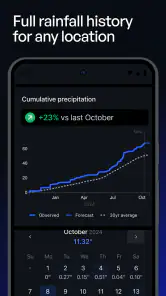
Precip – Rain Totals & Weather is designed for users who want more than a simple daily forecast. The app focuses on precipitation information, helping you check current rain conditions, expected rainfall, and weather trends for a selected location. It can be useful for planning commutes, outdoor activities, gardening, travel, sports, and any situation where knowing the likelihood and amount of rain matters.
How accurate are the rainfall forecasts in Precip?
The app provides rainfall estimates based on available meteorological data and forecasting models, but no weather forecast is completely guaranteed. Accuracy can vary depending on your location, forecast range, terrain, and how quickly conditions change. Short-term predictions are generally more useful for immediate planning, while longer-range rainfall totals should be treated as guidance rather than a precise promise.
Does Precip provide forecasts for locations outside my current area?
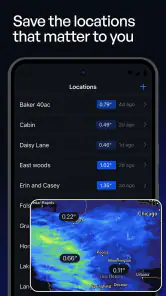
Yes, Precip is intended to let you view precipitation and weather information for selected locations, not only the place where you are currently located. Depending on the version and device settings, you may be able to search for a city or save multiple locations. This is convenient for checking conditions at home, work, a travel destination, or another place you regularly monitor.
Does Precip require location access or an internet connection?
Location access may be useful if you want the app to automatically identify your current area and display local weather information. You can usually manage this permission through your device settings, and manually selected locations may be available if you prefer not to share precise location data. An internet connection is normally required to retrieve updated forecasts and rainfall information.
Pros
- Clear rainfall totals help with planning outdoor activities.
- Useful precipitation forecasts for short-term weather decisions.
- Clean interface makes key weather information easy to find.
- Helpful for gardeners
- commuters
- and outdoor workers.
- Rain-focused data avoids clutter found in broader weather apps.
Cons
- Forecast accuracy can vary significantly by location and weather conditions.
- Some advanced features may require a subscription or in-app purchase.
- Rainfall information may be limited in areas with sparse weather coverage.
- Frequent alerts can become distracting if notification settings are not adjusted.
- The app is less useful for users seeking detailed general weather data.
- Category
- Weather
- Version
- 4.2.8











