

Pocket Prep Professional 2026
- 173.00
- 4.5
- Installs
- 100.00K
- Price
- Free

Screenshots
Analysis by Reviewed
I approached Pocket Prep Professional 2026 as a study companion rather than a simple question bank. It is an education app from Pocket Prep, Inc. aimed at people preparing for professional certification exams, and its central promise is straightforward: give you a large supply of practice questions and mock-test material that can fit around work, commuting, or short study sessions. In my experience, that focus makes it more useful than a broad learning app when you already know which exam you are targeting.
The app is free to install, with optional in-app purchases ranging from around twenty-one dollars to one hundred twenty-five dollars per item. It is rated for Everyone, works on Android versions from 8.0 onward, and is currently listed as version 3.29.1. Its average rating is 4.5 from around 1.8 thousand ratings, while the app has passed one hundred thousand installs. Those figures suggest a well-established study tool, but they do not remove the need to check whether its particular exam content matches your own preparation plan.
Where study sessions usually get stuck
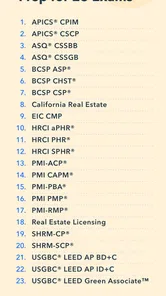
The first point of friction is choosing the right exam path. A catalog built around twenty-one professional certifications can be helpful, but it also means the app is not a single-purpose course. I found that the best starting point is to identify the exact certification and then treat the relevant question set as the center of the experience. If you open the app without a clear target, the range of options can make the first session feel less productive than expected.
Another common stumbling block is expecting practice questions to teach every subject from the beginning. That is not how I would use this app. Its strength is repeated testing, checking explanations, and exposing weak areas. Someone who has never encountered the terminology of an exam may feel lost if they rely on questions alone. I would pair it with official exam guidance, a textbook, class notes, or another structured learning source before treating it as a complete course.
The large library can also create a false sense of progress. Completing many easy questions is not the same as being ready for a certification test. I get more value when I review incorrect answers carefully and return to them later. A wrong answer is useful only if I understand why my choice failed and what clue in the question should have changed my decision.
There is a practical issue with short sessions too. A few spare minutes are ideal for individual questions, but they are not always enough for a full mock test. If I begin a longer session while waiting for an appointment or just before work, I risk stopping halfway and losing the rhythm of the exercise. I prefer to reserve mock-test practice for a quiet block and use shorter question sessions when my attention is limited.
What the app does well for targeted practice
The strongest part of the experience is the ability to turn spare time into deliberate exam practice. Instead of opening a general video platform and searching for a topic, I can move directly into questions connected with professional certification preparation. That reduces the amount of time spent deciding what to study, which matters on busy weekdays.
More From Our News Desk

 Gmail
GmailGmail in a Busy Inbox: Who Benefits Most?
From first account to crowded workday, Gmail earns its place through dependable search and flexible sorting—but its best fit depends on how much inbox maintenance you can tolerate.

 Prime Video
Switching to Prime Video: What Changes in Your Viewing Routine
Prime Video can make a compelling second home for streaming, but switching means learning a different catalog, rental layer, and route from browsing to playback.

 Universal TV Remote Control
Universal TV Remote Control Works Best as a Reliable Backup
A phone remote earns its place through quick setup and reliable habits. Here is how to get more from Universal TV Remote Control—and where its limits show.

 Weather - By Xiaomi
Weather by Xiaomi Review: Clear at a Glance, Less Clear Up Close
Xiaomi’s weather app makes everyday forecasts quick to scan, but its calm surface can leave useful details and recovery paths harder to find than they should be.

 X
XX Under Pressure: Can It Recover When Posting Goes Wrong?
A resilience-focused review of X, examining setup, mistaken posts, interruptions, weak connections, and the gaps that matter when recovery needs to be dependable.

 Clash of Clans
Clash of Clans Is Won Between the Battles
Its raids are quick; its community is a long-term project of coordination, teaching, rivalry, and shared responsibility—with all the friction that entails.
Latest News



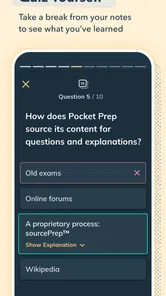
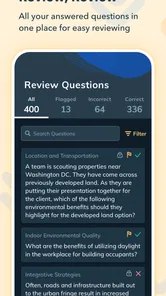
The question-and-review cycle is also more useful than simply reading notes. When I answer first and inspect the explanation afterward, I can see whether I genuinely understood the concept or merely recognized familiar wording. I recommend resisting the temptation to reveal an explanation too quickly. The small pause before checking the answer makes the session more diagnostic.
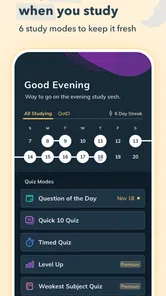
The mock-test approach has a different purpose from ordinary practice. Individual questions help me isolate knowledge gaps, while a longer test shows whether I can maintain concentration and make decisions without constantly changing context. I would not use mock results as a prediction of the real exam, but I would use them to decide whether my study routine is too comfortable.
The most useful habit is to treat every missed question as a study appointment, not as a score penalty. I note the subject behind the mistake, revisit the explanation, and then deliberately mix that topic into a later session. This prevents the common problem of repeating a familiar set until the answers feel memorized.
Setup checks before blaming the app
Before starting, I would confirm that the device meets the minimum operating requirement and that the app has finished installing its current version. The Android requirement is 8.0, so an older phone may be the first reason for trouble rather than the study content itself. I would also make sure the device has enough free space for normal app operation and that the operating system is not waiting for a restart after an update.
Account and purchase expectations deserve attention as well. The app can be installed without an upfront charge, but some content is connected with optional purchases. I would decide whether I am evaluating the free portion or considering expanded access before judging the value. Confusion often comes from expecting every exam resource to be available immediately simply because the download itself is free.
My first setup session would be deliberately small. I would select the intended certification, answer a modest batch of questions, open several explanations, and check that progress behaves as expected before committing to a long mock test. This simple check reveals problems early: an unsuitable exam selection, an unstable connection, or a workflow that does not fit the way I like to study.
If content appears slow to load, I would try the basic checks first: confirm a reliable connection, close other demanding apps, restart the study app, and restart the phone if the problem continues. I would avoid repeatedly tapping buttons while a question is loading, because that can make it harder to tell whether the original action completed. Safe troubleshooting is usually more useful than immediately reinstalling and risking unnecessary disruption to a study routine.
I would also check the device date and time if sessions behave strangely after a system change. Incorrect system settings can affect online services in general. This is not a Pocket Prep-specific diagnosis, but it is a sensible check before concluding that the app itself is broken.
A setup routine that prevents wasted study time
My preferred routine is to install the app when I have a few uninterrupted minutes, select the relevant exam, and complete a short diagnostic session. I then record the topics that felt uncertain, rather than focusing only on the percentage shown at the end. This gives me a starting map and avoids spending the first week answering random questions without a clear purpose.
I would keep the first mock test for later. A baseline can be useful, but taking a long test before understanding the interface and question style may produce more frustration than insight. Short sessions let me confirm that explanations are readable, navigation feels comfortable, and the device is reliable enough for study.
On a phone, screen size also matters. Reading detailed explanations on a small display can be tiring, especially after a full workday. I would adjust text size and brightness using the device’s normal settings and take regular breaks. If the explanation is dense, I would copy the key idea into my own notes rather than repeatedly scrolling through the same screen.
Notifications can interrupt concentration, even when the app is working perfectly. For serious sessions, I use the phone’s normal focus or do-not-disturb controls. For quick practice, I accept interruptions because the point is convenience. Separating those two modes makes the experience feel more intentional.
Recovering a study workflow after interruptions
Study plans rarely survive a busy week unchanged. If I miss several days, I do not try to compensate by rushing through a huge number of questions. I restart with a short session, review recent mistakes, and then continue with a mixed selection. This approach rebuilds recall without turning the app into a punishment.
If a session stops unexpectedly, I first reopen the app and check the last visible progress before repeating anything. I would not immediately assume that every unanswered item was lost or that every answer was recorded. If the same behavior happens again, I would restart the device and test a brief session rather than jumping straight into a long mock exam.
A useful recovery method is to keep a lightweight external study log. I write down the date, the exam area, the questions that caused trouble, and one sentence explaining the correction. This is not a replacement for the app; it gives me continuity when I change devices, take a break, or need to compare several study sessions. It also stops progress from being reduced to a single score.
When I repeatedly miss questions on one subject, I pause question grinding. I return to a trusted reference, clarify the underlying concept, and then come back to the app for confirmation. This trade-off is important: more questions are not always the fastest route to improvement. The app can reveal a weakness efficiently, but another source may be better at teaching the missing foundation.
For mock tests, I use a recovery rule: if I am interrupted early, I treat the attempt as practice rather than a meaningful benchmark. I then schedule a fresh attempt under calmer conditions. A score collected while distracted says more about the interruption than about exam readiness, so preserving the test as a focused exercise gives the result more value.
A realistic weekday example
Imagine I work a full day and have a certification exam ahead. On the train, I complete a small set of questions without trying to learn an entire chapter. During lunch, I review the explanations for the mistakes that stood out. In the evening, I spend a longer block with my notes or a textbook, then return to the app to test whether I can apply the idea.
At the weekend, I schedule a mock test with notifications disabled and enough time to finish without rushing. Afterward, I do not simply celebrate a high score. I sort the errors into careless reading, forgotten facts, and concepts I never understood. Each category needs a different response: slower reading, memorization, or outside instruction.
This workflow shows where the app fits best. It is the repeated practice layer between formal learning and exam simulation. It is not necessary to use it for every study activity, and forcing it into that role can make preparation feel repetitive.
When the app is not the cause of the problem
Some disappointing results come from a mismatch between the tool and the learner’s needs. If I need a complete beginner-friendly course with lessons arranged from first principles, a question-focused preparation app may feel too abrupt. I would choose a structured course or instructor-led option first, then use Pocket Prep as a way to test retention.
It may also be the wrong choice for someone who learns best through long explanations, demonstrations, or hands-on projects. Practice questions can show that I am weak in a topic, but they cannot automatically provide the depth of a workshop or practical lab. In that situation, the app still has value as an assessment tool, but it should not be the only resource.
Cost expectations are another deciding factor. Free installation is attractive for trying the workflow, yet optional purchases can change the overall value depending on how much exam content I need. I would compare the available access with the price of a book, course, or official preparation resource before paying. The right choice depends on whether I value quick mobile practice enough to justify expanding beyond the free starting point.
Device limitations can make the experience less pleasant without indicating a content problem. An aging phone, unreliable connectivity, a nearly full storage drive, or aggressive battery management can interrupt any study app. I would test the same short session under stable conditions before deciding that the question bank is unusable.
There is also a difference between recognition and mastery. Seeing a question repeatedly can make the wording feel familiar, which may inflate confidence. I protect against that by changing the order of topics, explaining answers in my own words, and using a separate reference when I cannot justify the result. If I only remember the correct option, I have memorized a screen rather than learned the subject.
Compared with flashcards, this app is better suited to exam-style decisions and explanations, while flashcards can be faster for names, definitions, and short facts. Compared with video courses, it is more convenient for active recall but less suitable for a first, guided introduction. Compared with a printed question book, it is easier to use in spare moments, although some learners may prefer paper for annotation and distraction-free review. I would choose according to the weakness I am trying to fix, not according to the format that looks most impressive.
Who will get the most from it
I would recommend it to a learner who already has a defined professional certification target, can study in short bursts, and is willing to review mistakes rather than chase a perfect streak. It is particularly practical for people who move between work, commuting, and home study, because the question format makes small gaps in the day usable.
I would be more cautious for someone who has not chosen an exam, expects a full curriculum inside one download, or dislikes learning through repeated testing. I would also avoid making it my only resource if the certification demands practical performance that questions cannot reproduce. In those cases, a course, mentor, official guide, or hands-on practice should carry more of the preparation.
The developer’s focus is clear enough that the app feels purpose-built for certification practice rather than general education. That specialization is its advantage, but it also narrows the audience. Someone looking for language lessons, school tutoring, or broad academic study would be better served elsewhere.
My practical verdict after using it as a study companion
Pocket Prep Professional 2026 works best when I give it a specific job: frequent retrieval practice, explanation review, and occasional mock-test discipline. It makes preparation easier to start, but it does not remove the need for a study plan. The app is most effective when I connect each wrong answer to a topic, consult a deeper source when necessary, and return later to verify that the weakness has actually improved.
I like the balance between convenience and exam focus. The free entry point makes it reasonable to test the workflow, while the optional purchases mean I would evaluate the full cost against my exam needs before expanding access. The Everyone rating and Android compatibility from version 8.0 onward also make it approachable for a broad range of users, provided the device and study conditions are dependable.
My main reservation is not that the app lacks usefulness, but that it can encourage shallow confidence if I measure progress only by completed questions or familiar wording. It also cannot replace foundational teaching for a beginner or practical experience for a hands-on certification. Those are important boundaries, and understanding them prevents disappointment.
My recommendation is simple: use it as the active practice engine in a wider preparation plan. Try a short session, confirm that the selected certification matches your goal, and see whether the explanations help you correct mistakes. If that workflow fits your learning style, the app can turn scattered spare time into consistent preparation. If you need a complete course, detailed instruction, or practical training first, choose those resources before relying on a mobile question bank.
Pocket Prep Professional 2026 Frequently Asked Questions
Which professional certification exams can I prepare for with Pocket Prep Professional 2026?
Pocket Prep Professional 2026 is designed for people preparing for professional certification exams, with preparation content spanning multiple exam areas. Its summary highlights more than 21 professional certification exams, so it is worth checking the exam list in the app or store before downloading. Confirm that the exact certification you need is included, rather than assuming that a related profession or exam is covered.
What is Pocket Prep Professional 2026, and who is it designed for?
Pocket Prep Professional 2026 is a mobile study and exam-preparation app aimed at people preparing for professional certification and licensing tests. It brings practice questions and mock tests together as a way to review material and prepare for an exam. The exact subjects and exams available can vary by profession, so users should confirm that their specific test and current exam version are supported before downloading or subscribing.
Does Pocket Prep Professional 2026 include the latest exam content?
The app is presented as a 2026-focused preparation resource, but exam requirements can change throughout the year. Before relying on it as your only study method, check the listed exam name, question categories, content update date, and alignment with the official testing organization. Pocket Prep can be useful for practice and review, although official exam outlines and reference materials should remain part of your preparation.
Is Pocket Prep Professional 2026 free to download and use?
The application is free to download, but access to its complete question banks, advanced study modes, performance analytics, or professional features can require a subscription or in-app purchase. In-app purchases range from $20.99 to $124.99 per item. Pricing, trial periods, renewal terms, and available plans may differ between Android and iOS. Review the store listing carefully before starting a trial, especially if automatic renewal is enabled.
Can I use Pocket Prep Professional 2026 without an internet connection?
Some study functions may be available offline after the necessary content has been downloaded, which is convenient for commuting, traveling, or studying where mobile data is limited. However, features such as account synchronization, subscription verification, progress backups, updates, and certain explanations may require an internet connection. It is advisable to open the app online before studying offline and confirm which materials remain accessible.
Pros
- Short practice sessions fit easily into busy study schedules.
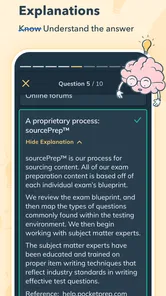
- Detailed answer explanations help reinforce concepts after each question.
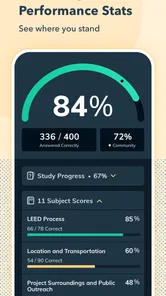
- Progress tracking makes it easy to identify weaker subject areas.
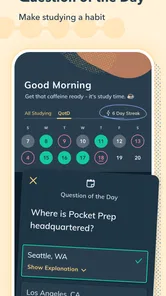
- Practice reminders can encourage consistent preparation habits.
- Useful for studying on the go without carrying printed materials.
Cons
- Full access may require a costly subscription for some learners.
- Question coverage may not match every school or employer’s exam blueprint.
- Some users may prefer official materials for the most current requirements.
- Repeated practice can feel limited if you need advanced case-based questions.
- An internet connection may be needed for certain features or content updates.













