

Pocket Prep IT & Cybersecurity
- 348.00
- 4.3
- Installs
- 100.00K
- Price
- Free

Screenshots
Analysis by Reviewed
Preparing for an IT or cybersecurity certification can feel strangely difficult: there is usually plenty to read, but not always enough structured practice to show whether the information has actually stuck. Pocket Prep IT & Cybersecurity approaches that problem as a focused education app from Pocket Prep, Inc. Rather than trying to replace every course, book, or hands-on lab, it gives me a portable way to test my recall and identify the subjects that deserve another look.
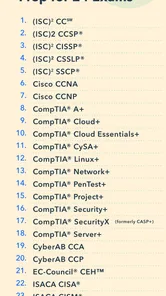
After using it as a study companion, I see the main appeal clearly. The app is built around practice questions for a broad collection of certification exams, with material covering 26 IT and cybersecurity certifications and more than 25,000 questions in total. That scale makes it useful for people who are already following a study plan and want regular exam-style practice, especially when a laptop and a full textbook are not convenient.
It is free to install, and the app is rated for Everyone, so the first step is easy for most learners. The important qualification is that in-app purchases range from around twenty-one dollars to one hundred twenty-five dollars per item. In other words, the free entry point is helpful, but anyone planning serious preparation should examine which content is available without payment before building an entire study routine around it.
How Pocket Prep IT & Cybersecurity feels in current use
When I think about using Pocket Prep IT & Cybersecurity around other people, I start with a simple boundary: a phone can be shared, but certification preparation is personal. In this section, I’ll look at how a household can make room for focused practice without assuming the app provides family controls, then consider what coordination and age expectations mean in everyday use.
A practical question-first study experience
The most useful way to think about this app is as a practice engine rather than a complete classroom. I can open it for a short session, answer questions, review explanations, and then return later without needing to recreate my study setup. That makes it a good fit for small gaps in the day: a commute, a lunch break, or the last few minutes before finishing work.
That convenience matters in certification preparation because consistency is often more valuable than occasional marathon sessions. A learner who answers a modest set of questions several times a week can build a clearer picture of weak areas than someone who reads passively for hours and only discovers the gaps at the end. Pocket Prep gives that process a concrete shape.
The app is also easier to approach than a large digital course. A course may offer videos, downloadable documents, labs, and discussion areas, but that variety can create decision fatigue. Here, the immediate task is simpler: choose a relevant exam area, work through questions, and use the results to decide what to study next. Its strongest role is targeted repetition, not broad theory teaching.
More From Our News Desk

 Gmail
GmailGmail in a Busy Inbox: Who Benefits Most?
From first account to crowded workday, Gmail earns its place through dependable search and flexible sorting—but its best fit depends on how much inbox maintenance you can tolerate.

 Prime Video
Switching to Prime Video: What Changes in Your Viewing Routine
Prime Video can make a compelling second home for streaming, but switching means learning a different catalog, rental layer, and route from browsing to playback.

 Universal TV Remote Control
Universal TV Remote Control Works Best as a Reliable Backup
A phone remote earns its place through quick setup and reliable habits. Here is how to get more from Universal TV Remote Control—and where its limits show.

 Weather - By Xiaomi
Weather by Xiaomi Review: Clear at a Glance, Less Clear Up Close
Xiaomi’s weather app makes everyday forecasts quick to scan, but its calm surface can leave useful details and recovery paths harder to find than they should be.

 X
XX Under Pressure: Can It Recover When Posting Goes Wrong?
A resilience-focused review of X, examining setup, mistaken posts, interruptions, weak connections, and the gaps that matter when recovery needs to be dependable.

 Clash of Clans
Clash of Clans Is Won Between the Battles
Its raids are quick; its community is a long-term project of coordination, teaching, rivalry, and shared responsibility—with all the friction that entails.
Latest News



Where the large question library helps
A large question pool is valuable for avoiding the false confidence that comes from memorizing a small group of repeated examples. With access to a substantial collection across several certification paths, I can use the app in different ways depending on my stage of preparation. Early on, I might use questions to discover unfamiliar terminology. Later, I can use them to check whether I can distinguish similar concepts under time pressure.
The breadth is especially useful for people comparing possible certification routes. Someone deciding between an entry-level IT credential and a cybersecurity-focused exam can get a feel for the vocabulary and style of each subject before committing to a full study purchase. That does not replace reading the official exam objectives, but it can make the choice less abstract.
There is a trade-off, though. A broad catalog can make the app feel less personal if I do not first choose a clear target. Jumping between unrelated exams may be interesting, but it weakens the feedback because mistakes from different domains become mixed together. I get better value when I select one certification, keep separate notes, and treat the app as a measurement tool for that specific goal.
Useful for short sessions, not a substitute for hands-on work
One realistic scenario is a support technician studying for a certification while working full time. After handling tickets during the day, that person may not have the energy for a long chapter, but can still answer a short batch of questions on a phone. If several questions expose confusion around networking, access control, or security terminology, the next evening’s reading becomes more focused instead of random.
That workflow is where I think the app earns its place. It turns spare time into diagnostic practice. However, question answering alone cannot provide the experience of configuring systems, troubleshooting a real network, interpreting logs, or responding to an incident. A learner aiming for practical job readiness should pair Pocket Prep with labs, a virtual environment, or supervised work. Someone who only wants an explanation of a topic from first principles may be better served by a structured course or a well-written technical book.
Who will get the most from it
I would recommend Pocket Prep IT & Cybersecurity to learners who already know which certification they are pursuing, people who need a mobile revision tool, and professionals who want to maintain familiarity with exam topics between longer study sessions. It is also a sensible option for anyone who learns well through retrieval practice and prefers discovering weak points by answering questions rather than rereading notes.
It is less suitable for a complete beginner who has no foundation and expects every topic to be taught from scratch. Practice questions can reveal that a concept is unfamiliar, but they do not necessarily provide the depth, examples, and guided sequence needed to build that concept comfortably. It may also disappoint learners who want extensive labs, instructor interaction, or a single all-inclusive course experience.
Comparing it with familiar alternatives
Compared with printed practice books, the app is more convenient for spontaneous sessions and easier to keep close at hand. A book can be better for marking pages, writing long notes, and studying without a device, but it is less flexible when I want to switch topics quickly or use a few spare minutes.
Compared with video courses, Pocket Prep is more active but less explanatory. Videos are often better when I need someone to walk me through a difficult subject in sequence. The app is better when I already have that foundation and need to test whether I can recall and apply it independently. Compared with flashcard tools, it can offer a more exam-oriented form of practice, although flashcards may be faster for memorizing concise definitions.
The choice therefore depends on the gap in a person’s preparation. If the problem is “I do not understand this topic,” start with teaching material. If the problem is “I understand it when reading, but I cannot reliably answer questions,” Pocket Prep becomes much more attractive.
What the current release tells me
The current version is 3.29.1, and the app was released on February 15, 2021. Those details place it in the category of an established study product rather than a newly launched experiment. The version number also matters for existing users: keeping the app updated is the sensible way to receive the developer’s current refinements and maintain compatibility with a supported device.
The minimum operating system is Android 8.0, which keeps the app accessible to many older phones while still setting a clear boundary for very old hardware. I would check that requirement before planning to use a spare or work-issued device. A study app is only useful if it opens reliably and remains comfortable to use during the small windows when a learner actually has time.
For existing users, the practical effect of an established release history is less about dramatic novelty and more about continuity. A person who already has saved progress or a familiar routine should approach updates as maintenance of the study environment, then verify that the selected exam and personal workflow still look the way they expect after updating. I would not treat a version number by itself as proof that the content matches a newly changed certification exam.
How I would build a smarter routine with it
My preferred workflow begins with a baseline session. I answer questions without immediately looking up every unfamiliar term, because the first result should show what I can recall unaided. I then separate mistakes into two groups: knowledge gaps, where I genuinely do not understand the subject, and reading mistakes, where I knew the idea but missed a qualifier or confused two similar choices.
That distinction is easy to overlook, yet it changes what I do next. Knowledge gaps call for a textbook, course lesson, or lab. Reading mistakes call for slower question analysis and attention to wording. Treating every wrong answer as the same problem wastes time and can make a learner believe that more questions alone will solve everything.
I also recommend keeping a small external “why I missed it” log. The goal is not to copy every explanation. I would write one sentence identifying the trap: a definition confused with an implementation, a security control assigned to the wrong stage, or a networking term remembered too broadly. Reviewing those patterns later is more useful than simply chasing a higher session score.
A second advanced habit is to mix familiar and weak areas rather than practicing only the easiest subject. Concentrated practice feels rewarding, but mixed practice tests whether I can recognize the right concept when the topic is not announced in advance. I would still reserve some sessions for a weak domain, but I would use mixed review as the exam gets closer.
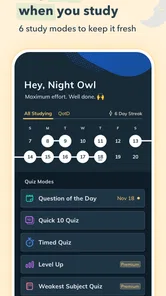
A third useful trade-off concerns timing. Short untimed sessions are ideal while learning, because they let me inspect the reasoning behind an answer. Closer to the exam, I would introduce timed blocks if the app’s available study mode supports the kind of practice I need, while remembering that speed should not replace understanding. The point is to expose pressure-related mistakes, not to turn every study session into a race.
Where friction remains
The biggest limitation is the boundary between practice and instruction. Even a strong explanation after a question may not be enough when the underlying subject is completely new. Learners should be prepared to leave the app, consult another resource, and then return to test whether the explanation has become usable knowledge.
The payment model is another consideration. The app itself is free, but the in-app purchase range means serious access may require a meaningful commitment. I would begin by checking the available free material and matching any purchase to one specific exam objective. Buying broad access before deciding on a certification path could be inefficient, especially for casual learners who only want general IT trivia or occasional cybersecurity reading.
There is also a risk of mistaking practice familiarity for exam readiness. Repeatedly seeing similar concepts can make the interface feel comfortable while leaving real-world application underdeveloped. I would want evidence from several sources before booking an exam: stable practice performance, coverage of the official objectives, and the ability to explain or perform the underlying concepts without relying on answer choices.
Finally, the app is not automatically the best choice for every certification candidate. A learner who needs accessibility features, offline behavior, detailed progress controls, or a particular exam’s newest blueprint should inspect the current experience carefully before paying. Those needs are personal and can outweigh the general convenience of a mobile question bank.
What I would watch as the product continues
For future use, I would pay attention to how Pocket Prep IT & Cybersecurity keeps its question content aligned with changing certification objectives. In IT and cybersecurity, terminology and recommended practices evolve, so freshness matters as much as quantity. A large library is only valuable when the questions remain relevant to the exam a learner plans to take.
I would also watch how the app balances its wide certification coverage with deeper guidance for individual learners. Breadth attracts users, but clear paths for one chosen exam would make the library easier to navigate. The best evolution would preserve quick practice while helping users understand whether a weak result comes from missing knowledge, poor question reading, or insufficient practical experience.
Existing users should therefore judge updates by their effect on study quality, not simply by a newer version label. Do questions remain well matched to the intended exam? Does the routine still make it easy to review mistakes? Can the app fit naturally beside the books, courses, and labs that provide deeper instruction? Those are more meaningful tests than cosmetic changes.
My recommendation after using it
Pocket Prep IT & Cybersecurity is a capable companion for certification preparation, especially when I need frequent retrieval practice in a portable format. Its free installation, broad exam coverage, and large question library make it easy to start, while its paid content means I would make a deliberate decision about the exact exam I am targeting before spending money.
I would recommend it to a focused learner who wants to turn idle minutes into measurable revision and who is willing to use other resources for explanations and hands-on experience. I would skip it as a sole study solution if I were starting from zero, seeking instructor-led teaching, or preparing mainly through practical labs. In those situations, a course, book, or lab platform should lead the plan.
Overall, I see the app as a useful checkpoint between learning and testing. Used carefully, it tells me what I can actually retrieve, exposes weak areas earlier, and gives structure to otherwise scattered study time. Use it to diagnose and reinforce your preparation, not to pretend that answering questions is the same as mastering IT or cybersecurity. That honest role is narrower than a complete course, but it is also what makes the app genuinely helpful.
Pocket Prep IT & Cybersecurity Frequently Asked Questions
Who is Pocket Prep IT & Cybersecurity intended for?
Pocket Prep IT & Cybersecurity is an education app for people preparing for IT and cybersecurity certification exams, including learners who want to review material in shorter sessions. It can also suit working professionals refreshing their knowledge or organizing their exam preparation. Its practice-based approach is most useful when paired with a clear study plan and the objectives for the specific certification you intend to pursue.
What is Pocket Prep IT & Cybersecurity?
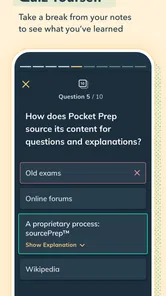
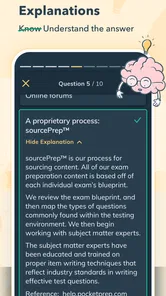
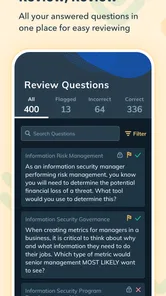
Pocket Prep IT & Cybersecurity is a mobile study and exam-preparation app designed for people pursuing information technology and cybersecurity certifications. It provides practice questions, explanations, quizzes, progress tracking, and review tools that can be used in short study sessions. The app is intended to complement official certification materials rather than replace textbooks, instructor-led training, or the current exam objectives published by the certification provider.
Which IT and cybersecurity certifications does Pocket Prep support?
The app supports preparation for multiple IT and cybersecurity certification exams, although the exact catalog can change as courses are added, updated, or retired. Available subjects may include well-known certification tracks from organizations such as CompTIA, ISC2, ISACA, and other technology-focused providers. Before downloading or subscribing, users should check the current in-app course list and confirm that their specific exam version and objectives are supported.
Is Pocket Prep IT & Cybersecurity free to use?
Pocket Prep is free to download and offers limited access to study content, allowing users to sample questions and explore the interface before committing. More extensive question banks, advanced practice modes, detailed performance tools, and complete exam courses may require a paid subscription or in-app purchase. Purchases range from about $21 to $125 per item, so review the purchase screen carefully before confirming payment.
Can I use the app offline while studying?
Pocket Prep is designed for convenient study on a mobile device, but offline availability can depend on the course, app version, and whether content has been downloaded or synchronized in advance. Some features, such as account synchronization, updates, or certain explanations, may require an internet connection. If you plan to study during travel or without reliable data access, open the relevant course beforehand and verify which questions and tools remain available offline.
Pros
- Covers multiple IT and cybersecurity certification exams in one app.
- Practice questions include explanations to reinforce learning.
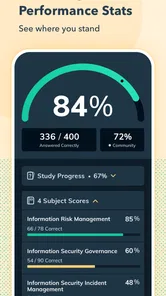
- Progress tracking helps identify weak topics and study gaps.
- Short quizzes fit easily into commutes or other spare moments.
- Study content is regularly updated for changing certification objectives.
Cons
- Full access to many questions and features requires a paid subscription.
- Some certification courses may have limited question coverage.
- Advanced learners may find repeated practice questions too familiar.
- Requires an internet connection for certain content and account features.
- Subscription costs can be high for users preparing for one exam only.













