

Pocket Prep EMS 2026
- 454.00
- 4.5
- Installs
- 100.00K
- Price
- Free
Screenshots
Analysis by Reviewed
Studying for an EMS exam is difficult enough without wasting time fighting an awkward study tool. I spent time with Pocket Prep EMS 2026 as an education app from Pocket Prep, Inc., focusing not only on its question bank but also on how comfortably it supports different study habits, abilities, and everyday situations. My overall impression is that it works best as a flexible practice companion: something I can open for a short session, use to expose weak areas, and return to repeatedly while preparing for one of the EMS exams it covers.
The app is free to install and available to Everyone, with optional in-app purchases ranging from $15.99 to $95.99 per item. It has a 4.5 average from around 2.8 thousand ratings and has passed 100 thousand installs, which suggests that it has found a solid audience among EMS learners. Its current version is 3.29.1, and it runs on Android 8.0 or later. Those details matter, but they do not tell me whether the app will suit a particular learner. The more important question is how well its design supports concentration, reading, navigation, and realistic study conditions.
How clearly the study experience is organized
I look at study organization as more than a tidy screen: it can determine whether a quick session turns into useful review or just another score. In the next section, I focus on how question-led practice can help me spot what deserves attention, and why a deliberate routine matters more than rushing through a large bank.
A question-first design that reduces setup time
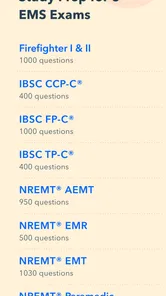
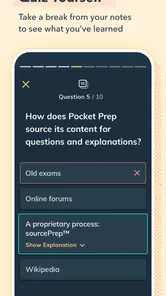
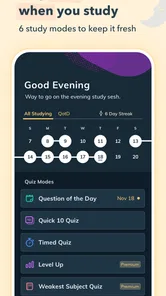
The central experience is straightforward: practice questions, review answers, and use mock exams to check readiness. The store summary points to more than 9,000 practice questions and mock exams for nine EMS exams, so the scale is much larger than a small collection of sample quizzes. I found that this kind of question-first structure is useful when I already know what I need to study and do not want to spend ten minutes building a session from scratch.
That simplicity is particularly helpful for learners who find dense study dashboards tiring. Instead of beginning with a long textbook chapter, I can start with a question and let the result show me where to look more closely. A wrong answer becomes a prompt for targeted review rather than a vague feeling that I am “behind.” For a learner who prefers visible progress through small tasks, this can make preparation feel more manageable.
There is also a practical advantage for people who study in uneven bursts. EMS students and working professionals may have a full evening one day and only a few spare minutes the next. A question bank is easier to fit around those changes than a fixed lesson plan. I can use a short session to keep the material active, then reserve longer periods for mock exams when I have enough uninterrupted attention.
Readability matters more than the question count
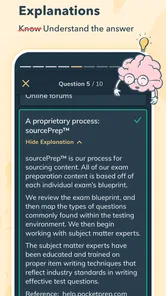
A large question bank is useful only when I can read and process it without unnecessary strain. In this app, the wording of a question carries most of the learning experience, so I pay attention to how easily I can distinguish the prompt, answer choices, explanation, and result. That separation is important for readers who lose their place in crowded screens or who need to slow down and reread clinical wording.
More From Our News Desk

 Gmail
GmailGmail in a Busy Inbox: Who Benefits Most?
From first account to crowded workday, Gmail earns its place through dependable search and flexible sorting—but its best fit depends on how much inbox maintenance you can tolerate.

 Prime Video
Switching to Prime Video: What Changes in Your Viewing Routine
Prime Video can make a compelling second home for streaming, but switching means learning a different catalog, rental layer, and route from browsing to playback.

 Universal TV Remote Control
Universal TV Remote Control Works Best as a Reliable Backup
A phone remote earns its place through quick setup and reliable habits. Here is how to get more from Universal TV Remote Control—and where its limits show.

 Weather - By Xiaomi
Weather by Xiaomi Review: Clear at a Glance, Less Clear Up Close
Xiaomi’s weather app makes everyday forecasts quick to scan, but its calm surface can leave useful details and recovery paths harder to find than they should be.

 X
XX Under Pressure: Can It Recover When Posting Goes Wrong?
A resilience-focused review of X, examining setup, mistaken posts, interruptions, weak connections, and the gaps that matter when recovery needs to be dependable.

 Clash of Clans
Clash of Clans Is Won Between the Battles
Its raids are quick; its community is a long-term project of coordination, teaching, rivalry, and shared responsibility—with all the friction that entails.
Latest News



My practical advice is to avoid treating every question as a race. EMS questions often depend on small differences in priority, timing, or assessment. Reading quickly can turn a knowledge problem into a comprehension problem. I get more value by reading the entire prompt once, identifying what it is actually asking, and only then comparing the choices. This workflow also helps learners who need extra processing time, because it turns each question into a repeatable sequence rather than a pressured reaction.
The app is more comfortable for focused review than for replacing a full reference book. Explanations can help me understand why an answer is preferred, but I would not use brief question feedback as my only source for complicated topics. When I repeatedly miss questions from the same subject, I treat that pattern as a signal to return to class notes, a course text, or instructor guidance. The app is strongest at revealing gaps and reinforcing decisions, not at serving as a complete clinical curriculum.
Navigation for different study styles
People do not all organize revision in the same way. Some want random exposure, while others need to concentrate on one exam area until it becomes familiar. Pocket Prep EMS 2026 is most useful when I make that choice deliberately. Random practice can reveal whether I can switch between subjects under pressure, but focused practice is better when I am still learning a topic or recovering from a weak result.
A useful routine is to begin with a short focused set, review every explanation, and finish with a few mixed questions. That creates a bridge between learning and exam-style switching. It also avoids a common mistake: repeatedly answering only the easiest questions because the session feels more successful that way. If I use the app only for confidence, I may miss the very topics that need attention.
For users who prefer visual planning, the app may feel less satisfying than a study platform built around elaborate calendars, notes, or course modules. Its value is in active recall rather than in managing every part of a preparation program. I would pair it with a simple external schedule if I needed to track classroom assignments, clinical practice, and revision deadlines in one place.
Small-screen and low-distraction habits
Reading clinical questions on a phone is convenient, but it is not automatically comfortable. I find that a larger screen is preferable for longer sessions because it reduces repeated scrolling and makes it easier to compare answer choices. A phone remains useful for quick practice, especially when I am waiting for an appointment or commuting as a passenger, but I would not assume that every learner can comfortably study that way.
I also recommend creating a quiet routine instead of relying on constant mobile access. Notifications, glare, background movement, and fatigue can all make an otherwise clear question harder to understand. The app can provide the content, but the surrounding environment still determines how accessible that content feels.
Motor, sensory, and situational access in everyday use
Access in everyday use depends on the person, device, and setting, so I find it more useful to consider practical adjustments than to assume one format works for everyone. The next section looks at how energy, reading comfort, motor interaction, and sensory preferences can shape a realistic study session, including when another kind of resource may be a better fit.
Reducing pressure on learners with limited energy
One of the app’s most inclusive qualities is its fit with short, repeatable study sessions. Someone managing fatigue, pain, variable concentration, or a busy care schedule may not be able to commit to a long block every day. A question-based tool gives that person a way to maintain continuity without waiting for perfect conditions. Even a small session can be useful if it ends with a clear review of mistakes rather than a hurried score check.
That does not mean short sessions are always enough. Mock exams require sustained attention, and learners who need frequent breaks may find a full simulation tiring. I would divide preparation into two modes: brief practice for maintaining recall and longer sessions for building stamina. Trying to use only one mode can create a mismatch between daily study comfort and exam-day demands.
For users with motor difficulties, the number of taps and the need for precise selection can affect comfort. I would test the app on the device I plan to use before committing to long sessions. A tablet or a phone held in a stable position may be easier than using a small handset one-handed. External device settings that enlarge text or adjust touch response may also help, but the best setup depends on the individual and the operating system.
Supporting different sensory preferences without overpromising
Visual learners may appreciate seeing a question, selecting an answer, and immediately connecting the result with an explanation. Learners who are sensitive to visual clutter can keep sessions shorter and focus on one task at a time. I would not describe the app as a substitute for specialist assistive technology, though. Its usefulness for a particular visual, auditory, or cognitive need depends on the device, system settings, and the learner’s personal requirements.
This matters because a question bank is primarily text-based study. Someone who needs audio instruction, extensive visual alternatives, or highly customized presentation may find a course with dedicated accessibility tools more suitable. The app can still play a supporting role alongside those resources, especially for checking recall, but it should not be expected to solve every sensory barrier on its own.
I also find that the explanations reward deliberate reading. If I am distracted, I can recognize the correct answer without fully understanding the reasoning. For learners with attention-related challenges, I suggest a simple rule: after each response, explain to yourself why the chosen answer is right or wrong before moving on. That extra pause turns passive tapping into a more reliable learning activity.
Using it in real situations
Consider a realistic day for an EMS student who has classes in the morning, work in the afternoon, and family responsibilities at night. A traditional study plan might fail because the available time keeps shifting. With this app, the student could complete a focused set during a quiet break, review missed questions after work, and reserve a mock exam for a planned weekend session. The advantage is not that the app makes studying effortless; it makes the study material easier to carry into changing circumstances.
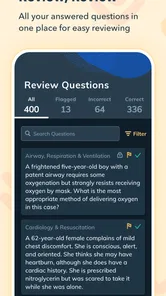
Another useful situation is the period before a review class. I can use a short set to identify questions I want to ask an instructor. That is more productive than simply guessing how prepared I feel. The app becomes a diagnostic tool: it shows which concepts deserve classroom attention and which ones are already stable enough for mixed practice.
It is also suitable for learners who dislike carrying a textbook everywhere. A phone-based question bank can be less physically demanding than a stack of manuals, particularly for quick revision. Still, I would avoid studying while walking, driving, or handling equipment. Mobile convenience should never override safety or attention to the surrounding situation.
Where the app fits beside usual alternatives
Compared with printed question books, the app is more convenient for changing locations and repeating practice without carrying extra material. It also makes it easier to turn spare moments into active recall. Printed resources may be better for learners who need to annotate heavily, prefer a larger page, or want a study experience free from phone distractions.
Compared with video courses, this app asks more from the learner. It does not provide the same kind of guided demonstration or spoken explanation that can help someone encountering a topic for the first time. Video instruction may be the better starting point for a difficult concept, while Pocket Prep is stronger after the learner has basic knowledge and needs repeated decision-making practice.
Compared with a classroom or instructor-led review, the app is more private and flexible but less interactive. It cannot replace feedback on practical technique, professional judgment in a real setting, or clarification from someone who knows the learner’s weaknesses. I see it as a layer in a wider preparation plan, not as a complete replacement for formal EMS education.
Barriers I would consider before paying
The free starting point makes it easy to test the workflow, but the in-app purchase range means serious users should decide whether the paid access matches their study plan. I would not buy simply because the question count sounds impressive. I would first complete enough practice to see whether the explanations, pacing, and organization genuinely help me. A large library has little value if I do not review mistakes carefully.
Another limitation is the risk of shallow repetition. Answering thousands of questions can create the illusion of preparation if I remember patterns instead of understanding principles. I recommend keeping a small error log outside the app with three notes: the topic, the reason for the mistake, and the clue that should have changed the decision. This is one of the most effective ways to turn repeated practice into lasting improvement.
There is also a trade-off between convenience and context. The app can tell me how I performed on its questions, but a score alone does not explain whether I am ready for the exact exam experience, practical expectations, or local training requirements I face. I would use results to guide study, not as a guarantee of success.
Who should use it, and who should choose something else
I would recommend Pocket Prep EMS 2026 to learners who already have access to core instruction and want a substantial practice resource. It is especially appealing to people who study in short bursts, want to locate weak areas quickly, or prefer testing themselves over rereading chapters. The free entry point also lets a learner judge the experience before deciding whether paid content is worthwhile.
I would be more cautious if someone is starting EMS education with little background knowledge, needs extensive audio or alternative-format instruction, or depends on detailed instructor feedback. That learner may benefit more from a structured course, a textbook with guided explanations, or a resource designed around specific assistive needs. The app can supplement those options, but it should not carry the entire burden.
For learners with reading difficulties, I suggest trying a few sessions under realistic conditions before purchasing. Check whether the question wording can be processed comfortably, whether the screen size works for you, and whether breaks are easy to build into your routine. For learners with motor limitations, test the physical interaction on the intended device. These checks are more useful than assuming that a generally clean study app will automatically suit every person.
My inclusive verdict
After using it as a study companion, I see Pocket Prep EMS 2026 as a practical and focused education app rather than a complete EMS school. Its strongest contribution is flexibility: I can practice in small pieces, return to missed questions, and use mock exams when I need a more demanding check. The question-bank approach also supports a useful learning cycle of attempt, explanation, reflection, and retry.
Its inclusive value comes from that flexible rhythm, not from a promise that every barrier disappears. Learners with different energy levels or schedules can adapt the length of a session, and people who prefer active recall can avoid long stretches of passive reading. At the same time, text-heavy study, small-screen use, sustained mock exams, and the need for outside instruction may limit its usefulness for some people.
My recommendation is to treat it as a diagnostic practice tool, not a standalone guarantee of exam readiness. Start with short sessions, read explanations instead of chasing scores, keep an error log, and use mixed practice only after focused review has repaired the basics. If that workflow matches the way you learn, the app offers a convenient path through EMS exam preparation. If you need highly individualized instruction or broader accessibility support, choose a more comprehensive resource and use this app only where it genuinely helps.
In the end, Pocket Prep EMS 2026 earns its place for learners who want repeated, portable practice and are willing to think carefully about every answer. I would recommend trying the free experience first, checking how comfortably it works with your device and study needs, and paying only if the content and routine become a dependable part of your preparation.
Pocket Prep EMS 2026 Frequently Asked Questions
Who publishes Pocket Prep EMS 2026, and what devices can I use it on?
Pocket Prep EMS 2026 is an education app developed by Pocket Prep, Inc. It is available for Android and iOS devices, making it possible to study on a phone or tablet. Check that your device meets the app’s minimum operating-system requirement before downloading, and keep the app updated to access its current version and features.
How much does Pocket Prep EMS 2026 cost, and are there in-app purchases?
The app is free to download, but it also offers in-app purchases. Paid options are listed at prices ranging from $15.99 to $95.99 per item, so the cost of accessing additional study features can vary. Review the purchase details shown in your app store before confirming a transaction, and consider whether the available free access meets your study needs.
What is Pocket Prep EMS 2026, and who is it designed for?
Pocket Prep EMS 2026 is a mobile study and practice app for people preparing for emergency medical services examinations, such as EMT and paramedic-related tests. It is intended for students, trainees, and working EMS professionals who want to review key subjects through practice questions, explanations, and progress tracking. It works best as a study companion rather than a replacement for classroom instruction, clinical training, official textbooks, or guidance from an accredited program.
What type of study material and questions does Pocket Prep EMS 2026 include?
The app generally focuses on exam-style practice questions organized around important EMS topics, including patient assessment, airway and breathing, trauma, medical emergencies, operations, and other areas commonly covered in certification testing. Questions are typically accompanied by explanations to help users understand why an answer is correct. Its summary highlights preparation for 9 EMS exams using 9,000+ practice questions and mock exams. Check the current subject list and question coverage because content, exam alignment, and available features may change with updates.
Does Pocket Prep EMS 2026 work offline?
Pocket Prep is designed for convenient studying on a phone or tablet, but offline availability may depend on the specific feature and the content already downloaded to the device. Users should open the app and allow questions or study materials to synchronize before traveling or studying without reliable internet access. Some account, progress-syncing, subscription, or updated-content functions may still require a connection, so it should not be assumed that every part of the app works offline.
Pros
- Focused EMS exam practice for EMT
- AEMT
- and paramedic learners.
- Large question bank supports regular practice sessions.
- Detailed explanations help clarify why answers are correct.
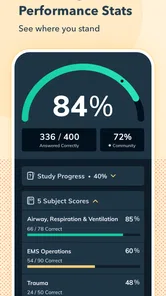
- Progress tracking makes weak topics easier to identify.
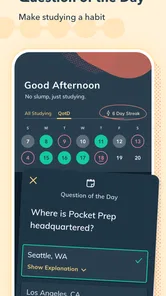
- Study reminders encourage consistent preparation on mobile.
Cons
- Full access may require a relatively expensive subscription.
- Some questions may not match every state’s exam emphasis.
- Requires internet access for certain features and content.
- Repeated practice can feel less engaging than interactive simulations.
- Advanced learners may find some questions too basic.













