Pengu - Virtual Pets
- 2.37K
- 4.8
- Installs
- 1.00M
- Price
- Free

Screenshots



Analysis by Reviewed
I like the idea of a pocket-sized pet most when it adds a small, cheerful pause to a day rather than demanding a new routine. Pengu - Virtual Pets is a social game from SLAY GmbH built around raising a penguin, and its appeal is easy to understand: there is a cute character to care for, playful activities to dip into, and a way to share the experience with friends. I’d approach it as light entertainment, not as a substitute for a real pet or a deep, competitive game.
What to expect from the penguin routine
The basic pleasure is returning to a familiar little companion and choosing how to spend a short session. That makes the game a natural fit for a break between tasks, a relaxed evening check-in, or a shared activity with a friend who enjoys virtual pets. If you want a game with a long plot, demanding strategy, or a wide roster of animals, this focused penguin experience may feel narrow. Its charm depends on whether caring for one cute character is enough to keep you interested.
It also sits in a different lane from social feeds and messaging apps: the interaction is organized around a pet rather than an endless stream of posts. Compared with older virtual-pet games, the social framing is a reason to try it with someone else, but it also means the experience may be less appealing if you prefer a completely solitary pastime. The game is free to download, while optional in-app purchases range from $0.99 to $129.99 per item, so I’d treat buying as a choice rather than a necessary first step.
Starting out and finding a comfortable rhythm
A first session that feels manageable
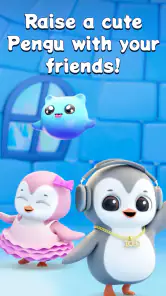
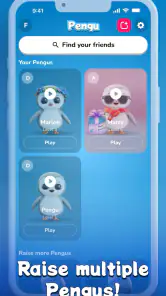
As soon as you open Pengu - Virtual Pets, you're greeted with the cutest virtual penguin eager to become your friend. The app allows you to customize your pet, picking everything from its color to its accessories, making it truly yours. I spent a good half-hour just tinkering with the options, trying to create the perfect little buddy.
For a first-time player, I’d keep that first visit simple: get comfortable with your penguin and the available choices before worrying about collecting everything. A useful way to make the start feel rewarding is to set a tiny goal for each session, such as spending a few minutes with the pet or trying one activity. That avoids turning a cute game into a checklist. If you’re setting it up for a child, it’s also worth agreeing together on whether purchases are off limits or need an adult’s permission.
Small activities, short breaks
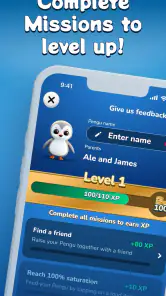
What makes this app stand out is its interactive nature. You can play mini-games, take your penguin on various adventures, and even teach it tricks. The mini-games are surprisingly addictive and serve as a great way to earn coins, which you can use to buy treats and toys for your penguin. The best part? These games are designed to be quick and fun, perfect for those few minutes of downtime throughout the day.
That quick-session design suits a realistic routine: I might open the game while waiting for a kettle to boil, play a round, then leave it rather than stretching a short break into a long one. If earning coins is part of what you enjoy, mini-games give your session a clear purpose; if you mainly want to personalize your companion, it may be more satisfying to save toward one item you genuinely like instead of buying every available option. Either way, the small goal helps the game feel like a treat, not another obligation.
More From Our News Desk

Clash of Clans Is Won Between the Battles

Android Auto Makes the Case for Quieter Car Software

MobiOffice: Transforming Mobile Productivity with Seamless Integration

EA SPORTS FC™ Mobile Soccer: Redefining Mobile Sports Gaming

How Microsoft OneDrive Became a Mobile Productivity Giant

How Google Translate Breaks Language Barriers Effortlessly
Care without turning it into a chore
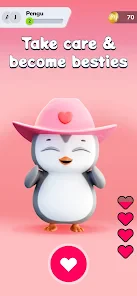
Beyond the games, the app encourages you to check in regularly to feed and care for your pet, much like a real animal. It’s a fantastic way to teach kids responsibility and empathy, or for adults to indulge in a bit of nostalgia from the Tamagotchi era.
I’d frame that routine as gentle pretend play rather than a lesson in real animal care: a virtual penguin can make checking in fun, but it doesn’t replace the patience and practical work of looking after an actual pet. Nor would I recommend it to someone who dislikes reminders or recurring check-ins. For families, a sensible approach is to use the game as a prompt for a short conversation about caring for a character, while keeping screen time and spending expectations clear.
Looks, navigation, and practical details
The graphics in Pengu - Virtual Pets are charming and vibrant. The animations are smooth, and the overall design is intuitive and easy to navigate. I was particularly taken by the attention to detail, from the way the penguin waddles around to its adorable reactions during playtime. It’s clear that the developers put a lot of love into crafting a visually appealing experience.
Pengu is rated Everyone, has a 4.8 average from around 90,000 ratings, and has passed one million installs. It was released on November 14, 2023, and version 1.15.0 (5) requires Android 10 or later. Those details make it easier to judge whether it fits your device and household, but they don’t tell you whether the daily loop suits your taste: the best test is whether you enjoy caring for this particular penguin after the novelty of making it your own wears off.
Where the trade-offs show
While I thoroughly enjoyed the app, there are a few areas where it could improve. For instance, adding more variety in the types of virtual pets available could broaden its appeal. Also, the app occasionally prompts you to make in-app purchases, which can be a bit intrusive. However, these are minor gripes in an otherwise delightful package.
The purchase prompts are the point where I’d pause rather than tap automatically. Since the game can be enjoyed without treating every item as essential, decide in advance whether you’re comfortable spending and avoid making a purchase just to keep a session moving. If your main priority is a wide range of animals, a more traditional virtual-pet game may be a better match; if you want a low-pressure penguin to share with friends, this one has a clearer focus.
Who I’d recommend it to
Overall, Pengu - Virtual Pets is a fantastic app for anyone looking to add a little joy to their daily routine. Whether you’re a kid, or just a kid at heart, this app is sure to bring a smile to your face. So why not give it a try? Your new best friend is waiting!
I’d especially recommend it to someone who likes cute character customization, short mini-games, and the idea of raising a pet alongside friends. I’d skip it if you need a substantial single-player challenge, want lots of different animals, or find purchase prompts and regular care loops frustrating. My advice is to start with one relaxed session, enjoy making the penguin feel like yours, then see whether the small check-ins still feel pleasant a few days later. That’s the real measure of whether this cheerful social game belongs in your routine.
Making the social side work for you
The friend element is most useful when you treat it as a shared little ritual, not as a reason to be constantly online. For example, two friends could each open the game after school or work, compare how their penguins look, and choose an activity to try before moving on with the evening. That gives the social angle a natural place in the day without making the game compete with a full conversation in a messaging app.
If you are introducing it to someone who has never played a virtual-pet game, explain the basic appeal first: this is a small character to return to, not a game that needs a long session to make sense. A friend who enjoys customizing characters may gravitate toward the visual choices, while someone who prefers a clear task can begin with a mini-game. Let each person find their own reason to check in rather than turning shared play into a schedule or obligation.
A practical way to decide whether it fits
One useful test is to notice what you naturally do after the first customization session. If you want to come back because you are curious about the pet’s reactions or enjoy a quick activity, the central loop is probably working for you. If your only motivation is to unlock every item or keep pace with someone else, the experience can start to feel like a task. I’d use enjoyment, not completion, as the measure of progress.
It can also help to separate the game’s different pleasures. The pet-care routine offers a reason to return, mini-games add a short active goal, and customization gives you a creative outlet. You do not need to make all three the point of every visit. On a busy day, a brief check-in may be enough; when you have more time, you can explore the activities. That flexibility is a strength, provided you are comfortable with a game whose rewards are mostly tied to its own small world.
Choosing it over other kinds of games
Compared with a conventional single-player pet simulator, Pengu’s social emphasis makes it a better fit for friends who want a shared character-centered pastime, but a weaker pick for someone who wants a private, self-contained progression experience. Compared with social apps, it offers a concrete focus—a penguin and its care—rather than a stream of updates. Neither difference makes it universally better; it simply helps clarify what you are opening the game for.
I would choose a story-driven game when I want a strong sense of direction, a strategy game when I want decisions with more weight, or a broader pet title if variety is the main draw. Pengu makes more sense when the desired payoff is modest: a cute companion, a little customization, and a low-pressure activity that can fit between other things. That distinction is worth knowing before downloading, especially if you tend to expect every game to provide hours of new content.
Keeping the first week low-pressure
For a new player, I’d avoid making daily attendance the goal. Try the game when you have a spare moment, and notice whether the penguin and its activities make that moment more pleasant. If you miss a day, there is no need to treat it as a failure or rush to make up for it. A virtual pet is most enjoyable when its routine feels inviting rather than like another responsibility competing for attention.
For a family, it is practical to agree on purchase rules before handing over the device, since optional purchases are part of the experience. A child can still enjoy caring for the penguin and trying activities without being given an open-ended spending decision. I’d also keep the first play session shared: help them explore the choices, then let them decide what they actually like. That is a calmer introduction than promising every accessory or treating coins as a race.
What the game is—and is not—best at
Pengu works best as a compact, friendly companion game. It is not the title I would pick for a long commute if I wanted a rich campaign, or for a competitive group that needs rankings and high-stakes matches. Its appeal is gentler: a recognizable character, little moments of care, and activities that are easy to approach. Those qualities are specific strengths, but they also explain why the game may not hold the attention of players who need constant novelty.
My bottom line is to give it a try if the idea of a penguin you can personalize and revisit sounds genuinely relaxing. Start with one short session, choose a small activity, and see whether you want to return without feeling pushed. If you do, it can become a pleasant shared break; if you don’t, that is a useful sign that you would be happier with a more story-focused game or a virtual pet with a wider range of animals.
Pengu - Virtual Pets Frequently Asked Questions
Can I play Pengu - Virtual Pets with friends?
Yes. Pengu is built around raising cute Pengus with friends, so its social focus is part of the basic appeal rather than just a pet-care activity on your own. If you enjoy sharing a lighthearted virtual-pet experience with people you know, that theme may suit you. The game is described as a social game, making its shared-play angle worth considering before you download.
Does Pengu - Virtual Pets have a free download?
Pengu - Virtual Pets is free to download, which lets you try it without paying an upfront price. The game also offers optional in-app purchases, so the free download does not mean every item is free. If a child will be playing, it is sensible to review the purchase controls on your device before handing it over, especially if you want to avoid accidental spending.
Is Pengu - Virtual Pets appropriate for children?
Pengu - Virtual Pets has an Everyone content rating, and its central theme is raising cute virtual pets with friends. That makes it a family-oriented option to consider, though parents should still decide whether the social features and optional purchases suit their child. Checking device-level purchase controls and discussing how the child uses social features can help make the experience a better fit for your household.
Who developed Pengu - Virtual Pets, and what kind of game is it?
Pengu - Virtual Pets is a social game developed by SLAY GmbH. Its central idea is raising cute Pengus with friends, making it a pet-care experience with a social focus. If you are looking for a gentle game built around virtual pets and shared play, that gives you a useful sense of what to expect before downloading.
Is Pengu - Virtual Pets free to download, and are there in-app purchases?
Pengu - Virtual Pets is free to download, so you can try the game without paying an upfront price. It also offers optional in-app purchases, with individual items priced from $0.99 to $129.99. Consider those purchase options before letting a child play, and use the purchase controls available on your device if you want to prevent accidental spending.
Pros
- Engaging virtual pet interaction
- Customizable pet environments
- Educational mini-games
- Regular updates with new features
- User-friendly interface
Cons
- In-app purchases can be pricey
- Occasional app crashes
- Requires constant internet connection
- Limited offline features
- Ads can be intrusive
- Category
- Social
- Version
- 1.15.0 (5)











